


How to Choose Prompts to Target
Choose tracked prompts for an AI-generated article in AmICited to focus its topic and citation goals.

Every article you generate in AmICited is built to win specific questions. Prompts to target is where you choose those questions: the tracked prompts you want this piece to get cited for. Get this step right and the whole draft aims at the right target.
Quick Steps
- Prompts to target is step 2 of Generate an article (Articles → Create a new article), right after naming the article.
- Search, filter by tag, and tick the tracked prompts you want; each becomes a removable chip so you can review the cluster at a glance.
- Start from the Prompts table’s Not ranked filter: those gaps are pure upside since you aren’t cited there yet.
- Group prompts by shared intent, not just topic, and match your content type (step 3) to the shape of the questions.
- Keep the cluster focused. A tight, related set of prompts produces a deeper, more citable article than a broad, unrelated one.
What are “prompts” in AI search visibility?
A prompt, in the context of AI search visibility , is a real question a person might type into ChatGPT, Perplexity, Gemini, or Google AI Overviews, things like “best project management software for remote teams” or “how to reduce churn in a SaaS product.” Unlike traditional SEO keywords, prompts are conversational and intent-rich: they’re phrased the way people actually talk to an AI assistant, not the way they type into a search box. That difference matters, because an AI engine doesn’t rank ten blue links against a keyword: it synthesizes one answer to a prompt and decides which sources, if any, deserve a citation inside that answer.
A tracked prompt is a prompt AmICited monitors on a recurring basis, checking which brands get cited in the AI’s response and where each one is positioned. Over time this builds a picture of your AI citation rate, your AI share of voice relative to competitors, and, critically, the prompts where you’re invisible entirely. That last category is what “prompts to target” in the Generate an article flow is for: it’s the bridge between knowing you have a gap and doing something about it.
Prompts matter more than keywords in this world because AI answers are assembled per-question, not per-topic. A page can rank on Google for a keyword yet never get pulled into an AI answer if it doesn’t actually address the specific prompt the way the model needs it addressed: clearly, directly, and early. That’s why generative engine optimization (GEO) starts with prompt selection rather than keyword research: you’re not optimizing for an index, you’re optimizing to be the source the model reaches for when it answers a specific, real question. Choosing the right cluster of prompts before you write is what turns a generic article into one built to be cited.
Where to find it
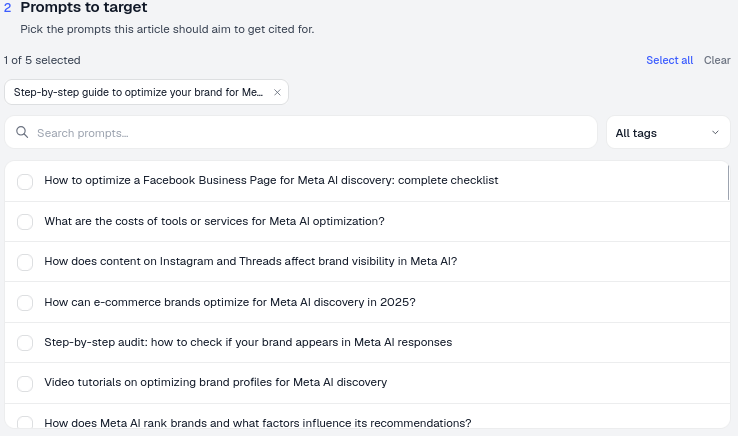
It’s step 2 of the Generate an article flow (open Articles → Create a new article), headed “Prompts to target: pick the prompts this article should aim to get cited for.” This step sits right after you’ve named the article and right before you choose its content type, and it’s deliberately the first substantive decision in the flow: everything AmICited’s writer generates downstream (structure, headings, the questions it answers directly, the entities it name-checks) is shaped by which prompts you select here.
How to select prompts
- The counter shows how many you’ve picked (e.g. 1 of 5 selected), with Select all and Clear shortcuts so you can reset quickly if your first pass was too broad.
- Use the Search prompts box and the All tags filter to find the right questions quickly. Tags typically group prompts by topic, product line, or funnel stage, which makes it fast to pull a coherent cluster instead of scrolling the full list.
- Tick the prompts you want; each becomes a chip so you can see your selection at a glance and remove any with the ×. Reviewing the chip row before moving on is a useful sanity check: if the chips don’t read like questions one article could plausibly answer, trim the list.
How to choose well
- Start from your gaps. The best targets are usually prompts you’re not ranked for: pull them from the Prompts table’s Not ranked filter. These are the questions where AI assistants currently answer without mentioning you at all, which means every citation you win there is pure upside rather than incremental improvement on an already-strong position. If you haven’t built out this list yet, running a dedicated content gap analysis first will show you exactly which prompt clusters are worth prioritizing before you commit to a full article.
- Group by intent. Pick prompts that a single, coherent article can genuinely answer together (e.g. several “how to…” questions on one theme). Intent match matters more than topical proximity: two prompts can mention the same keyword yet expect completely different answers (a definitional question versus a comparison question), and forcing both into one article usually satisfies neither.
- Mind the shape. Comparison questions suit a Comparison article; how-to questions suit a How-to guide. Your prompt choice and the content type (step 3) should agree. AI engines tend to cite sources whose structure mirrors the question being asked, so a mismatch between prompt intent and article format is one of the more common reasons a generated draft underperforms even when the topic is right.
- Don’t overload. A focused article targeting a tight prompt cluster beats a sprawling one chasing everything. A handful of closely related prompts gives the writer enough shared context to build a genuinely deep answer; a dozen loosely related ones forces it to generalize, which tends to produce content that’s technically on-topic but not specific enough to earn a citation for any single question.
- Check for overlap with existing content. If you already have a page ranked for part of this cluster, targeting the exact same prompts with a new article can cannibalize it rather than adding coverage. Prompt selection is also where you decide whether you’re extending your footprint or reinforcing it, both are valid, but the choice should be deliberate.
The footer summarizes your setup (e.g. “2 prompts · Blog post · English”) so you can confirm before you generate.
Why prompt selection is the highest-leverage step in the flow
Of all the choices in the Generate an article flow, prompt selection has the largest effect on whether the finished piece actually earns citations. Tone, length, and formatting can be adjusted after the fact; the underlying question set an article was built to answer generally can’t be: it’s baked into the structure, the headings, and the specific sub-questions the draft addresses. Treating this step as a quick formality and clicking through with a default or overly broad selection is the single most common reason a generated article reads well but doesn’t move the needle on AI visibility. Spending the extra minute filtering by the Not ranked view, checking tags, and confirming the chip list forms a coherent cluster is what separates an article that’s merely readable from one that’s engineered to win a specific set of AI answers.
It’s also worth remembering that prompt sets aren’t static. New questions surface as your market, product, and competitors evolve, and an article that nails today’s prompt cluster can drift out of relevance as the underlying questions change. Revisiting your Not ranked list periodically, rather than treating prompt discovery as a one-time setup task, keeps your content pipeline aimed at the gaps that actually exist right now. If you’re building this list from scratch, the workflow for how to find which prompts trigger AI to mention your brand walks through discovering and validating new prompts before you ever reach this step.
Where this fits in your broader AI visibility workflow
Prompt selection in the Generate an article flow is downstream of a bigger decision: which prompts you choose to track in AmICited in the first place. Your AI rank tracker surfaces where you already stand (cited, ranked-but-not-cited, or absent) across every tracked prompt, and that ranked list is exactly what feeds the Not ranked filter you use in step 2. Getting the most out of content generation therefore starts one level up, with a prompt library that genuinely reflects the questions your buyers ask, not just the keywords your team assumes matter.
This is also where content generation connects to the rest of the platform’s AI visibility reporting. Once an article targeting a prompt cluster is published, it feeds back into the same tracking loop: AmICited continues monitoring those prompts, and you can see directly whether the new piece starts appearing in AI answers, what position it holds, and how it shifts your AI share of voice against competitors on that specific cluster. That feedback loop (target, generate, publish, re-measure) is what turns content generation from a one-off writing exercise into a repeatable SEO AI agent workflow, where every article is a deliberate answer to a measured gap rather than a guess.
Choosing prompts well is ultimately a research discipline dressed up as a two-minute UI step. If you’re new to thinking in prompts rather than keywords, it’s worth reading how prompt research differs from traditional keyword research before your next content sprint. It reframes what “relevant” means when the audience for your content is an AI model synthesizing an answer, not a search index returning a list. Get the prompt cluster right at this step, and everything downstream (the content type you pick, the draft AmICited generates, and the citations you eventually earn) has a real target to aim at.
Frequently asked questions
Start with prompts you're not ranked for, pulled from the Prompts table's Not ranked filter. These are questions AI assistants currently answer without mentioning you at all, so every citation you win there is pure upside rather than incremental improvement on an already-strong position.
Keep the cluster tight and focused on a single shared intent, rather than a broad or unrelated set. A handful of closely related prompts gives the writer enough shared context to build a genuinely deep answer; a dozen loosely related ones forces it to generalize, which produces content that's on-topic but not specific enough to earn a citation for any one question.
Tone, length, and formatting can be adjusted after the fact; the question set an article was built to answer generally can't be, since it's baked into the structure and headings from the start. Clicking through with a default or overly broad selection is the single most common reason a generated article reads well but doesn't earn citations.
Group by intent, not just topic. Two prompts can share a keyword yet expect different answers, for example a definitional question versus a comparison question, and forcing both into one article usually satisfies neither. Also match your prompt cluster's shape to the content type in step 3, so comparison questions go to a Comparison article and how-to questions go to a How-to guide.
More tutorials in this section
 What Content Types Can You Generate?
Explore AmICited content types, from blog posts and FAQs to landing pages, comparisons, glossaries and …
Read guide →
What Content Types Can You Generate?
Explore AmICited content types, from blog posts and FAQs to landing pages, comparisons, glossaries and …
Read guide →
 How to Use the Article Editor
Tour the AmICited Article Editor, including its writing canvas, formatting tools, GEO score, outline and …
Read guide →
How to Use the Article Editor
Tour the AmICited Article Editor, including its writing canvas, formatting tools, GEO score, outline and …
Read guide →
 What Is the GEO Score?
The GEO Score in AmICited rates how well a generated article is optimized for AI answer engines.
Read guide →
What Is the GEO Score?
The GEO Score in AmICited rates how well a generated article is optimized for AI answer engines.
Read guide →Ready to put it into practice?
Free check · 7-day trial · card required