


How to Find Your Top Cited Sources
Find the domains AI engines cite most for your prompts and see where your site ranks in AmICited’s Top Cited Sources widget.

Every AI-generated answer is built on a handful of sources the model decided to trust, and knowing exactly which domains those are is one of the fastest ways to understand your competitive position in AI search.
At a Glance
- The Top cited sources widget ranks the domains AI engines pull from most when answering your tracked prompts.
- Your own domain carries a you badge, so you can see immediately where you sit against the leaderboard.
- The mix usually blends large platforms, publications, research sites, and a handful of real business rivals.
- Study the top domains’ pages to see what format and structure earns citations, then match or exceed it.
- Click Open → to break the leaderboard down by engine, URL, and time in the full Sources view.
What are “top cited sources”?
An AI citation is any moment an AI assistant (ChatGPT, Perplexity, Gemini, or Google AI Overviews) names, links to, or visibly draws on a specific domain while answering a question. Unlike a traditional search results page, where ten blue links compete more or less equally, an AI answer typically synthesizes information from a small, curated set of sources, often somewhere between three and ten domains per response. Your “top cited sources” are simply the domains that show up most often across that synthesis, aggregated across every prompt you track.
This matters because AI source selection is not random. Language models weigh signals like topical depth, structural clarity, freshness, and perceived authority when deciding what to pull into an answer, a process closer to how a research assistant picks references than how a search engine ranks pages. The domains that keep winning citations for a given topic are, in effect, the sources the model has learned to trust for that subject matter. If you see the same five or six domains recurring across your tracked prompts, you’re looking at the model’s de facto trust list for your topic space.
That trust list is a moving target, and it rarely mirrors traditional SEO competitors one-to-one. A community forum, a video platform, or an academic archive can easily outrank a direct business competitor for citations, simply because AI engines favor certain formats (long-form explainers, structured Q&A, peer-discussed content, cited research) over conventional marketing pages. Understanding who’s winning those citations, and why, is foundational to any generative engine optimization strategy, because it tells you what kind of content and structure actually earns trust in your niche before you invest in producing more of it.
For a brand tracking its own presence, the top cited sources list answers two questions at once: how much AI search visibility you already have relative to the sources dominating your space, and what those sources are doing differently that you could learn from or outperform.
This is also where citation volume starts to connect to a more strategic metric: share of voice . A single citation count tells you how often one domain showed up; share of voice tells you what proportion of all the citations across your tracked prompts belong to you versus everyone else combined. The top cited sources leaderboard is effectively the raw material behind that number: it’s where you can see, domain by domain, exactly who is eating into your share and by how much. A brand that improves its position in this leaderboard is, almost by definition, improving its share of voice at the same time.
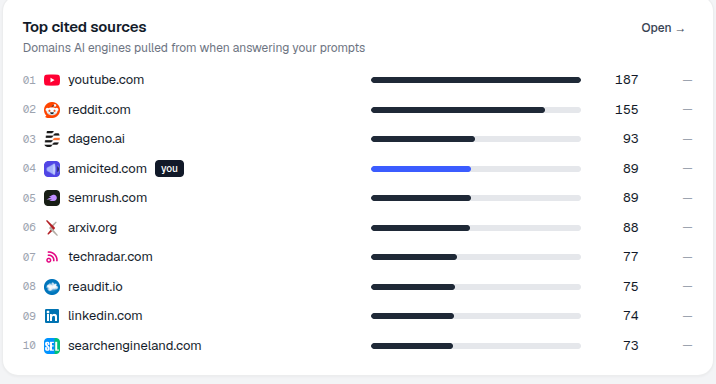
The Top cited sources widget on the AmICited dashboard turns this into a concrete, at-a-glance leaderboard, the domains AI engines reach for most when they answer your prompts, with your own domain marked so you can see exactly where you stand.
Where to find it
Scroll down the Dashboard to the Top cited sources card, subtitled “Domains AI engines pulled from when answering your prompts.” It’s a numbered list with a bar and a citation count per domain, plus an Open → link to the full Sources view. Because this widget aggregates every AI engine and every tracked prompt into one ranking, it’s the fastest place on the dashboard to get a birds-eye view of the whole competitive landscape before drilling into any single engine or prompt.
What it shows
Each row is a domain ranked by how often it was cited across your tracked prompts. In the example: youtube.com (187), reddit.com (155), dageno.ai (93), amicited.com (you, 89), semrush.com (89), arxiv.org (88)… Your own domain carries the you badge, so you can immediately see who’s above and below you.
The mix of domains in a ranking like this is itself informative. It’s rarely a clean list of your direct business competitors; it usually blends large platforms (YouTube, Reddit), industry publications, research repositories (arXiv), and adjacent tools, alongside a handful of actual rivals. That blend reflects how AI engines actually retrieve information: they don’t just ask “who sells something similar,” they ask “who has published the clearest, most citable answer to this specific question.” A domain with no commercial overlap with you at all can still out-cite you simply because its content is better structured for extraction.
The citation counts themselves are cumulative across your whole tracked prompt set, not per-prompt, so a domain near the top of the list isn’t necessarily winning every single prompt; it may be dominating a handful of high-volume topics while barely appearing elsewhere. That’s worth keeping in mind before assuming a leading domain is uniformly stronger than you across the board; the Sources view lets you check whether a competitor’s lead is broad or concentrated in just a few prompts.
Why it matters
These are the sources AI engines currently trust for your topics. That tells you two things:
- The format that wins. If the top sources are community sites (Reddit, YouTube), long-form guides, or research (arXiv), that hints at what the engines favor for your questions. A ranking dominated by forums suggests the model is leaning on discussion and lived experience; one dominated by documentation or research sites suggests it wants precision and citations of its own. Either signal should shape what you publish next.
- Your real competition. The domains ranked above you are the ones taking the citations you want, not always your business competitors, but always your citation competitors. Two brands can be nowhere near each other in the market and still be head-to-head in this list, because the AI engine is optimizing for answer quality, not commercial category.
Tracking this list over time also surfaces something a single snapshot can’t: whether a source’s dominance is stable or volatile. A domain that has held the top spot for months represents an entrenched trust signal that will take sustained work to displace. A domain that just jumped into the top five might reflect a single new high-quality page, a much more approachable target to match or beat.
How to use it
- See your position. Find your you row: how far from the top are you? A brand sitting just outside the top three is in a fundamentally different situation than one buried at position fifteen; the former needs incremental improvements to specific pages, the latter likely needs a broader content and authority push.
- Study the leaders. Open a few of the top domains’ cited pages (via the Sources view) to see why they’re being cited, then match or exceed that depth. Look specifically at how they structure the page (heading hierarchy, use of direct answers near the top, presence of data or examples), since these are the same signals covered in guidance on which sources AI engines trust most and which pages get cited most by AI . Becoming an authoritative source for a topic is rarely about a single page; it’s the accumulated pattern of consistently well-structured, well-evidenced content that shifts a model’s trust over time.
- Click Open → to drill into the full Sources section, where you can break these down by AI engine, by URL, and over time. Filtering by engine matters here, since ChatGPT, Perplexity, and Gemini don’t always trust the same domains; a source dominating Perplexity’s citations may barely register in Gemini’s, so the aggregate leaderboard on the dashboard is a starting point, not the whole picture.
Once you know which sources you’re up against, treat the list as a standing input to your content roadmap rather than a one-time report. Re-check it after you publish new pages to see whether your you row moves, use it alongside a content gap analysis to decide which topics are worth contesting first, and compare it against your AI rank tracker results to see whether gains in citation volume are translating into better rank within individual answers. If your domain is still absent from the leaderboard entirely, the priority shifts from out-ranking incumbents to simply getting cited by AI models that have never heard of you , a different problem with a different playbook, and one where seeing exactly who currently owns the citations is the necessary first step, much as it was for brands like HZ-Containers that went from unranked to consistently cited across AI engines.
Frequently asked questions
It's a numbered leaderboard of the domains AI engines pull from most when answering your tracked prompts, aggregated across every engine and every prompt you track. Each row shows a domain and its citation count, with your own domain marked with a "you" badge so you can see exactly where you rank against the field.
Because AI engines optimize for the clearest, most citable answer to a question, not commercial category. Large platforms like YouTube or Reddit, research repositories like arXiv, and industry publications often out-cite direct business rivals simply because their content is better structured for extraction. These are your real citation competitors even if they don't sell anything similar to you.
Cumulative across your whole tracked prompt set, not per-prompt. That means a domain near the top isn't necessarily winning every single prompt; it may dominate a handful of high-volume topics while barely appearing elsewhere. Click Open → into the full Sources view to check whether a competitor's lead is broad or concentrated in just a few prompts.
Open a few of the top domains' cited pages via the Sources view and study why they're being cited: heading structure, direct answers near the top, use of data or examples. Then match or exceed that pattern in your own content, and re-check the leaderboard after publishing to see whether your "you" row moves.
More tutorials in this section
 How to Read Your Visibility Score
Learn what the AmICited Visibility Score measures and how its gauge and platform breakdown show your AI …
Read guide →
How to Read Your Visibility Score
Learn what the AmICited Visibility Score measures and how its gauge and platform breakdown show your AI …
Read guide →
 How to See Your Share of Voice
Find your AmICited Share of Voice and learn how it compares with your Visibility Score.
Read guide →
How to See Your Share of Voice
Find your AmICited Share of Voice and learn how it compares with your Visibility Score.
Read guide →
 How to Use the Domain Semantic Map
Explore the AmICited Domain Semantic Map to find clusters and topic gaps across prompts, fan-out queries and …
Read guide →
How to Use the Domain Semantic Map
Explore the AmICited Domain Semantic Map to find clusters and topic gaps across prompts, fan-out queries and …
Read guide →Ready to put it into practice?
Free check · 7-day trial · card required