


How to Use the Semantic Scatter Map
Explore the AI semantic scatter map to compare prompts, fan-out queries, cited URLs and your page content.

The Semantic scatter map plots everything around a prompt (the prompt itself, its fan-out queries, the cited URLs and even page-content elements) by meaning, so related things sit near each other. It’s a visual answer to “is my content semantically close to what AI engines actually cite for this question?”
Quick Steps
- The Semantic scatter map plots a prompt, its fan-out queries, cited URLs and page content by meaning, so you can see what’s actually semantically close to what.
- Find it at the bottom of any prompt’s detail page in AmICited.
- The dense cluster near the prompt and its queries is what an AI model treats as “on-topic” for that question.
- Highlight your own domain in the panel to see whether you sit inside the cluster or drift toward the edge.
- Toggle the Title, H1–H6 and Paragraph layers to pinpoint exactly which part of your content is pulling you away from the cluster.
How Semantic Similarity Affects AI Citations
When ChatGPT, Perplexity, Gemini or Google’s AI Overviews answer a question, they don’t just match keywords the way a classic search engine used to. They convert text into embeddings : long lists of numbers that represent the meaning of a sentence, paragraph or page rather than its exact wording. Two pieces of text that discuss the same idea in different words end up with embeddings that sit close together in that numerical space; text about an unrelated topic ends up far away. The distance between those points is what’s called semantic similarity , and it’s one of the core signals AI systems use to decide which sources are relevant enough to read, summarize and ultimately cite.
This matters because a single user prompt is rarely answered from one query alone. AI engines typically perform a query fan-out: they silently expand the original question into several related sub-queries, retrieve documents for each, and blend the results into one answer. Understanding query fan-out is the key to understanding why a page can rank well in traditional search yet never get cited in AI answers: it may match the literal prompt but sit outside the semantic neighborhood of the sub-queries the AI actually runs.
The practical implication for AI search visibility is this: it’s not enough for your page to contain the right keyword. It needs to be semantically close to the cluster of ideas an AI model forms around a topic: its titles, headings and paragraphs need to talk about the same underlying concepts, in comparable depth, as the pages that already get cited. Content that drifts even slightly outside that cluster tends to get retrieved less often, cited less often, or cited for the wrong sub-question. This is closely related to semantic completeness (covering a topic thoroughly enough, across enough related angles, that an AI model has no reason to look elsewhere) and to topical authority , the broader pattern of consistently being the semantically closest, most complete source across an entire subject area rather than just one query.
The Semantic scatter map is AmICited’s way of making that invisible numerical space visible. Instead of asking you to imagine where your content sits relative to a prompt’s meaning, it plots the prompt, its fan-out queries, every cited URL, and (if you toggle the layers) the actual titles, headings and paragraphs of those pages, all positioned by how semantically close they are to one another. What would otherwise be an abstract embedding calculation becomes a map you can read at a glance.
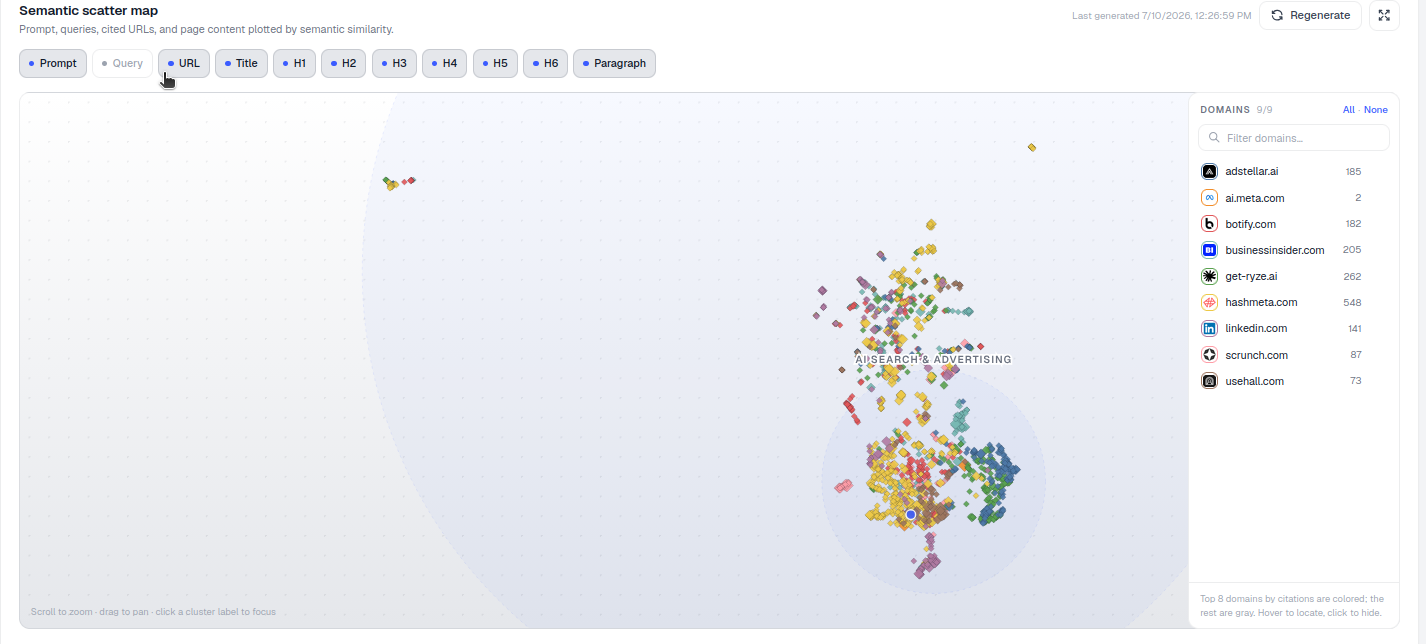
Where to find it
Scroll to the bottom of the prompt detail page to Semantic scatter map, subtitled “Prompt, queries, cited URLs, and page content plotted by semantic similarity.” Every tracked prompt in AmICited has its own scatter map, generated from the actual fan-out queries and cited sources AmICited recorded when it checked that prompt across AI engines, so the map reflects real retrieval behavior for that specific question, not a generic model of your niche.
What you’re looking at
- Each point is an item, its type set by the toggles above the map: Prompt, Query, URL, Title, H1–H6, Paragraph. Turning layers on and off lets you go from a high-level view (just the prompt, queries and cited URLs) down to a granular one (the individual headings and paragraphs pulled from each cited page).
- Distance = similarity. Points close together are semantically related; distant points are off-topic for this prompt. Because the map is built from embeddings rather than keyword overlap, two points can sit close together even if they never share a single exact word; two points can sit far apart even if they repeat the same keyword, if the surrounding context differs.
- The domains panel on the right lets you color, locate and hide specific domains: the top domains by citation count are colored, the rest gray. This is what turns the map from a general visualization into a competitive one: you can isolate your own domain, isolate a single competitor, or hide the noise and look only at the handful of sources actually shaping the answer.
- On-map hints, “Scroll to zoom · drag to pan · click a cluster label to focus”, and a note of any pages skipped because they couldn’t be read (for example, pages blocking crawlers or returning errors when AmICited attempted to fetch their content).
How to use it
- Find the main cluster. The dense group near the prompt and its queries is the semantic “center of gravity” for this question: the shared meaning that most cited pages converge on. If you’re new to a prompt, start here: it tells you what the AI model actually considers “on-topic” for this query, which is often narrower or differently framed than the prompt’s literal wording suggests.
- Check where you land. Use the domains panel to highlight your own domain: are your pages inside that cluster or drifting on the edge? A domain sitting right in the dense center is a strong candidate for repeat citations; a domain hovering at the periphery is contributing tangentially related content that an AI model may reference occasionally but won’t lean on as a primary source.
- Spot gaps. Sub-queries sitting alone, away from any cited URLs, are angles no one covers well: content opportunities. These orphaned query points are effectively a live content gap analysis for the prompt: nobody has published anything semantically close enough for the AI model to retrieve and cite, which means the field is open for whoever publishes first with a genuinely complete answer.
- Toggle layers to diagnose which part of your content (a weak title vs. thin paragraphs) is pulling you away from the cluster. It’s common to find that a page’s title and H1 sit comfortably inside the cluster while its paragraphs drift outside it, a sign the page promises the right topic but doesn’t deliver enough semantic depth in the body copy to back it up, or the reverse, where solid body content is undermined by a vague or generic heading that doesn’t signal the topic clearly.
- Compare against competitor URLs. Because cited competitor pages are plotted on the same map, you can see not just that a competitor outranks you on a prompt but why: their page may simply sit closer to the query cluster because it addresses more of the underlying sub-queries in one place, or because its structure makes each idea easier for an AI model to isolate and extract.
Reading the map as a diagnostic, not just a snapshot
The real value of the scatter map shows up when you stop treating it as a one-off curiosity and start treating it as a recurring diagnostic. Revisit the map after you publish or rewrite content targeting a prompt: has your domain’s cluster of points moved closer to the query cluster, or stayed put? Because the map is rebuilt from AmICited’s tracked checks, it reflects how retrieval behavior evolves as both your content and the competitive landscape change: new competitors entering a cluster, previously cited pages dropping out, or the fan-out queries themselves shifting as AI engines refine how they interpret a prompt over time.
It’s also worth reading the map alongside the other prompt-level detail on the same page: the map explains the why behind the what. If a domain’s citation rate on a prompt is falling, the scatter map is often the fastest way to see whether the cause is semantic (the content has drifted from the cluster, or a new competitor has published something closer to it) rather than a ranking or crawlability issue. This is the kind of grounded diagnosis that separates guessing at generative engine optimization from actually measuring it.
Where this fits into a broader visibility strategy
The scatter map is most useful when you treat every orphaned query point as a to-do item: something worth writing, restructuring or clarifying so it lands inside the cluster next time AmICited checks the prompt. Pair it with attention to how you structure content for AI citation : clear headings, direct answers early, and paragraphs that stay tightly on-topic tend to produce embeddings that cluster more predictably than sprawling, multi-topic pages. If you’re responsible for visibility across many prompts rather than one, the scatter map is best used prompt-by-prompt after you’ve identified priority gaps elsewhere in AmICited (for example through share of voice trends or an AI rank tracker view), then used here to understand precisely what content change would close the gap. Whether you’re an in-house SEO team extending your rank-tracking workflow to AI answers or an agency running this across multiple client accounts , the same principle holds: citations follow semantic proximity, and the scatter map is the one place in AmICited where you can watch that proximity directly rather than inferring it from citation counts alone.
Frequently asked questions
It plots a prompt, its fan-out queries, the cited URLs, and, if you toggle the layers, their titles, headings and paragraphs, all by meaning, so items covering the same idea sit close together. Distance represents semantic similarity, not keyword overlap, letting you see at a glance whether your content sits inside the cluster AI engines treat as on-topic for that question.
Scroll to the bottom of any prompt's detail page in AmICited. Every tracked prompt has its own map, built from the actual fan-out queries and cited sources AmICited recorded when it checked that prompt across AI engines, so it reflects real retrieval behavior rather than a generic model of your niche.
A domain drifting from the dense cluster near the prompt and its queries usually means its content isn't semantically close enough to what the AI model considers on-topic. Toggle the Title, H1-H6 and Paragraph layers to see which part is pulling you away, often a page's heading fits but its paragraphs drift, or the reverse.
The main cluster near the prompt is where most cited pages converge, the AI model's shared center of gravity for that question. An orphaned query point, sitting alone with no cited URLs nearby, is a sub-query nobody covers well yet, effectively a live content gap you can target with new or rewritten content.
More tutorials in this section
 How to Use the Fan-Out Queries Heatmap
Explore related fan-out queries for a prompt and see how well cited pages match them in AmICited’s heatmap.
Read guide →
How to Use the Fan-Out Queries Heatmap
Explore related fan-out queries for a prompt and see how well cited pages match them in AmICited’s heatmap.
Read guide →
 Read AI Responses to a Tracked Prompt
Read the latest AI response for a tracked prompt, including the brands and sources detected by AmICited.
Read guide →
Read AI Responses to a Tracked Prompt
Read the latest AI response for a tracked prompt, including the brands and sources detected by AmICited.
Read guide →
 Top Brands Mentioned for an AI Prompt
Use the Brand Mentions leaderboard to compare which brands AI engines name for a prompt and their citation …
Read guide →
Top Brands Mentioned for an AI Prompt
Use the Brand Mentions leaderboard to compare which brands AI engines name for a prompt and their citation …
Read guide →Ready to put it into practice?
Free check · 7-day trial · card required