


What Is the GEO Score?
The GEO Score in AmICited rates how well a generated article is optimized for AI answer engines.
When you generate an article in AmICited, you’ll see a GEO Score, a gauge that rates how well that piece is set up to be picked up and cited by AI answer engines.
At a Glance
- The GEO Score is a gauge in the Article Editor that rates how “quotable” a piece of content is to AI answer engines.
- It looks at direct answer-shaped content, clear structure, specificity, and how fully the piece covers its target prompts.
- It updates live as you edit, so you can treat each revision as a quick experiment and watch the score respond.
- A high score means the article is structurally eligible to be cited, not a guarantee that it will be.
- Balance the score against readability: the goal is content that reads naturally for humans and quotes cleanly for AI.
What is the GEO Score?
GEO stands for Generative Engine Optimization : the AI-era counterpart to SEO, focused on being quoted by ChatGPT, Google AI Overviews, Gemini and Perplexity rather than just ranked in a list of blue links. Where traditional SEO optimizes a page to rank for a keyword, GEO optimizes a page to be the sentence an AI model pulls out and repeats, with your brand attached, when someone asks a related question. The GEO Score is AmICited’s attempt to quantify that second thing, how “quotable” a given piece of content is, before you ever hit publish.
The score exists because AI answer engines don’t read content the way a human skims a webpage. They chunk it, extract the parts that answer a specific question cleanly, and discard the rest. A page can rank well in traditional search and still be almost invisible to an AI model if its useful information is buried inside long, meandering paragraphs with no clear boundaries. Conversely, a page with modest domain authority can get quoted disproportionately often if its content is structured so that individual sentences and sections stand on their own as complete, citation-worthy content . The GEO Score is a proxy for that structural quality.
Under the hood, the score is built from several independent signals rather than one formula. It looks at whether claims are stated directly rather than hedged into vagueness, whether the piece is organized so a machine parser can identify discrete, self-contained sections, whether facts and figures are specific enough to be worth repeating verbatim, and whether the article actually addresses the full set of questions it was generated to answer. None of these signals is exotic, they’re the same qualities a sharp human editor would flag, but the gauge makes them visible in real time instead of leaving you to guess.
It’s worth being clear about what the GEO Score is not. It isn’t a prediction of traffic, and it isn’t a guarantee that ChatGPT or Perplexity will cite the piece: no vendor can promise that, because citation behavior is ultimately decided by the AI model, not the publisher. It’s a leading indicator: content that scores well is structurally eligible to be quoted, in the same way a technically clean page is eligible to rank. What happens after publication, whether the targeted prompts actually start surfacing your page, is something you track separately with an AI rank tracker once the article is live.
Where you’ll see it
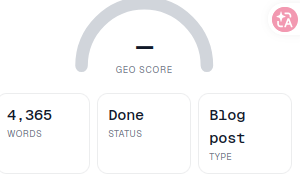
The GEO Score appears as a gauge in the right rail of the Article Editor, above the Words / Status / Type tiles. It updates as the article changes, so you can watch it respond as you edit rather than finding out after the fact. It computes shortly after the draft loads, and recalculates as you revise sections, add facts, or restructure headings. Because it’s live, the most efficient way to use it is as a running check while you write: draft a section, glance at whether the gauge moved, and use that feedback to decide what to tighten next instead of doing one big edit pass at the end.
What it measures
The score reflects how well the article follows the patterns that make content easy for AI engines to lift and cite. In practice that means signals like:
- Direct, answer-shaped content: clear questions answered in clear, self-contained statements that an AI can quote without needing the surrounding paragraphs. This is the same principle behind answer-first content structure : put the conclusion first, then the supporting detail, rather than building up to the point across several paragraphs.
- Structure: meaningful headings, short scannable sections, lists and tables where they help, so machines can parse the piece. A model deciding what to quote is effectively looking for chunk boundaries; a wall of undifferentiated text gives it nothing clean to extract.
- Specificity: concrete facts, figures, definitions and named entities rather than vague filler, since answer engines favor content they can attribute confidently. Models are more likely to cite a source that names people, products, companies and numbers explicitly than one that talks in generalities.
- Coverage of the target prompts: how completely the article addresses the questions you told it to target. A piece that only partially answers its target prompts leaves an opening for a competitor’s page to win the AI citation for the parts it missed.
A higher score means the article is more likely to be surfaced and cited when someone asks a related question, though, as with any optimization signal, it improves your odds rather than locking in an outcome.
How to read the gauge
- Treat it as guidance, not a grade. A high GEO Score improves your odds of being cited; it doesn’t guarantee it, and it’s not a substitute for the piece being genuinely useful and accurate.
- Watch what moves it. If the score is low, it’s usually pointing at a fixable structural issue: a section that rambles, missing direct answers, or thin coverage of a prompt you meant to target. Treat a drop in score the way you’d treat a broken build: a signal to go find the specific paragraph that’s causing it, not a reason to rewrite the whole piece.
- Balance it against readability. Don’t optimize purely for the number. The goal is content that reads well for humans and is easy for AI to quote: the score is highest when both are true. Content that reads like a list of disconnected facts might technically satisfy some of the underlying signals while failing the reader, which defeats the purpose.
How to use it when generating content
- Generate the article against the prompts you want to win.
- Check the GEO Score in the editor.
- If it’s lower than you’d like, tighten the weak sections: add direct answers, break up long blocks, add a specific fact or definition where the piece is vague.
- Re-check the gauge and repeat until the score is strong and the article still reads naturally.
- Publish, then track whether the targeted prompts start citing your page.
This loop is deliberately cheap to repeat. Because the score recalculates as you edit, you can treat each pass as a quick experiment: tighten one section, see whether the gauge moves, keep the change if it does. That’s a very different workflow from traditional content QA, where you often don’t find out whether a structural choice worked until weeks after publication, once rankings settle. If you want a broader checklist to apply on top of the gauge (covering things like third-party mentions, crawlability and entity authority that sit outside what a single article’s score can capture), a step-by-step approach to boost your AI search visibility is worth reading alongside this page.
Why article-level scoring matters for GEO
It helps to place the GEO Score in the context of the broader discipline it belongs to. Generative Engine Optimization is still young, and unlike classic SEO, where decades of tooling exist to check title tags, backlinks and page speed, there isn’t yet an industry-standard way to audit whether a page is AI-citable. Most teams are left guessing, publishing content and waiting to see if it ever gets quoted, which can take weeks to become obvious in analytics. The GEO Score compresses that feedback loop down to the moment of writing, which matters because the difference between GEO and SEO isn’t just the metric being optimized: it’s when in the process you get to correct course. If the distinction between the two disciplines is still fuzzy for your team, GEO vs SEO: key differences lays out how the practices diverge in practice, not just in name.
It’s also worth understanding what the gauge deliberately leaves out. It scores the article itself, not your domain’s overall authority, not your backlink profile, and not how competitors are covering the same prompts. Those are real inputs into whether AI models cite you, but they operate at a different level than a single draft, and AmICited surfaces them elsewhere, in prompt tracking, competitor analysis and technical audits, rather than folding them into this one number. Treating the GEO Score as the complete picture of your AI visibility would be a mistake; it’s one input, focused specifically on the artifact you’re about to publish.
Think of the GEO Score as a coach for AI-readability. It tells you, before you publish, whether a piece is shaped the way answer engines like to quote, so you can fix it while it’s cheap to change, rather than discovering months later that a well-researched article never got picked up because it was structured wrong. Once a piece is live, the score’s job is done; from there, the useful question shifts from “is this article well-structured” to “is it actually getting cited,” which is what prompt-level tracking and share of voice reporting are built to answer. If content generation in AmICited is new to you, it’s worth pairing this gauge with the SEO Agents feature, which handles the drafting itself, and with a read of how to measure AI search visibility so you know which numbers to check once the article you scored here is published and being tracked in the wild.
Frequently asked questions
It rates how quotable a generated article is to AI answer engines, based on signals like direct answer-shaped content, clear structure, specificity of facts, and how fully the piece covers its target prompts. It's a proxy for structural quality, not a measure of your domain's overall authority.
No. A high score means the article is structurally eligible to be quoted, not that ChatGPT or Perplexity definitely will cite it, since citation behavior is ultimately decided by the AI model. Whether the targeted prompts actually start surfacing your page is something you track afterward with an AI rank tracker.
It appears as a gauge in the right rail of the Article Editor, above the Words / Status / Type tiles. It recalculates live as you edit sections, add facts, or restructure headings, so you can treat each revision as a quick experiment and watch the score respond.
Treat a low score as a pointer to a specific fixable issue, such as a rambling section, missing direct answers, or thin coverage of a target prompt, rather than a reason to rewrite the whole piece. Tighten the weak section, re-check the gauge, and balance improvements against keeping the writing natural for human readers.
More tutorials in this section
 How to Choose Prompts to Target
Choose tracked prompts for an AI-generated article in AmICited to focus its topic and citation goals.
Read guide →
How to Choose Prompts to Target
Choose tracked prompts for an AI-generated article in AmICited to focus its topic and citation goals.
Read guide →
 What Content Types Can You Generate?
Explore AmICited content types, from blog posts and FAQs to landing pages, comparisons, glossaries and …
Read guide →
What Content Types Can You Generate?
Explore AmICited content types, from blog posts and FAQs to landing pages, comparisons, glossaries and …
Read guide →
 How to Use the Article Editor
Tour the AmICited Article Editor, including its writing canvas, formatting tools, GEO score, outline and …
Read guide →
How to Use the Article Editor
Tour the AmICited Article Editor, including its writing canvas, formatting tools, GEO score, outline and …
Read guide →Ready to put it into practice?
Free check · 7-day trial · card required