

AI Crawlers Explained: GPTBot, ClaudeBot, and More
Understand how AI crawlers like GPTBot and ClaudeBot work, their differences from traditional search crawlers, and how to optimize your site for AI search visib...
13 min read

Learn how AI crawlers impact server resources, bandwidth, and performance. Discover real statistics, mitigation strategies, and infrastructure solutions for managing bot load effectively.
AI crawlers have become a significant force in web traffic, with major AI companies deploying sophisticated bots to index content for training and retrieval purposes. These crawlers operate at massive scale, generating approximately 569 million requests per month across the web and consuming over 30TB of bandwidth globally. The primary AI crawlers include GPTBot (OpenAI), ClaudeBot (Anthropic), PerplexityBot (Perplexity AI), Google-Extended (Google), and Amazonbot (Amazon), each with distinct crawling patterns and resource demands. Understanding the behavior and characteristics of these crawlers is essential for website administrators to properly manage server resources and make informed decisions about access policies.
| Crawler Name | Company | Purpose | Request Pattern |
|---|---|---|---|
| GPTBot | OpenAI | Training data for ChatGPT and GPT models | Aggressive, high-frequency requests |
| ClaudeBot | Anthropic | Training data for Claude AI models | Moderate frequency, respectful crawling |
| PerplexityBot | Perplexity AI | Real-time search and answer generation | Moderate to high frequency |
| Google-Extended | Extended indexing for AI features | Controlled, follows robots.txt | |
| Amazonbot | Amazon | Product and content indexing | Variable, commerce-focused |
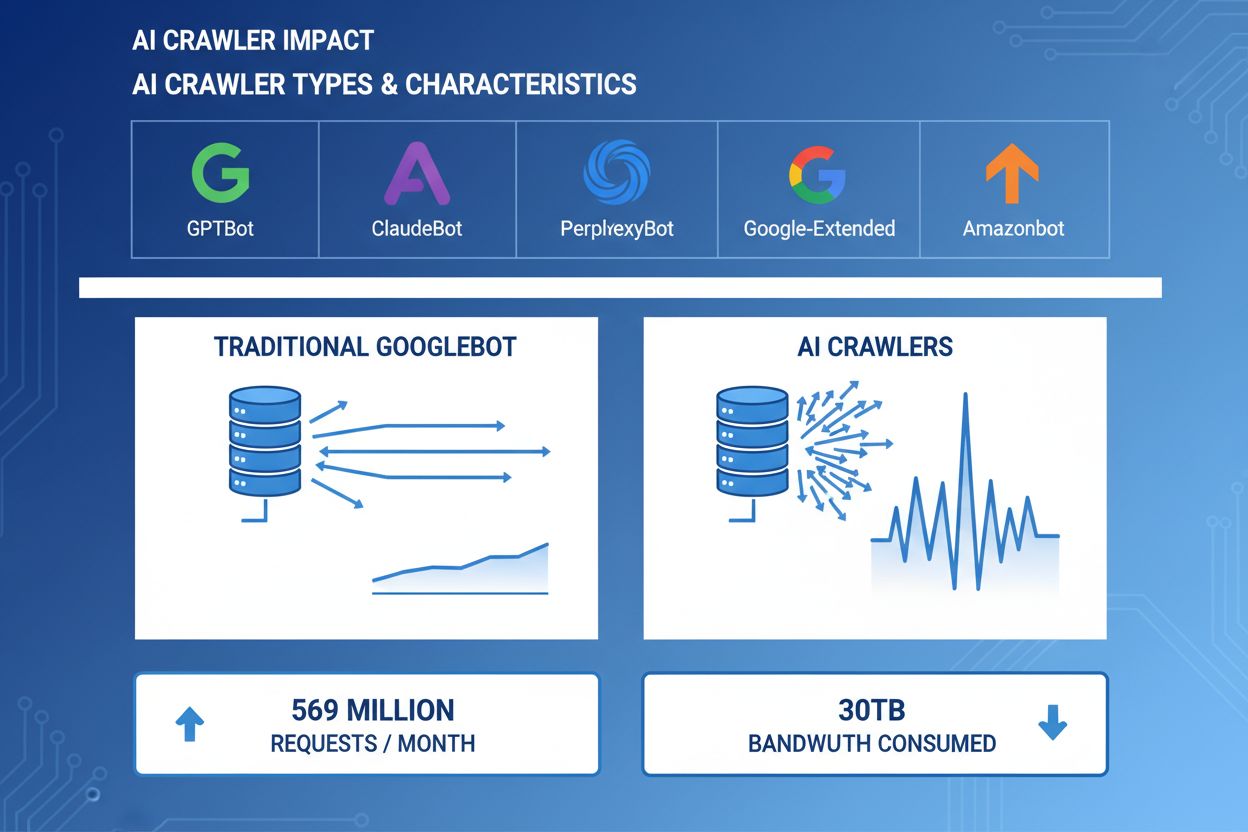
AI crawlers consume server resources across multiple dimensions, creating measurable impacts on infrastructure performance. CPU usage can spike by 300% or more during peak crawler activity, as servers process thousands of concurrent requests and parse HTML content. Bandwidth consumption represents one of the most visible costs, with a single popular website potentially serving gigabytes of data to crawlers daily. Memory usage increases significantly as servers maintain connection pools and buffer large amounts of data for processing. Database queries multiply as crawlers request pages that trigger dynamic content generation, creating additional I/O pressure. Disk I/O becomes a bottleneck when servers must read from storage to serve crawler requests, particularly for sites with large content libraries.
| Resource | Impact | Real-World Example |
|---|---|---|
| CPU | 200-300% spikes during peak crawling | Server load average increases from 2.0 to 8.0 |
| Bandwidth | 15-40% of total monthly usage | 500GB site serving 150GB to crawlers monthly |
| Memory | 20-30% increase in RAM consumption | 8GB server requiring 10GB during crawler activity |
| Database | 2-5x increase in query load | Query response times increase from 50ms to 250ms |
| Disk I/O | Sustained high read operations | Disk utilization jumps from 30% to 85% |
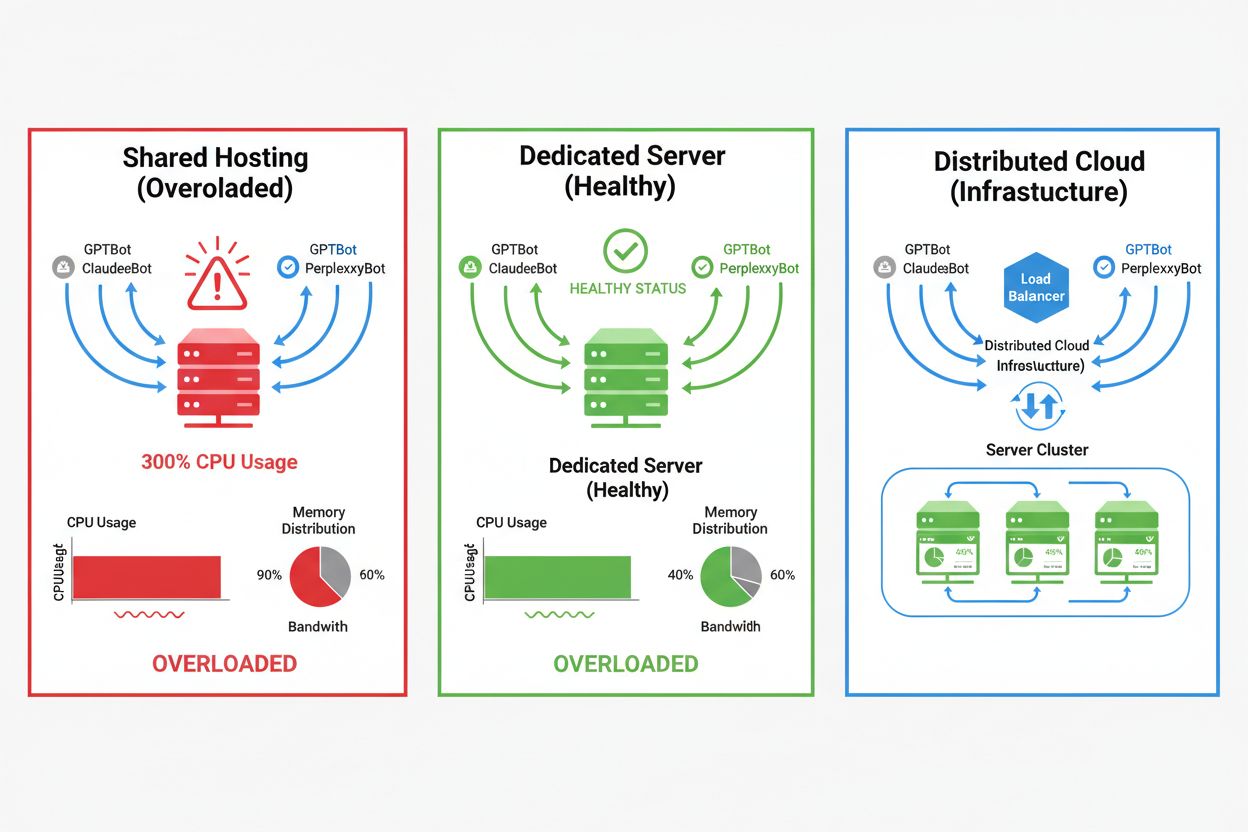
The impact of AI crawlers varies dramatically depending on your hosting environment, with shared hosting environments experiencing the most severe consequences. In shared hosting scenarios, the “noisy neighbor syndrome” becomes particularly problematic—when one website on a shared server attracts heavy crawler traffic, it consumes resources that would otherwise be available to other hosted websites, degrading performance for all users. Dedicated servers and cloud infrastructure provide better isolation and resource guarantees, allowing you to absorb crawler traffic without affecting other services. However, even dedicated infrastructure requires careful monitoring and scaling to handle the cumulative load from multiple AI crawlers operating simultaneously.
Key differences between hosting environments:
The financial impact of AI crawler traffic extends beyond simple bandwidth costs, encompassing both direct and hidden expenses that can significantly affect your bottom line. Direct costs include increased bandwidth charges from your hosting provider, which can add hundreds or thousands of dollars monthly depending on your traffic volume and crawler intensity. Hidden costs emerge through increased infrastructure requirements—you may need to upgrade to higher-tier hosting plans, implement additional caching layers, or invest in CDN services specifically to handle crawler traffic. The ROI calculation becomes complex when considering that AI crawlers provide minimal direct value to your business while consuming resources that could serve paying customers or improve user experience. Many website owners find that the cost of accommodating crawler traffic exceeds any potential benefits from AI model training or visibility in AI-powered search results.
AI crawler traffic directly degrades the user experience for legitimate visitors by consuming server resources that would otherwise serve human users faster. Core Web Vitals metrics suffer measurably, with Largest Contentful Paint (LCP) increasing by 200-500ms and Time to First Byte (TTFB) degrading by 100-300ms during periods of heavy crawler activity. These performance degradations trigger cascading negative effects: slower page loads reduce user engagement, increase bounce rates, and ultimately decrease conversion rates for e-commerce and lead-generation websites. Search engine rankings suffer as well, since Google’s ranking algorithm incorporates Core Web Vitals as a ranking factor, creating a vicious cycle where crawler traffic indirectly harms your SEO performance. Users experiencing slow load times are more likely to abandon your site and visit competitors, directly impacting revenue and brand perception.
Effective management of AI crawler traffic begins with comprehensive monitoring and detection, allowing you to understand the scope of the problem before implementing solutions. Most web servers log user-agent strings that identify the crawler making each request, providing the foundation for traffic analysis and filtering decisions. Server logs, analytics platforms, and specialized monitoring tools can parse these user-agent strings to identify and quantify crawler traffic patterns.
Key detection methods and tools:
The first line of defense against excessive AI crawler traffic is implementing a well-configured robots.txt file that explicitly controls crawler access to your website. This simple text file, placed in your website root directory, allows you to disallow specific crawlers, limit crawl frequency, and direct crawlers to a sitemap containing only content you want indexed. Rate limiting at the application or server level provides an additional layer of protection, throttling requests from specific IP addresses or user-agents to prevent resource exhaustion. These strategies are non-blocking and reversible, making them ideal starting points before implementing more aggressive measures.
# robots.txt - Block AI crawlers while allowing legitimate search engines
User-agent: GPTBot
Disallow: /

User-agent: ClaudeBot
Disallow: /

User-agent: PerplexityBot
Disallow: /

User-agent: Amazonbot
Disallow: /

User-agent: CCBot
Disallow: /

# Allow Google and Bing
User-agent: Googlebot
Allow: /

User-agent: Bingbot
Allow: /

# Crawl delay for all other bots
User-agent: *
Crawl-delay: 10
Request-rate: 1/10s
Web Application Firewalls (WAF) and Content Delivery Networks (CDN) provide sophisticated, enterprise-grade protection against unwanted crawler traffic through behavioral analysis and intelligent filtering. Cloudflare and similar CDN providers offer built-in bot management features that can identify and block AI crawlers based on behavioral patterns, IP reputation, and request characteristics without requiring manual configuration. WAF rules can be configured to challenge suspicious requests, rate-limit specific user-agents, or block traffic from known crawler IP ranges entirely. These solutions operate at the edge, filtering malicious traffic before it reaches your origin server, dramatically reducing the load on your infrastructure. The advantage of WAF and CDN solutions is their ability to adapt to new crawlers and evolving attack patterns without requiring manual updates to your configuration.
Deciding whether to block AI crawlers requires careful consideration of trade-offs between protecting your server resources and maintaining visibility in AI-powered search results and applications. Blocking all AI crawlers eliminates the possibility of your content appearing in ChatGPT search results, Perplexity AI answers, or other AI-powered discovery mechanisms, potentially reducing referral traffic and brand visibility. Conversely, allowing unrestricted crawler access consumes significant resources and may degrade user experience without providing measurable benefits to your business. The optimal strategy depends on your specific situation: high-traffic websites with abundant resources may choose to allow crawlers, while resource-constrained sites should prioritize user experience by blocking or rate-limiting crawler access. Strategic decision-making should consider your industry, target audience, content type, and business objectives rather than adopting a one-size-fits-all approach.
For websites that choose to accommodate AI crawler traffic, infrastructure scaling provides a path to maintaining performance while absorbing increased load. Vertical scaling—upgrading to servers with more CPU, RAM, and bandwidth—offers a straightforward but expensive solution that eventually reaches physical limits. Horizontal scaling—distributing traffic across multiple servers using load balancers—provides better long-term scalability and resilience. Cloud infrastructure platforms like AWS, Google Cloud, and Azure offer auto-scaling capabilities that automatically provision additional resources during traffic spikes, then scale down during quiet periods to minimize costs. Content Delivery Networks (CDN) can cache static content at edge locations, reducing the load on your origin server and improving performance for both human users and crawlers. Database optimization, query caching, and application-level improvements can also reduce resource consumption per request, improving efficiency without requiring additional infrastructure.
Ongoing monitoring and optimization are essential for maintaining optimal performance in the face of persistent AI crawler traffic. Specialized tools provide visibility into crawler activity, resource consumption, and performance metrics, enabling data-driven decision-making about crawler management strategies. Implementing comprehensive monitoring from the start allows you to establish baselines, identify trends, and measure the effectiveness of mitigation strategies over time.
Essential monitoring tools and practices:
The landscape of AI crawler management continues to evolve, with emerging standards and industry initiatives shaping how websites and AI companies interact. The llms.txt standard represents an emerging approach to providing AI companies with structured information about content usage rights and preferences, potentially offering a more nuanced alternative to blanket blocking or allowing. Industry discussions around compensation models suggest that AI companies may eventually pay websites for training data access, fundamentally changing the economics of crawler traffic. Future-proofing your infrastructure requires staying informed about emerging standards, monitoring industry developments, and maintaining flexibility in your crawler management policies. Building relationships with AI companies, participating in industry discussions, and advocating for fair compensation models will be increasingly important as AI becomes more central to web discovery and content consumption. The websites that thrive in this evolving landscape will be those that balance innovation with pragmatism, protecting their resources while remaining open to legitimate opportunities for visibility and partnership.
AI crawlers (GPTBot, ClaudeBot) extract content for LLM training without necessarily sending traffic back. Search crawlers (Googlebot) index content for search visibility and typically send referral traffic. AI crawlers operate more aggressively with larger batch requests and ignore bandwidth-saving guidelines.
Real-world examples show 30TB+ per month from single crawlers. Consumption depends on site size, content volume, and crawler frequency. OpenAI's GPTBot alone generated 569 million requests in a single month on Vercel's network.
Blocking AI training crawlers (GPTBot, ClaudeBot) won't affect Google rankings. However, blocking AI search crawlers might reduce visibility in AI-powered search results like Perplexity or ChatGPT search.
Look for unexplained CPU spikes (300%+), increased bandwidth usage without more human visitors, slower page load times, and unusual user-agent strings in server logs. Core Web Vitals metrics may also degrade significantly.
For sites experiencing significant crawler traffic, dedicated hosting provides better resource isolation, control, and cost predictability. Shared hosting environments suffer from 'noisy neighbor syndrome' where one site's crawler traffic affects all hosted sites.
Use Google Search Console for Googlebot data, server access logs for detailed traffic analysis, CDN analytics (Cloudflare), and specialized platforms like AmICited.com for comprehensive AI crawler monitoring and tracking.
Yes, through robots.txt directives, WAF rules, and IP-based filtering. You can allow beneficial crawlers like Googlebot while blocking resource-intensive AI training crawlers using user-agent specific rules.
Compare server metrics before and after implementing crawler controls. Monitor Core Web Vitals (LCP, TTFB), page load times, CPU usage, and user experience metrics. Tools like Google PageSpeed Insights and server monitoring platforms provide detailed insights.
Get real-time insights into how AI models are accessing your content and impacting your server resources with AmICited's specialized monitoring platform.
Understand how AI crawlers like GPTBot and ClaudeBot work, their differences from traditional search crawlers, and how to optimize your site for AI search visib...

Community discussion on AI crawler frequency patterns. Real data on how often GPTBot, PerplexityBot, and ClaudeBot visit websites.
Learn which AI crawlers to allow or block in your robots.txt. Comprehensive guide covering GPTBot, ClaudeBot, PerplexityBot, and 25+ AI crawlers with configurat...