



OpenAI opened Businesses in ChatGPT in beta on November 10, 2026. Through a new portal called Business Hub, companies can claim their listing, correct what ChatGPT knows about them, upload product feeds and, for the first time, see OpenAI’s own numbers: how often ChatGPT mentions them and how many people click through to their website. OpenAI pitches it at the 1.2 billion people who use ChatGPT each week.
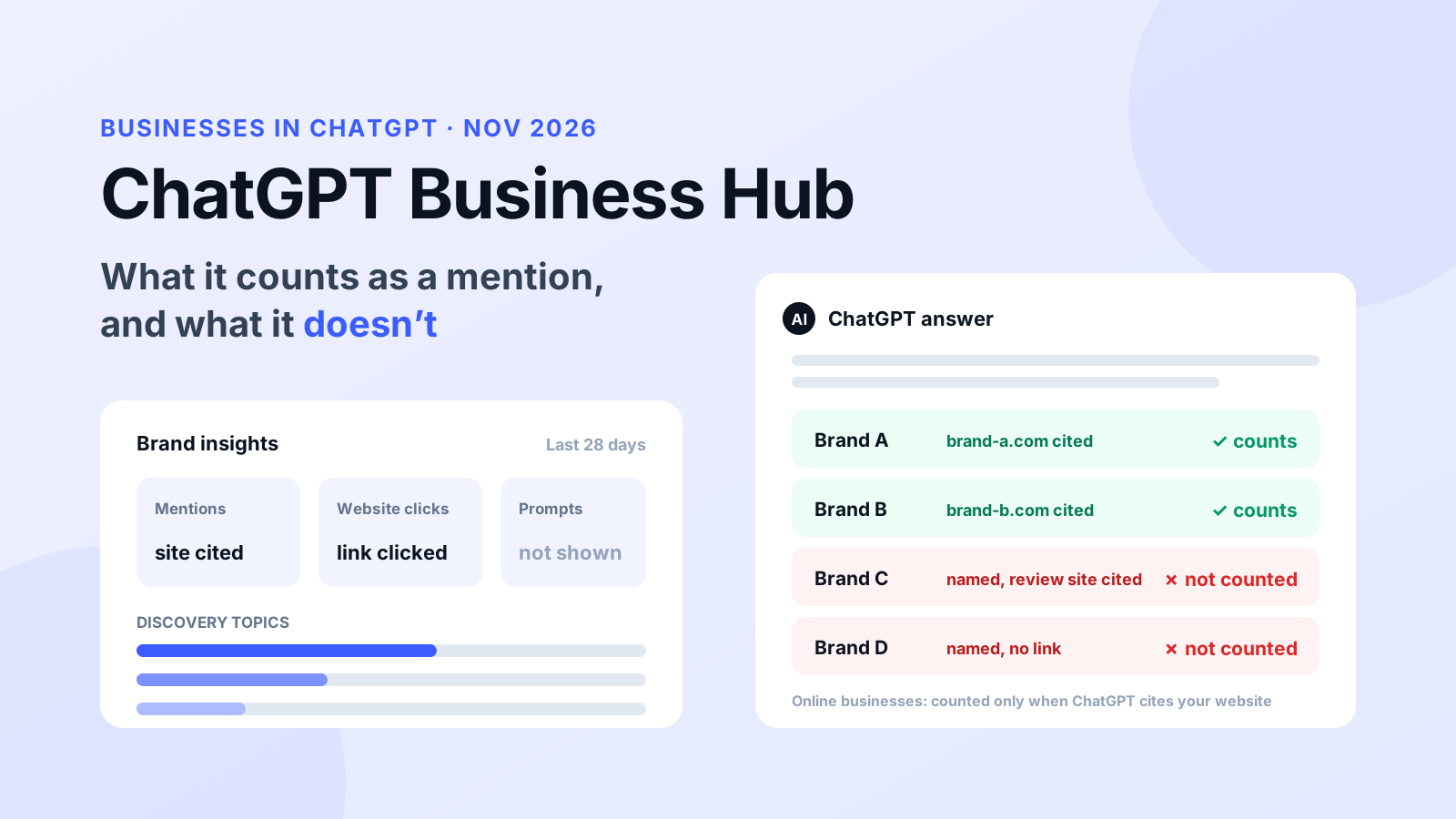
The catch is in the definition. For an online business, OpenAI’s help center says a mention counts only “when ChatGPT references the business’s website. The brand name alone doesn’t count.” In AmICited’s tracking of 233 prompts in ChatGPT over the past 30 days, 27.5% of brand mentions came with no source from the brand’s own site.
This guide covers how to claim your business in ChatGPT, what each Business Hub metric means, what the dashboard leaves out, and how to track your brand mentions in ChatGPT when you need the full picture.
Key Takeaways
- OpenAI launched Businesses in ChatGPT and its Business Hub portal in beta on November 10, 2026, per OpenAI’s announcement.
- Claiming needs no Ads account or Enterprise agreement and works by business phone, business email, a DNS record or Shopify, followed by Persona identity verification ( OpenAI help center).
- Business Hub insights cover the past 28 days: mentions, website clicks and discovery topics. No prompts, no conversations and no competitor data.
- For online businesses, a mention only counts when ChatGPT references your website; a name-only mention doesn’t count.
- In AmICited’s data (3,268 brand mentions in 487 ChatGPT answers, Oct 20 to Nov 18, 2026), 27.5% of mentions had no source from the brand’s own domain.
- Claiming doesn’t change your visibility in ChatGPT, OpenAI says. It fixes your information and gives you a first-party count; ChatGPT visibility tracking shows the answers behind it.
What is ChatGPT Business Hub?
ChatGPT Business Hub is OpenAI’s portal for Businesses in ChatGPT, a beta program that lets a company claim the profile ChatGPT shows for it, keep its details current and see aggregated insights. OpenAI’s announcement describes three parts: claiming and managing your business, insights on how people engage with it, and Business Agents for eligible US online businesses.
When a business appears in an answer, people can click through to its ChatGPT profile. A claimed profile can show your website, description, category, logo, delivery and return policies, and products with prices and availability from a feed. Once your identity is verified, the profile gets a blue check.
Three things it is not:
- Not the ChatGPT Business plan. “ChatGPT Business” is OpenAI’s paid team workspace. Business Hub is a listing portal, and the help center says you need neither an Ads account nor a ChatGPT Enterprise agreement to claim a business.
- Not a ranking lever. “Claiming a profile or disputing ownership doesn’t change its visibility in ChatGPT,” per the help center. A product feed “doesn’t guarantee that ChatGPT recommends your products.”
- Not Search Console for ChatGPT. It reports totals and themes. It doesn’t list the questions people asked. NewzDash’s John Shehata called it “a very early, very limited Search Console moment for ChatGPT” in Digiday.
If you’ve built a Google Business Profile, the closest comparison is a business listing with a small analytics tab attached.

Ready to Monitor Your AI Visibility?
Track how AI chatbots mention your brand across ChatGPT, Perplexity, and other platforms.
How to claim your business in ChatGPT
To claim your business in ChatGPT, sign in, open Business Hub from the ChatGPT sidebar, find your listing, verify the claim, wait for OpenAI’s approval, then verify your identity with Persona. Only after both approvals can you publish changes, view insights or connect a product feed. OpenAI reviews each step and emails its decision.
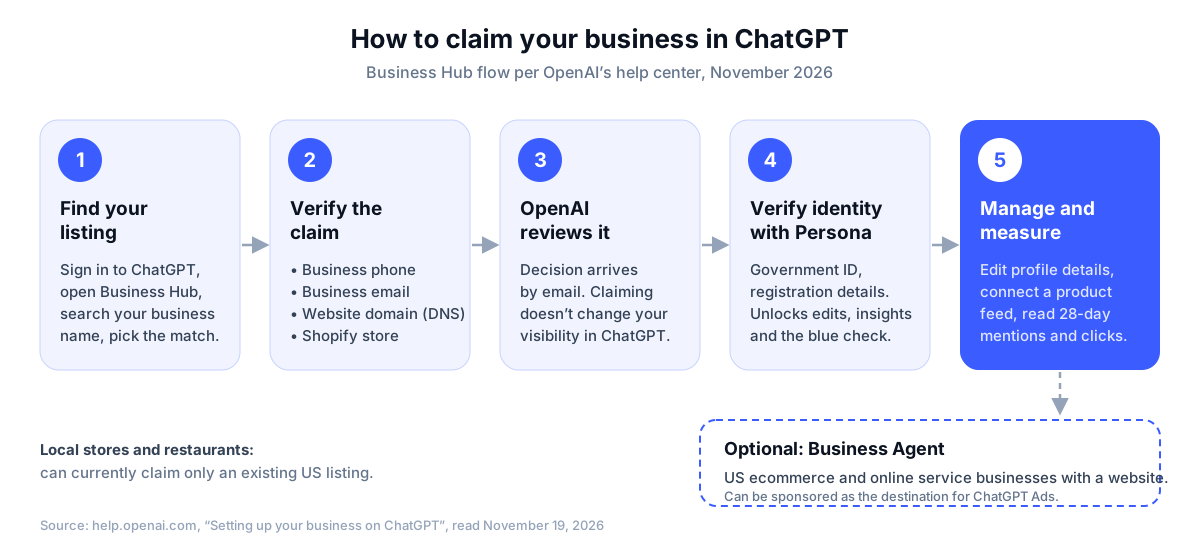
- Find your listing. Sign in to ChatGPT, open Business Hub from the sidebar and search your business name. Pick the listing that matches and confirm which ChatGPT account will manage it. Eligible online businesses that don’t appear may see an option to add one; local stores and restaurants can currently claim only an existing US listing.
- Verify the claim. Choose one of the methods offered for your listing: a code by text or automated call to the business phone, a code to the business email, a TXT record on your website domain, or connecting your Shopify store. The DNS route avoids changing a public phone number you can’t receive codes on.
- Wait for approval. OpenAI reviews the claim and emails a decision or a request for more information.
- Verify your identity with Persona. Persona asks for a government-issued ID and may ask for business registration details and proof that you can represent the company. Use the legal name from your registration documents. You need it before you can edit the profile, view insights, connect a product feed or get the blue check.
- Update the profile. Edit website, description, category, logo, delivery and return policies, and add a cover photo. OpenAI reviews changes before they appear, and “ChatGPT may also use other sources when answering questions about your business.”
- Connect a product feed if you sell products: a Shopify feed, a hosted CSV URL or a file upload that follows OpenAI’s product feed specification.
If someone else already claimed your business, open its profile, select the three-dot menu and choose Dispute ownership. Enterprise customers and advertisers can also claim through their OpenAI representative.
What Business Hub insights show
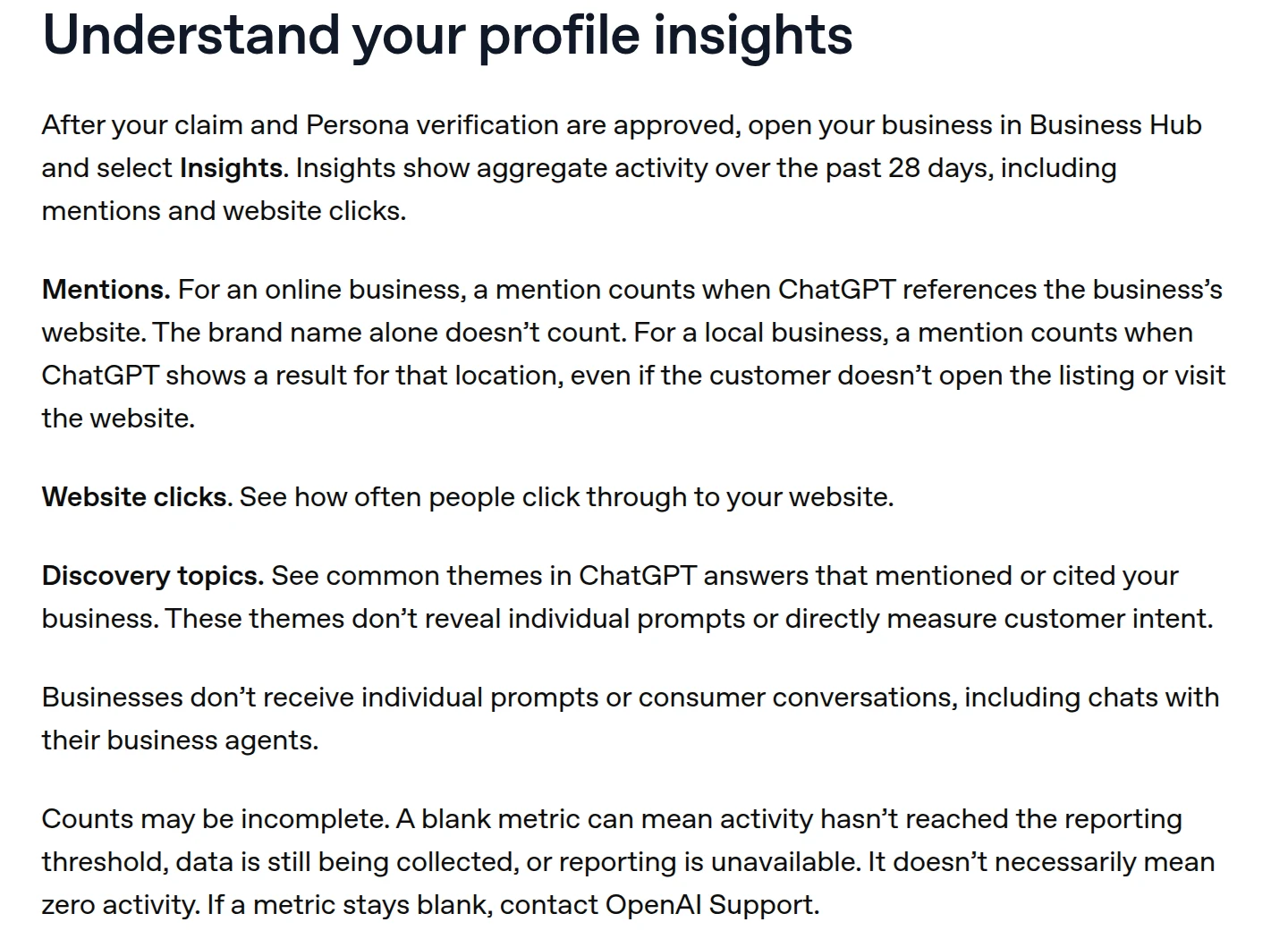
Business Hub insights show aggregate activity over the past 28 days in three parts: mentions, website clicks and discovery topics. Businesses don’t receive individual prompts or conversations, and insights appear only once activity passes a reporting threshold. OpenAI’s own definition of each metric matters more than the number on the tile.
| Metric | What OpenAI counts | What to keep in mind |
|---|---|---|
| Mentions (online business) | Answers where ChatGPT references your website | Answers that name you without your site don’t count |
| Mentions (local business) | Answers that show a result for your location | Counted even if nobody opens the listing |
| Website clicks | Clicks on links to your website in ChatGPT | OpenAI notes clicks don’t confirm visits or conversions |
| Discovery topics | Common themes in answers that mentioned or cited you | Themes, not prompts; they don’t measure intent |
| Blank metric | Below threshold, still collecting, or unavailable | Not the same as zero activity |
Early numbers show how far mentions and clicks can sit apart. Lily Ray told Digiday her consultancy’s dashboard showed 4 clicks from 25 mentions, and that the website-only definition “makes click-through rates appear disproportionately high.” Compare the Hub’s clicks with chatgpt.com referral sessions in your own analytics, and expect a gap: some ChatGPT visits land as direct traffic.
Stay Updated on AI Visibility Trends
Get the latest insights on AI mentions, brand monitoring, and optimization strategies.
What counts as a Business Hub mention
A mention in Business Hub is narrower than a brand mention in the everyday sense. For an online business, ChatGPT has to reference your website. If an answer recommends you by name but cites only G2, Reddit or a comparison article, your Business Hub mention count doesn’t move. For a local business, showing your location as a result is enough.
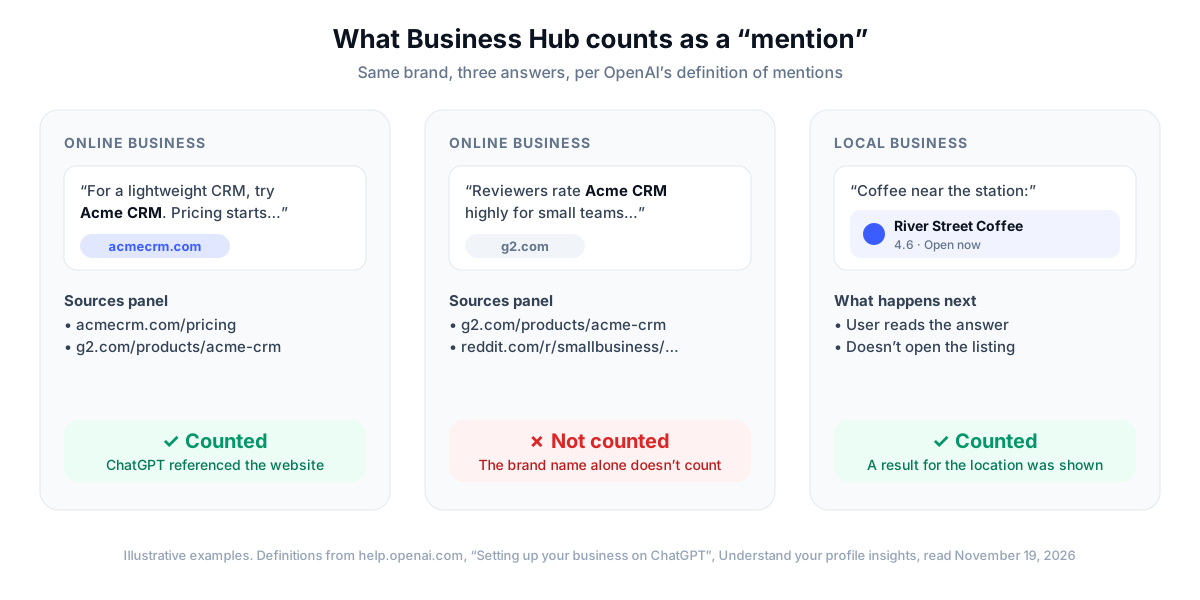
That rule has a practical consequence. The answers that cite third-party pages about you, such as review sites, listicles and forum threads, are often where buyers compare options. They’re invisible in Business Hub unless your own site is also among the sources. Our earlier piece on brand mentions without links covers why those mentions still shape what AI engines recommend.
How often ChatGPT names brands without linking
To size the gap, we checked how often ChatGPT cites a brand’s own website when it names the brand. Across 3,268 brand mentions in 487 ChatGPT answers, 72.5% came with at least one source from the brand’s own domain. The other 27.5% were name-only: the kind Business Hub leaves out for online businesses.
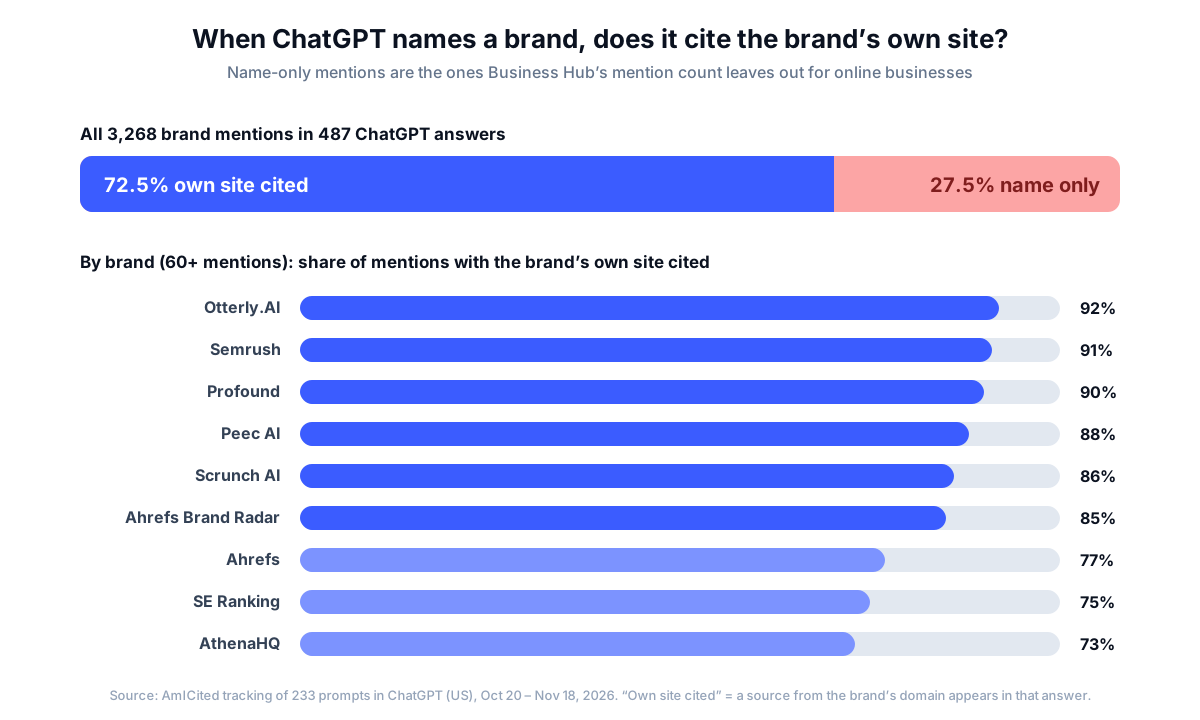
The share varies by brand. Among brands named at least 60 times, Otterly.AI had its own site cited in 92% of its mentions and AthenaHQ in 73%. More than half of the answers (55.2%) named at least one brand without citing that brand’s site. Brands that ChatGPT used as examples, such as retailers named inside an answer about a software report, were cited by their own domain far less often.
The answers also change from day to day. For the 9 prompts we track daily in the same window, ChatGPT’s answers on consecutive days shared only 29.5% of their cited URLs. A 28-day total smooths that over, which is useful for trends but hides which answers you won and lost.
What Business Hub doesn’t show
Business Hub doesn’t show the prompts behind your mentions, the answers where you were named without your website, the competitors recommended alongside or instead of you, or any engine other than ChatGPT. It also can’t tell you about a business you don’t own. Those gaps are by design: OpenAI built the insights to protect user privacy.
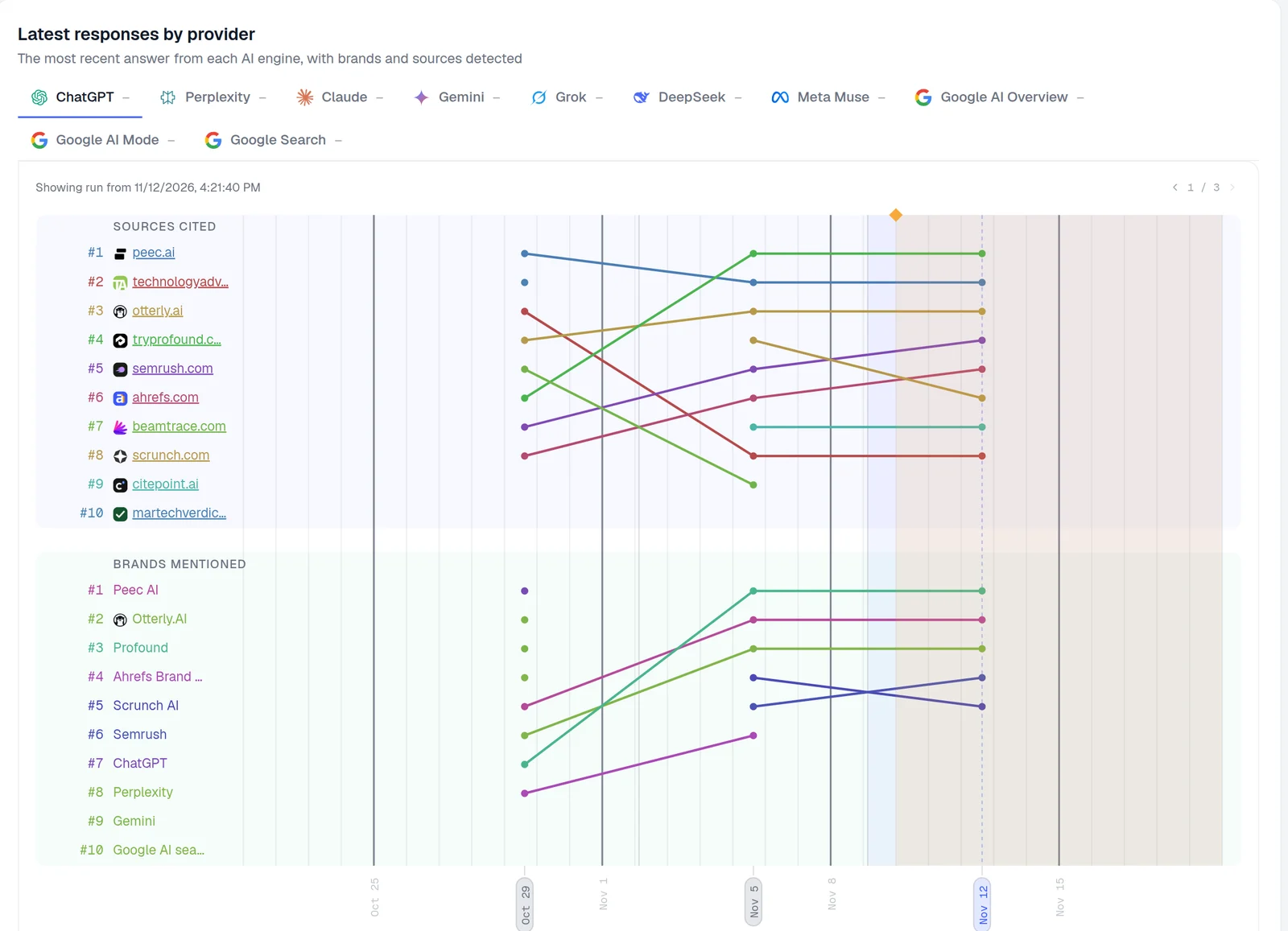
A per-answer view like this one, from AmICited’s prompt detail, is what the Hub’s privacy design rules out. It shows the brands ChatGPT named and the sources it cited side by side, run after run, so you can see who is named, who is linked and how both change.
| Question | ChatGPT Business Hub | Third-party ChatGPT tracker |
|---|---|---|
| Source of data | OpenAI’s own logs of real conversations | Scheduled runs of prompts you choose |
| Coverage | All conversations, aggregated | Only the prompts you track |
| Prompts and full answers | Not shown | Every answer stored |
| Name-only mentions (online business) | Not counted | Recorded |
| Competitors | Not shown | Brands named and their positions |
| Sources ChatGPT cited | Not listed | Every source per answer |
| Website clicks | Yes, from ChatGPT | No; use analytics for referral traffic |
| Other AI engines | ChatGPT only | Depends on the tool |
| Who can see it | The verified owner | Anyone tracking that prompt |
| Cost | No fee listed by OpenAI | Paid, usually per prompt or check |
The two answer different questions. Business Hub tells you how much of real ChatGPT traffic touches your website. A tracker tells you what ChatGPT says for the questions that matter to you, and who wins them. AmICited is our product: it runs your prompts in ChatGPT and up to eight other engines and records each answer’s brands and sources, at €0.015 per check.
Business Agents and ChatGPT Ads
A Business Agent is a chat that answers customer questions with your product and policy information, using instructions you set. People can start it from your ChatGPT profile, and OpenAI labels it as separate from ChatGPT’s own answers. Agents are open to eligible US ecommerce and online service businesses with a website, after claim and Persona approval.
Businesses can also sponsor their Business Agent and use it as the destination for ChatGPT Ads. OpenAI says sponsored placements are “clearly labeled and separate from ChatGPT responses.” That links Business Hub to ChatGPT’s ad business: if you’re weighing ad spend there, our guide to showing up in ChatGPT without paying covers how its ads work, and ChatGPT Ads intelligence shows which competitors already buy placements on your prompts.
How to track brand mentions in ChatGPT
To track brand mentions in ChatGPT, combine Business Hub’s first-party counts with prompt-level tracking. Claim your business to get OpenAI’s mentions and clicks, then run your buyers’ questions in ChatGPT on a schedule and record every answer. Read both against your analytics, because no single source shows mentions, answers and visits together.
| Method | Answers | Misses |
|---|---|---|
| Business Hub insights | How many real conversations cited your site, and the clicks they sent | Prompts, name-only mentions, competitors |
| Prompt tracking | What ChatGPT says for your chosen questions, who it names and which sources it cites | Conversations outside your prompt list |
| Web analytics | Visits and conversions from chatgpt.com referrals | Answers that never sent a click |
What to do now
- Claim your business now. Even with limited insights, verifying stops someone else from claiming the listing and lets you fix wrong details. Check which incorrect information ChatGPT repeats first.
- Make your website citable. Business Hub only counts answers that reference your site. Check that OAI-SearchBot isn’t blocked in robots.txt: per OpenAI’s crawler documentation, sites that opt out of it “will not be shown in ChatGPT search answers.”
- List the prompts that matter. Write 20–50 questions your buyers ask, by intent: best tools, comparisons, pricing, how-to. Track them daily or weekly, since answers change between runs.
- Record name-only mentions. Note which answers name you through review sites, Reddit or listicles. Those pages are where ChatGPT gets its information, and they decide whether you’re recommended.
- Watch competitors per prompt. Business Hub has no competitor view. Track share of voice against the brands ChatGPT names instead of you.
- Reconcile clicks with analytics. Compare Business Hub’s website clicks with chatgpt.com referral sessions, using a regex filter for AI referrers.
- Cover the other engines. Business Hub is ChatGPT only. Perplexity, Gemini and Google’s AI features cite different sources; see our multi-platform tracking guide.
The takeaway
Business Hub is the first time OpenAI has given businesses any data about their presence in ChatGPT, and the listing controls alone make it worth claiming this week. Read its mention count for what it is: answers that referenced your website, totalled over 28 days. The answers that named you without a link, the prompts behind them and the competitors beside you sit outside it, and for many brands that’s about a quarter of what ChatGPT says about them.
 LinkedIn