



Facebook ad fatigue and audience saturation look the same at first: frequency rises, click-through rate slips and cost per result climbs. The difference is what ran out. Ad fatigue means the same people have tired of the same creative. Audience saturation means you’ve already reached most of the people your targeting can reach, so extra spend mostly buys repeat impressions.
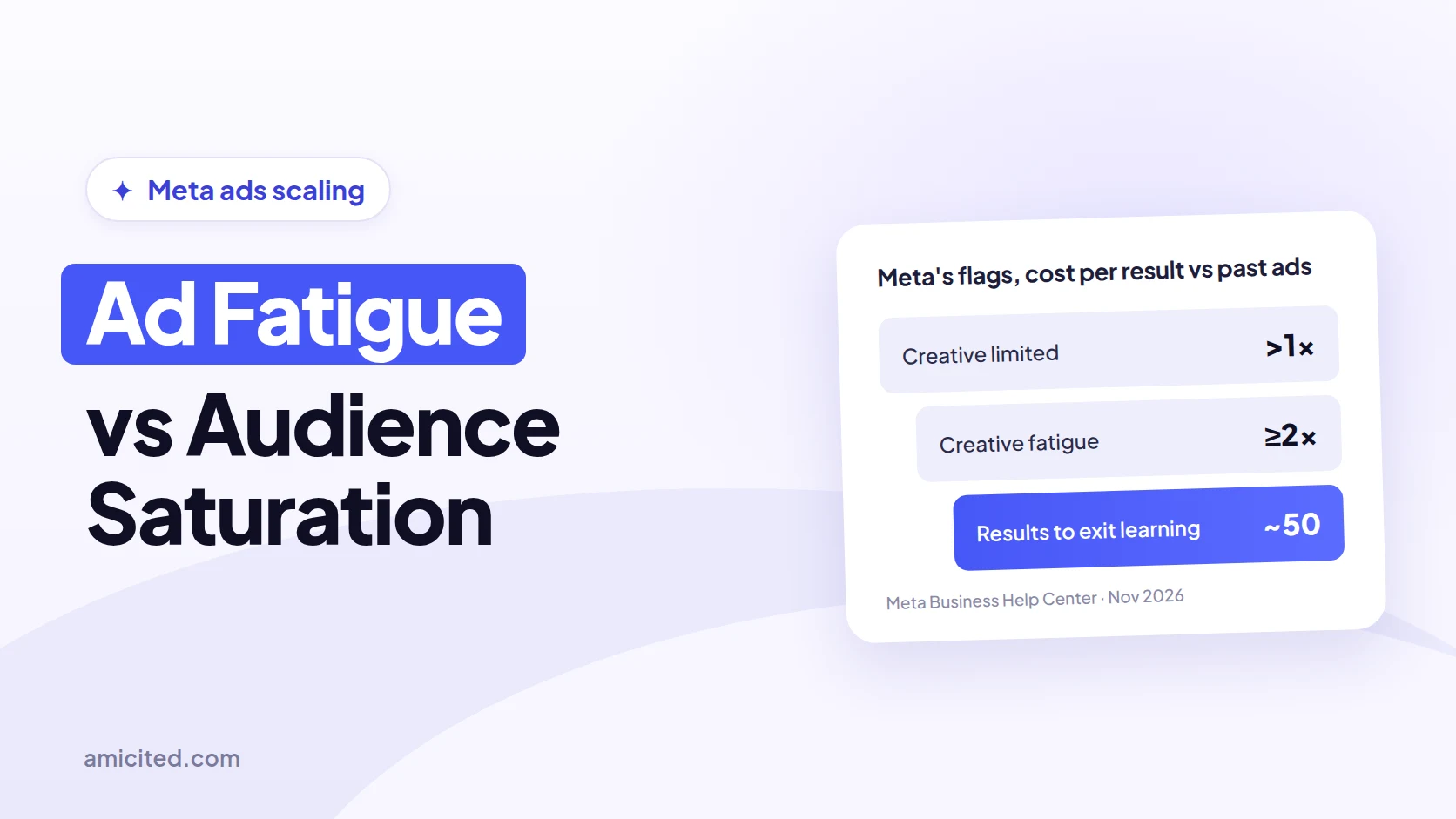
Meta flags the first one for you. An ad or ad set shows Creative fatigue in the Delivery column when its cost per result is at least twice that of ads you ran in the past, and Creative limited when it’s higher but under twice, according to Meta’s Business Help Center. There’s no status for saturation. You read it from reach, frequency and first-time impressions.
This guide gives a symptom-by-symptom diagnosis, the fix for each problem, and a way to scale Meta spend that checks the next euro against contribution margin instead of the campaign average.
Key Takeaways
- Meta shows “Creative fatigue” when an ad’s cost per result is 2× or more that of your past ads and “Creative limited” when it’s higher but under 2×, per Meta’s help page. The status only covers ad sets with one creative.
- Frequency is impressions divided by reach. Meta’s glossary says it “may average 1 to 2 per ad set or may be much higher” and gives no fatigue cutoff, so 3–4 per week is a rule of thumb.
- One fading ad among healthy ones in the same ad set points to creative fatigue. Every ad fading while reach flattens and first-time impressions fall points to audience saturation.
- Ad sets usually exit learning after about 50 results in the week after the last significant edit, Meta says. A $100 to $101 budget change is unlikely to reset it; $100 to $1,000 may.
- Scale on marginal CAC, not average CAC: the extra spend divided by the extra new customers, compared with the contribution margin a new customer brings.
- When we asked 9 AI engines this question on November 17, 2026, 3 cited Meta’s own fatigue help page and at least 4 quoted a frequency “warning zone” between 2.5 and 4 without a Meta source.
What ad fatigue is
Ad fatigue, also called creative fatigue, is a drop in response that happens when the same audience sees the same ad creative too often. People still in your audience stop clicking because they’ve seen it. Click-through rate falls first, then cost per result rises. A materially different creative shown to the same audience usually recovers performance.
Meta’s definition is short: creative fatigue “occurs when an audience has seen the same creative too many times,” which can lead to a higher cost per result. Three details from the same help page matter in practice:
- Exposure is counted across campaigns. Meta considers “all recent exposures of the ad’s image or video, including those from other campaigns from your Page.” Reusing one video in prospecting and retargeting tires it faster.
- The benchmark is your own history. The statuses compare the ad’s cost per result with ads you ran in the past, not with an industry average.
- Eligibility is narrow. The feature works only for ad sets with one creative, excluding Advantage+ catalog ads, dynamic creative and Advantage+ app campaigns. No status doesn’t mean no fatigue.

Ready to Monitor Your AI Visibility?
Track how AI chatbots mention your brand across ChatGPT, Perplexity, and other platforms.
What audience saturation is
Audience saturation is when an ad set has reached most of the people its targeting allows, so additional budget is spent showing ads again to people who’ve already seen them. Reach stops growing while spend keeps rising. Fresh creative helps briefly or not at all, because the problem is the size of the pool, not the ad.
Meta’s Inspect tool shows the signals at ad-set level once there are at least seven days of data, as Jon Loomer describes. Two of its charts are specific to saturation: first-time impression ratio, “the percentage of daily impressions [that] are the first time you’ve reached someone”, and audience reached ratio, “the percentage of your total potential audience that you’ve reached.”
Saturation comes faster with small audiences: retargeting lists, narrow interest stacks, small countries, and several ad sets that overlap and compete for the same people.
Fatigue vs saturation at a glance
The quickest way to separate them is to ask whether the problem follows the creative or the audience. Fatigue is local to one ad; saturation hits every ad aimed at the same people. The table below summarizes the core differences before the detailed symptom check.
| Ad (creative) fatigue | Audience saturation | |
|---|---|---|
| What ran out | People’s attention for one creative | New people in the targetable pool |
| Where it shows | One ad, while others in the ad set hold | All ads in the ad set at once |
| Reach vs spend | Reach can still grow | Reach flattens while spend rises |
| New creative helps? | Yes, usually clearly | Briefly or not at all |
| Meta status | Creative limited / Creative fatigue (eligible ad sets) | None; use Inspect and reach trends |
| Main fix | Materially different creative | Broader or new audience, or less budget |
Stay Updated on AI Visibility Trends
Get the latest insights on AI mentions, brand monitoring, and optimization strategies.
Symptom-by-symptom diagnosis
Diagnose from several signals moving together over at least two comparable windows, such as the last 7 days against the 7 before, or 14 and 28 days for low-volume accounts. One metric alone proves nothing. Rising frequency with stable CTR and cost per result is healthy repetition, not fatigue.
| Signal | Points to creative fatigue when… | Points to audience saturation when… | Points elsewhere when… |
|---|---|---|---|
| Frequency (impressions ÷ reach) | It rises on one ad faster than on its siblings | It rises across every ad in the ad set | It’s stable while results fall: check tracking, offer, landing page |
| Link CTR | It falls steadily from that ad’s own first weeks | It falls on new and old ads alike | It’s stable but cost per result rises: look at conversion rate |
| CPM | It rises for that ad only | It rises for the whole ad set | It rises across all your ad sets at once: auction competition or seasonality |
| Cost per result / CPA | Up on one ad; Meta may show Creative limited or Creative fatigue | Up on every ad, including fresh ones | It jumps overnight: usually tracking, checkout or a site issue |
| Reach growth vs spend | Reach still grows with spend | Reach flattens while spend rises | Reach falls with spend: budget or delivery issue |
| First-time impression ratio | Roughly stable | Falling | Not applicable |
| New-customer share of orders | Usually stable | Falling: spend increasingly reaches past buyers | Falling with a promotion: repeat buyers are responding to the offer |
| A new, different creative | Recovers CTR and cost per result | Fades fast, like the old one | Doesn’t change anything: the issue isn’t creative or audience |
The new-customer share is the row most guides skip. Meta’s purchase counts include existing customers, so an ad set can look stable in Ads Manager while it mostly re-reaches people who already bought. Comparing first-ever buyers in your store with Meta spend over the same window, as a new-customer CAC report does, shows saturation that platform metrics hide.
Check it in Ads Manager
Ads Manager has everything you need for a first diagnosis. Work at both the ad and the ad-set level, because fatigue lives at the ad and saturation at the ad set.
- Add the columns. Frequency, Reach, Impressions, CPM, CTR (link), Cost per result, Results and the Delivery status. Add “Last significant edit” too.
- Compare two equal windows. Use the last 7 days against the previous 7, or 14 and 28 days for low volume. Break the chart down by day to see when the trend turned.
- Compare ads inside one ad set. If one ad declines while others hold, that’s fatigue. If all decline together, look at the audience.
- Open Inspect on the ad set. Check frequency, first-time impression ratio, reach and audience reached ratio over time.
- Check overlap. If several ad sets target similar people, they compete for the same pool and saturate it together. Meta suggests combining similar ad sets, because combined ad sets also combine learning.
- Run the creative test. Launch one materially different creative to the same audience with the same budget and goal. Recovery means fatigue; a fast fade means saturation.
Is there a frequency threshold?
No official one. Meta defines frequency as “the average number of times each person saw your ad,” calculated as impressions divided by reach, and its reservation glossary says it “may average 1 to 2 per ad set or may be much higher, depending on your budget, audience size and schedule.” Its advice is to watch the trend against results.
The same glossary puts it plainly: “If performance begins to drop as your frequency numbers rise, your target audience may be experiencing ad fatigue.” That’s a relationship, not a number. A retargeting audience of past visitors can sit at a frequency of 6 and stay profitable; a cold audience can fatigue at 2 if the creative is weak.
Figures like “3–4 per week for prospecting” come from agency experience and vary by account, objective and creative format. Use them as a prompt to look closer, never as a rule to pause ads. There are also no reliable public fatigue benchmarks by industry, so compare each ad with its own first weeks.
Frequency caps don’t solve this for most advertisers. In Meta’s glossary, a frequency cap is described for reservation buying, where it defaults to 2 impressions every 7 days. In auction campaigns, the levers you control are audience size, budget and the number of distinct creatives.
How to fix ad fatigue
Fix creative fatigue with genuinely new creative, not small edits. Meta’s own recommendation is to create a new ad “with a new image or video that is materially different from the original creative.” A new headline on the same video still counts as the same exposure to a viewer who has seen that video.
Meta’s fatigue page lists three recommendations: create another ad, expand your audience, or try Advantage+ creative, which generates variations of one image or video (traffic and sales objectives with a website destination only). It also says that “keeping your original ad active instead of pausing or turning it off may maximize results.”
In practice:
- Change the concept, not the color. New hook, angle, format (static to video, UGC to demo) or offer framing.
- Keep a pipeline. Have the next two or three creatives ready before the current one fades, so you’re not launching under pressure.
- Rotate deliberately. Add the new ad next to the old one rather than replacing it. Note that adding a new ad to an ad set is a significant edit and can send the ad set back into learning.
- On a small budget, run fewer ads per ad set. Each ad then gets enough delivery for you to judge it, and you spend less time in learning.
How to fix audience saturation
Fix saturation by giving the ad set more people to reach, or by spending less on the people you already reach. New creative alone won’t hold, because the pool is the constraint. Broaden targeting, add new audiences, consolidate overlapping ad sets, or lower the budget until reach grows with spend again.
- Broaden targeting. Meta’s Advantage+ audience lets the system expand the eligible audience pool, while location, minimum age, language and custom audience exclusions stay fixed.
- Add a new pool. A wider lookalike, a new country or region, or a new interest group.
- Consolidate. Merge ad sets that chase the same people, so they stop competing in the same auctions.
- Exclude recent buyers from prospecting, so budget isn’t spent re-reaching customers.
- Reduce budget when no bigger audience exists. A smaller budget on a saturated pool often costs less per new customer than a larger one.
Remember that a targeting change is always a significant edit, so expect a learning period.
Prospecting vs retargeting
Retargeting audiences saturate by design. They’re small, they were built from people who already know you, and high frequency is often the point. Judge retargeting on incremental new customers and margin, not on frequency. Prospecting saturating is the more serious signal, because it caps growth.
A useful check is to split spend and results by prospecting and retargeting ad sets, then compare each against store data. If retargeting looks cheap but most of its purchases come from existing customers, its real acquisition cost is much higher than Ads Manager suggests. An ad-set view against realized orders, such as Audience Efficiency, makes that gap visible.
When to scale Meta ads
Scale when the ad set is out of learning, its cost per result has been stable against your target for at least a week, it spends its full budget, and none of the fatigue or saturation signals above are present. Scaling a fatiguing or saturated ad set mostly buys more repeat impressions at a higher price.
Readiness checklist before each step:
- The Delivery column reads Active, not Learning or Learning limited.
- Cost per result and new-customer CAC are inside target on weekly totals, not one good day.
- Frequency is stable or rising slowly, and reach still grows with spend.
- Tracking roughly reconciles with your store’s orders. If Meta claims far more purchases than you received, fix that first; our guide to Meta over-reporting conversions covers why it happens.
- You have stock, cash flow and the next creatives ready.
Scale without losing profit
Scale on the margin. Average CAC and blended ROAS describe all the customers you’ve bought so far; the decision is about the next ones. Marginal CAC is the extra spend divided by the extra new customers it brought. Keep scaling while marginal CAC stays below the contribution margin a new customer generates.
Example (illustrative numbers): a store spends €10,000 a week on Meta and gets 200 first-time customers, an average CAC of €50. It raises spend to €13,000 and gets 236 new customers. Average CAC is now €55, which still looks fine.
| Before | After | Change | |
|---|---|---|---|
| Weekly Meta spend | €10,000 | €13,000 | +€3,000 |
| New customers | 200 | 236 | +36 |
| Average CAC | €50.00 | €55.08 | +10% |
| Marginal CAC | €83.33 |
If a new customer brings €45 of contribution margin on the first order and about €75 over 12 months, the last €3,000 bought customers who don’t pay back within a year, even though the average looks healthy. Hold or roll back the step.
How to run each step:
- Set the ceiling first. Work out breakeven from contribution margin, not revenue; our guide to breakeven ROAS, true ROAS, MER and POAS has the formulas. For repeat-purchase brands, use realistic contribution LTV from mature cohorts.
- Raise budget in steps. Meta says budget changes “may or may not be significant, depending on the magnitude,” with $100 to $101 unlikely to reset learning and $100 to $1,000 likely to, per its significant edits page. The common 10–20% step is a practitioner rule of thumb.
- Change one thing at a time. Don’t change budget, creative and targeting together, or you can’t tell what moved results.
- Wait for a full read. Give each step several days, longer if your purchase cycle is long or volume is low, and judge it on weekly totals.
- Calculate marginal CAC on new customers from your store, not on Meta-reported purchases, which include repeat buyers and can include modeled conversions.
- Stop or hold when marginal CAC crosses your ceiling, when new-customer share falls, or when the saturation signals appear.
Vertical vs horizontal scaling
Vertical scaling raises the budget of an existing ad set or campaign. Horizontal scaling adds new audiences, creatives, placements or countries. Vertical keeps learning intact if steps are moderate; horizontal reaches new people but starts each new ad set in learning. Saturated ad sets need horizontal moves, not bigger budgets.
| Vertical scaling | Horizontal scaling | |
|---|---|---|
| What changes | Budget of a working ad set | New audiences, creatives, regions |
| Learning | Small steps usually keep it stable | Each new ad set starts in learning |
| Best when | Reach still grows with spend | Reach has flattened (saturation) |
| Risk | Rising marginal CAC | Fragmentation: many small ad sets learning slowly |
Meta warns that with high ad volumes “the delivery system learns less about each ad and ad set,” per its learning phase page, so horizontal scaling works best with fewer, broader ad sets rather than many duplicates.
Check scaling against real profit
Ads Manager can’t tell you whether the extra spend was profitable, because it doesn’t see your margins, returns or which buyers were new. Judge each scaling step against store data: contribution margin, first-ever customers and orders that actually landed. For causal proof, use a lift test or a marketing mix model.
Three checks cover most of it:
- Profit-based ROAS. Revenue ROAS hides product costs, shipping and fees. A profit-true ROAS view divides contribution after costs by spend.
- New-customer CAC. Spend divided by first-ever buyers over a window long enough for your buying cycle.
- Incrementality. Same-day spend and orders show association, not cause. A holdout or conversion lift study, or a marketing mix model, estimates what Meta added on top of demand you’d have had anyway, with uncertainty ranges. Our marketing mix modeling guide explains when that’s worth it.
Where AmICited fits
AmICited is our product. With Meta Ads and a store connected, it puts Meta delivery next to real orders. Meta Saturation tracks frequency, reach, impressions and CTR daily against a prior window. Meta Profit Scaling computes marginal CAC between spend tiers and checks it against mature contribution LTV.
Limits, stated plainly: the saturation report reads Meta’s reach and can’t diagnose frequency where reach is missing, and it shows signals, not proof that repetition caused a decline. Profit Scaling compares total Meta spend with shop-identified new customers, so it describes association, not Meta’s causal lift, and it withholds a verdict when cost inputs or observations are incomplete. Store and ad integrations start on the Pro plan, see ecommerce stores.
What to do now
- Pull two equal windows for each active ad set: frequency, reach, CPM, link CTR, cost per result and Delivery status.
- Compare ads inside each ad set. One fading ad means creative fatigue; all fading with flat reach means saturation.
- Test one materially different creative on the suspect ad set before changing the audience.
- Fix the right thing: new concepts for fatigue; broader, consolidated or new audiences, or less budget, for saturation.
- Add store data: new-customer CAC and contribution margin per new customer, via New-customer CAC or your own store export.
- Scale in steps and calculate marginal CAC after each one. Stop when it crosses contribution LTV.
The takeaway
Ad fatigue is a creative problem and audience saturation is an audience problem, and they need different fixes. Read frequency together with CTR, reach and first-time impressions, compare ads inside the same ad set, and treat any fixed frequency threshold as a rule of thumb. When you scale, judge the next euro by marginal CAC against contribution margin, not by the campaign’s average.
 LinkedIn