

AI Crawler Access Audit: Are the Right Bots Seeing Your Content?
Learn how to audit AI crawler access to your website. Discover which bots can see your content and fix blockers preventing AI visibility in ChatGPT, Perplexity,...
8 min read
Learn why AI crawlers like ChatGPT can’t see JavaScript-rendered content and how to make your site visible to AI systems. Discover rendering strategies for AI visibility.
The digital landscape has fundamentally shifted, but most organizations haven’t caught up. While Google’s sophisticated rendering pipeline can execute JavaScript and index dynamically generated content, AI crawlers like ChatGPT, Perplexity, and Claude operate under completely different constraints. This creates a critical visibility gap: content that appears perfectly fine to human users and even to Google’s search engine may be completely invisible to the AI systems that increasingly drive traffic and influence purchasing decisions. Understanding this distinction isn’t just a technical curiosity—it’s becoming essential for maintaining visibility across the entire digital ecosystem. The stakes are high, and the solutions are more nuanced than most organizations realize.
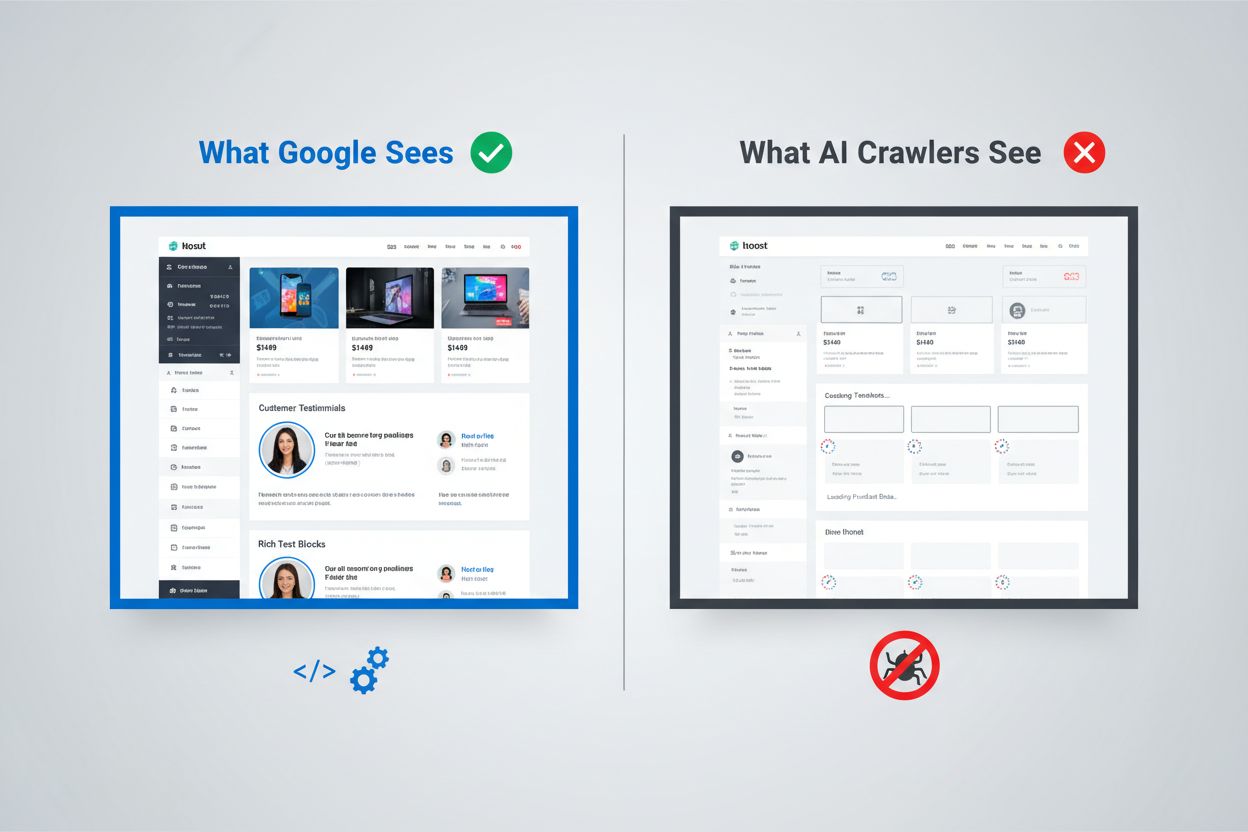
Google’s approach to JavaScript rendering represents one of the most sophisticated systems ever built for web indexing. The search giant employs a two-wave rendering system where pages are first crawled for their static HTML content, then later re-rendered using a headless Chrome browser through its Web Rendering Service (WRS). During this second wave, Google executes JavaScript, builds the complete DOM (Document Object Model), and captures the fully rendered page state. This process includes rendering caching, which means Google can reuse previously rendered versions of pages to save resources. The entire system is designed to handle the complexity of modern web applications while maintaining the ability to crawl billions of pages. Google invests enormous computational resources into this capability, running thousands of headless Chrome instances to process the web’s JavaScript-heavy content. For organizations relying on Google Search, this means their client-side rendered content has a fighting chance at visibility—but only because Google has built an exceptionally expensive infrastructure to support it.
AI crawlers operate under fundamentally different economic and architectural constraints that make JavaScript execution impractical. Resource constraints are the primary limitation: executing JavaScript requires spinning up browser engines, managing memory, and maintaining state across requests—all expensive operations at scale. Most AI crawlers operate with timeout windows of 1-5 seconds, meaning they must fetch and process content extremely quickly or abandon the request entirely. The cost-benefit analysis doesn’t favor JavaScript execution for AI systems; they can train on far more content by simply processing static HTML than by rendering every page they encounter. Additionally, the training data processing pipeline for large language models typically strips CSS and JavaScript during ingestion, focusing only on the semantic HTML content. The architectural philosophy differs fundamentally: Google built rendering into its core indexing system because search relevance depends on understanding rendered content, while AI systems prioritize breadth of coverage over depth of rendering. This isn’t a limitation that will be easily overcome—it’s baked into the fundamental economics of how these systems operate.
When AI crawlers request a page, they receive the raw HTML file without any JavaScript execution, which often means they see a dramatically different version of the content than human users do. Single Page Applications (SPAs) built with React, Vue, or Angular are particularly problematic because they typically ship minimal HTML and rely entirely on JavaScript to populate the page content. An AI crawler requesting a React-based ecommerce site might receive HTML containing empty <div id="root"></div> tags with no actual product information, pricing, or descriptions. The crawler sees the skeleton of the page but not the meat. For content-heavy sites, this means product catalogs, blog posts, pricing tables, and dynamic content sections simply don’t exist in the AI crawler’s view. Real-world examples abound: a SaaS platform’s feature comparison table might be completely invisible, an ecommerce site’s product recommendations might not be indexed, and a news site’s dynamically loaded articles might appear as blank pages. The HTML that AI crawlers receive is often just the application shell—the actual content lives in JavaScript bundles that never get executed. This creates a situation where the page renders perfectly in a browser but appears nearly empty to AI systems.
The business impact of this rendering gap extends far beyond technical concerns and directly affects revenue, visibility, and competitive positioning. When AI crawlers can’t see your content, several critical business functions suffer:
The cumulative effect is that organizations investing heavily in content and user experience may find themselves invisible to an increasingly important class of users and systems. This isn’t a problem that resolves itself—it requires deliberate action.
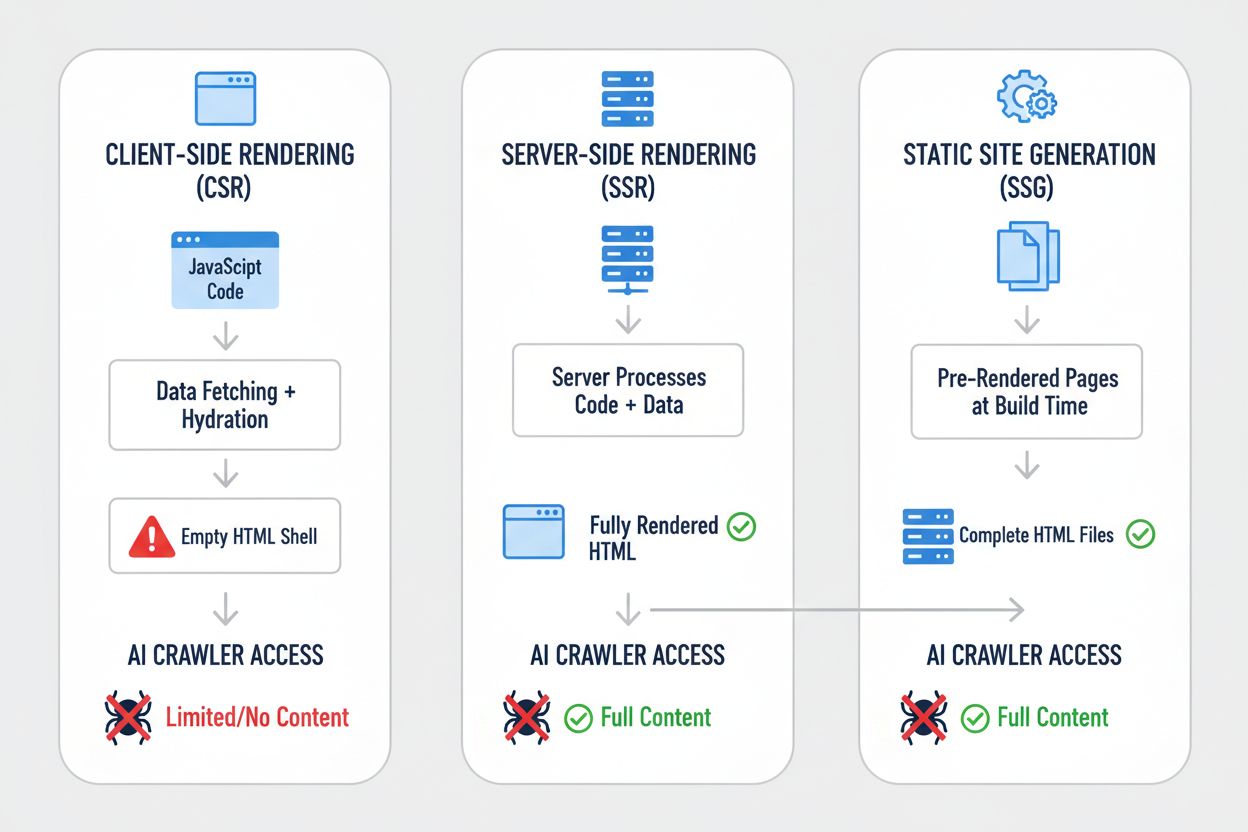
Different rendering strategies produce dramatically different results when viewed through the lens of AI crawler visibility. The choice of rendering approach fundamentally determines what AI systems can see and index. Here’s how the major strategies compare:
| Strategy | What AI Sees | Impact on AI Visibility | Complexity | Best For |
|---|---|---|---|---|
| Server-Side Rendering (SSR) | Complete HTML with all content rendered | Full visibility—AI sees everything | High | Content-heavy sites, SEO-critical applications |
| Static Site Generation (SSG) | Pre-rendered HTML files | Excellent visibility—content is static HTML | Medium | Blogs, documentation, marketing sites |
| Client-Side Rendering (CSR) | Empty HTML shell, minimal content | Poor visibility—AI sees skeleton only | Low | Real-time dashboards, interactive tools |
| Hybrid (SSR + CSR) | Initial HTML + client-side enhancements | Good visibility—core content visible | Very High | Complex applications with dynamic features |
| Pre-rendering Service | Cached rendered HTML | Good visibility—depends on service quality | Medium | Existing CSR sites needing quick fixes |
| API-First + Markup | Structured data + HTML content | Excellent visibility—if properly implemented | High | Modern web applications, headless CMS |
Each strategy represents a different trade-off between development complexity, performance, user experience, and AI visibility. The critical insight is that visibility to AI systems correlates strongly with having content in static HTML form—whether that HTML is generated at build time, request time, or served from a cache. Organizations must evaluate their rendering strategy not just for user experience and performance, but explicitly for AI crawler visibility.
Server-Side Rendering (SSR) represents the gold standard for AI visibility because it delivers complete, rendered HTML to every requester—human browsers and AI crawlers alike. With SSR, the server executes your application code and generates the full HTML response before sending it to the client, meaning AI crawlers receive the complete, rendered page on their first request. Modern frameworks like Next.js, Nuxt.js, and SvelteKit have made SSR significantly more practical than it was in previous generations, handling the complexity of hydration (where client-side JavaScript takes over from server-rendered HTML) transparently. The benefits extend beyond AI visibility: SSR typically improves Core Web Vitals, reduces Time to First Contentful Paint, and provides better performance for users on slow connections. The trade-off is increased server load and complexity in managing state between server and client. For organizations where AI visibility is critical—particularly content-heavy sites, ecommerce platforms, and SaaS applications—SSR is often the most defensible choice. The investment in SSR infrastructure pays dividends across multiple dimensions: better search engine visibility, better AI crawler visibility, better user experience, and better performance metrics.
Static Site Generation (SSG) takes a different approach by pre-rendering pages at build time, generating static HTML files that can be served instantly to any requester. Tools like Hugo, Gatsby, and Astro have made SSG increasingly powerful and flexible, supporting dynamic content through APIs and incremental static regeneration. When an AI crawler requests a page generated with SSG, it receives complete, static HTML with all content fully rendered—perfect visibility. The performance benefits are exceptional: static files serve faster than any dynamic rendering, and the infrastructure requirements are minimal. The limitation is that SSG works best for content that doesn’t change frequently; pages must be rebuilt and redeployed when content updates. For blogs, documentation sites, marketing pages, and content-heavy applications, SSG is often the optimal choice. The combination of excellent AI visibility, outstanding performance, and minimal infrastructure requirements makes SSG attractive for many use cases. However, for applications requiring real-time personalization or frequently changing content, SSG becomes less practical without additional complexity like incremental static regeneration.
Client-Side Rendering (CSR) remains popular despite its significant drawbacks for AI visibility, primarily because it offers the best developer experience and most flexible user experience for highly interactive applications. With CSR, the server sends minimal HTML and relies on JavaScript to build the page in the browser—which means AI crawlers see almost nothing. React, Vue, and Angular applications typically ship with CSR as the default approach, and many organizations have built their entire technology stack around this pattern. The appeal is understandable: CSR enables rich, interactive experiences, real-time updates, and smooth client-side navigation. The problem is that this flexibility comes at the cost of AI visibility. For applications that absolutely require CSR—real-time dashboards, collaborative tools, complex interactive applications—there are workarounds. Pre-rendering services like Prerender.io can generate static HTML snapshots of CSR pages and serve them to crawlers while serving the interactive version to browsers. Alternatively, organizations can implement hybrid approaches where critical content is server-rendered while interactive features remain client-side. The key insight is that CSR should be a deliberate choice made with full awareness of the visibility trade-offs, not a default assumption.
Implementing practical solutions requires a systematic approach that begins with understanding your current state and progresses through implementation and ongoing monitoring. Start with an audit: use tools like Screaming Frog, Semrush, or custom scripts to crawl your site as an AI crawler would, examining what content is actually visible in the raw HTML. Implement rendering improvements based on your audit findings—this might mean migrating to SSR, adopting SSG for appropriate sections, or implementing pre-rendering for critical pages. Test thoroughly by comparing what AI crawlers see versus what browsers see; use curl commands to fetch raw HTML and compare it to the rendered version. Monitor continuously to ensure that rendering changes don’t break visibility over time. For organizations with large, complex sites, this might mean prioritizing high-value pages first—product pages, pricing pages, and key content sections—before tackling the entire site. Tools like Lighthouse, PageSpeed Insights, and custom monitoring solutions can help track rendering performance and visibility metrics. The investment in getting this right pays dividends across search visibility, AI visibility, and overall site performance.
Testing and monitoring your rendering strategy requires specific techniques that reveal what AI crawlers actually see. The simplest test is using curl to fetch raw HTML without JavaScript execution:
curl -s https://example.com | grep -i "product\|price\|description"
This shows you exactly what an AI crawler receives—if your critical content doesn’t appear in this output, it won’t be visible to AI systems. Browser-based testing using Chrome DevTools can show you the difference between the initial HTML and the fully rendered DOM; open DevTools, go to the Network tab, and examine the initial HTML response versus the final rendered state. For ongoing monitoring, implement synthetic monitoring that regularly fetches your pages as an AI crawler would and alerts you if content visibility degrades. Track metrics like “percentage of content visible in initial HTML” and “time to content visibility” to understand your rendering performance. Some organizations implement custom monitoring dashboards that compare AI crawler visibility across competitors, providing competitive intelligence on who’s optimizing for AI visibility and who isn’t. The key is making this monitoring continuous and actionable—visibility issues should be caught and fixed quickly, not discovered months later when traffic mysteriously declines.
The future of AI crawler capabilities remains uncertain, but current limitations are unlikely to change dramatically in the near term. OpenAI has experimented with more sophisticated crawlers like Comet and Atlas browsers that can execute JavaScript, but these remain experimental and aren’t deployed at scale for training data collection. The fundamental economics haven’t changed: executing JavaScript at scale remains expensive, and the training data pipeline still benefits more from breadth than depth. Even if AI crawlers eventually gain JavaScript execution capabilities, the optimization you do now won’t hurt—server-rendered content performs better for users, loads faster, and provides better SEO regardless. The prudent approach is to optimize for AI visibility now rather than waiting for crawler capabilities to improve. This means treating AI visibility as a first-class concern in your rendering strategy, not an afterthought. Organizations that make this shift now will have a competitive advantage as AI systems become increasingly important for traffic and visibility.
Monitoring your AI visibility and tracking improvements over time requires the right tools and metrics. AmICited.com provides a practical solution for tracking how your content appears in AI-generated responses and monitoring your visibility across different AI systems. By tracking which of your pages get cited, quoted, or referenced in AI-generated content, you can understand the real-world impact of your rendering optimizations. The platform helps you identify which content is visible to AI systems and which content remains invisible, providing concrete data on the effectiveness of your rendering strategy. As you implement SSR, SSG, or pre-rendering solutions, AmICited.com lets you measure the actual improvement in AI visibility—seeing whether your optimization efforts translate into increased citations and references. This feedback loop is critical for justifying the investment in rendering improvements and identifying which pages need additional optimization. By combining technical monitoring of what AI crawlers see with business metrics of how often your content actually appears in AI responses, you get a complete picture of your AI visibility performance.
No, ChatGPT and most AI crawlers cannot execute JavaScript. They only see the raw HTML from the initial page load. Any content injected via JavaScript after the page loads remains completely invisible to AI systems, unlike Google which uses headless Chrome browsers to render JavaScript.
Google uses headless Chrome browsers to render JavaScript, similar to how a real browser works. This is resource-intensive but Google has the infrastructure to do it at scale. Google's two-wave rendering system first crawls static HTML, then re-renders pages with JavaScript execution to capture the complete DOM.
Disable JavaScript in your browser and load your site, or use the curl command to see raw HTML. If key content is missing, AI crawlers won't see it either. You can also use tools like Screaming Frog in 'Text Only' mode to crawl your site as an AI crawler would.
No. You can also use Static Site Generation, pre-rendering services, or hybrid approaches. The best solution depends on your content type and update frequency. SSR works well for dynamic content, SSG for stable content, and pre-rendering services for existing CSR sites.
Google can handle JavaScript, so your Google rankings shouldn't be directly affected. However, optimizing for AI crawlers often improves overall site quality, performance, and user experience, which can indirectly benefit your Google rankings.
It depends on the AI platform's crawl frequency. ChatGPT-User crawls on-demand when users request content, while GPTBot crawls infrequently with long revisit intervals. Changes may take weeks to appear in AI answers, but you can monitor progress using tools like AmICited.com.
Pre-rendering services are easier to implement and maintain with minimal code changes, while SSR offers more control and better performance for dynamic content. Choose based on your technical resources, content update frequency, and complexity of your application.
Yes, you can use robots.txt to block specific AI crawlers like GPTBot. However, this means your content won't appear in AI-generated answers, potentially reducing visibility and traffic from AI-powered search tools and assistants.
Track how AI systems reference your brand across ChatGPT, Perplexity, and Google AI Overviews. Identify visibility gaps and measure the impact of your rendering optimizations.
Learn how to audit AI crawler access to your website. Discover which bots can see your content and fix blockers preventing AI visibility in ChatGPT, Perplexity,...

Learn how to test whether AI crawlers like ChatGPT, Claude, and Perplexity can access your website content. Discover testing methods, tools, and best practices ...
Learn how JavaScript impacts AI crawler visibility. Discover why AI bots can't render JavaScript, what content gets hidden, and how to optimize your site for bo...