

How to Handle Infinite Scroll for AI Crawlers and Search Engines
Learn how to implement infinite scroll while maintaining crawlability for AI crawlers, ChatGPT, Perplexity, and traditional search engines. Discover pagination ...
10 min read
Learn how prerendering makes JavaScript content visible to AI crawlers like ChatGPT, Claude, and Perplexity. Discover the best technical solutions for AI search optimization and improve your visibility in AI-powered search results.
AI crawlers like GPTBot, ClaudeBot, and PerplexityBot have fundamentally changed how content is discovered and indexed across the web, yet they face a critical limitation: they cannot execute JavaScript. This means that any content rendered dynamically through JavaScript—which powers modern single-page applications (SPAs), dynamic product pages, and interactive dashboards—remains completely invisible to these crawlers. According to recent data, AI crawlers now account for approximately 28% of Googlebot traffic, making them a significant portion of your site’s crawl budget and a crucial factor in content accessibility. When an AI crawler requests a page, it receives the initial HTML shell without the rendered content, effectively seeing a blank or incomplete version of your site. This creates a paradox: your content is perfectly visible to human users with JavaScript-enabled browsers, but invisible to the AI systems that increasingly influence content discovery, summarization, and ranking across AI-powered search engines and applications.
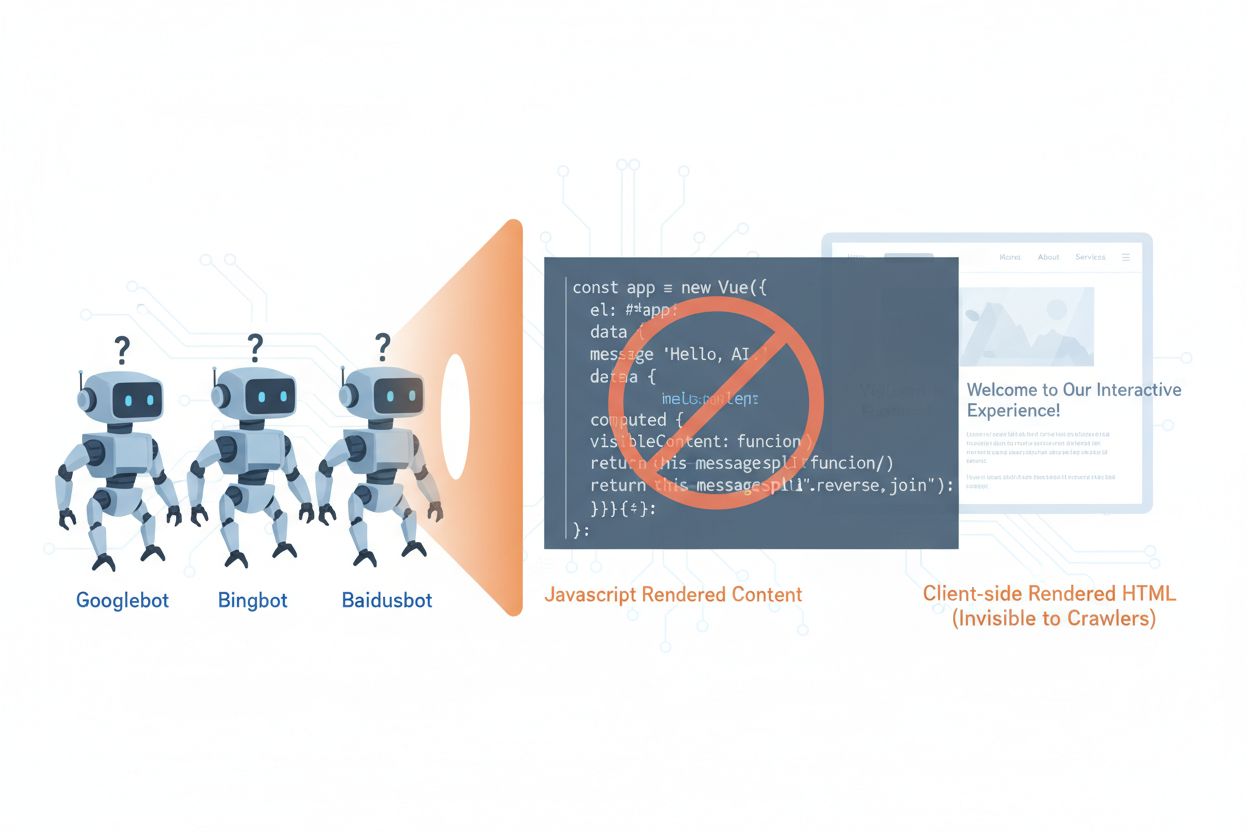
The technical reasons behind AI crawlers’ JavaScript limitations stem from fundamental architectural differences between how browsers and crawlers process web content. Browsers maintain a full JavaScript engine that executes code, manipulates the DOM (Document Object Model), and renders the final visual output, while AI crawlers typically operate with minimal or no JavaScript execution capabilities due to resource constraints and security considerations. Asynchronous loading—where content fetches from APIs after the initial page load—presents another major challenge, as crawlers receive only the initial HTML before content arrives. Single-page applications (SPAs) compound this problem by relying entirely on client-side routing and rendering, leaving crawlers with nothing but a JavaScript bundle. Here’s how different rendering methods compare in terms of AI crawler visibility:
| Rendering Method | How It Works | AI Crawler Visibility | Performance | Cost |
|---|---|---|---|---|
| CSR (Client-Side Rendering) | Browser executes JavaScript to render content | ❌ Poor | Fast for users | Low infrastructure |
| SSR (Server-Side Rendering) | Server renders HTML on every request | ✅ Excellent | Slower initial load | High infrastructure |
| SSG (Static Site Generation) | Content pre-built at build time | ✅ Excellent | Fastest | Medium (build time) |
| Prerendering | Static HTML cached on-demand | ✅ Excellent | Fast | Medium (balanced) |
Prerendering offers an elegant middle ground between the resource-intensive demands of server-side rendering and the build-time limitations of static site generation. Rather than rendering content on every request (SSR) or at build time (SSG), prerendering generates static HTML snapshots on-demand when a crawler or bot requests a page, then caches that rendered version for subsequent requests. This approach means that AI crawlers receive fully-rendered, static HTML containing all the content that would normally be generated by JavaScript, while regular users continue to receive the dynamic, interactive version of your site without any changes to their experience. Prerendering is particularly cost-effective because it only renders pages that are actually requested by crawlers, avoiding the overhead of pre-rendering your entire site or maintaining expensive server-side rendering infrastructure. The maintenance burden is minimal—your application code remains unchanged, and the prerendering layer operates transparently in the background, making it an ideal solution for teams that want AI crawler accessibility without architectural overhauls.
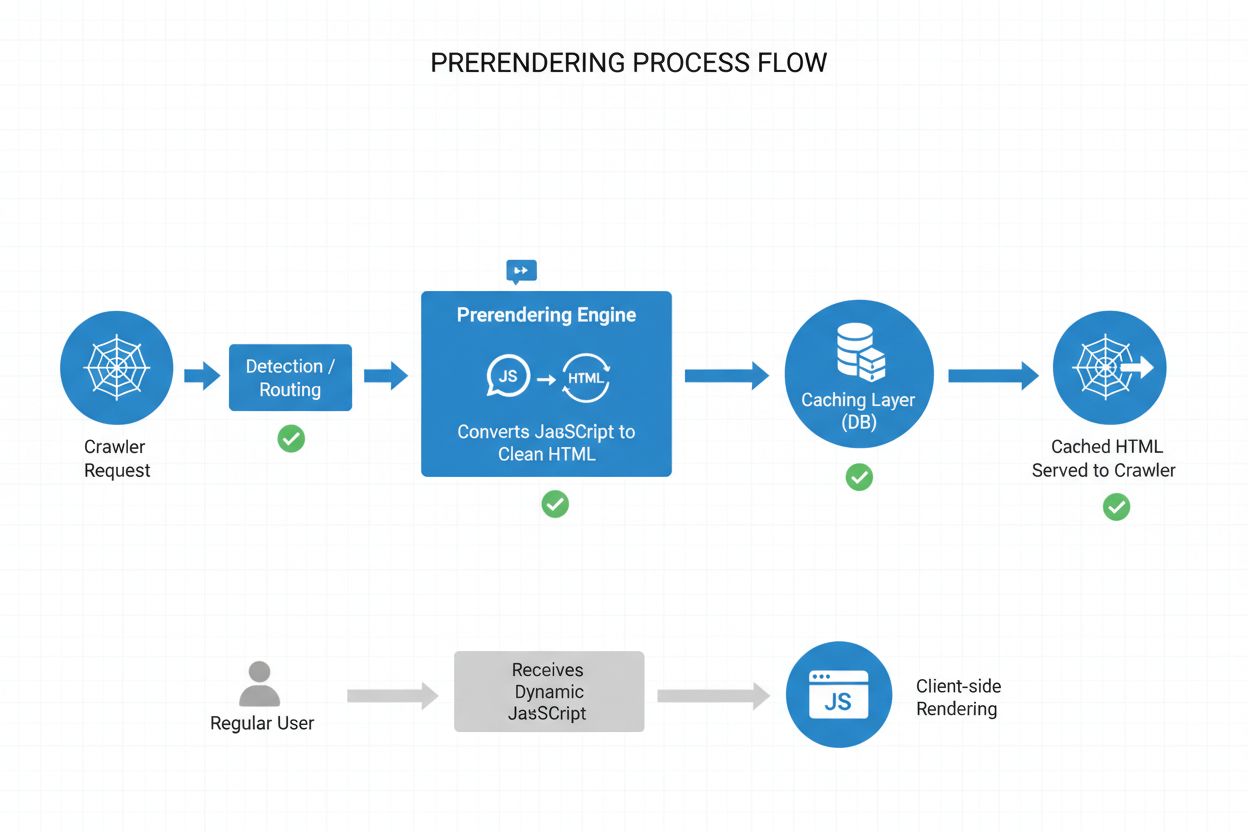
The prerendering process operates through a sophisticated but straightforward workflow that ensures AI crawlers receive optimized content while users experience no disruption. When a request arrives at your server, the system first detects the user agent to identify whether it’s an AI crawler (GPTBot, ClaudeBot, PerplexityBot) or a regular browser. If an AI crawler is detected, the request is routed to the prerendering engine, which launches a headless browser instance, executes all JavaScript, waits for asynchronous content to load, and generates a complete static HTML snapshot of the rendered page. This HTML is then cached (typically for 24-48 hours) and served directly to the crawler, bypassing your application entirely and reducing server load. Meanwhile, regular browser requests bypass the prerendering layer entirely and receive your dynamic application as normal, ensuring users get the full interactive experience with real-time updates and dynamic functionality. The entire process happens transparently—crawlers see fully-rendered content, users see your application unchanged, and your infrastructure remains efficient because prerendering only activates for bot traffic.
While both prerendering and server-side rendering (SSR) solve the JavaScript visibility problem, they differ significantly in implementation, cost, and scalability. SSR renders content on every single request, meaning your server must spin up a JavaScript runtime, execute your entire application code, and generate HTML for each visitor—a process that becomes prohibitively expensive at scale and can increase Time to First Byte (TTFB) for all users. Prerendering, by contrast, caches rendered pages and only regenerates them when content changes or the cache expires, dramatically reducing server load and improving response times for both crawlers and users. SSR makes sense for highly personalized content or frequently-changing data where every user needs unique HTML, while prerendering excels for content that’s relatively static or changes infrequently—product pages, blog posts, documentation, and marketing content. Many sophisticated implementations use a hybrid approach: prerendering for AI crawlers and static content, SSR for personalized user experiences, and client-side rendering for interactive features. This layered strategy provides the best of all worlds—excellent AI crawler accessibility, fast performance for users, and reasonable infrastructure costs.
Structured data in JSON-LD format is critical for helping AI crawlers understand your content’s meaning and context, yet most implementations fail to account for AI crawler limitations. When structured data is injected into the page via JavaScript—a common practice with Google Tag Manager and similar tag management systems—AI crawlers never see it because they don’t execute the JavaScript that creates these data structures. This means that rich snippets, product information, organization details, and other semantic markup remain invisible to AI systems, even though they’re perfectly visible to traditional search engines that have evolved to handle JavaScript. The solution is straightforward: ensure all critical structured data is present in the server-rendered HTML, not injected via JavaScript. This might mean moving JSON-LD blocks from your tag manager into your application’s server-side template, or using prerendering to capture JavaScript-injected structured data and serve it as static HTML to crawlers. AI crawlers rely heavily on structured data to extract facts, relationships, and entity information, making server-side structured data implementation essential for AI-powered search engines and knowledge graph integration.
Implementing prerendering requires a strategic approach that balances coverage, cost, and maintenance. Follow these steps to get started:
Identify JavaScript-heavy pages: Audit your site to find pages where critical content is rendered via JavaScript—typically SPAs, dynamic product pages, and interactive dashboards. Use tools like Lighthouse or manual inspection to identify pages where the initial HTML differs significantly from the rendered version.
Choose a prerendering service: Select a prerendering provider like Prerender.io, which handles headless browser rendering, caching, and crawler detection. Evaluate based on pricing, cache duration, API reliability, and support for your specific tech stack.
Configure user agent detection: Set up your server or CDN to detect AI crawler user agents (GPTBot, ClaudeBot, PerplexityBot, Bingbot, Googlebot) and route them to the prerendering service while allowing regular browsers through normally.
Test and validate: Use tools like curl with custom user agents to verify that crawlers receive fully-rendered HTML. Test with actual AI crawler user agents to ensure content is visible and structured data is present.
Monitor results: Set up logging and analytics to track prerendering effectiveness, cache hit rates, and any rendering failures. Monitor your prerendering service’s dashboard for performance metrics and errors.
Effective monitoring is essential for ensuring your prerendering implementation continues to work correctly and that AI crawlers can access your content. Log analysis is your primary tool—examine your server logs to identify requests from AI crawler user agents, track which pages they’re accessing, and identify any patterns in crawl behavior or errors. Most prerendering services like Prerender.io provide dashboards that show cache hit rates, rendering success/failure metrics, and performance statistics, giving you visibility into how effectively your prerendered content is being served. Key metrics to track include cache hit rate (percentage of requests served from cache), rendering success rate (percentage of pages that render without errors), average render time, and crawler traffic volume. Set up alerts for rendering failures or unusual crawl patterns that might indicate issues with your site’s JavaScript or dynamic content. By correlating prerendering metrics with your AI search engine traffic and content visibility, you can quantify the impact of your prerendering implementation and identify optimization opportunities.
Successful prerendering requires attention to detail and ongoing maintenance. Avoid these common pitfalls:
Don’t prerender 404 pages: Configure your prerendering service to skip pages that return 404 status codes, as caching error pages wastes resources and confuses crawlers about your site’s structure.
Ensure content freshness: Set appropriate cache expiration times based on how frequently your content changes. High-traffic pages with frequent updates might need 12-24 hour cache windows, while static content can use longer durations.
Monitor continuously: Don’t set up prerendering and forget about it. Regularly check that pages are rendering correctly, structured data is present, and crawlers are receiving the expected content.
Avoid cloaking: Never serve different content to crawlers than to users—this violates search engine guidelines and undermines trust. Prerendering should show crawlers the same content users see, just in static form.
Test with actual crawlers: Use real AI crawler user agents in your testing, not just generic bot identifiers. Different crawlers may have different rendering requirements or limitations.
Keep content updated: If your prerendered content becomes stale, crawlers will index outdated information. Implement cache invalidation strategies that refresh prerendered pages when content changes.
The importance of AI crawler optimization will only grow as these systems become increasingly central to content discovery and knowledge extraction. While current AI crawlers have limited JavaScript execution capabilities, emerging technologies like Comet and Atlas browsers suggest that future crawlers may have more sophisticated rendering abilities, though prerendering will remain valuable for performance and reliability reasons. By implementing prerendering now, you’re not just solving today’s AI crawler problem—you’re future-proofing your content against evolving crawler capabilities and ensuring your site remains accessible regardless of how AI systems evolve. The convergence of traditional SEO and AI crawler optimization means that staying ahead requires a comprehensive approach: optimize for both human users and AI systems, ensure your content is accessible in multiple formats, and maintain flexibility to adapt as the landscape changes. Prerendering represents a pragmatic, scalable solution that bridges the gap between modern JavaScript-heavy applications and the accessibility requirements of AI-powered search and discovery systems, making it an essential component of any forward-thinking SEO and content strategy.
Prerendering generates static HTML snapshots on-demand and caches them, while server-side rendering (SSR) renders content on every single request. Prerendering is more cost-effective and scalable for most use cases, while SSR is better for highly personalized or frequently-changing content that requires unique HTML for each user.
No, prerendering only affects how crawlers see your content. Regular users continue to receive your dynamic, interactive JavaScript application exactly as before. Prerendering operates transparently in the background and has no impact on user-facing functionality or performance.
Cache expiration times depend on how frequently your content changes. High-traffic pages with frequent updates might need 12-24 hour cache windows, while static content can use longer durations. Most prerendering services allow you to configure cache times per page or template.
Yes, prerendering works well with dynamic content. You can set shorter cache expiration times for pages that change frequently, or implement cache invalidation strategies that refresh prerendered pages when content updates. This ensures crawlers always see relatively fresh content.
The main AI crawlers to optimize for are GPTBot (ChatGPT), ClaudeBot (Claude), and PerplexityBot (Perplexity). You should also continue optimizing for traditional crawlers like Googlebot and Bingbot. Most prerendering services support configuration for all major AI and search crawlers.
If you're already using SSR, you have good AI crawler accessibility. However, prerendering can still provide benefits by reducing server load, improving performance, and providing a caching layer that makes your infrastructure more efficient and scalable.
Monitor your prerendering service's dashboard for cache hit rates, rendering success metrics, and performance statistics. Check your server logs for AI crawler requests and verify they're receiving fully-rendered HTML. Track changes in your AI search visibility and content citations over time.
Prerendering costs vary by service and usage volume. Most providers offer tiered pricing based on the number of pages rendered per month. Costs are typically much lower than maintaining server-side rendering infrastructure, making prerendering a cost-effective solution for most websites.
Track how AI platforms like ChatGPT, Claude, and Perplexity reference your content with AmICited. Get real-time insights into your AI search visibility and optimize your content strategy.
Learn how to implement infinite scroll while maintaining crawlability for AI crawlers, ChatGPT, Perplexity, and traditional search engines. Discover pagination ...

Discover how SSR and CSR rendering strategies affect AI crawler visibility, brand citations in ChatGPT and Perplexity, and your overall AI search presence.
Learn how JavaScript impacts AI crawler visibility. Discover why AI bots can't render JavaScript, what content gets hidden, and how to optimize your site for bo...