

Does JavaScript Affect AI Crawling? Impact on AI Search Visibility
Learn how JavaScript impacts AI crawler visibility. Discover why AI bots can't render JavaScript, what content gets hidden, and how to optimize your site for bo...
7 min read

Learn how JavaScript rendering impacts your website’s visibility in AI search engines like ChatGPT, Perplexity, and Claude. Discover why AI crawlers struggle with JavaScript and how to optimize your content for AI discoverability.
JavaScript rendering for AI refers to how AI crawlers process and display JavaScript-generated content on websites. Unlike Google, most AI crawlers like ChatGPT's GPTBot cannot execute JavaScript and only see raw HTML, making JavaScript-dependent content invisible to AI search engines and answer generators.
JavaScript rendering for AI refers to how artificial intelligence crawlers process and interpret JavaScript-generated content on websites. This is fundamentally different from how traditional search engines like Google handle JavaScript. While Google has invested heavily in rendering capabilities using headless Chrome browsers, most AI crawlers including ChatGPT’s GPTBot, Perplexity, and Claude do not execute JavaScript at all. Instead, they only see the raw HTML that is initially served when a page loads. This critical distinction means that any content dynamically injected or rendered through JavaScript becomes completely invisible to AI search engines and answer generators, potentially costing your website significant visibility in AI-powered search results.
The importance of understanding JavaScript rendering for AI has grown exponentially as AI-powered search tools become primary discovery channels for users. When AI crawlers cannot access your content due to JavaScript rendering limitations, your website effectively becomes invisible to these emerging search platforms. This creates a visibility gap where your brand, products, and services may not appear in AI-generated answers, even if they would be highly relevant to user queries. The challenge is particularly acute for modern web applications built with frameworks like React, Vue, and Angular that rely heavily on client-side rendering to display content.
The fundamental difference between how AI crawlers and Google handle JavaScript stems from their architectural approaches and resource constraints. Google’s Googlebot operates through a sophisticated two-wave rendering system designed to handle the complexity of modern web applications. In the first wave, Googlebot fetches the raw HTML and static resources without executing any scripts. In the second wave, pages are queued for rendering using a headless version of Chromium, where JavaScript is executed, the DOM is fully constructed, and dynamic content is processed. This two-step approach allows Google to eventually index JavaScript-dependent content, though there may be delays before such content appears in search results.
In stark contrast, AI crawlers like GPTBot, ChatGPT-User, and OAI-SearchBot operate with significant resource constraints and tight timeouts of only 1-5 seconds. These crawlers fetch the initial HTML response and extract text-based content without waiting for or executing any JavaScript. According to OpenAI’s documentation and confirmed by multiple technical analyses, these crawlers do not run JavaScript files even though they may download them. This means that any content loaded dynamically through client-side rendering—such as product listings, prices, reviews, or interactive elements—remains completely hidden from AI systems. The architectural difference reflects the different priorities: Google prioritizes comprehensive indexing of all content, while AI crawlers prioritize speed and efficiency in gathering training data and real-time information.
| Feature | Google Crawler | AI Crawlers (ChatGPT, Perplexity, Claude) |
|---|---|---|
| JavaScript Execution | Yes, with headless Chrome | No, static HTML only |
| Rendering Capability | Full DOM rendering | Text extraction from raw HTML |
| Processing Time | Multiple waves, can wait | 1-5 second timeout |
| Content Visibility | Dynamic content eventually indexed | Only initial HTML content visible |
| Crawl Frequency | Regular, based on authority | Infrequent, selective, quality-driven |
| Primary Purpose | Search ranking and indexing | Training data and real-time answers |
When your website relies on JavaScript to render content, several critical elements become completely invisible to AI crawlers. Dynamic product information such as prices, availability, variants, and discounts loaded through JavaScript APIs are not seen by AI systems. This is particularly problematic for ecommerce websites where product details are fetched from backend systems after the page loads. Lazy-loaded content including images, customer reviews, testimonials, and comments that only appear when users scroll or interact with the page are also missed by AI crawlers. These crawlers do not simulate user interactions like scrolling or clicking, so any content hidden behind these interactions remains inaccessible.
Interactive elements such as carousels, tabs, modals, sliders, and expandable sections that require JavaScript to function are invisible to AI systems. If your key information is hidden behind a tab that users must click to reveal, AI crawlers will never see that content. Client-side rendered text in single-page applications (SPAs) built with React, Vue, or Angular frameworks often results in AI crawlers receiving a blank page or skeleton HTML instead of the fully rendered content. This is because these frameworks typically send minimal HTML initially and populate the page content through JavaScript after the page loads. Additionally, content behind login walls, paywalls, or bot-blocking mechanisms cannot be accessed by AI crawlers, even if the content would otherwise be valuable for AI-generated answers.
The inability of AI crawlers to access JavaScript-rendered content has significant business implications across multiple industries. For ecommerce businesses, this means that product listings, pricing information, inventory status, and promotional offers may not appear in AI-powered shopping assistants or answer engines. When users ask AI systems like ChatGPT for product recommendations or pricing information, your products may be completely absent from the response if they rely on JavaScript rendering. This directly impacts visibility, traffic, and sales opportunities in an increasingly AI-driven discovery landscape.
SaaS companies and software platforms that use JavaScript-heavy interfaces face similar challenges. If your service features, pricing tiers, or key functionality descriptions are loaded dynamically through JavaScript, AI crawlers will not see them. This means when potential customers ask AI systems about your solution, the AI may provide incomplete or inaccurate information, or no information at all. Content-heavy websites with frequently updated information, such as news sites, blogs with dynamic elements, or knowledge bases with interactive features, also suffer from reduced AI visibility. The growing prevalence of AI Overviews in search results—which now appear for over 54% of search queries—means that being invisible to AI crawlers directly impacts your ability to be cited and recommended by these systems.
The financial impact extends beyond lost traffic. When AI systems cannot access your complete product information, pricing, or key differentiators, users may receive incomplete or misleading information about your offerings. This can damage brand trust and credibility. Additionally, as AI-powered discovery becomes increasingly important for user acquisition, websites that fail to optimize for AI crawler accessibility will fall behind competitors who have addressed these technical issues.
Server-Side Rendering (SSR) is one of the most effective solutions for making JavaScript content accessible to AI crawlers. With SSR, your application executes JavaScript on the server and delivers a fully rendered HTML page to the client. Frameworks like Next.js and Nuxt.js support SSR by default, allowing you to render React and Vue applications on the server. When an AI crawler requests your page, it receives complete HTML with all content already rendered, making everything visible. The advantage of SSR is that both users and crawlers see the same complete content without relying on client-side JavaScript execution. However, SSR requires more server resources and ongoing maintenance compared to client-side rendering approaches.
Static Site Generation (SSG) or pre-rendering is another powerful approach, particularly for websites with predictable content that doesn’t change frequently. This technique builds fully rendered HTML files during the deployment process, creating static snapshots of your pages. Tools like Next.js, Astro, Hugo, and Gatsby support static generation, allowing you to generate static HTML files for all your pages at build time. When AI crawlers visit your site, they receive these pre-rendered static files with all content already in place. This approach is ideal for blogs, documentation sites, product pages with stable content, and marketing websites. The advantage is that static files are extremely fast to serve and require minimal server resources.
Hydration represents a hybrid approach that combines the benefits of both SSR and client-side rendering. With hydration, your application is initially pre-rendered on the server and delivered as complete HTML to the client. JavaScript then “hydrates” the page in the browser, adding interactivity and dynamic features without requiring re-rendering of the initial content. This approach ensures that AI crawlers see the fully rendered HTML while users still benefit from dynamic, interactive features. Frameworks like Next.js support hydration by default, making it a practical solution for modern web applications.
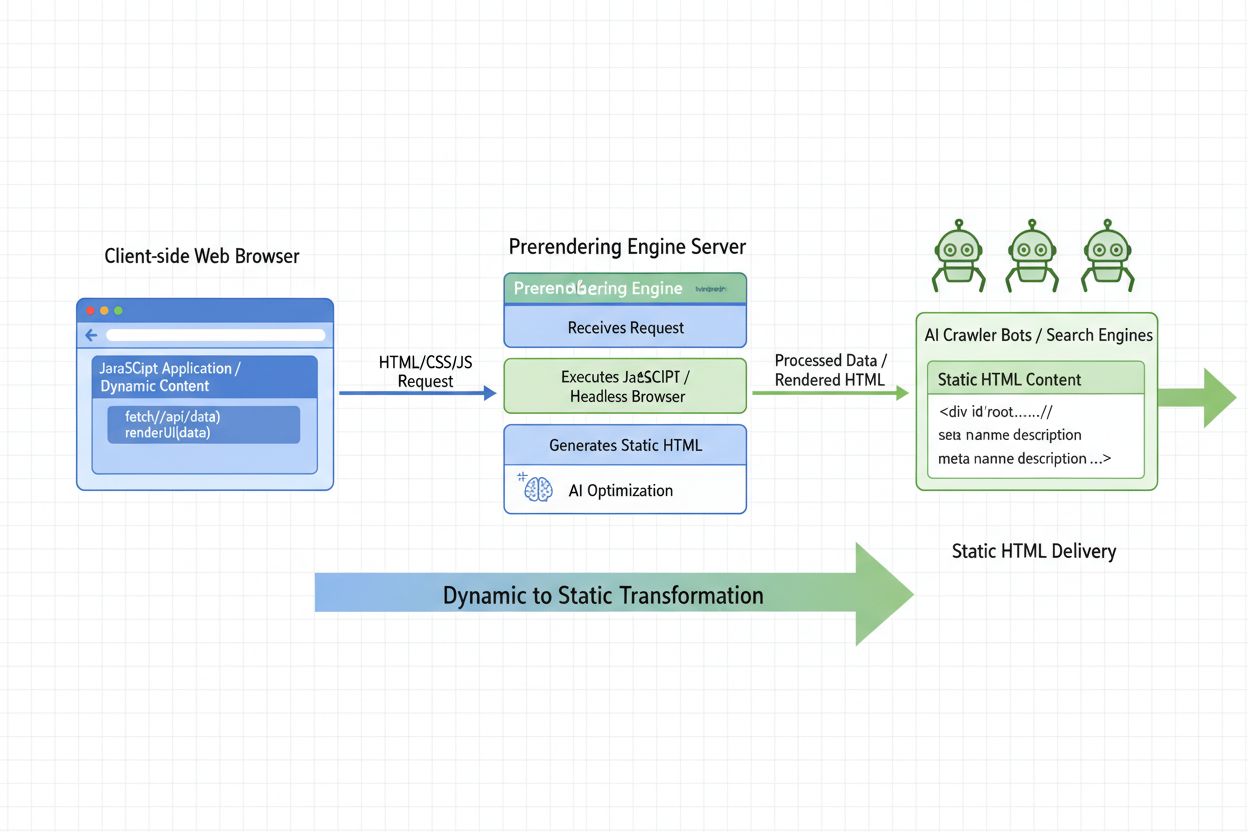
Prerendering services like Prerender.io offer another solution by generating fully rendered HTML snapshots of your pages before crawlers request them. These services automatically render your JavaScript-heavy pages and cache the results, serving the pre-rendered HTML to AI crawlers while serving the dynamic version to regular users. This approach requires minimal changes to your existing architecture and can be implemented without modifying your application code. The service intercepts requests from known AI crawlers and serves them the pre-rendered version, ensuring complete visibility while maintaining your dynamic user experience.
To ensure your website remains visible to AI crawlers, start by auditing your JavaScript-heavy content to identify which parts of your site load dynamically. Use tools like Screaming Frog’s SEO Spider in “Text Only” mode, Oncrawl, or Chrome Developer Tools to view your page source and identify content that only appears after JavaScript execution. Look for missing product descriptions, schema markup, blog content, or other critical information in the raw HTML. This audit will help you prioritize which pages need optimization.
Prioritize critical content in your HTML by ensuring that key information like headings, product details, pricing, descriptions, and internal links are present in the initial HTML response. Avoid hiding important content behind tabs, modals, or lazy-loading mechanisms that require JavaScript to reveal. If you must use interactive elements, ensure that the most important information is accessible without interaction. Implement proper structured data markup using schema.org vocabulary to help AI crawlers understand your content better. Include schema markup for products, articles, organizations, and other relevant entities directly in your HTML, not in JavaScript-injected content.
Test your site as AI crawlers see it by disabling JavaScript in your browser and loading your pages, or by using the command curl -s https://yourdomain.com | less to view the raw HTML. If your main content isn’t visible in this view, AI crawlers won’t see it either. Minimize client-side rendering for critical content and use server-side rendering or static generation for pages that need to be visible to AI crawlers. For ecommerce sites, ensure that product information, pricing, and availability are present in the initial HTML, not loaded dynamically. Avoid bot-blocking mechanisms like aggressive rate limiting, CAPTCHA challenges, or JavaScript-based bot detection that might prevent AI crawlers from accessing your content.
The landscape of JavaScript rendering for AI is evolving rapidly. OpenAI’s Comet browser (used by ChatGPT) and Perplexity’s Atlas browser represent potential improvements in how AI systems handle web content. Early indications suggest these browsers may include rendering capabilities that better approximate what a human user sees, potentially supporting cached or partial rendering of JavaScript-based pages. However, details remain limited, and these technologies may introduce only a middle ground between raw HTML scraping and full headless rendering rather than complete JavaScript execution support.
As AI-powered search and discovery continue to grow in importance, the pressure on AI platforms to improve their crawling and rendering capabilities will likely increase. However, relying on future improvements is risky. The safest approach is to optimize your website now by ensuring that critical content is accessible in static HTML, regardless of how it’s rendered for users. This future-proofs your website against the limitations of current AI crawlers while ensuring compatibility with whatever rendering approaches AI systems adopt in the future. By implementing server-side rendering, static generation, or prerendering solutions today, you ensure that your content remains visible to both current and future AI systems.
Track when and where your content appears in AI-generated answers from ChatGPT, Perplexity, Claude, and other AI search engines. Get real-time alerts when your brand is mentioned.
Learn how JavaScript impacts AI crawler visibility. Discover why AI bots can't render JavaScript, what content gets hidden, and how to optimize your site for bo...
Learn what AI Prerendering is and how server-side rendering strategies optimize your website for AI crawler visibility. Discover implementation strategies for C...

Learn how JavaScript rendering impacts AI visibility. Discover why AI crawlers can't execute JavaScript, what content gets hidden, and how prerendering solution...