
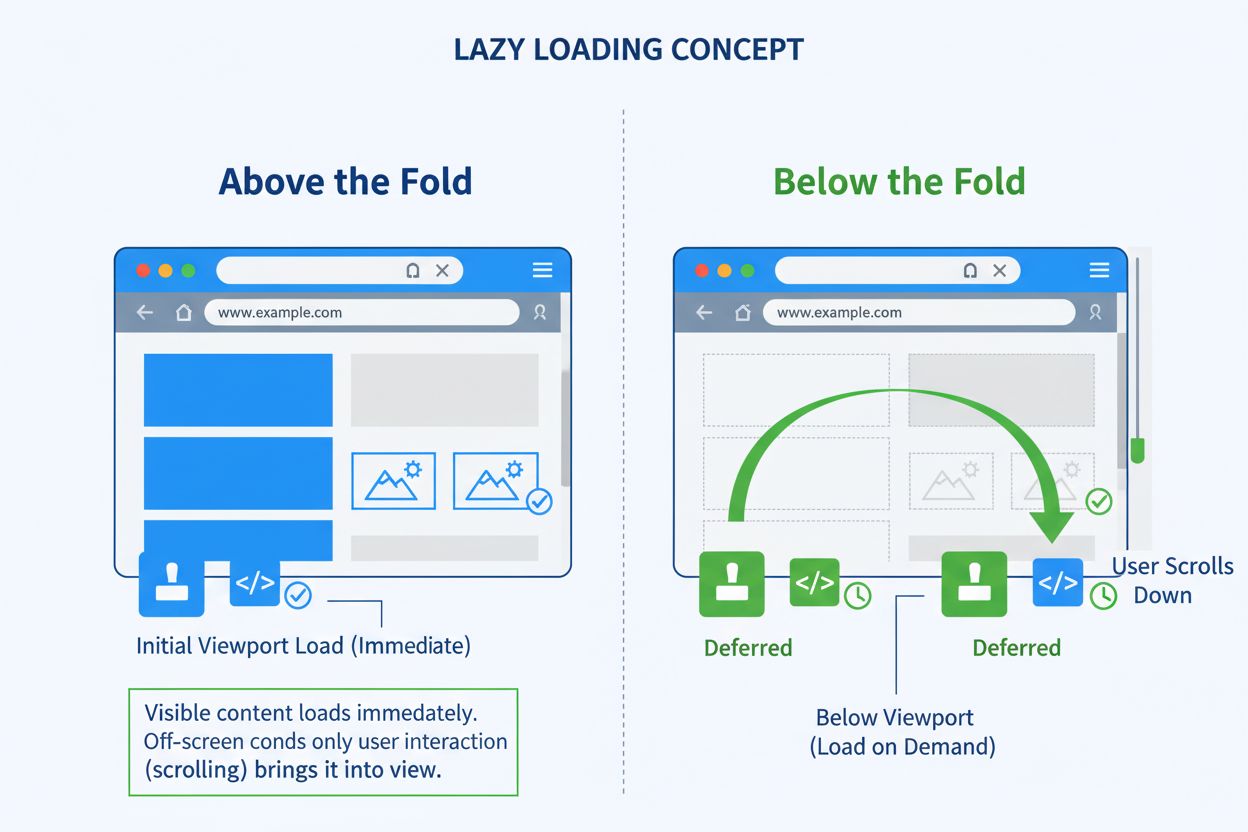
Lazy Loading
Lazy loading defers non-critical resource loading until needed. Learn how this optimization technique improves page speed, reduces bandwidth, and enhances user ...
11 min read

Learn how lazy loading impacts AI crawlers and answer engines. Discover best practices to ensure your content remains visible to AI systems while maintaining fast page performance.
Lazy loading is a performance optimization technique that defers loading non-critical resources until they're needed. When implemented incorrectly, it can significantly impact AI crawlers' ability to index your content, potentially hiding your site from AI search engines, ChatGPT, Perplexity, and other AI answer generators.
Lazy loading is a performance optimization technique that defers the loading of non-critical resources until they are actually needed. Instead of loading all page content immediately when a user visits your website, lazy loading prioritizes only the essential content that appears in the initial viewport and delays everything else until the user scrolls down or interacts with the page. This approach significantly reduces initial page load times, improves Core Web Vitals scores, and enhances the overall user experience by delivering content more efficiently.
The technique works by identifying resources as non-blocking (non-critical) and loading them only when required. Between 2011 and 2019, median resource weights increased from approximately 100KB to 400KB for desktop and 50KB to 350KB for mobile, while image sizes grew from 250KB to 900KB on desktop and 100KB to 850KB on mobile. Lazy loading addresses this challenge by shortening the critical rendering path, allowing websites to deliver faster initial page loads without sacrificing content quality or visual richness.
Lazy loading operates through several key mechanisms that determine when and how resources are loaded. The most common implementation uses the IntersectionObserver API, which detects when an element enters the browser’s viewport and triggers its loading at that moment. This approach is superior to older scroll-event listeners because it’s more efficient and doesn’t rely on user interactions that AI crawlers cannot perform.
The process follows a straightforward sequence: first, the page loads only essential content such as above-the-fold images, primary scripts, and critical stylesheets. Non-essential elements remain in a placeholder state, often displaying as blurred or low-resolution versions. When the user scrolls down or interacts with specific page sections, lazy-loaded elements are triggered to load dynamically. Finally, the browser fetches and displays these elements only when needed, reducing the initial page load time and bandwidth consumption.
Modern browsers support native lazy loading through the loading="lazy" attribute on image and iframe elements. This built-in feature allows developers to implement lazy loading without complex JavaScript, making it more reliable and accessible to search engines and AI crawlers. However, JavaScript-based lazy loading implementations that rely on user interactions or scroll events can create significant problems for AI systems that don’t interact with pages the way humans do.
When lazy loading is implemented incorrectly, it creates a substantial barrier between your content and AI crawlers from systems like ChatGPT, Perplexity, Bing AI, Google’s AI features, and other answer engines. These AI-powered systems crawl websites similarly to traditional search engines, but they have specific limitations that make improper lazy loading particularly damaging.
AI crawlers and answer engines operate under these constraints:
| Crawler Behavior | Impact on Lazy Loading | Consequence |
|---|---|---|
| Limited JavaScript execution | JavaScript-dependent lazy loading may not trigger | Content remains invisible to crawlers |
| No user interaction capability | Cannot scroll or click to load content | Below-the-fold content never loads |
| Single-pass crawling | Don’t wait for deferred resources | Missing content from initial crawl |
| Headless browser limitations | Some JavaScript frameworks fail to render | Structured data and semantic markup lost |
| Time-limited crawl sessions | Cannot wait for all resources to load | Incomplete content indexing |
The fundamental issue is that AI crawlers don’t interact with pages like humans do. They don’t scroll, click buttons, or wait for JavaScript to execute on demand. If your content requires user interaction to appear, many AI crawlers will never see it. This means essential product information, reviews, structured data, and entire sections of your website can go completely unnoticed by AI systems that determine whether your content appears in AI-generated answers.
Used improperly, lazy loading actively obstructs your visibility by preventing search engines and AI crawlers from accessing your content. This creates a cascading series of problems that directly impact your ability to appear in AI-generated answers and voice assistant responses.
Content doesn’t render during the initial crawl because AI systems typically perform a single-pass crawl without waiting for JavaScript to execute or user interactions to trigger loading. If your important content is hidden behind lazy loading that requires scrolling or clicking, the crawler’s initial pass will miss it entirely. This means your content never enters the AI system’s knowledge base for answer generation.
JavaScript-driven loading fails in headless browsers that many AI crawlers use. While these browsers can execute some JavaScript, they often have limitations with complex frameworks or asynchronous loading patterns. If your lazy loading implementation relies on sophisticated JavaScript patterns, the crawler may fail to execute the code properly, leaving your content invisible.
Important elements never reach the HTML DOM when lazy loading is implemented incorrectly. AI crawlers analyze the rendered HTML to understand page structure and extract meaning. If your content only appears in the DOM after user interaction, it won’t be present when the crawler analyzes the page, making it impossible for the AI system to understand your content’s context and relevance.
Structured data and semantic markup are lost when lazy loading prevents proper rendering. Schema markup, JSON-LD structured data, and semantic HTML elements that help AI systems understand your content’s meaning and context may never be parsed if they’re loaded after the initial crawl. This eliminates crucial signals that help AI systems determine whether your content is authoritative and relevant.
Rich snippets and AI-powered answers skip your site entirely when your content isn’t visible during crawling. AI answer engines prioritize well-structured, easily discoverable content from authoritative sources. If your content is invisible to crawlers, it’s automatically excluded from consideration for featured answers, voice assistant responses, and AI-generated summaries.
Consider an online retailer that implements lazy loading to improve page speed. Product images, specifications, customer reviews, and pricing information are all set to load only after users scroll down the page. This works beautifully for human visitors who enjoy a fast, responsive experience with smooth scrolling and quick interactions.
However, when an AI crawler from Perplexity arrives searching for answers to “best waterproof hiking backpack with lumbar support,” a critical problem emerges. Unless a human scrolls to trigger lazy loading, those backpack listings, specifications, and reviews never load. The crawler sees zero product content to index. Meanwhile, a competitor whose product pages use native lazy loading with server-rendered markup snags the answer engine slot, voice assistant shout-out, and top-of-page visibility. The first retailer’s inventory sits buried behind invisible JavaScript calls, completely invisible to AI systems that could drive significant traffic and sales.
Native lazy loading using the loading="lazy" attribute is the most reliable approach for maintaining visibility to both users and AI crawlers. This built-in browser feature allows images and iframes to load efficiently without hiding them from crawlers. Native lazy loading ensures that essential page elements remain in the HTML source, providing AI systems with a clear path to index content accurately.
<img src="backpack.jpg" loading="lazy" alt="Hiking backpack with lumbar support">
<iframe src="map.html" loading="lazy" title="Location map"></iframe>
Native lazy loading is superior because the resources remain in the HTML source code that crawlers parse. Even though the browser defers loading the actual image or iframe content, the element itself is present in the DOM, allowing crawlers to understand the page structure and extract metadata. This approach provides the best balance between performance optimization and crawler visibility.
If JavaScript must be used for lazy loading, ensure that key information is present in the DOM during the initial page visit. Crawlers don’t always wait for client-side rendering to complete, so critical content must be available in the initial HTML response. Pre-rendering tools or frameworks like Next.js with Server-Side Rendering (SSR) can deliver a fully-built HTML version of your page for crawlers to index while maintaining dynamic functionality for users.
For additional support, services like Prerender.io serve pre-rendered snapshots to bots, ensuring no content is missed during the crawl. This approach creates two versions of your page: a static, pre-rendered version for crawlers and a dynamic, interactive version for users. The crawler receives complete content immediately, while users enjoy the performance benefits of lazy loading.
Avoid infinite scrolling that loads more content via JavaScript without exposing permanent URLs or links. AI crawlers need standard HTML links to navigate your site and discover deeper content. Make sure key sections are reachable via static links or crawlable pagination such as “page 1,” “page 2,” etc. You can also generate XML sitemaps for dynamically loaded pages to ensure they’re indexed properly.
Each chunk of content loaded through infinite scroll should have its own persistent, unique URL. Use absolute page numbers in URLs (e.g., ?page=12) rather than relative elements like ?date=yesterday. This allows crawlers to consistently find the same content under a given URL, making it easier for AI systems to properly index the content and understand the relationship between different pages.
Even if parts of your page load later, structured data should be available in the initial page source. This allows crawlers to understand and index relationships within your content. Implement schema markup for products, FAQs, articles, and other content types. The bottom line: include as much SEO-relevant metadata as possible before lazy loading kicks in.
<script type="application/ld+json">
{
  "@context": "https://schema.org",
  "@type": "Product",
  "name": "Waterproof Hiking Backpack",
  "description": "Durable backpack with lumbar support",
  "image": "backpack.jpg",
  "offers": {
    "@type": "Offer",
    "price": "129.99"
  }
}
</script>
Structured data in the initial page source ensures that AI crawlers understand your content’s meaning and context immediately, without waiting for lazy-loaded elements to appear. This is particularly important for e-commerce sites, FAQ pages, and content that needs to be understood by AI systems for answer generation.
Don’t assume your content is accessible—test it the way AI systems do. Use tools such as Google Search Console’s URL Inspection, Google’s Lighthouse Tool, Screaming Frog SEO Spider, and Bing Webmaster Tools. Verify specifically whether lazy-loaded elements are included in the rendered HTML. If they don’t appear, you have a discoverability issue that will prevent AI systems from seeing your content.
The URL Inspection Tool in Google Search Console shows exactly what content Google’s crawler sees when it visits your page. If important content is missing from the rendered HTML, you know that AI crawlers will also miss it. This testing should be part of your regular quality assurance process, especially when implementing or updating lazy loading on your site.
Answer Engine Optimization (AEO) raises the stakes for lazy loading implementation. While traditional SEO focused on ranking in search results, AEO is about being the authoritative answer that AI systems cite and recommend. This requires not just good content, but content that’s structured clearly, easily discoverable, and immediately accessible to crawlers.
Tools like ChatGPT, Alexa, Perplexity, and Google’s AI features pull answers from well-structured, easily crawlable sources. If your content is trapped behind a slow-loading interface or JavaScript-only layers, it won’t get surfaced in AI-generated answers. Many brands are quietly missing out—not because their content isn’t good, but because it’s invisible to the systems that determine what information gets shared with users.
The difference is significant: in traditional search, you might rank on page two and still get some traffic. In AI answer generation, if your content isn’t visible to the crawler, you get zero traffic. There’s no page two in AI answers—there’s only the content that the AI system found and deemed authoritative enough to cite.
Several proven platforms and tools can help you implement lazy loading while maintaining crawler visibility. Gatsby Image and Next.js Image are React-based libraries with built-in SEO-safe lazy loading that automatically handles optimization for both users and crawlers. Lazysizes.js is a flexible, widely-used lazy loading library that plays well with search engines and AI crawlers.
For more advanced implementations, Cloudflare Workers and Akamai Edge Workers enable pre-rendering and server-side content delivery, ensuring that crawlers receive fully-rendered HTML while users benefit from performance optimizations. These edge computing solutions can serve different versions of your page to different visitors—a pre-rendered version for crawlers and a dynamic version for users.
Dynamic rendering is another proven approach that pairs lazy loading with crawler-specific optimization. This technique delivers pre-rendered HTML to bots while maintaining a JavaScript-rich experience for users. Modern frameworks like Next.js and Nuxt support hybrid builds where server-rendered content coexists with dynamic UI elements, offering both performance and crawlability.
Lazy loading above-the-fold content is a critical mistake that directly harms your Core Web Vitals and user experience. Applying lazy loading to hero images, logos, or key call-to-action buttons delays their display and increases Largest Contentful Paint (LCP) time. These elements should always be preloaded, not lazy-loaded, to ensure they appear immediately when the page loads.
Not reserving space for lazy-loaded elements causes Cumulative Layout Shift (CLS) when images and videos load without explicit width and height attributes. Always set dimensions for all images, videos, and iframes to reserve space in the layout before content loads. This prevents the frustrating visual jank that occurs when content suddenly appears and shifts other elements around.
Lazy loading too many JavaScript and CSS files can cause render-blocking issues where the browser cannot display the page correctly because it’s waiting for critical resources. Load critical CSS inline for immediate styling and defer only non-essential scripts that don’t affect initial rendering. Use a Critical CSS tool to extract and inline the most essential styles needed for above-the-fold content.
Lazy loading external resources without optimization can slow down page loading significantly. Third-party resources like ads, embedded social media feeds, and tracking scripts should be deferred and fetched from a content delivery network (CDN) for better performance. Only lazy-load non-essential third-party content that doesn’t affect core functionality.
Using lazy loading on non-scrollable content like fixed navigation bars or carousels may prevent these elements from ever loading because they don’t trigger the viewport entry event. Exclude fixed-position content from lazy loading to ensure these elements load as part of the initial page load.
Given the critical importance of AI visibility for modern digital marketing, monitoring whether your content appears in AI-generated answers is essential. AmICited provides comprehensive monitoring of your brand’s appearance across AI answer generators including ChatGPT, Perplexity, Bing AI, and other AI search engines. This monitoring helps you understand whether your lazy loading implementation is preserving visibility to AI systems or inadvertently hiding your content.
By tracking your brand’s presence in AI answers, you can identify content that should be appearing but isn’t, diagnose whether lazy loading is the culprit, and verify that your optimization efforts are working. This data-driven approach ensures that your performance optimizations don’t come at the cost of AI visibility—the most important discovery channel for modern audiences.
Ensure your content appears in AI-generated answers across ChatGPT, Perplexity, and other AI search engines. Track your brand's presence and optimize for AI visibility.
Lazy loading defers non-critical resource loading until needed. Learn how this optimization technique improves page speed, reduces bandwidth, and enhances user ...

Largest Contentful Paint (LCP) is a Core Web Vital measuring when the largest page element renders. Learn how LCP impacts SEO, user experience, and conversion r...
Page speed measures how quickly a webpage loads. Learn about Core Web Vitals metrics, why page speed matters for SEO and conversions, and how to optimize loadin...