


Ecommerce Cost Inputs for Accurate Margins
Cost inputs is where packaging, shipping, fixed overhead, payment fees, ad spend and other costs beyond the cost of goods sold get entered as dated periods. Contribution and profit in the eshop reports are computed from these numbers.
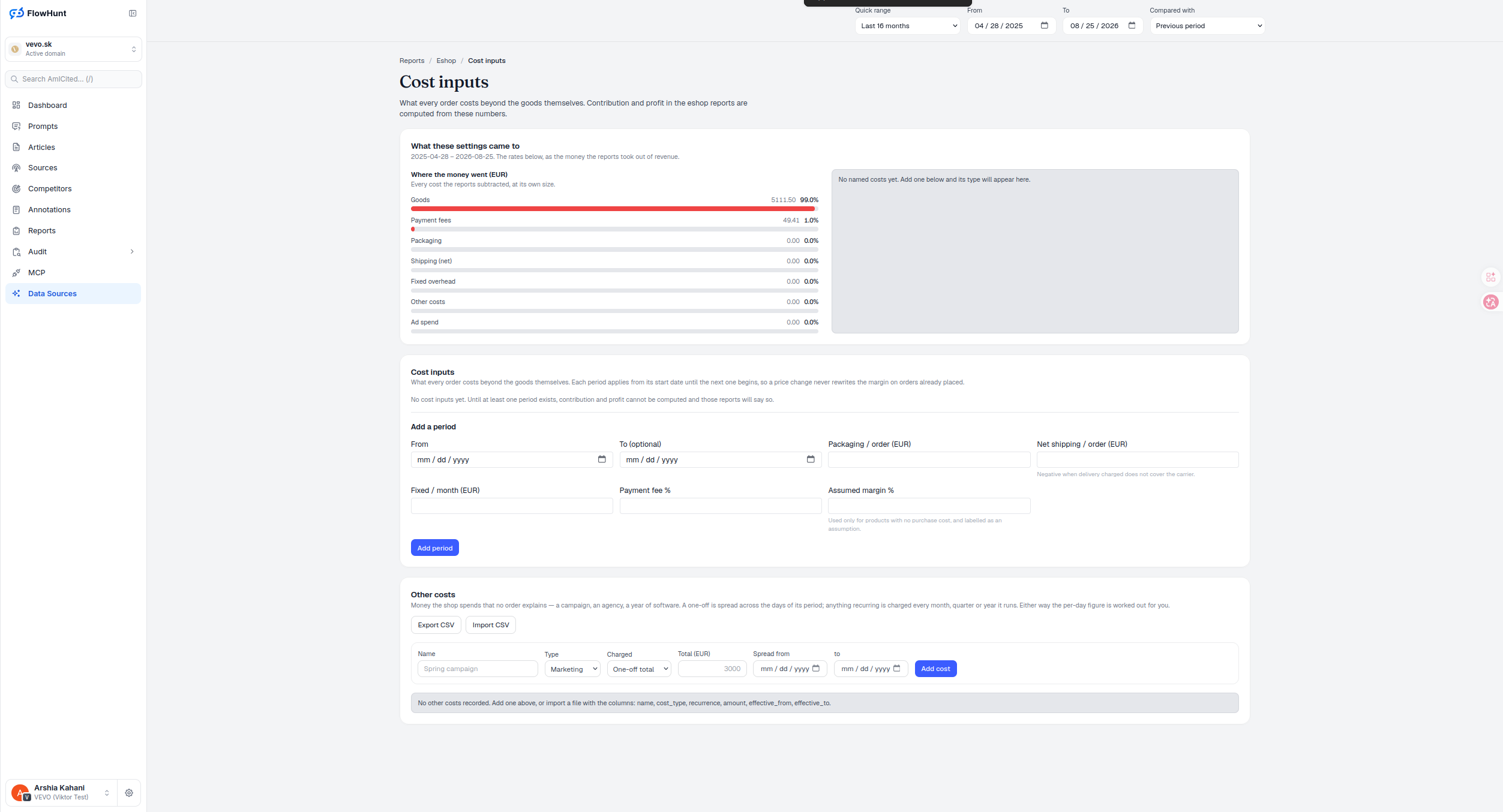
Effective-Dated Product Purchase Costs
Each cost period applies from its start date until the next one begins. Change the payment fee percentage today and the new figure applies going forward — the margin computed on every order already placed stays exactly as it was, the same way a currency rate stamped at import never rewrites history on Currencies.
- Where the money went — a bar breakdown of every cost the reports subtracted, each bar sized by its own share of total cost so the panel adds to 100%; a longer bar means a bigger share, not automatically a problem. Connected ad-platform totals sit beneath the combined Ad spend bar, flagged if they don’t reconcile.
- Dated periods, not a single global number — each period runs from its start date until the next begins, so a price change never rewrites the margin on orders already placed.
- Packaging, net shipping, fixed overhead cost, payment fee % — the recurring per-order and per-month costs a shop actually carries.
- Assumed margin %, labelled as an assumption — used only for products with no purchase cost on record, and called out as an assumption rather than passed off as fact.
- Other costs, spread by the day — a campaign, an agency, a year of software: one-off costs spread across their period, recurring ones charged every month, quarter or year, with the per-day figure worked out automatically.
Add New Purchase Cost Periods
A cost-input period runs ‘From’ a start date to an optional ‘To’ date — a missing end date reads ‘in force’ — carrying packaging per order, net shipping per order, fixed cost per month, payment fee percentage, and an assumed margin percentage. The next period you add takes over from its own start date; the orders placed under the previous one keep the numbers they were computed with. Periods can’t overlap, an end date has to fall after its start, and money is stored as integer micros so nothing rounds unpredictably.
- Packaging / order and Net shipping / order — per-order costs in EUR; net shipping can run negative when delivery charged doesn’t cover the carrier, and the bar chart above draws that by magnitude and labels it ’earned, not spent’ rather than crossing a zero line.
- Fixed / month — overhead that isn’t tied to any single order.
- Payment fee % — the processor’s cut, applied per order; fee and assumed-margin percentages are constrained to 0–100, packaging and overhead can’t go negative.
- Assumed margin % — used only where a product has no purchase cost on Purchase Costs, and labelled as an assumption rather than a fact.
- Add period — one click starts a new period from today; saving the same start date again replaces that row instead of creating a duplicate, and the old period’s numbers stay attached to the orders placed under it. Delete removes a period by its start date.
Daily Allocation of Fixed Costs
Other costs cover money the shop spends that isn’t tied to an order: a marketing campaign, an agency retainer, an annual software license. Mark it a one-off total or a recurring charge, set the type and the required start/end dates it’s spread across, and the daily share is worked out automatically. The summary panel above groups these by type with its own accent-coloured bars — but note it totals each cost’s full entered amount, not just the slice that falls inside the selected date range, so it reads concentration by type rather than window spend.
- Name, type, charged — e.g. a ‘Marketing’ cost, charged as a ‘One-off total’; amount can’t be negative and the end date must follow the start.
- Total and spread dates — the amount in EUR and the from/to dates it’s spread across, shown in the table alongside the backend-derived daily share.
- One-off or recurring — a one-off spreads across the days of its period; recurring charges hit every month, quarter or year they run.
- Export and Import CSV — export the complete table as custom-costs.csv; import replaces the whole table atomically, not a merge, and reports back the count it imported.
cost categories every order’s contribution is built from
Goods, payment fees, packaging, net shipping, fixed overhead and other costs — each period-dated, each applying forward only, so nothing already reported moves when a rate changes.
See Purchase CostsManage All Ecommerce Cost Inputs
Packaging, shipping, fixed overhead, payment fees and other costs — entered as periods that apply forward only, feeding contribution and profit across the eshop reports.
Ready to see what your orders actually cost?
Free check · 7-day trial · card required