


Ecommerce Currency Conversion for Accurate Margins
Currencies sets the ECB exchange rates a multi-currency ecommerce shop converts with, and which one of them this domain reports in. Cost inputs and purchase costs are entered in the reporting currency, and every margin figure downstream is computed from it.
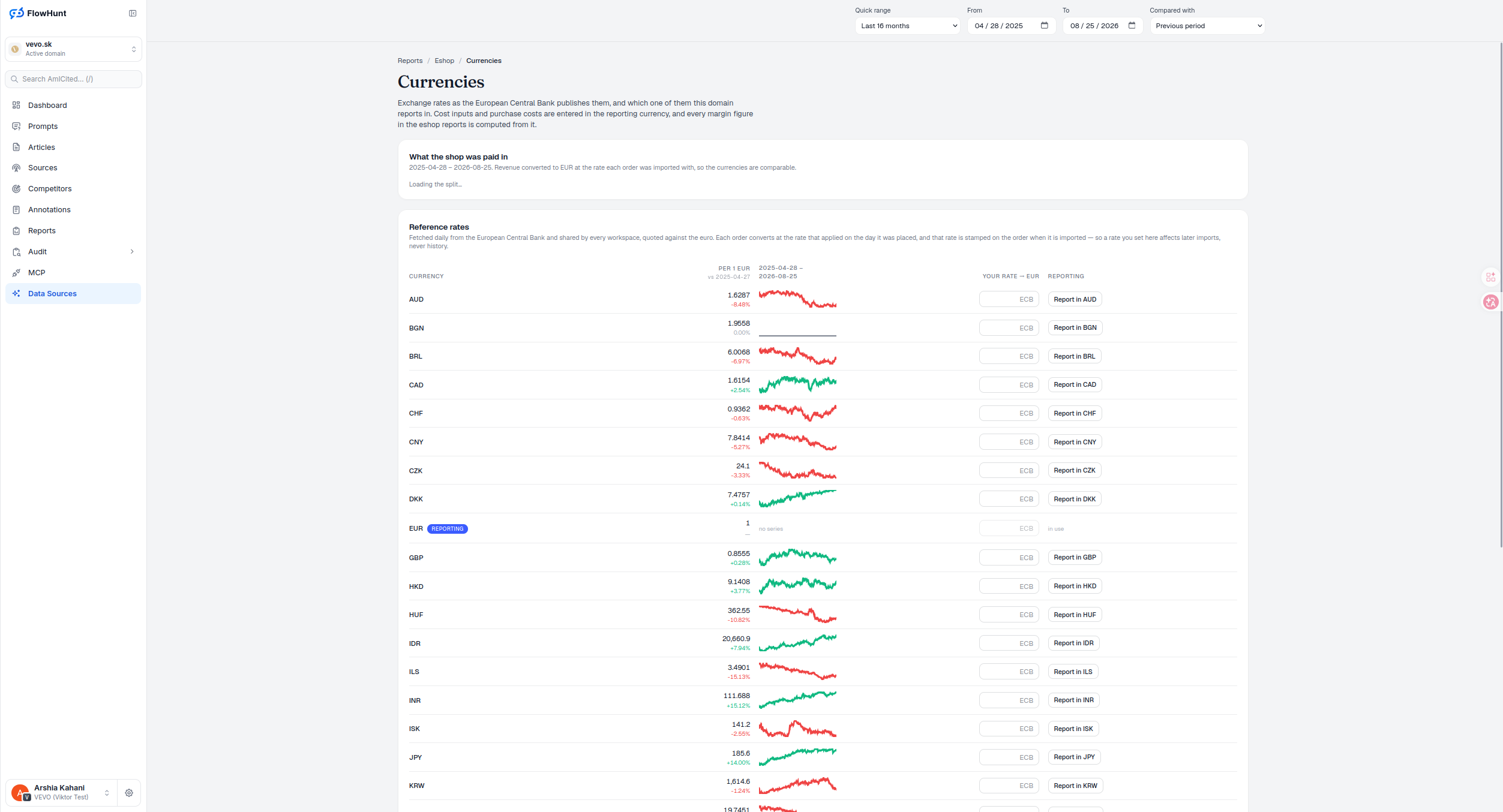
Effective-Dated Currency Conversion Rates
Reference rates are fetched daily from the European Central Bank and shared by every workspace, quoted against the euro. Each order converts at the rate that applied on the day it was placed, and that rate is stamped on the order at import — so changing a rate here affects later imports, never the orders already booked.
- What the shop was paid in — revenue converted to the reporting currency at the rate each order was imported with, so multi-currency ecommerce figures stay comparable across currencies.
- ECB reference rates, daily — fetched once a day and shared across every workspace, quoted against the euro, covering a wide range of currencies from AUD to KRW.
- Rate stamped at import, not looked up later — the rate that applied on the day an order was placed is written onto that order, so a later rate change never moves a historical figure.
- Your rate, editable per currency — defaults to the ECB rate; commits on blur or Enter, clearing removes the override, and anything invalid or non-positive reverts to the ECB figure. The reporting currency’s own rate can’t be edited.
- One reporting currency per domain — a single ‘Report in [CCY]’ button sets which currency every cost input, purchase cost and margin figure in the eshop reports is entered and computed in; replacing it asks for confirmation, since connected shops get re-imported at each order’s own-date rate and reports can briefly mix currencies while that runs.
Currency Rates and Manual Overrides
Each row carries the currency’s ECB rate against a comparison date, formatted to six significant digits, and a sparkline of how it has moved. That sparkline has no labelled axis, and its vertical range is its own minimum to maximum, not zero — so it shows shape and direction, not a level you can compare between rows. Fewer than two observations reads ’no series’ rather than a flat or empty line. An editable ‘Your rate → [reporting currency]’ field reverses the ECB’s own-EUR orientation into whatever this domain reports in, and defaults to the ECB figure until overridden. A ‘Report in [CCY]’ button on the active row carries a REPORTING / in use badge, so it’s always clear which currency the rest of the eshop suite is computing in.
- PER 1 EUR — the ECB reference rate for each currency, to six significant digits, against a comparison date.
- Sparkline, own scale — each row’s vertical range is its own min-to-max, not zero, so shapes reveal movement but levels aren’t comparable row to row; under two points shows ’no series’.
- Rising vs falling, colour only — a comparison shows the percentage change since the comparison date, green for a rise and red for a fall; rising units per euro means that currency weakened, which can help a buyer and hurt a seller — the colour carries no universal good or bad.
- Your rate → reporting currency — editable per currency, reversing the ECB’s per-EUR orientation into whatever this domain reports in; EUR itself is fixed at 1.0.
- REPORTING badge — marks the one currency in use; switching it is one click on ‘Report in [CCY]’.
Historical Order Currency Conversion
An order placed in April converts at April’s rate, one placed in November at November’s — not today’s rate applied retroactively. Revenue and Orders each render as their own sorted, largest-first share-bar group, with no conventional axis or zero-line: the empty track is zero and the full track is the group’s own total, so a positive share under 1% still gets a 1%-wide sliver rather than disappearing. Read the two groups against each other — a currency carrying a bigger share of orders than of revenue is running lower-value orders than the shop average; a bigger revenue share than order share is running higher-value ones. That’s the signal worth a second look before checking a currency’s latest rate and trend.
- Converted at import — the rate that applied the day the order was placed is the one it converts at.
- Stamped, not recalculated — that rate is written onto the order, so it doesn’t drift as ECB rates move later.
- Order share vs revenue share — a currency with more order share than revenue share is carrying lower-value orders; more revenue share than order share means higher-value ones.
- Foundation for every downstream figure — Cost inputs and Purchase costs are entered in this same reporting currency, so nothing needs re-converting twice.
reporting currency every eshop figure is computed from
Cost inputs, purchase costs and every margin figure in the eshop reports are entered and computed in whichever currency is marked REPORTING here — change it, and everything downstream follows.
See Cost InputsReport Every Margin in One Currency
ECB reference rates, daily, with a rate stamped on each order at import — so a rate change here never rewrites history.
Ready to see what your margins actually run on?
Free check · 7-day trial · card required