


Ecommerce Order Status Revenue Classification
Order statuses is where your shop’s own status names get classified into what the reports actually understand. Whether an order counts as revenue follows from its status and how it was paid, together.
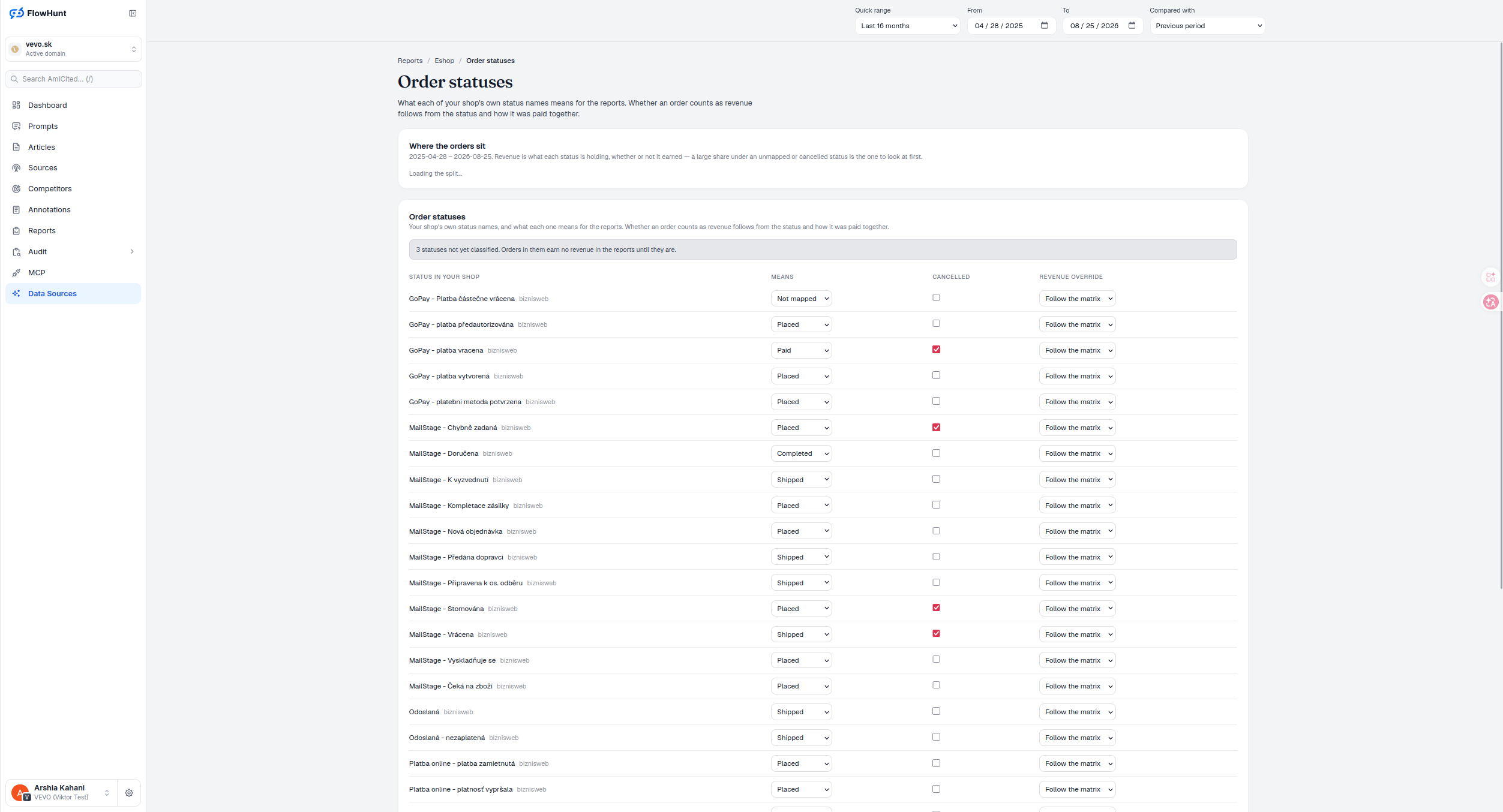
Order Status Mapping Requirements
Order status sync means a status your shop uses that has not been mapped yet earns no revenue in any report until it is classified. That is not a bug — it is the same philosophy Payment methods runs on: an unclassified status could mean anything from just placed to refunded, so the reports treat it as zero rather than guess.
- Where the orders sit — revenue held by each status, whether or not it earned, so a large share sitting under an unmapped or cancelled status is the first thing worth checking.
- Five meanings, one small vocabulary — Not mapped, Placed, Paid, Completed, Shipped — every platform-specific status name your shop uses gets classified into one of these.
- Cancelled, its own checkbox — independent of the meaning, so a status can be both ‘Completed’ and ‘Cancelled’ if that is what the shop’s workflow needs.
- Revenue override, defaults to the matrix — ‘Follow the matrix’ is the default; override only where a status genuinely needs to break the normal status-plus-payment-method rule.
- Unmapped means zero, not undefined — a status left unmapped counts no revenue anywhere in the reports until someone classifies it, so a missed mapping shows up as a gap, not a silent overcount.
Revenue by Unmapped Order Status
Before touching the mapping table, two independently sorted, largest-first share-bar lists show revenue and order count held by each of the shop’s own status names — earned or not. Bars start at zero and their width is the row’s share of the displayed total; a leader is only full-width if it owns 100% of it, and any positive share under 1% still gets a 1%-wide sliver while its label keeps the true percentage. There’s no comparison series or zero-line — a zero total just says so. Start with the status holding the largest revenue share, then check its order share: a small order share carrying a large revenue share deserves priority, since a mapping mistake there affects disproportionate value. A large revenue share sitting under Not mapped or a cancelled status is a signal to check the mapping — not proof that revenue should count.
- Every status shown — including ones not yet classified, so nothing is invisible while it is unmapped.
- Revenue vs. orders, independently sorted — money attached to the status either way against how many orders sit in it, so a status can carry a lot of orders and little revenue or the reverse.
- Tagged with its source — e.g. bizniweb — for shops pulling from more than one platform.
- A warning banner counts what is left — ‘N statuses not yet classified’ stays visible until every one is mapped.
Map Source Order Status Values
Each row is a status string exactly as your shop’s platform sends it, tagged with its source. New connections seed rows only from status names the shop actually reports — known platform values get sensible defaults (WooCommerce’s ‘processing’ maps to Paid, ‘refunded’ to Paid plus Cancelled), unknown ones start Not mapped, and reconnecting never overwrites a decision you’ve already made, though a row you never touched can pick up a newly learned default. Pick what it means from a small, deliberately short list, tick Cancelled if it applies independently, and leave Revenue override on ‘Follow the matrix’ unless this specific status needs to break the rule — the matrix counts Paid, Shipped and Completed for cash on delivery, bank transfer, online card and wallet, while ‘Other’ counts Paid and Completed but not Shipped, and even ‘Always revenue’ can’t turn a checked Cancellation into revenue. This table is how you map order status to revenue; the other half of the rule — the payment method’s kind — lives on the next page.
- Status in your shop — the exact string your platform uses, e.g. from bizniweb, never renamed.
- Means — Not mapped, Placed, Paid, Completed or Shipped.
- Cancelled — a separate checkbox, independent of the meaning; it always wins, even over an ‘Always revenue’ override.
- Revenue override — ‘Follow the matrix’ by default, so status and payment method decide together; use Always/Never revenue only when a status genuinely can’t be represented by the shared matrix.
- Every edit autosaves — no Save button; a change sends immediately, shows ‘Saving…’ or the returned error, and only that one row is touched — everything else stays exactly as it was.
revenue counted from an unmapped status, by design
Every status your shop’s platform uses — tagged with its source, e.g. bizniweb — is listed with a warning banner counting how many still are not classified. Orders sitting under them earn nothing in the reports until they are.
See Payment MethodsExclude Revenue From Unmapped Statuses
Your shop’s own status names, classified into Placed, Paid, Completed or Shipped — with Cancelled and a revenue override alongside, so nothing counts by accident.
Ready to see which statuses are actually counting as revenue?
Free check · 7-day trial · card required