


Google Search Page Performance
Pages is the same Search Console dataset as Queries, rolled up by landing page instead of by query — clicks, impressions, CTR and average position per page, with per-row actions to inspect, verify and refresh a page you need to check right now.
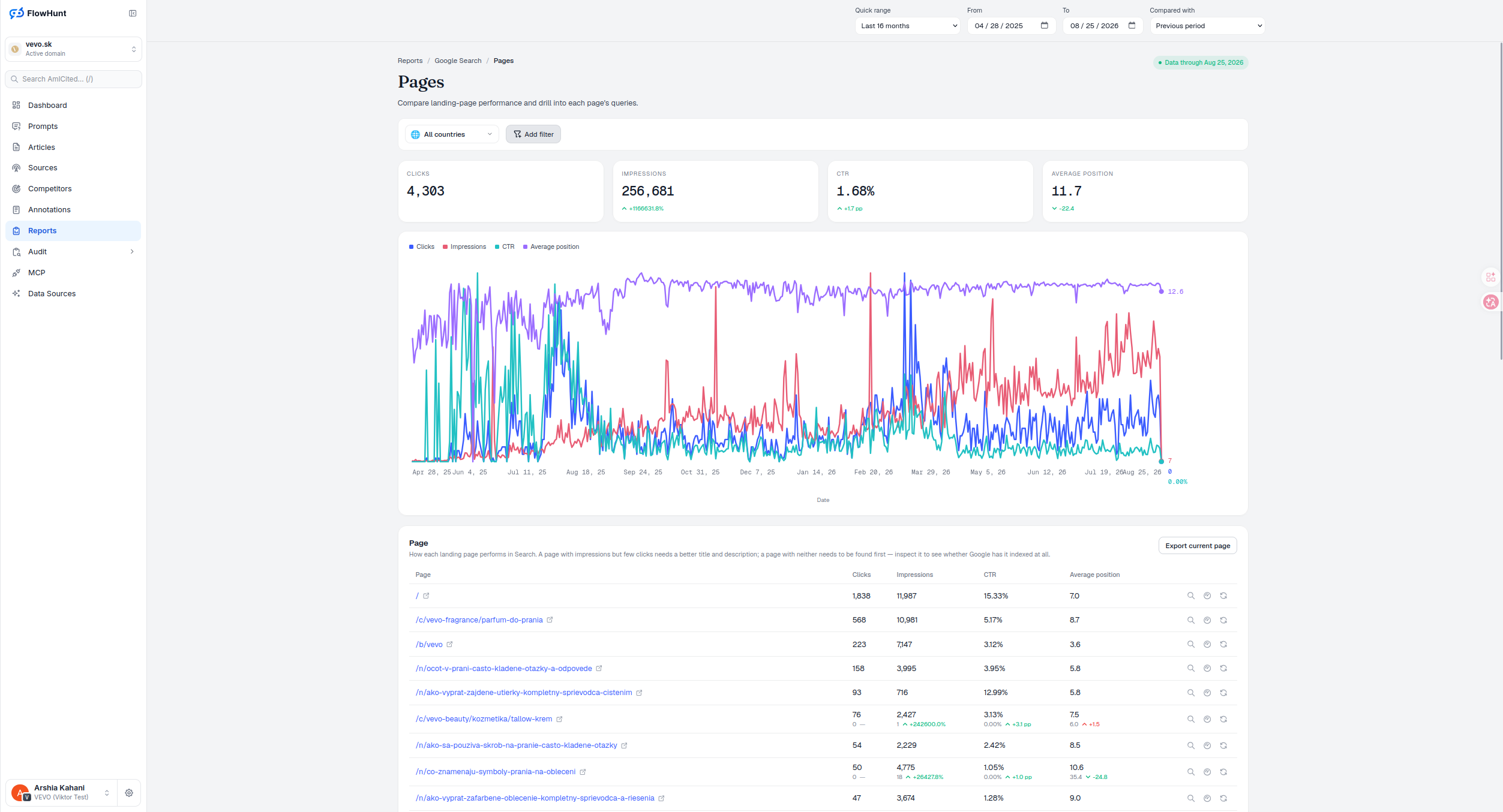
Page Impressions and Clicks
This search console pages report tells the two problems apart: a page with impressions but few clicks needs a better title and description, while a page with neither needs to be found first — inspect it to see whether Google has it indexed at all before assuming the content is the problem.
- Four stat tiles — Clicks, Impressions, CTR and Average position, each with a period-over-period delta arrow. Scoped to date, country and any query drill-down; directory and stacked filters don’t narrow these tiles.
- Same trend chart as Queries — Clicks (blue), Impressions (red), CTR (teal) and Average position (purple), over the selected date range, each line normalized 0-100 against its own peak since the four metrics share no common unit — read direction within a color, not height across colors.
- Filter by country — the All countries dropdown, plus Add filter for query, page, country, device, impressions, clicks or position. Directory scope is a true path-prefix subtree, not a substring match, so it won’t false-positive on a URL that merely contains the same text.
- Page table — Page, Clicks, Impressions, CTR, Average position, one row per landing page. URLs on the active domain show as a path; URLs on another host keep the full host, so distinct pages never collapse into the same-looking row.
- Click a page to drill in — opens the Queries report scoped to that exact page, the reverse of Track’s link from Queries.
- Three row actions — inspect opens AmICited’s own Google URL inspection tool for that page’s stored verdict; the speed icon opens PageSpeed Insights in a new tab; refresh sends Google a recrawl request after a confirmation prompt, visible only to users with update permission — it shortens the wait for a recrawl, not the outcome.
- Export current page — the visible current-period rows and four metrics only, as gsc-pages.csv, not the full result set or comparison values.
Google Search Page Metrics
Every row is a landing page with clicks, impressions, CTR and average position for the selected range and country filter, up to 50 pages per page load, sortable on any column. Three icon actions sit at the end of the row: inspect the page’s live index status, check its PageSpeed score, or ask Google to recrawl it — all without leaving the table. The small external-link icon next to the URL is separate again: it just opens the live page in a new tab.
- Page, Clicks, Impressions, CTR, Average position — the five core columns for every row, plus comparison deltas when a comparison window is set.
- Inspect — opens AmICited’s own URL Inspection view of Google’s stored verdict, the answer when impressions alone don’t explain the click count.
- PageSpeed and refresh — PageSpeed opens Google’s own tool in a new tab; refresh sends a recrawl request (visible only with update permission) after a confirmation prompt, and reports back that it shortened the wait, not that it guarantees indexing.
- Export — gsc-pages.csv, the current page’s rows and current-period metrics only.
actions on every row: inspect, verify, refresh
A page with impressions but few clicks needs a title fix; a page with neither needs to be found first — the inspect action answers that without leaving the table.
See Google Search DirectoriesAnalyze Google Search Pages
Clicks, impressions, CTR and average position per page, with inspect, verify and refresh actions built into the table.
Ready to see how your pages actually perform in Search?
Free check · 7-day trial · card required