


Index Bloat and Inactive Pages
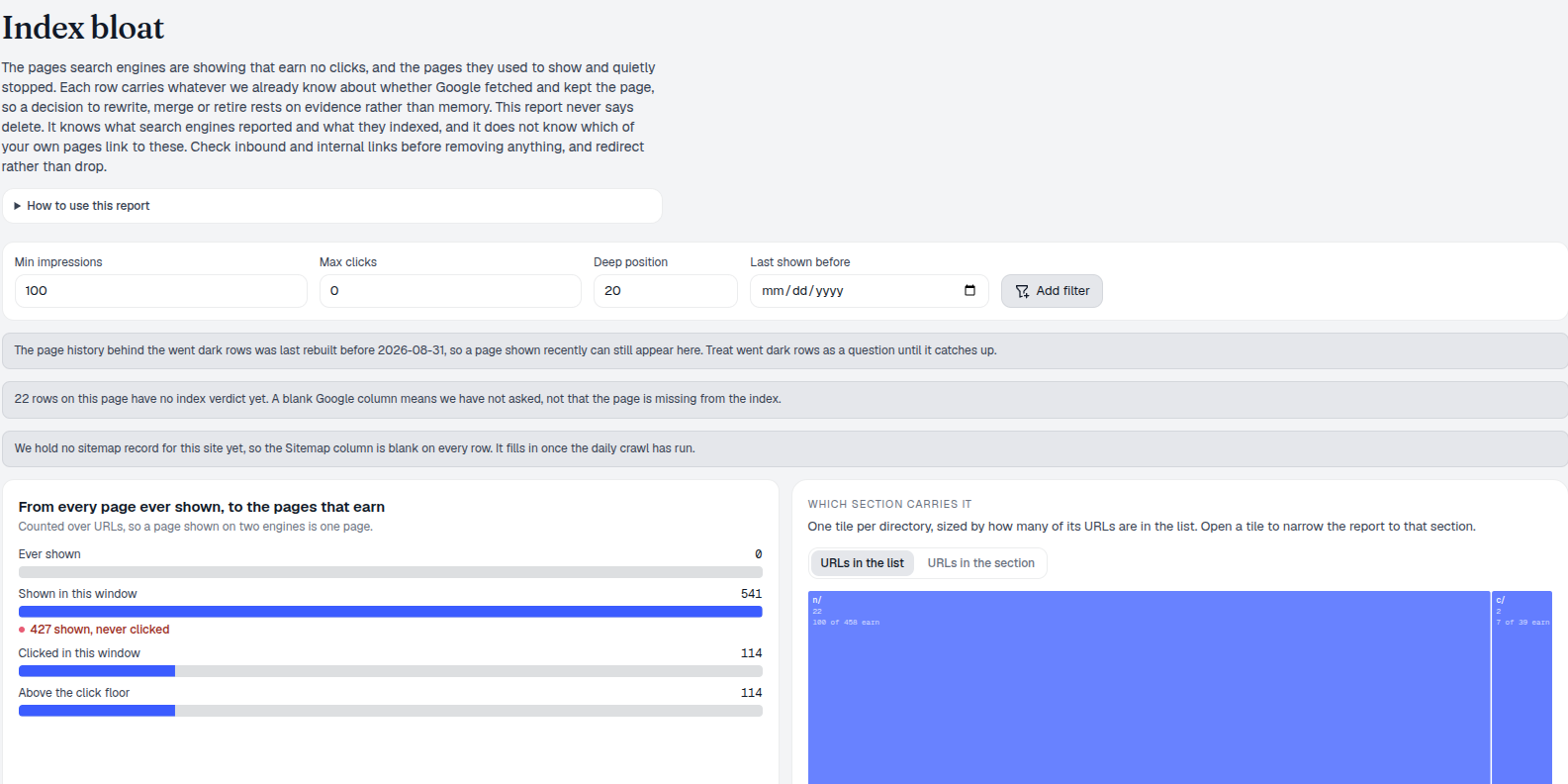
Index Bloat finds two different organic visibility patterns: URLs shown during the selected window that stayed below your click floor, and URLs seen before the window that no longer appeared in it. It combines warehouse traffic history with optional sitemap observations and cached URL Inspection verdicts, so an SEO team can investigate before making an irreversible index decision.
Index Bloat Evidence Types
Zero-click rows have impressions in the current window; their reason can distinguish pages that never became competitive, pages that ranked well but were not clicked, and mixed cases. Went-dark rows have no current-window impressions, so they have no current position to interpret. Both are kept separate throughout the table and exports.
- Directory scope focuses the read on a stored site section.
- Minimum impressions, maximum clicks, and deep-position controls make the candidate rule explicit.
- Last-impression-before narrows only the went-dark set, because a current zero-click URL is shown by definition.
- Google and Bing remain separate, so a URL absent on one engine is not called absent everywhere.
For domain owners, the report is a prioritised review list. It does not know inbound links, business value, or every technical reason a URL should remain indexable.
Review Index Bloat URLs
Rows are ranked by lifetime impressions, bringing the largest observed exposure to the top. Alongside current and lifetime clicks, impressions, position, and first or last observed presence, AmICited can show an optional Google URL Inspection result and what its sitemap observation ledger recorded. Directory treemaps, age bands, and the funnel provide the context a raw URL list lacks.
SEO specialists can open the high-exposure zero-click rows to test relevance, titles, canonicalisation, and internal linking. Owners can review an older went-dark section as a group before treating it as obsolete.
The recommendations are deliberately limited to keep, improve, or review. There is no automated delete or noindex instruction because the evidence does not include link equity or every business constraint.
Index Bloat Data Coverage
Index verdict coverage tells you how many returned rows have a cached inspection, how many do not, and how many were inspected on this request. Sitemap data carries its own boundary: the first and last dates are when AmICited observed an entry, not when a CMS published or changed the page.
- Incomplete verdict coverage is explicit, never inferred from a blank cell.
- Sitemap-not-observed warnings prevent an absent ledger record from becoming a sitemap claim.
- Short-window and stale-presence warnings flag a read that may be too recent for a durable conclusion.
- A request can refresh missing verdicts, but that is a live lookup, not a ranking or indexing guarantee.
Use the list to decide what deserves investigation. Validate high-impact actions in Search Console, the CMS, analytics, and your link or revenue data.
distinct states: zero-click and went-dark
Inspect the evidence behind an underperforming URL before deciding whether to improve it, retain it, or investigate further.
Explore Google URL InspectionPrioritize Index Bloat URLs
Traffic history, directory context, sitemap observations, and optional inspection evidence in one report.
Ready to review the URLs that earn nothing or disappeared from view?
Free check · 7-day trial · card required