


AI Prompt Tracking for Brands
Paste a list, upload a CSV, or point AmICited at a URL and let it suggest up to eight prompts plus ranked keywords. Track ChatGPT, Perplexity, Gemini, AI Overviews and AI Mode independently, each on its own schedule, from hourly to yearly.
Build an AI Prompt Library
AI prompt monitoring starts with the list: paste questions one per line, upload a CSV of up to 1,000 rows, or point AmICited at a URL and let it suggest the prompts buyers actually ask — the URL method pulls up to eight AI-suggested prompts alongside ranked keywords in the same pass, deduplicated so you are not choosing between near-duplicates. Every batch gets a country, optional tag, schedule and provider set in the same flow, and your last choices are remembered for the next one.
- 5 engines tracked independently — how to track brand mentions in ChatGPT, Perplexity, Gemini, Google AI Overview and AI Mode, each its own scored run, not a blend.
- Six schedules, not one — hourly, every three hours, daily, weekly, monthly, yearly or one-time, set per batch or across a multi-select in bulk.
- Bulk everything — multi-select prompts to change tags, cadence or providers, process a batch on demand, or export the whole table in one click.
Track Prompt Citation Rankings
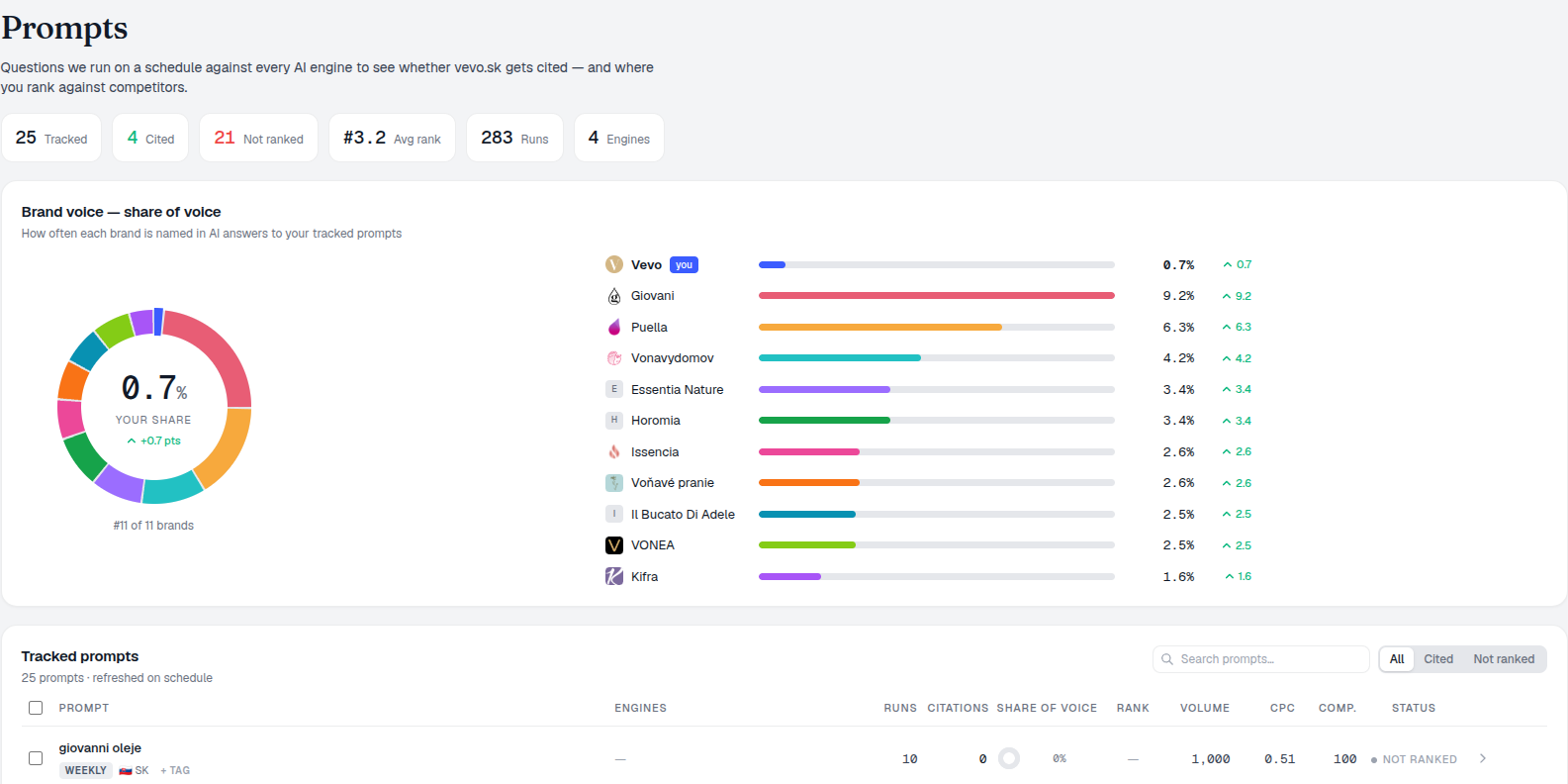
The prompt table reads status before it reads outcome: new and pending runs show as queued, processing stays in progress, and a failed run exposes its recorded error on hover — only a completed run is ever labelled cited or missing. For a completed row, visibility is the tracked brand’s mention share for that prompt — its extracted mentions divided by every brand mentioned in the answer — and rank is the best position recorded in the period, so lower is better. A summary strip above the table totals tracked, cited and missing counts, average rank, total runs and engine count, and a Brand Voice card compares your share against the leading extracted brands over the same window.
- Queued isn’t missing — new and pending prompts haven’t produced a citation result yet; only failed, cited or missing are verdicts.
- Per-engine rank — see exactly where you land in ChatGPT vs Perplexity vs AI Overviews for the same question.
- Demand as context, not a score — optional DataForSEO volume, CPC and competition sit alongside each row to prioritize which missing prompt is worth chasing first, not to measure AI visibility itself.
- Filter by date, provider, country, tag or prompt text — the metrics view returns up to 500 rows; cited/missing buttons then filter what’s already on screen.
Use Prompts in AI Agents
The same prompts, ranks and citations you track in the dashboard are exposed as live MCP tools — so Claude Code, Cursor or Codex can query what is tracked and why, without switching tabs.
- Live tools, not exports — query your prompt list on demand.
- Works with your stack — Claude Code, Cursor, Codex and more.
- No dashboard required — check tracking status from where you work.
- CSV export covers the full set — not the 500-row screen cap, and it respects tag, country and search filters; it skips the provider filter, since provider metrics live in a separate index.
prompts per CSV upload
Import your entire keyword or question list in one file. Every row becomes a tracked prompt with its own schedule, engines and history.
See the AI rank trackerTrack Brand AI Prompts
Paste, import or auto-generate your prompt list, choose your engines, and let AmICited track citations on a schedule that runs itself.
Ready to build your prompt library?
Free check · 7-day trial · card required