


Customer Segmentation and Contact Priorities
Segments is customer segmentation software built on RFM — it derives who to contact, in what order, and when from how each segment actually behaves over the window you’re reading, against the period before it — not from fixed day counts borrowed from somewhere else.
Segment-Specific Customer Timing
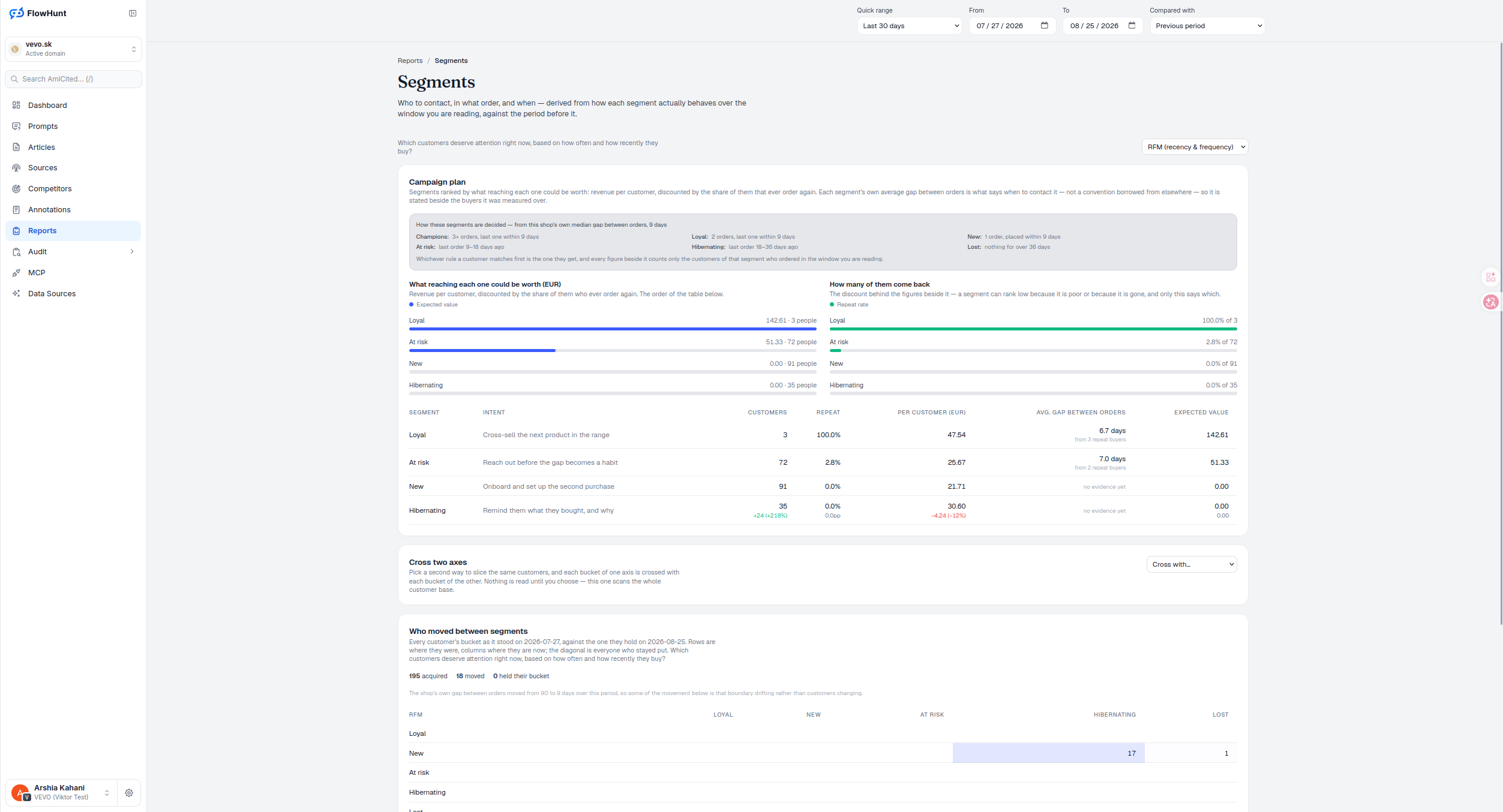
Champions, At risk, Loyal, Hibernating, New and Lost are drawn from this shop’s own median gap between orders, not a convention. A customer’s bucket uses their whole order history, not just this window, so a champion doesn’t get demoted for a quiet thirty days. Whichever rule a customer matches first is the one they get, and the campaign plan by segment ranks every one of them by what reaching it could be worth.
- Campaign plan — segments ranked by revenue per customer, discounted by the share that ever orders again, each with its own average gap between orders.
- Segment rules, from the shop’s own data — built on this shop’s median 9-day gap between orders: Champions (3+ orders, last within 9 days), At risk (9-18 days since last), Loyal (2 orders, last within 9 days), Hibernating (18-36 days since last), New (1 order, within 9 days), Lost (36+ days).
- 21 ways to cut the same customers — value and margin, lifecycle and timing, acquisition, and behavior groupings, from basket size and category breadth to discount habits and carrier preference.
- Ranked by who you can actually reach — the priority order is expected value adjusted by the share of the segment with a real, unmasked email on file, so a segment nobody can be emailed doesn’t outrank one that’s reachable.
- Cross two axes — pick a second way to slice the same customers; cells are shaded by revenue relative to the highest cell present, and nothing runs until you choose the second axis.
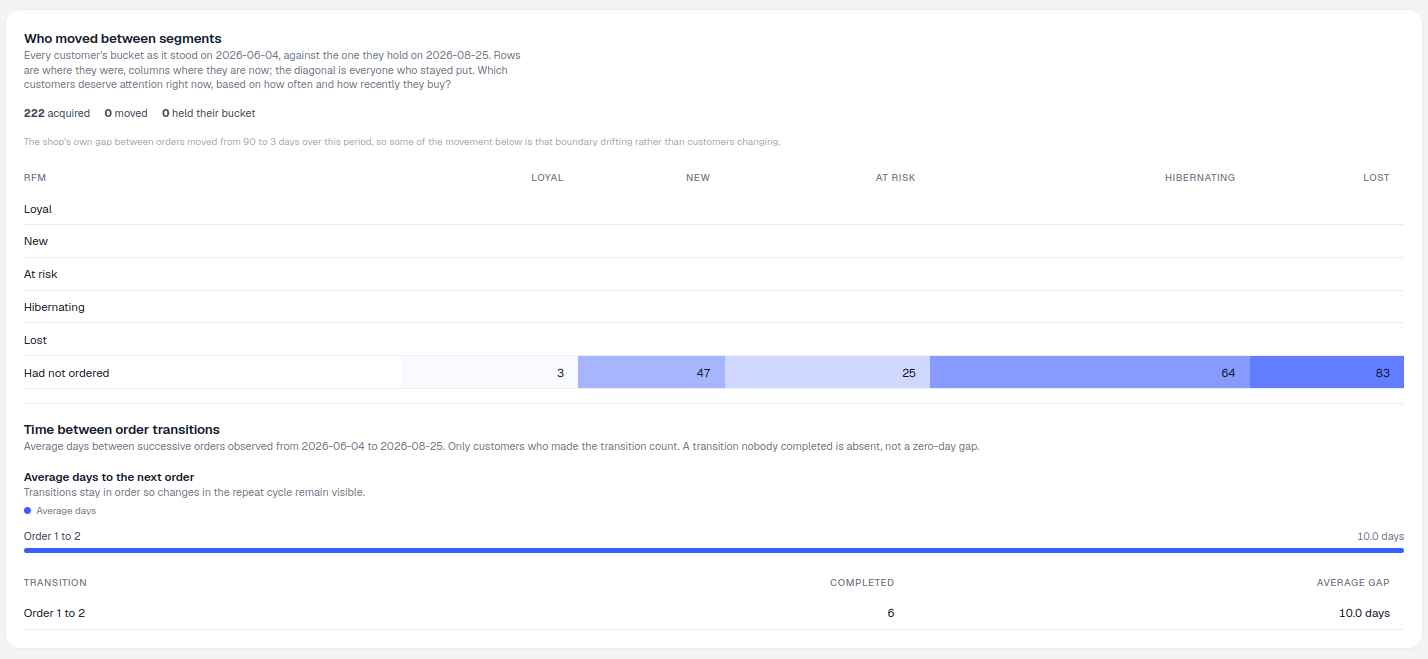
- Who moved between segments — one date’s bucket against today’s, rows where they were and columns where they are now, the diagonal is everyone who stayed put.
- Acquisition is not a move — customers who had not ordered on the first date get their own “Had not ordered” row rather than an invented source segment; observed order-sequence gaps appear beneath the matrix.
- Your own segments — write a rule for the cut none of the axes make, like paid cash on delivery, over 500 EUR, no order in 60 days.
- The customers themselves — a warehouse-paged, sortable drilldown for the selected axis and segment, with a full filtered export; anonymised shops retain purchase analysis without exposing addresses.
Customer Segment Action Plans
Loyal customers with a 100% repeat rate get a cross-sell; At risk customers, still repeating at 2.8%, get a nudge before the gap becomes a habit. New and Hibernating carry no repeat evidence yet, so their expected value sits at zero until they prove it either way — that’s a real zero, not a missing number, and one-time buyers don’t get an invented gap to fill it in. Read the average gap next to its repeat-buyer count: a gap measured from two buyers is a weaker signal than the same number measured from twenty, even though the table shows the same figure either way.
Custom Customer Segment Rules
RFM, cross-tabs and the migration matrix cover most questions, but not all of them — ‘paid cash on delivery, spent over 500 EUR, hasn’t ordered in 60 days’ is a real campaign with no axis of its own. Your Own Segments is a rule you write once; The Customers Themselves lists every member of any segment, newest identity from their last order, exportable as CSV.
Customer Segment Movement Matrix
In the cross-tab, a darker cell shows where this shop’s revenue mass sits, not performance against a benchmark — empty cells just mean nobody made that combination. In the migration matrix it’s the same rule: color means movement only. Before calling a shift behavioral, check the boundary-drift warning — this shop’s own median gap moved from 90 to 9 days over the window, so part of the flow below is that ruler moving, not customers changing.
- Cross-tab shading is relative — darker means more of this shop’s revenue, not a score against an external benchmark.
- Migration color means movement only — inspect the direction, the new-acquisition row, and the contribution behind it before reading a trend into it.
- A boundary can drift under you — if the segment rule itself changed between the two dates being compared, the card says so, and some of the apparent movement is that, not customer behavior.
- Long tails fold into “Other” — real economics on the four dynamic axes, but not a reproducible customer list, so that synthetic bucket cannot be opened or exported as if it named people.
this shop’s own median gap between orders
Every segment rule in the Campaign Plan — Champions, At risk, Loyal, Hibernating, New, Lost — is built on that number, not a fixed convention borrowed from elsewhere.
See ReplenishmentPrioritize Customers by Segment
Segments ranked by expected value, cross-tabulated by any two axes, tracked as customers move between buckets, and exportable to CSV.
Ready to know who to contact, and when?
Free check · 7-day trial · card required