


SEO MCP Tools for Teams
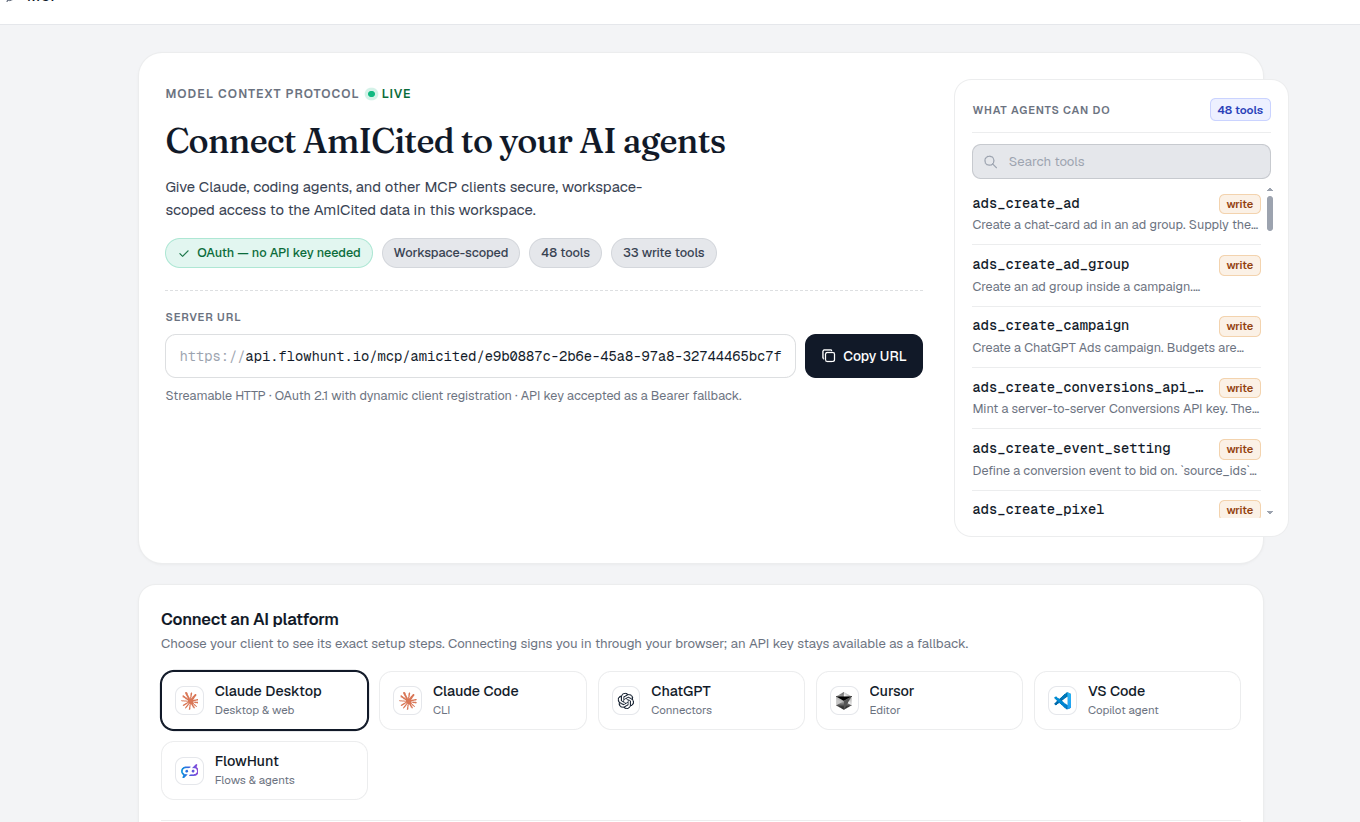
The AmICited MCP server exposes live workspace tools — so Claude Code, Cursor, Codex and ChatGPT can read AI visibility, search, traffic, and reporting data, then take permitted actions where you work. It uses a workspace URL and OAuth connection; the catalog is read from the running server rather than copied from an internal REST API.
SEO MCP Tools
AmICited exposes articles, annotations, prompts, citations, sources, competitors, analytics, fan-outs, ranked keywords, freshness, Web Vitals, accessibility, performance impact, and connected reporting as live MCP tools. They have their own schemas, validation, permissions, and scopes, not a general public REST interface.
- Dashboard versus client — the dashboard derives a full live catalogue; default
tools/listgives clients only the core and five discovery tools. - Discover progressively — use
list_toolsets,search_tools, anddescribe_tool, thenread_toolorrun_tool; pin areas with?toolsets=or use?toolsets=all. - Read is the default — read-only OAuth can discover and invoke read tools; mutations need the separate write grant.
- Evidence, not attribution — a tool result informs an investigation. It does not prove one SEO action caused an outcome.
Organic Search Tools
Read Google Search Console and Bing Webmaster reporting, then work through traffic and content evidence before choosing a technical action. The report surface includes Click Waterfall, Unified Pages and Keywords, directories, movers, Decay & Growth, Query Coverage, Index Bloat, Content Changes, N-Grams, Cannibalization, CTR and citation gaps, paid gaps, and share of search.
- Inspect before submitting — crawl and URL-inspection evidence are distinct from Google indexing, Bing submission, or IndexNow actions.
- Keep engines distinct — Google and Bing are not blended into an incompatible single result.
- Carry the caveats — anonymised queries, incomplete imports, fitted curves, and missing evidence constrain the answer.
- Confirm the request, not the outcome — a submission does not guarantee crawling, indexing, ranking, traffic, or citation.
Paid Ads and Ecommerce Tools
Bring commercial evidence into the same review: e-commerce covers orders, products, customers, retention, LTV, costs, and profitability; Google and Bing Ads cover their reporting suites; Meta covers attribution, profit, CAC, audiences, saturation, dayparting, and scaling. ChatGPT Ads adds account, campaign, creative, conversion, insight, and bulk-job tools.
- Profit needs inputs — cost mapping, order data, and attribution coverage qualify every commercial result.
- Bulk stays observable — submit a job, then read its operations and status instead of assuming every change landed.
- Compare without claiming cause — matching paid and organic movement forms a hypothesis, not attribution.
- Providers remain in control — their rules, quotas, credits, and delivery outcomes still apply.
Uptime and Workspace Tools
Manage the surrounding operating context: tracked domains, tags, competitors, connections, import options, sync status, previews, inbox state, and prompt suggestions. Availability tools add monitors, checks, incidents, heartbeats, status pages, maintenance windows, subscribers, and SLA reporting.
- Workspace binding comes first — every request resolves in the connected workspace, not a copied identifier.
- Plan limits remain active — monitor and status-page creation can still be capped.
- Maintenance is a declaration — it can suppress planned incident noise, not prove a deployment was harmless.
- Availability is a lead, not SEO attribution — an incident can focus investigation without proving a traffic cause.
MCP Skills and Workflows
Built-in skill:// resources turn a catalogue into a repeatable review. Start with using-amicited, then choose AI visibility audit, competitor-gap analysis, traffic-drop triage, indexing triage, cannibalization cleanup, paid-waste review, profitability, customer value, SEO-to-revenue, recurring reports, uptime setup, onboarding, prompt-set design, or “did our change work?”.
- Ask for scope first — skills prompt for date windows, connection state, and caveats before a summary.
- Keep evidence separate — traffic reviews retain demand, position, CTR, and coverage; content reviews retain observation versus causality.
- Route, do not bypass — a skill selects tools but cannot evade OAuth, workspace permissions, quotas, or confirmations.
- Repeat the check — owners get a consistent workflow while experts can inspect the supporting rows.
AI Agent Use Cases
Claude Desktop and ChatGPT connectors are conversational clients; Claude Code is a terminal and coding agent; Cursor and VS Code Copilot Agent are IDE agents; and FlowHunt runs workflow agents. These six guided clients have setup snippets. Codex and other standards-compatible MCP clients can use the same workspace endpoint without a dedicated snippet. Ask for a domain, window, and decision, then let a skill find the relevant evidence.
“Why did clicks fall?” maps to traffic-drop-triage. “Should we submit this URL?” uses indexing-triage to inspect first. “Did the rewrite work?” uses did-our-change-work. Paid-waste-review, profitability-deep-dive, customer-value, uptime-setup, and recurring-reports cover the matching commercial and operational questions.
- Read before action — reports, inspection, status, and schemas precede a write.
- Keep writes separate — indexing, submissions, provider changes, and workspace updates need write scope, validation, and may meet provider, plan, quota, or credit limits.
- Confirm the request, not the result — acceptance does not prove crawling, rankings, profit, recovery, or citation.
- Hand off the evidence — return the window, coverage, warnings, and relevant rows for review.
MCP Access and Security
OAuth tokens must be live, bound to the workspace URL, and carry the read scope. Writes need the additional write scope; the workspace owner needs AmICited Pro or above. A workspace API key is a fallback with workspace access rather than OAuth’s split grants.
- Read-only stays read-only — it can explore but cannot create, change, or delete.
- Tool kinds are visible — read, write, destructive, and external distinguish a report lookup from a deletion, submission, or credit-using call.
- Revocation ends the token family — remove a grant when a client should no longer connect.
- Permissions still apply — MCP does not turn a restricted action into an allowed one.
One server, every AI client
Claude Desktop, Claude Code, ChatGPT connectors, Cursor, VS Code Copilot Agent and FlowHunt each speak MCP with a ready-made setup snippet. Connect AmICited once — via OAuth, or an API key as fallback — and your visibility data is available in all of them.
See the SEO agentsSEO MCP Workflow
Connect the AmICited MCP server to Claude Code, Cursor, Codex or FlowHunt and query your prompts, ranks and citations as live tools — right where you build.
Wire AI visibility into your workflow
Free check · 7-day trial · card required