


- Breadcrumb navigation is a short trail of links near the top of a page that shows where it sits in the site, such as Home > Men > Shoes > Running Shoes.
- Hierarchy breadcrumbs that follow your categories are the standard. Trails based on the visitor’s path change from visit to visit and duplicate the back button.
- Every trail links back up the hierarchy with consistent anchor text, so on a large store breadcrumbs are often the steadiest source of internal links to category pages.
- BreadcrumbList structured data should match the visible trail exactly. Google may use it to show where a result sits on your site, but it decides the display.
Where AmICited fits
AmICited’s Google Search Directories report adds up clicks and impressions for whole site sections and lets you drill down one level at a time, which works best when your URLs and breadcrumbs follow the same hierarchy.
See the directories report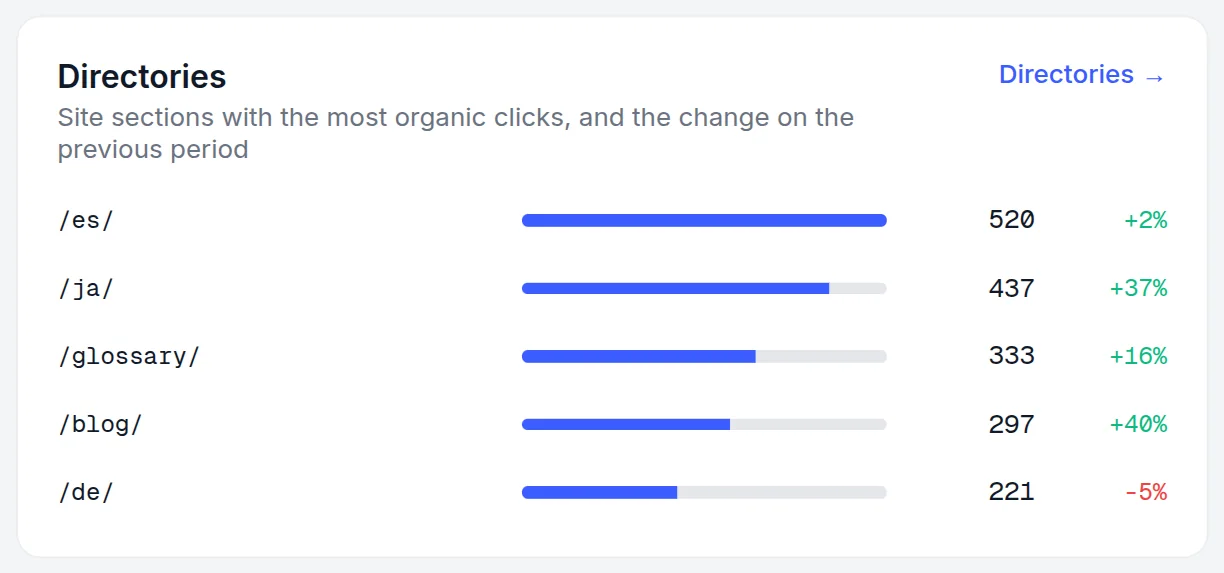
What Is Breadcrumb Navigation?
Breadcrumb navigation is a small trail of links that shows where the current page sits within a website, for example Home > Men > Shoes > Running Shoes. The name comes from the Hansel and Gretel story, where the children left breadcrumbs to find their way home.
Breadcrumbs are most common on sites with deep hierarchies: ecommerce stores, documentation sites, news sites and large blogs. Shopify themes, WooCommerce, Magento and most WordPress SEO plugins can generate them. They’re secondary navigation. They don’t replace the main menu, but they help users who landed deep in the site from search and want to move up a level.
How Breadcrumb Navigation Works
A typical hierarchy breadcrumb follows the site’s category structure:
- Home links to the homepage.
- Each parent level links to its category or section page.
- The current page appears last, usually as plain text.
Behind the visible trail, many sites add BreadcrumbList structured data in
JSON-LD. Each step is a ListItem with a position, a name and a URL. Google documents the format in its
breadcrumb structured data guide. The markup describes the same trail the user sees.
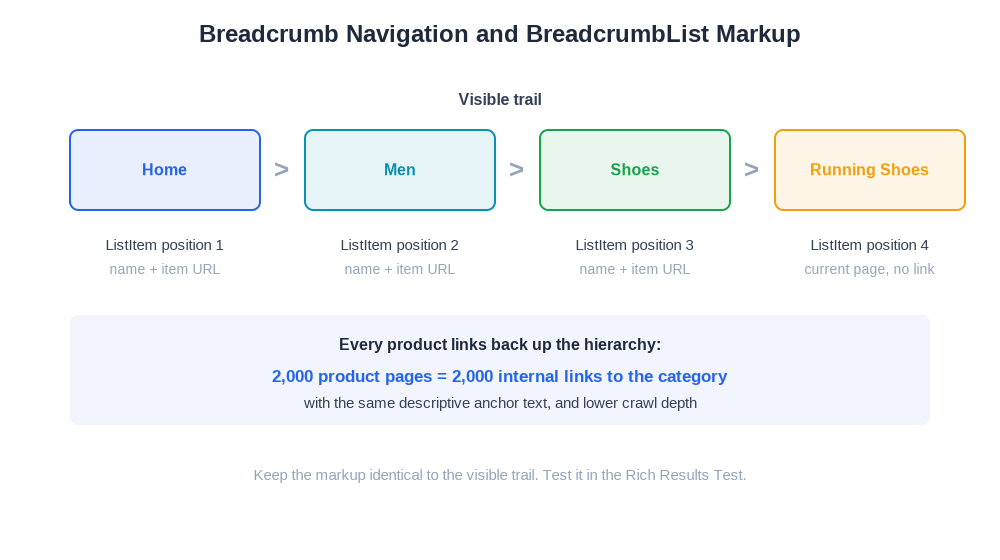
Breadcrumbs also shorten paths for crawlers. Picture a product four clicks from the homepage, with category pages that are only reachable through filters. With breadcrumbs, every one of 2,000 product pages links back to its category, so the category receives 2,000 internal links with the same descriptive anchor text. That makes it easier for search engines to find and understand those category pages, and it lowers their crawl depth.
Types of Breadcrumb Navigation
| Type | Example | Best for | Notes |
|---|---|---|---|
| Hierarchy (location) | Home > Men > Shoes > Running | Most sites with categories | The standard choice and the one search engines understand best |
| Attribute | Running Shoes > Size 10 > Blue | Ecommerce with filters | Useful for users, but filter URLs often shouldn’t be indexed |
| History (path) | Search results > Product A > Product B | Rarely recommended | Duplicates the back button and changes per visitor |
| Hybrid | Home > Shoes > Running (+ filter chips) | Large stores | Hierarchy trail for SEO, attributes shown separately |
For products in several categories, pick one primary category for the breadcrumb trail. Changing the trail based on how the user arrived creates inconsistent internal linking.
Breadcrumbs vs Main Navigation
The main menu shows what the site offers from the top down. Breadcrumbs show the path from the current page back up. A good navigation structure uses both: menus for exploring and breadcrumbs for orientation. Breadcrumbs also connect to information architecture. If the trail looks odd (“Home > Uncategorized > Blog > 2021 > Post”), the problem is usually the site structure, not the breadcrumb.

Stay Updated on AI Visibility Trends
Get the latest insights on AI mentions, brand monitoring, and optimization strategies.
Breadcrumbs in Search Results
When Google understands your breadcrumbs, it can use them to describe where a result sits on your site, showing a trail such as example.com › Shoes › Running instead of a long raw URL. This works best when the breadcrumb labels are short and the BreadcrumbList markup matches what users see. Google decides how results are displayed and changes the format from time to time, especially on mobile, so treat this as a possible bonus rather than the main reason to add breadcrumbs.
The bigger, steadier benefit is internal linking. Every breadcrumb trail is a set of links with consistent anchor text pointing up the hierarchy. On a large store, that is often the most reliable source of links to category pages.
Breadcrumb Navigation and AI Search
AI crawlers read pages much like search crawlers do, and breadcrumbs give them a compact statement of what category a page belongs to. That context helps when an AI engine is deciding whether your page about “carbon plate running shoes” is a product page, a review or a buying guide. The effect is small, but it’s free once breadcrumbs are in place.
Breadcrumbs also tie into the way you organize and report on sections. AmICited’s Google Search Directories report compares whole site sections by clicks or impressions, which works best when your URLs and breadcrumbs follow the same hierarchy.
Best Practices for Breadcrumb Navigation
- Use hierarchy-based breadcrumbs that match your URL folders and category structure.
- Place them near the top of the page, above the H1, in small but readable text.
- Use a clear separator such as “>” or “/” and keep labels short: the category name, not a long title.
- Link every step except the current page.
- Add BreadcrumbList schema that matches the visible trail exactly, and test it in the Rich Results Test.
- Show breadcrumbs on mobile too. Users on small screens benefit most from a quick way up.
Common Breadcrumb Navigation Mistakes
A frequent mistake is breadcrumb markup that doesn’t match the visible trail, often because a plugin generates schema from one taxonomy and the theme displays another. Another is trails that include meaningless levels like “Uncategorized”, “Archives” or a date, which come straight from CMS defaults.
Ecommerce sites often use the path a visitor took instead of a fixed primary category, so the same product shows different trails. Some sites hide breadcrumbs on mobile to save space, removing the most useful navigation aid for those users. And some link the last item to the page itself, which adds nothing.