
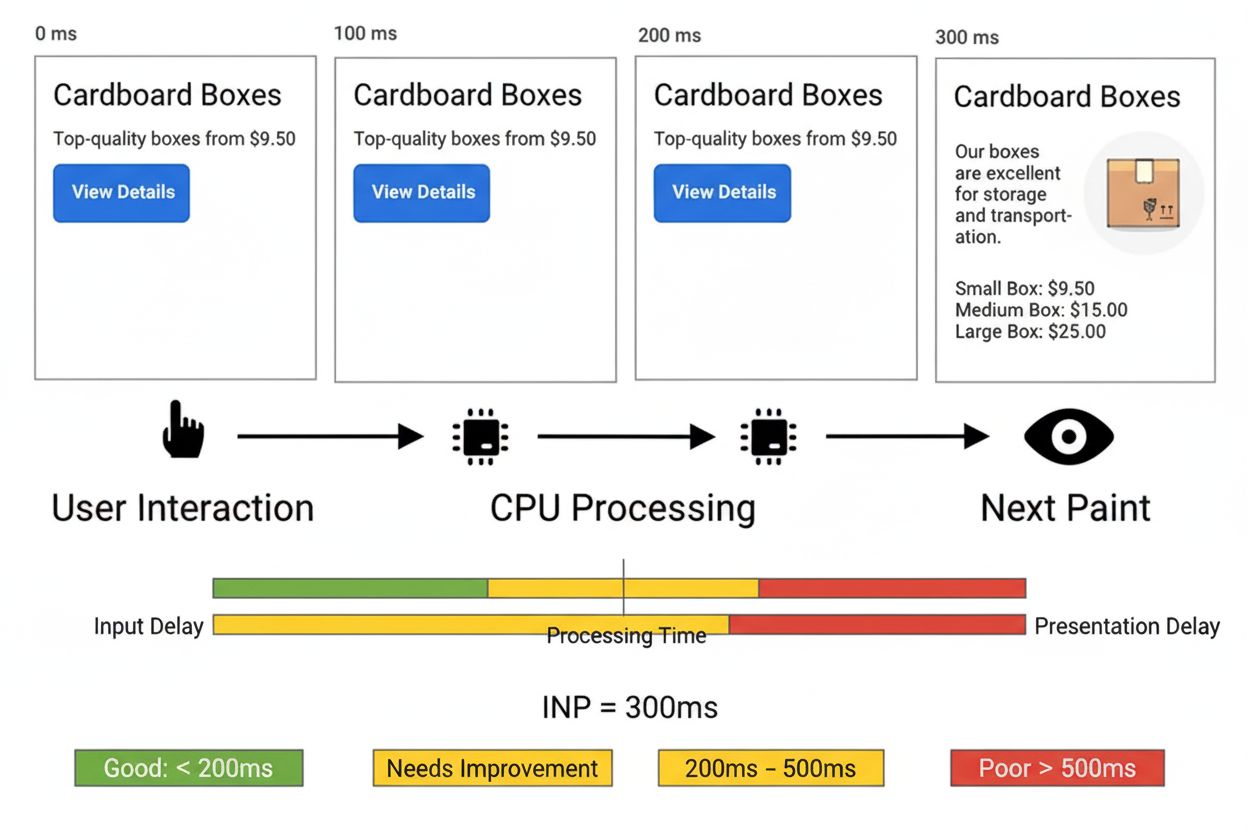
Interaction to Next Paint (INP)
Learn about Interaction to Next Paint (INP), the Core Web Vitals metric measuring page responsiveness. Understand how INP works, why it replaced FID, and how to...
10 min read
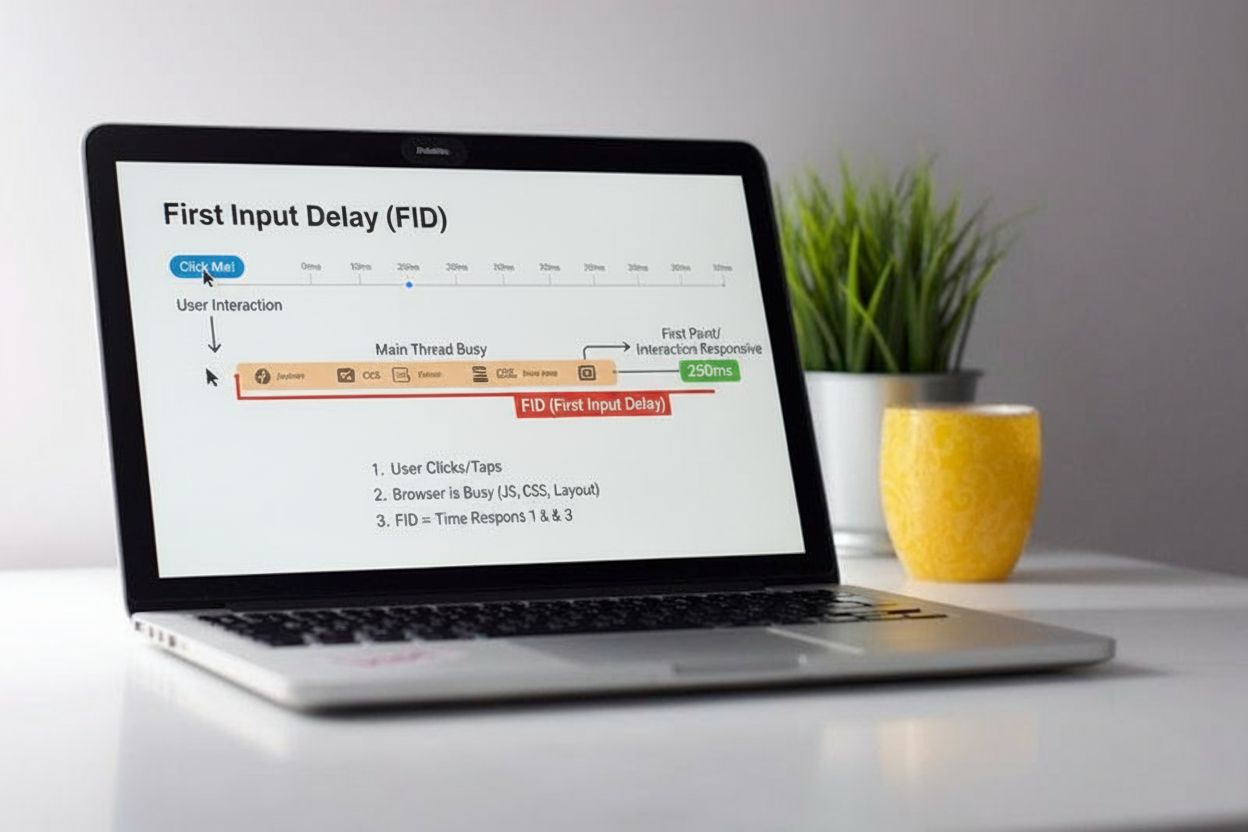
First Input Delay (FID) is a web performance metric that measures the time between a user’s first interaction with a webpage (such as a click or tap) and the moment the browser’s main thread begins processing that interaction. It reflects the responsiveness of a website during the critical loading phase.
First Input Delay (FID) is a web performance metric that measures the time between a user's first interaction with a webpage (such as a click or tap) and the moment the browser's main thread begins processing that interaction. It reflects the responsiveness of a website during the critical loading phase.
First Input Delay (FID) is a user-centric web performance metric that measures the time elapsed between a user’s first interaction with a webpage and the moment the browser’s main thread begins processing that interaction event. When users click a link, tap a button, or press a key on a webpage, they expect immediate feedback. FID captures the responsiveness gap that occurs when the browser is busy executing other tasks and cannot immediately respond to user input. This metric is particularly important because it reflects the real-world experience of users during the critical page-loading phase, when JavaScript is being parsed and executed. FID is measured in milliseconds and represents only the input delay portion of the interaction lifecycle, not the total time required to complete the interaction or display visual feedback. Understanding FID is essential for developers and performance engineers who want to create responsive, user-friendly web experiences that keep users engaged rather than frustrated.
First Input Delay emerged as a Core Web Vital metric in 2020, introduced by Google to address the growing need for measuring real-world interactivity on the web. Before FID, developers relied on lab-based metrics like Time to Interactive (TTI) that didn’t capture actual user experience during page interactions. The metric was designed to fill a critical gap in performance measurement by focusing on the user’s first impression of a site’s responsiveness. For several years, FID served as the primary responsiveness metric in Google’s Core Web Vitals framework, influencing search rankings and driving widespread adoption of performance optimization practices. However, research and real-world data revealed limitations in FID’s approach—specifically that it only measured the first interaction and didn’t account for the full event processing lifecycle. According to the HTTP Archive 2024 Performance Report, approximately 68% of desktop websites and 51% of mobile websites achieved good FID scores, indicating significant progress in web performance optimization. This widespread adoption of FID optimization practices contributed to overall improvements in web responsiveness, though the metric’s limitations prompted Google to develop a more comprehensive successor.
FID operates by measuring the delta between two critical timestamps: the moment an input event is received by the browser and the moment the main thread becomes available to process that event. When a user interacts with a webpage, the browser queues the interaction event and waits for the main thread to finish its current task before it can begin executing the associated event handler. The main thread is the single-threaded execution environment where the browser performs critical tasks including parsing HTML, executing JavaScript, recalculating styles, and rendering layouts. If the main thread is occupied with long-running JavaScript tasks, the input event must wait in the queue, creating the delay that FID measures. The measurement is straightforward but powerful: if a user clicks a button at timestamp 1000ms and the browser’s main thread becomes available at 1050ms, the FID value is 50 milliseconds. This delay is invisible to the user in terms of the metric itself, but it directly impacts perceived performance—users notice that their click didn’t produce immediate feedback. FID specifically excludes the time required to actually process the event handler and update the visual display, focusing solely on the waiting period. This design choice was intentional because including processing time might incentivize developers to use asynchronous workarounds that would actually worsen user experience rather than improve it.
| Metric | Measures | Type | Scope | Threshold | Status |
|---|---|---|---|---|---|
| First Input Delay (FID) | Time between user input and browser processing start | Field | First interaction only | ≤100ms (good) | Deprecated (replaced by INP) |
| Interaction to Next Paint (INP) | Full interaction lifecycle including input, processing, and visual feedback | Field | All interactions (worst case) | ≤200ms (good) | Current Core Web Vital |
| Total Blocking Time (TBT) | Sum of blocking time for all long tasks during page load | Lab | Page load phase | ≤300ms (good) | Lab proxy for FID |
| Time to Interactive (TTI) | When page becomes fully interactive and responsive | Lab | Page load phase | ≤3.8s (good) | Legacy metric |
| First Contentful Paint (FCP) | Time when first content appears on screen | Field/Lab | Initial render | ≤1.8s (good) | Core Web Vital |
| Largest Contentful Paint (LCP) | Time when largest content element becomes visible | Field/Lab | Main content render | ≤2.5s (good) | Core Web Vital |
First Input Delay directly influences user satisfaction and conversion rates because it determines whether a website feels responsive or sluggish. Research consistently shows that users abandon websites that feel unresponsive, with even delays of 100-300 milliseconds causing noticeable frustration. When users click a button and experience a significant delay before seeing feedback, they may click multiple times, leading to duplicate submissions or navigation errors. High FID values correlate with increased bounce rates and reduced engagement, particularly on mobile devices where users have lower tolerance for delays. From a business perspective, poor FID performance can negatively impact search engine rankings since Google incorporates Core Web Vitals (which included FID) into its ranking algorithm. Websites with good FID scores benefit from improved SEO visibility, higher click-through rates from search results, and better user retention. The metric also serves as a diagnostic tool—high FID values indicate that the main thread is being blocked by JavaScript execution, pointing developers toward specific optimization opportunities. For e-commerce sites, SaaS applications, and content platforms, optimizing FID can directly translate to improved conversion rates and user lifetime value.
FID behavior varies significantly across different devices and network conditions, making it essential to analyze performance segmented by device type and connection speed. Mobile devices typically experience higher FID values than desktop computers because they have less processing power and memory, making them more susceptible to main thread blocking. On mobile devices, the same JavaScript that causes minimal delay on desktop can create noticeable FID problems, particularly on mid-range and budget devices that represent a significant portion of global web traffic. Network conditions also influence FID indirectly—slower networks mean JavaScript files take longer to download, extending the period during which the main thread is busy parsing and executing code. Browser differences are minimal for FID measurement itself since the metric relies on standardized APIs, but different browsers may handle JavaScript execution differently, leading to variations in real-world FID performance. Chrome, Edge, and other Chromium-based browsers share similar performance characteristics, while Firefox and Safari may show different patterns. The Event Timing API, which powers FID measurement, is supported across modern browsers but with some limitations—for example, FID measurements from cross-origin iframes may not be captured in all scenarios. Developers should analyze FID data segmented by device category and browser type to identify platform-specific optimization opportunities.
Reducing First Input Delay requires a multi-faceted approach targeting JavaScript optimization, task management, and resource delivery. Code splitting is one of the most effective strategies—dividing JavaScript into smaller chunks that are loaded only when needed rather than loading one massive bundle upfront. This approach ensures that the critical path JavaScript required for initial interactivity is available quickly, while less critical functionality loads asynchronously. Breaking long tasks into smaller chunks under 50 milliseconds allows the browser to respond to user input between task executions, dramatically improving perceived responsiveness. Developers can achieve this using techniques like setTimeout, requestIdleCallback, or modern async/await patterns that yield control back to the browser. Deferring non-critical JavaScript using the defer attribute or dynamic imports ensures that the main thread isn’t blocked by scripts that aren’t needed for initial interactivity. Minification and compression reduce file sizes, allowing JavaScript to download and parse faster. Using modern compression algorithms like Brotli can reduce JavaScript bundle sizes by 15-20% compared to gzip. Web Workers enable offloading computationally expensive tasks to background threads, keeping the main thread free to handle user interactions. Lazy loading defers the loading of images and non-critical resources until they’re needed, reducing the initial main thread workload. Optimizing event handlers through debouncing and throttling prevents excessive function calls for high-frequency events. Removing unused JavaScript through tree-shaking and dead code elimination reduces the amount of code the browser must process. Using passive event listeners for scroll and touch events informs the browser that the listener won’t prevent default behavior, allowing smooth scrolling without waiting for the listener to complete.
In March 2024, Google officially replaced First Input Delay with Interaction to Next Paint (INP) as the responsiveness metric in Core Web Vitals, marking a significant evolution in how web performance is measured. While FID measured only the input delay of the first interaction, INP provides a more comprehensive view by measuring the entire interaction lifecycle across all user interactions throughout the page’s lifetime. INP captures three distinct phases: input delay (similar to FID), processing delay (time to execute event handlers), and presentational delay (time to recalculate layout and paint updates). This broader measurement approach addresses FID’s limitations by recognizing that users care about the complete responsiveness of their interactions, not just the initial delay. The transition reflects industry recognition that FID alone didn’t capture the full user experience—a page could have excellent FID but poor overall responsiveness if event handlers were slow or layout recalculations were expensive. For developers, this transition means optimization strategies must expand beyond reducing main thread blocking to include efficient event handler execution and optimized rendering pipelines. However, the principles underlying FID optimization remain relevant for INP, as reducing main thread blocking continues to be a foundational performance practice. Many websites that optimized for FID found their INP scores also improved, though additional optimization may be needed to address processing and presentational delays.
First Input Delay can only be measured in the field with real users because it requires actual interactions with the page. Several tools and approaches enable FID measurement and monitoring. Google’s PageSpeed Insights provides FID data from the Chrome User Experience Report (CrUX), showing real-world performance data aggregated from millions of Chrome users. The Search Console Core Web Vitals report displays FID performance for your website’s pages, segmented by device type and URL. The web-vitals JavaScript library, maintained by Google, provides a simple way to measure FID programmatically and send data to analytics platforms. Real User Monitoring (RUM) platforms like Datadog, New Relic, and others capture FID data from actual users and provide detailed analysis and alerting. For developers who want to measure FID directly in JavaScript, the Event Timing API provides access to first-input entries through the PerformanceObserver interface. The API reports first-input entries that include the startTime (when the input occurred) and processingStart (when the browser began processing), allowing developers to calculate FID as the delta between these values. However, developers must account for several nuances: FID should be ignored for pages loaded in background tabs, pages that were backgrounded before the first input, and inputs from iframes (though the metric should include them). Total Blocking Time (TBT) serves as an excellent lab-measurable proxy for FID, correlating well with field FID data and helping developers identify optimization opportunities during development and testing.
First Input Delay’s legacy extends far beyond its replacement by INP, as it fundamentally changed how the web development community approaches performance measurement and optimization. FID introduced the concept of measuring real-world user experience rather than relying solely on synthetic lab metrics, establishing a pattern that continues with INP and other field-based metrics. The metric’s focus on responsiveness during page load highlighted a critical gap in web performance—the period between when content becomes visible and when the page becomes fully interactive. This insight drove widespread adoption of code splitting, lazy loading, and JavaScript optimization practices that have collectively improved web responsiveness across millions of sites. The transition to INP represents the natural evolution of performance measurement, moving from measuring a single interaction to measuring the complete responsiveness profile across all interactions. As web applications become increasingly interactive and complex, metrics will likely continue evolving to capture more nuanced aspects of user experience. Emerging concerns include measuring responsiveness during sustained interaction periods, accounting for animation smoothness, and capturing the impact of third-party scripts on overall page responsiveness. Developers who invested in FID optimization are well-positioned for INP, as the foundational principles of reducing main thread blocking and optimizing JavaScript execution remain central to achieving good INP scores. The web performance community’s focus on user-centric metrics like FID and INP has established a culture of performance-first development that benefits all users, particularly those on slower devices and networks.
First Input Delay (FID) measures only the delay of the first user interaction, while Interaction to Next Paint (INP) measures the full responsiveness across all interactions throughout the page's lifetime. INP considers input delay, processing delay, and presentational delay, providing a more comprehensive view of interactivity. As of March 2024, INP has replaced FID as the official Core Web Vital metric.
According to Google's Core Web Vitals guidelines, a good FID score is 100 milliseconds or less. Sites should aim to achieve this threshold for at least 75% of page loads, measured across both mobile and desktop devices. Scores between 100-300ms need improvement, while scores above 300ms are considered poor and require optimization.
JavaScript execution directly impacts FID because when the browser's main thread is busy parsing, compiling, or executing JavaScript code, it cannot respond to user interactions. Large JavaScript bundles, long-running tasks, and inefficient code all contribute to higher FID values. Optimizing JavaScript through code splitting, minification, and deferring non-critical scripts can significantly reduce FID.
FID can only be measured in the field with real users because it requires actual user interactions. However, developers can use Total Blocking Time (TBT) as a lab-measurable proxy metric that correlates well with FID. Tools like Lighthouse, PageSpeed Insights, and Chrome DevTools can help identify performance issues that affect FID.
High FID is primarily caused by long-running JavaScript tasks blocking the main thread, large unoptimized JavaScript bundles, render-blocking CSS and scripts, heavy third-party scripts (ads, analytics), inefficient event handlers, and poor mobile device optimization. Additionally, complex DOM structures and excessive event listeners can strain main thread resources and increase input delays.
FID directly impacts user experience by determining how quickly websites respond to user actions, affecting perceived performance and user satisfaction. Google considers FID (and now INP) as a ranking factor in search results, meaning poor FID scores can negatively impact SEO performance. Websites with good FID scores provide better user experiences and may rank higher in search results.
Several tools can measure FID including Google's PageSpeed Insights, Chrome User Experience Report (CrUX), Search Console Core Web Vitals report, the web-vitals JavaScript library, and real user monitoring (RUM) platforms. For lab testing, use Lighthouse with its Timespan feature. AmICited can help monitor how your FID performance appears in AI-generated responses and citations.
Start tracking how AI chatbots mention your brand across ChatGPT, Perplexity, and other platforms. Get actionable insights to improve your AI presence.
Learn about Interaction to Next Paint (INP), the Core Web Vitals metric measuring page responsiveness. Understand how INP works, why it replaced FID, and how to...
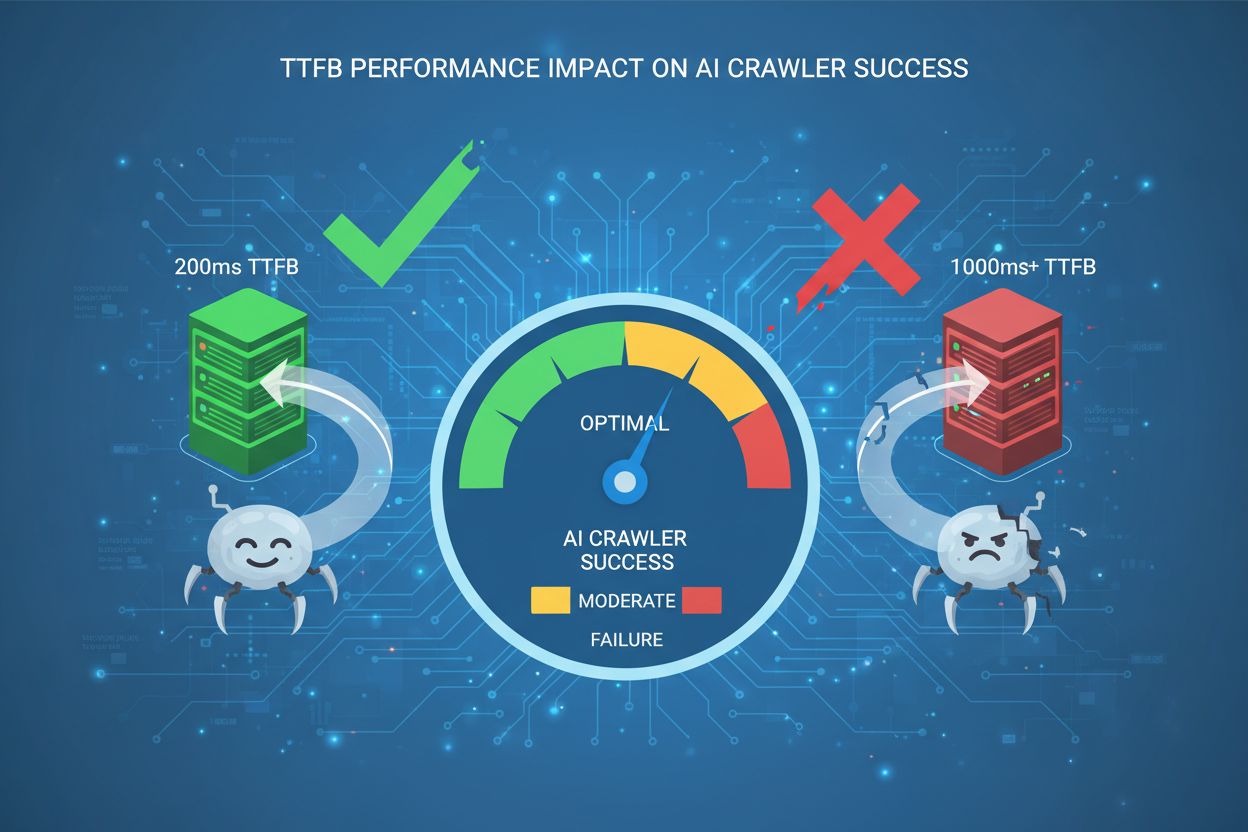
Learn how Time to First Byte impacts AI crawler success. Discover why 200ms is the gold standard threshold and how to optimize server response times for better ...

Page speed measures how quickly a webpage loads. Learn about Core Web Vitals metrics, why page speed matters for SEO and conversions, and how to optimize loadin...
Cookie Consent
We use cookies to enhance your browsing experience and analyze our traffic. See our privacy policy.