
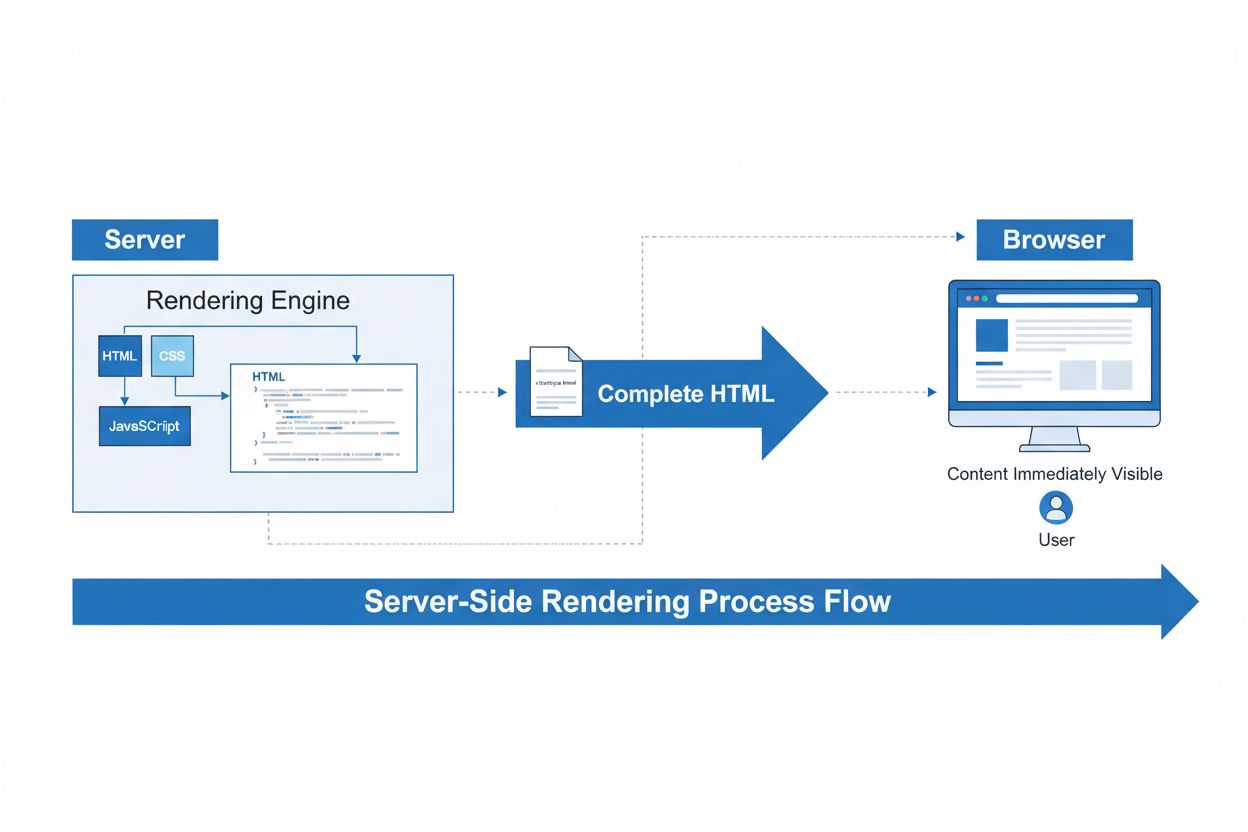
Server-Side Rendering (SSR)
Server-Side Rendering (SSR) is a web technique where servers render complete HTML pages before sending them to browsers. Learn how SSR improves SEO, page speed,...
11 min read
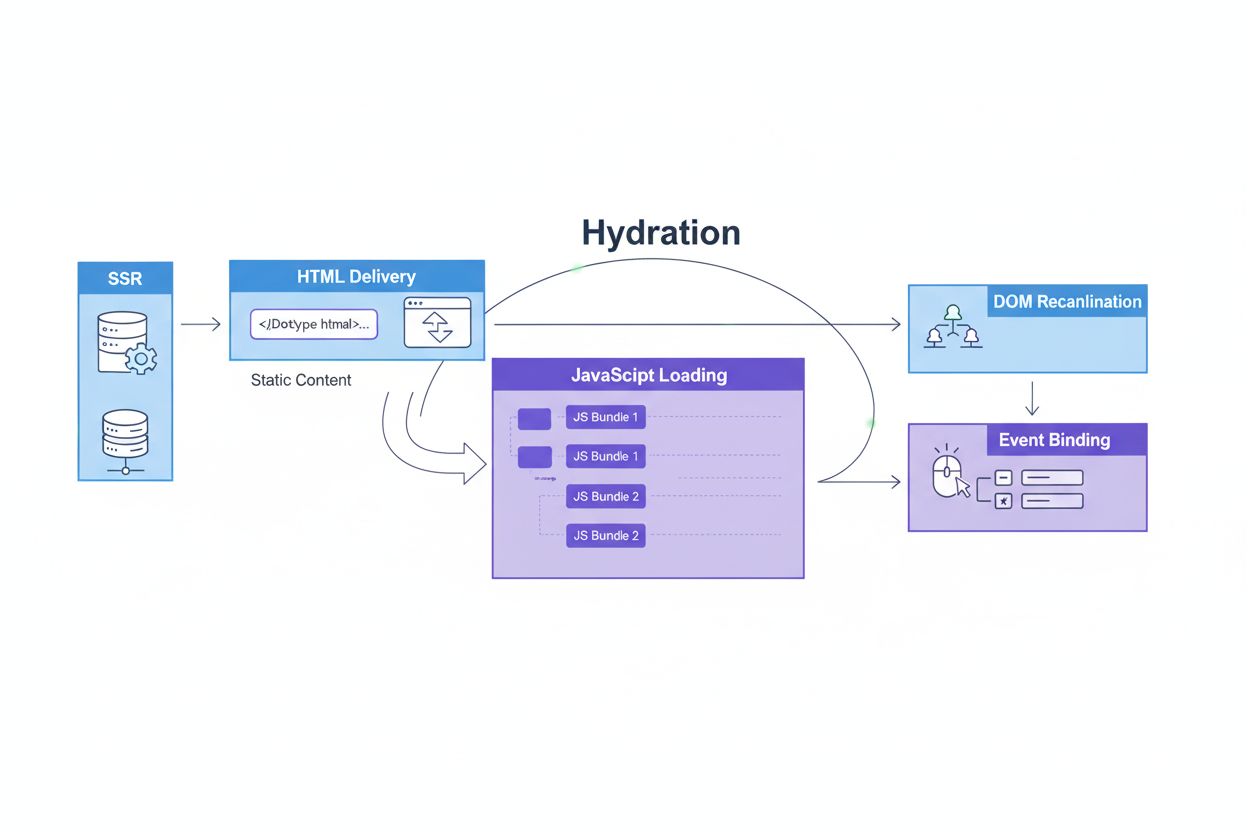
Hydration is the process of adding interactivity to server-rendered HTML by attaching JavaScript event listeners and synchronizing application state on the client side. It bridges static server-generated content with dynamic, interactive web applications, enabling fast initial page loads while maintaining full functionality.
Hydration is the process of adding interactivity to server-rendered HTML by attaching JavaScript event listeners and synchronizing application state on the client side. It bridges static server-generated content with dynamic, interactive web applications, enabling fast initial page loads while maintaining full functionality.
Hydration is the process of converting static, server-rendered HTML into an interactive web application by attaching JavaScript event listeners, synchronizing application state, and binding component lifecycle methods on the client side. In essence, hydration “activates” pre-rendered HTML that was generated on the server, transforming it from a static document into a fully functional, responsive user interface. This technique bridges the performance benefits of server-side rendering with the interactivity of client-side applications, allowing developers to deliver fast initial page loads while maintaining rich, dynamic user experiences. Hydration has become fundamental to modern web development frameworks and is essential for building performant applications that balance speed with functionality.
The concept of hydration emerged as web applications grew increasingly complex and developers sought to optimize both performance and user experience. In the early days of single-page applications (SPAs), developers faced a critical choice: render everything on the client for interactivity, or render on the server for speed. This trade-off created the “uncanny valley” problem where pages appeared ready but weren’t interactive. According to research from Google’s web.dev team, over 78% of enterprises now use server-side rendering or hybrid approaches that incorporate hydration to balance these concerns. The term “hydration” itself was popularized by the React community around 2016-2017 as frameworks began implementing server-side rendering capabilities. Modern frameworks like Next.js, Nuxt, and SvelteKit have made hydration a core feature, with each generation improving efficiency and reducing the performance overhead associated with the process. The evolution of hydration strategies—from full-page hydration to progressive and selective hydration—reflects the industry’s ongoing effort to optimize web performance metrics and user experience.
The hydration process follows a precise sequence of steps that ensures seamless integration between server-rendered content and client-side interactivity. First, the server renders the complete HTML for a page, including all necessary CSS and initial data, then sends this static markup to the browser. The browser immediately parses and displays this HTML, providing users with visible content almost instantly—this is why hydration improves First Contentful Paint (FCP). Simultaneously, the browser begins downloading JavaScript bundles containing the framework code and application logic. Once the JavaScript arrives, the framework builds a virtual representation of the page in memory and compares it against the actual DOM that was rendered by the server. This comparison process, called DOM reconciliation, identifies any differences and ensures they’re minimal. The framework then attaches event listeners to interactive elements, making buttons clickable, forms responsive, and enabling all dynamic functionality. Finally, component lifecycle methods are initialized, allowing components to respond to user interactions and state changes just as they would in a purely client-rendered application. This entire process typically completes within milliseconds to seconds, depending on JavaScript bundle size and device capabilities.
Hydration has a profound impact on key web performance metrics that determine user experience and search engine rankings. First Contentful Paint (FCP) improves dramatically with hydration because users see rendered content immediately, rather than waiting for JavaScript to download and execute. Studies show that hydration can reduce FCP by 40-60% compared to pure client-side rendering. However, Time to Interactive (TTI) presents a more complex picture—while content appears quickly, the page remains non-interactive until hydration completes, creating a period where users perceive the interface as frozen. This gap between visual readiness and actual interactivity is sometimes called the “uncanny valley” of web performance. Modern metrics like Interaction to Next Paint (INP) measure how quickly the page responds to user input after hydration, making this metric critical for evaluating hydration effectiveness. Progressive hydration strategies can improve INP by up to 35% by prioritizing the hydration of interactive elements first. Additionally, hydration affects Largest Contentful Paint (LCP) positively by delivering pre-rendered content upfront, though excessive JavaScript execution during hydration can negatively impact this metric on lower-powered devices.
| Aspect | Hydration (SSR + CSR) | Pure Server-Side Rendering | Pure Client-Side Rendering | Static Rendering |
|---|---|---|---|---|
| Initial Load Speed | Fast (pre-rendered HTML) | Very Fast | Slow (waits for JS) | Very Fast |
| Time to Interactive | Moderate (depends on JS size) | Slow (no interactivity) | Slow (large bundles) | Very Fast |
| SEO Friendliness | Excellent | Excellent | Good (with crawling) | Excellent |
| Dynamic Content | Yes (after hydration) | Limited | Yes (full) | No (static only) |
| Bundle Size | Large (framework + app code) | Small | Large | Very Small |
| Complexity | High | Low | Moderate | Low |
| Best Use Case | Interactive apps with SEO needs | Content-heavy sites | SPAs, dashboards | Blogs, documentation |
| Hydration Mismatch Risk | High | None | N/A | None |
Despite its benefits, hydration introduces several technical challenges that developers must carefully manage. Hydration mismatch errors occur when the HTML rendered on the server differs from what the client-side JavaScript expects, causing console warnings and potential UI inconsistencies. Common causes include using browser-only APIs like window or localStorage during server rendering, rendering time-sensitive data that changes between server and client, or using random values that differ between renders. According to developer surveys, approximately 23% of React applications experience hydration-related errors in production, often going unnoticed until users report issues. Another significant challenge is the performance overhead of hydration itself—traversing the DOM, registering event listeners, and synchronizing state consumes CPU resources, particularly on mobile devices with limited processing power. The bundle size problem compounds this issue; including all JavaScript necessary for hydration increases initial download times, potentially negating the performance gains from server-side rendering. Additionally, debugging hydration issues can be extremely difficult because errors may only manifest under specific conditions, such as particular browser versions or network speeds, making reproduction and diagnosis challenging for development teams.
Modern frameworks have developed sophisticated approaches to mitigate hydration challenges through progressive hydration, which hydrates components incrementally rather than all at once. This strategy prioritizes interactive elements first, allowing users to interact with critical parts of the page while less important components hydrate in the background. Research indicates that progressive hydration can reduce Time to Interactive by 30-50% compared to full-page hydration, particularly for content-heavy pages. Selective hydration takes this further by only hydrating components that users actually interact with, leaving static content as inert HTML. React 18 introduced Suspense-based selective hydration, which automatically prioritizes hydrating components when users attempt to interact with them, even if their code hasn’t fully loaded yet. This approach is especially effective for pages with many static sections and scattered interactive elements, such as e-commerce product pages or content platforms. Streaming server-side rendering complements these strategies by sending HTML in chunks as it’s generated, allowing the browser to begin rendering and hydrating while the server continues processing. Frameworks like Next.js, Remix, and SvelteKit have implemented these advanced hydration patterns, enabling developers to achieve both fast initial loads and responsive interactivity without sacrificing user experience.
Different JavaScript frameworks implement hydration with varying levels of sophistication and optimization. React uses the hydrateRoot() API to reconcile server-rendered DOM with its virtual DOM, comparing the two and attaching event listeners only where necessary. React 18 introduced concurrent features that enable selective hydration, allowing the framework to pause hydration if the user interacts with a component, prioritizing that interaction. Vue 3 provides streamlined hydration with improved error handling and better performance than previous versions, using a similar reconciliation approach but with optimizations specific to Vue’s reactivity system. Svelte takes a different approach by compiling components to optimized JavaScript without a virtual DOM, resulting in smaller bundle sizes and faster hydration, though with less flexibility for dynamic updates. Next.js abstracts hydration complexity through its App Router and Server Components, allowing developers to mark components as server-only or client-only, automatically optimizing hydration. Angular offers hydration through its provideClientHydration() function, with support for incremental hydration through the @defer directive. Each framework’s approach reflects different trade-offs between bundle size, performance, and developer experience, making framework selection an important consideration for hydration-heavy applications.
Hydration plays a crucial role in search engine optimization and content discoverability. Since hydration delivers fully rendered HTML to the browser immediately, search engine crawlers receive complete, indexable content without needing to execute JavaScript. This is particularly important for Google’s crawling capabilities, which have improved but still face limitations with JavaScript-heavy sites. According to Google’s documentation, server-rendered pages with proper hydration achieve significantly better crawlability scores compared to pure client-side rendered applications. The semantic HTML delivered during hydration also benefits accessibility tools and screen readers, which can parse content before JavaScript execution. For AI-powered search systems like those monitored by AmICited, hydration affects how your content appears in AI-generated responses and overviews. AI systems that crawl your site may encounter either server-rendered HTML or client-rendered content depending on their capabilities and timing, making hydration strategy important for AI visibility. Properly implemented hydration ensures that your content is consistently discoverable across all search modalities, from traditional search engines to emerging AI platforms, maximizing your digital presence and citation opportunities.
The hydration landscape continues to evolve as frameworks and browsers introduce new capabilities and optimization techniques. React Server Components, currently in development, promise to fundamentally change how hydration works by allowing components to remain on the server while only interactive pieces hydrate on the client. This approach could dramatically reduce bundle sizes and hydration overhead. Resumability, a concept pioneered by Qwik, takes a different approach by serializing the application state and event handlers, allowing the browser to “resume” execution without re-running framework initialization code. This could reduce hydration time from seconds to milliseconds for large applications. Partial hydration and island architecture patterns are gaining adoption, where pages are divided into independent interactive regions that hydrate separately, reducing the complexity of managing global state. Browser improvements like streaming HTML and enhanced service worker capabilities will enable more sophisticated hydration strategies. Additionally, as Core Web Vitals continue to influence search rankings, frameworks will increasingly prioritize hydration optimization, with tools providing better visibility into hydration performance. The emergence of edge computing and distributed rendering may enable new hydration patterns where rendering occurs closer to users, reducing latency and improving hydration speed. These developments suggest that hydration will remain central to web performance optimization for years to come, with continued innovation focused on reducing the performance cost while maintaining the benefits of server-side rendering.
For platforms like AmICited that monitor brand and domain appearances in AI-generated responses, understanding hydration is essential. AI systems that index your website may encounter different content depending on whether they access server-rendered HTML or client-rendered content. Properly implemented hydration ensures that your content is consistently discoverable and correctly represented across different crawling scenarios. When AI systems like ChatGPT, Perplexity, Google AI Overviews, or Claude crawl your site, they may not execute JavaScript in the same way traditional browsers do, potentially missing client-only content. By ensuring critical content is available in server-rendered HTML through proper hydration implementation, you maximize the likelihood that your content will be cited and referenced in AI-generated responses. This is particularly important for businesses and content creators seeking to establish authority and visibility in AI-powered search results. Monitoring how your hydrated content appears across different AI platforms helps identify optimization opportunities and ensures your brand maintains consistent representation in the emerging AI search landscape.
Hydration is the initial process of attaching JavaScript to server-rendered HTML to make it interactive. Rehydration, while often used interchangeably, technically implies regularly updating the DOM with the latest state after the initial hydration is complete. In modern frameworks like React 18, the distinction has become less critical as frameworks handle both processes seamlessly through their reconciliation algorithms.
Hydration mismatches happen when the HTML rendered on the server differs from what the client-side JavaScript expects, often due to time-sensitive data, browser-specific APIs, or random values. Prevention strategies include ensuring consistent data between server and client, avoiding browser-only APIs during server rendering, using proper conditional rendering patterns, and leveraging frameworks' built-in hydration error boundaries to gracefully handle mismatches.
Hydration significantly improves First Contentful Paint (FCP) by delivering pre-rendered HTML immediately, but can negatively impact Time to Interactive (TTI) if JavaScript bundles are large. Modern approaches like progressive hydration and streaming SSR mitigate this by hydrating components incrementally, reducing the time between when content appears and when it becomes interactive, ultimately improving Interaction to Next Paint (INP) metrics.
Progressive hydration hydrates individual page components over time rather than all at once, prioritizing interactive elements first. It's ideal for pages with many static sections and a few interactive components, reducing initial JavaScript bundle size by up to 40-60% according to performance studies. This approach is particularly beneficial for content-heavy websites, e-commerce platforms, and applications targeting mobile users with slower connections.
React uses hydrateRoot() to reconcile server-rendered DOM with client-side virtual DOM, Vue 3 provides streamlined hydration with improved error handling, Svelte compiles to optimized JavaScript without virtual DOM overhead, and Next.js offers multiple strategies including static optimization and incremental static regeneration. Each framework optimizes hydration differently based on their architecture, with modern versions supporting selective and streaming hydration for better performance.
Key challenges include hydration mismatch errors from inconsistent rendering, performance overhead from large JavaScript bundles, the 'uncanny valley' where UI appears interactive but isn't yet, and complexity in managing state serialization. Additionally, debugging hydration issues can be difficult, and improper implementation can actually worsen performance metrics compared to pure client-side rendering, making careful optimization essential.
Hydration enables search engines to crawl fully rendered HTML immediately, improving SEO compared to pure client-side rendering. Since the server provides complete HTML with metadata and content upfront, search engine crawlers can index pages more effectively. This also benefits accessibility tools and screen readers, which receive semantic HTML content before JavaScript execution, making hydration a critical component of modern SEO strategies.
AI monitoring platforms track how web applications appear in AI-generated responses and search results. Hydration affects this visibility because AI systems may crawl either server-rendered HTML or client-rendered content depending on their capabilities. Understanding hydration helps ensure that your application's content is properly indexed and appears correctly in AI overviews, Perplexity responses, and other AI-powered search interfaces that AmICited monitors.
Start tracking how AI chatbots mention your brand across ChatGPT, Perplexity, and other platforms. Get actionable insights to improve your AI presence.
Server-Side Rendering (SSR) is a web technique where servers render complete HTML pages before sending them to browsers. Learn how SSR improves SEO, page speed,...
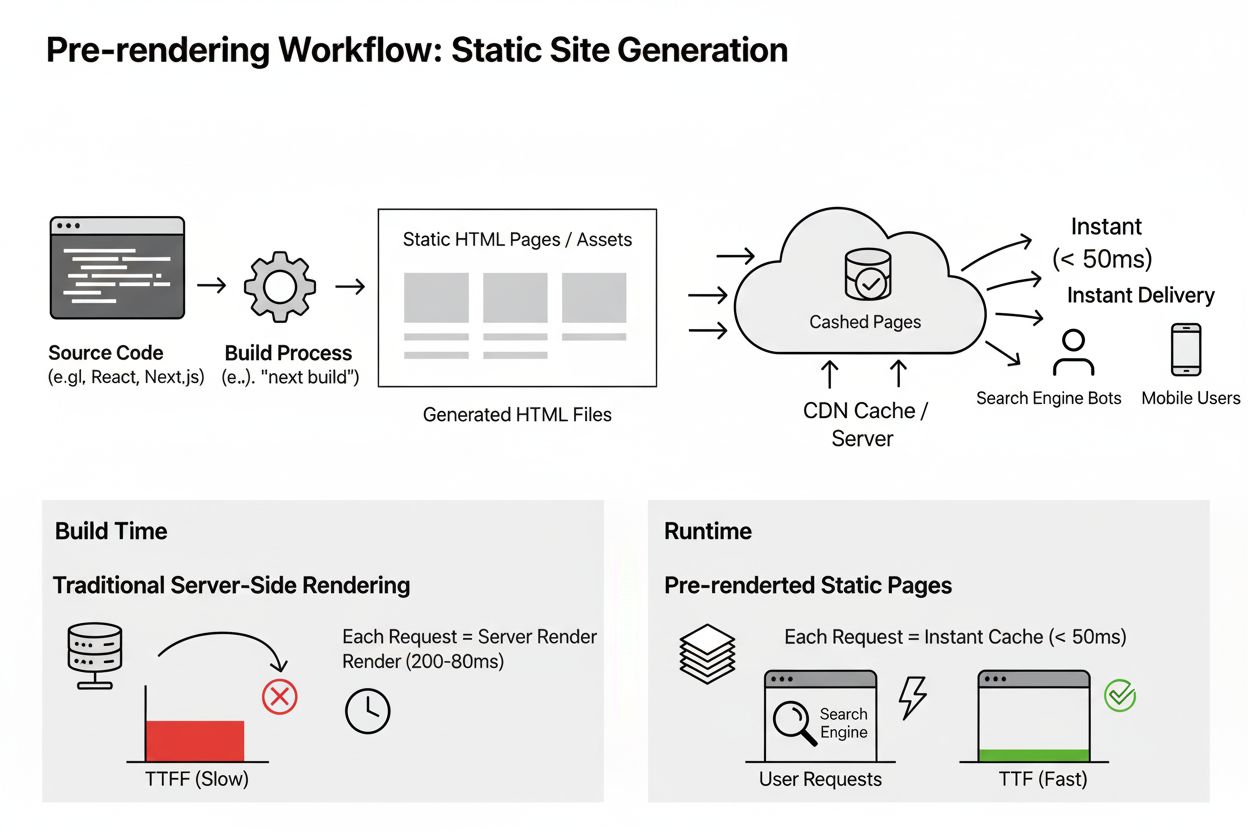
Pre-rendering generates static HTML pages at build time for instant delivery and improved SEO. Learn how this technique benefits AI indexing, performance, and s...
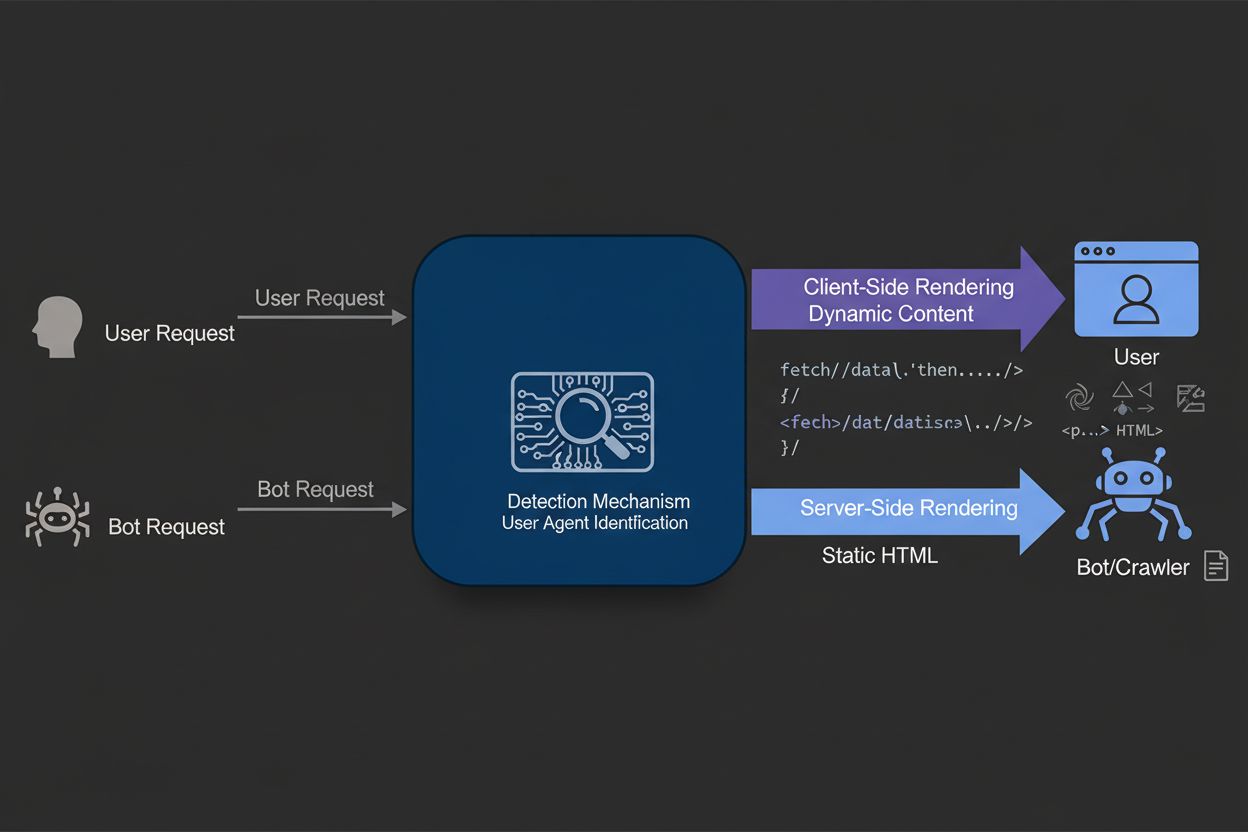
Dynamic rendering serves static HTML to search engine bots while delivering client-side rendered content to users. Learn how this technique improves SEO, crawl ...
Cookie Consent
We use cookies to enhance your browsing experience and analyze our traffic. See our privacy policy.