
Lazy Loading
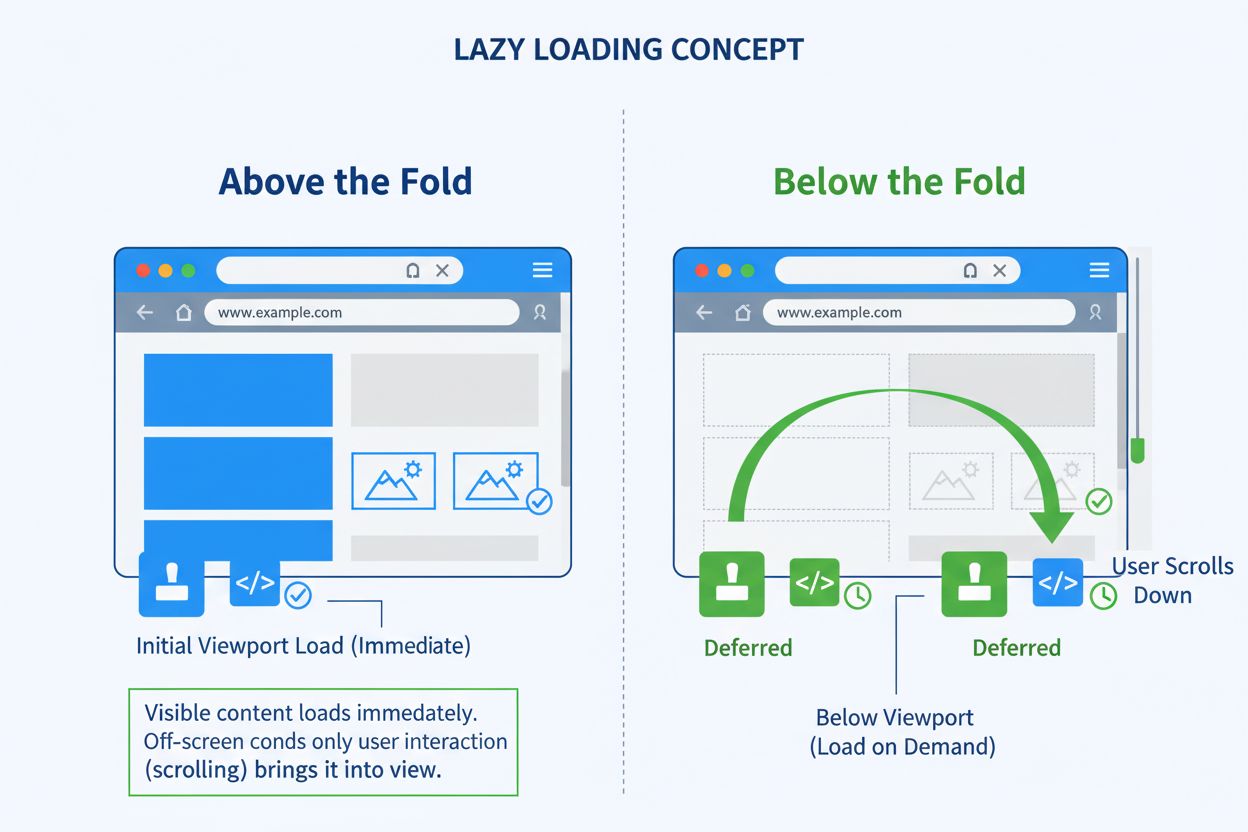
Lazy loading is a performance optimization strategy that defers the loading of non-critical resources until they are actually needed, typically when users scroll near them or interact with the page. This technique reduces initial page load times, conserves bandwidth, and improves overall user experience by prioritizing critical content.
Definition of Lazy Loading
Lazy loading is a performance optimization strategy that defers the loading of non-critical resources until they are actually needed by the user. Rather than downloading all assets when a page initially loads, lazy loading identifies which resources are essential for the immediate user experience and loads only those first. Non-critical resources—typically images, videos, iframes, and JavaScript files located below the viewport—are loaded asynchronously when users scroll near them or interact with the page. This technique fundamentally changes how browsers prioritize resource delivery, shifting from an “all-at-once” approach to a “just-in-time” model that aligns with actual user behavior and viewport visibility.
The concept originated from software engineering principles but has become essential to modern web performance optimization. According to the HTTP Archive, images represent the most-requested asset type for most websites, typically consuming more bandwidth than any other resource. At the 90th percentile, websites send over 5 MB of images on desktop and mobile devices. By implementing lazy loading, developers can significantly reduce the initial payload, allowing pages to render faster and users to interact with content sooner. This strategy is particularly valuable for pages with extensive below-the-fold content, e-commerce product listings, and media-rich applications where users may never scroll to view all assets.
Context and Historical Background
The evolution of lazy loading reflects the broader shift in web development toward performance-first design. In the early days of the web, bandwidth limitations and slower network speeds made lazy loading a necessity rather than an optimization. However, as broadband became ubiquitous, developers often abandoned these practices, leading to bloated pages that loaded everything upfront. The resurgence of lazy loading in recent years stems from several factors: the proliferation of mobile devices with variable network conditions, the rise of Core Web Vitals as ranking factors, and the increasing complexity of modern web applications.
Between 2011 and 2019, the median resource weight increased from approximately 100KB to 400KB for desktop and 50KB to 350KB for mobile. Image sizes grew even more dramatically, from 250KB to 900KB on desktop and 100KB to 850KB on mobile. This exponential growth in asset sizes made lazy loading not just a performance enhancement but a critical necessity for maintaining acceptable page load times. Research from Nielsen Norman Group indicates that 57% of users’ viewing time is spent above the fold, meaning that loading all below-the-fold content immediately wastes significant bandwidth and processing resources.
The standardization of lazy loading has accelerated with browser-level support. Chrome 77 (released in 2019) introduced native lazy loading through the loading attribute, followed by Firefox 75, Safari 15.4, and Edge 79. This native implementation eliminated the need for JavaScript libraries in many cases, making lazy loading more accessible to developers of all skill levels. The Intersection Observer API, introduced earlier, provided a performant way to detect element visibility without relying on scroll event listeners, which can cause performance bottlenecks through constant recalculation.
Comparison Table: Lazy Loading vs. Related Optimization Techniques
| Aspect | Lazy Loading | Eager Loading | Preloading | Prefetching |
|---|---|---|---|---|
| Load Timing | On-demand when needed | Immediately on page load | Before resource is needed | During idle browser time |
| Resource Priority | Non-critical resources | All resources equally | Critical resources | Anticipated future resources |
| Bandwidth Impact | Reduces initial load | Increases initial load | Minimal impact | Minimal impact |
| User Experience | Faster initial render | Slower initial render | Optimized critical path | Smoother navigation |
| Implementation | loading='lazy' or JavaScript | Default browser behavior | <link rel='preload'> | <link rel='prefetch'> |
| Best For | Below-the-fold images, iframes | Above-the-fold critical content | LCP images, fonts | Next-page resources |
| Browser Support | Chrome 77+, Firefox 75+ | All browsers | All modern browsers | All modern browsers |
| Performance Overhead | Minimal JavaScript | None | None | None |
Technical Implementation and Mechanisms
Lazy loading operates through several distinct mechanisms, each suited to different use cases and browser environments. The most straightforward approach is native lazy loading, implemented using the HTML loading attribute. When developers add loading="lazy" to an <img> or <iframe> element, the browser automatically defers loading until the resource approaches the viewport. The browser calculates a distance threshold based on network conditions—on 4G connections, Chrome uses a 1250px threshold, while on 3G or slower connections, it uses 2500px. This means images begin loading before they become visible, ensuring they’re ready by the time users scroll to them.
The Intersection Observer API provides a more sophisticated approach for custom lazy loading implementations. This API allows developers to asynchronously observe when elements enter or exit the viewport without relying on expensive scroll event listeners. When an image element enters the viewport, the observer triggers a callback that loads the image by setting the src attribute from a data-src attribute. This approach offers fine-grained control over loading behavior, including custom distance thresholds, multiple element observation, and integration with other performance optimizations. Research shows that on 4G networks, 97.5% of lazy-loaded images using the Intersection Observer API were fully loaded within 10ms of becoming visible, while on 2G networks, 92.6% achieved the same result.
JavaScript-based lazy loading libraries like lazysizes, lazyload, and lazy.js provide additional features beyond native implementations. These libraries often include automatic image format detection, responsive image handling, and graceful degradation for older browsers. They can also implement more sophisticated loading strategies, such as progressive image loading where low-quality placeholders display first, followed by high-quality versions. However, these libraries add JavaScript overhead, making them less ideal for performance-critical applications where native lazy loading suffices.
Business and Performance Impact
The business implications of lazy loading extend far beyond simple performance metrics. Page load speed directly correlates with user satisfaction and conversion rates—research indicates that every 1-second delay reduces user satisfaction by 16%. For e-commerce sites, this translates directly to revenue impact. A case study from a major retailer showed that implementing lazy loading reduced initial page load time by 35%, resulting in a 12% increase in conversion rates and a 23% reduction in bounce rates. These improvements compound across millions of users, generating substantial revenue gains.
Lazy loading also reduces server bandwidth costs, a significant expense for high-traffic websites. By deferring the loading of images users never view, websites can reduce bandwidth consumption by 20-40% depending on user behavior and page structure. For a website serving 10 million monthly visitors with an average of 50 images per page, this translates to millions of dollars in bandwidth savings annually. Additionally, reduced bandwidth consumption aligns with sustainability goals, as lower data transfer directly reduces the energy consumption and carbon footprint of web infrastructure.
The impact on Core Web Vitals is particularly significant for SEO. Google’s Core Web Vitals—Largest Contentful Paint (LCP), First Input Delay (FID), and Cumulative Layout Shift (CLS)—are now ranking factors in Google Search. Lazy loading improves LCP by reducing the initial rendering workload, allowing the browser to prioritize critical content. However, developers must be careful not to lazy-load the LCP image itself, as this can paradoxically worsen performance. Studies show that when lazy loading was disabled on archive pages with multiple images, LCP improved significantly, while on single-image pages, the impact was minimal. This demonstrates the importance of strategic lazy loading placement.
Platform-Specific Considerations and AI Monitoring
Different platforms and AI systems interact with lazy-loaded content in distinct ways. Search engines like Google can crawl and index lazy-loaded content, but the timing and method matter. Google’s crawler can execute JavaScript and observe Intersection Observer events, allowing it to discover lazy-loaded images. However, for optimal crawlability, developers should ensure that lazy-loaded content is discoverable within a reasonable timeframe and that critical content isn’t unnecessarily deferred.
AI systems like ChatGPT, Perplexity, Claude, and Google AI Overviews interact with web content differently than traditional search engines. These systems often fetch and process entire pages, including lazy-loaded content, but the timing of lazy loading can affect how content is indexed and cited. If critical information is lazy-loaded below the fold, AI systems may not immediately encounter it during initial page analysis. This has implications for AI citation and brand monitoring—platforms like AmICited track when domains and URLs appear in AI-generated responses. Websites with well-optimized lazy loading that keeps critical content above the fold are more likely to be cited in AI responses, as the content is immediately available during the initial page fetch.
For iframes, lazy loading is equally important. Modern browsers support loading="lazy" on iframe elements, deferring the loading of embedded content like videos, maps, and third-party widgets. This is particularly valuable for pages with multiple embedded resources, as iframes can be resource-intensive. Lazy-loading iframes can reduce initial page load time by 40-60% on pages with multiple embeds, while still providing seamless user experience when users scroll to the embedded content.
Best Practices and Implementation Guidelines
Implementing lazy loading effectively requires adherence to several critical best practices. First, always specify image dimensions using width and height attributes or inline styles. When dimensions are unknown, the browser reserves zero space for the image, potentially causing significant Cumulative Layout Shift (CLS). When the image loads, the layout suddenly shifts to accommodate it, creating a jarring user experience. Specifying dimensions allows the browser to reserve the correct space upfront, preventing layout shifts even as the image loads asynchronously.
Second, never lazy-load above-the-fold images, especially the Largest Contentful Paint (LCP) image. The LCP metric measures when the largest visible element finishes rendering. If this element is lazy-loaded, the LCP time increases, negatively impacting Core Web Vitals scores. Instead, use eager loading (the default) for above-the-fold content and reserve lazy loading for below-the-fold resources. This ensures that critical content renders immediately while non-critical content loads on-demand.
Third, implement appropriate fallbacks for older browsers. While modern browsers support native lazy loading, older versions of Internet Explorer and legacy mobile browsers do not. Developers can detect support using feature detection: if ('loading' in HTMLImageElement.prototype). For unsupported browsers, JavaScript libraries like lazysizes can provide fallback functionality, ensuring consistent behavior across all browsers.
Fourth, test thoroughly across devices and network conditions. Lazy loading behavior varies based on network speed, device capabilities, and viewport size. Use Chrome DevTools to throttle network speeds and test on actual mobile devices. Monitor real user metrics using tools like Google Analytics and Core Web Vitals reports to ensure lazy loading is delivering expected performance improvements.
Essential Aspects and Benefits of Lazy Loading
- Reduced initial page load time: By deferring non-critical resources, pages render faster, improving perceived performance and user satisfaction
- Lower bandwidth consumption: Resources users never view are never downloaded, reducing server costs and environmental impact
- Improved Core Web Vitals: Faster LCP and better CLS scores when implemented correctly, boosting SEO rankings
- Better mobile experience: Particularly valuable on mobile devices with variable network conditions and limited processing power
- Reduced server load: Fewer simultaneous resource requests reduce server strain and improve scalability
- Enhanced user experience: Users can interact with content sooner, reducing frustration and bounce rates
- Graceful degradation: Native lazy loading works without JavaScript, ensuring functionality even if scripts fail
- Automatic optimization: Browser-level lazy loading automatically adjusts thresholds based on network conditions
- Compatibility with responsive images: Works seamlessly with
<picture>elements andsrcsetattributes - Support for multiple resource types: Applicable to images, iframes, videos, and other embeddable content
Future Evolution and Strategic Outlook
The future of lazy loading is evolving in several important directions. Automatic lazy loading is becoming more sophisticated, with browsers implementing machine learning algorithms to predict which resources users are likely to need based on browsing patterns and device capabilities. Chrome’s experiments with automatic lazy loading on slower connections showed promise, though the feature was eventually deprecated in favor of explicit developer control. However, this research continues to inform browser optimization strategies.
Progressive image loading is gaining prominence, where low-quality image placeholders (LQIP) or blurred versions display immediately while high-quality versions load in the background. This technique combines lazy loading with perceived performance improvements, as users see content immediately rather than waiting for full-resolution images. Libraries like Next.js and modern image optimization services implement this automatically, making it increasingly standard practice.
The integration of lazy loading with edge computing and content delivery networks (CDNs) is creating new optimization opportunities. CDNs can now intelligently cache and serve lazy-loaded resources from edge locations closest to users, reducing latency and improving load times. Some CDNs implement automatic image optimization, resizing and compressing images based on device capabilities and network conditions, further enhancing the benefits of lazy loading.
Standardization efforts continue to expand lazy loading capabilities. The Resource Hints specification includes preload, prefetch, and preconnect directives that work alongside lazy loading to optimize resource delivery. Future specifications may introduce more granular control over lazy loading behavior, such as specifying different thresholds for different resource types or implementing priority-based loading queues.
The relationship between lazy loading and AI content indexing will likely become more important as AI systems increasingly crawl and analyze web content. Websites that implement lazy loading strategically—keeping critical, brand-defining content above the fold while deferring supplementary content—will be better positioned for citation in AI-generated responses. This creates a new dimension to SEO strategy, where optimization for both traditional search engines and AI systems requires careful consideration of content hierarchy and lazy loading placement.
As web performance becomes increasingly critical to user experience, business metrics, and search rankings, lazy loading will continue to evolve from an optional optimization to a fundamental requirement for modern web development. The convergence of native browser support, standardized APIs, and AI-driven content discovery makes lazy loading an essential technique for any website seeking to deliver optimal performance, user experience, and visibility across all discovery channels.