
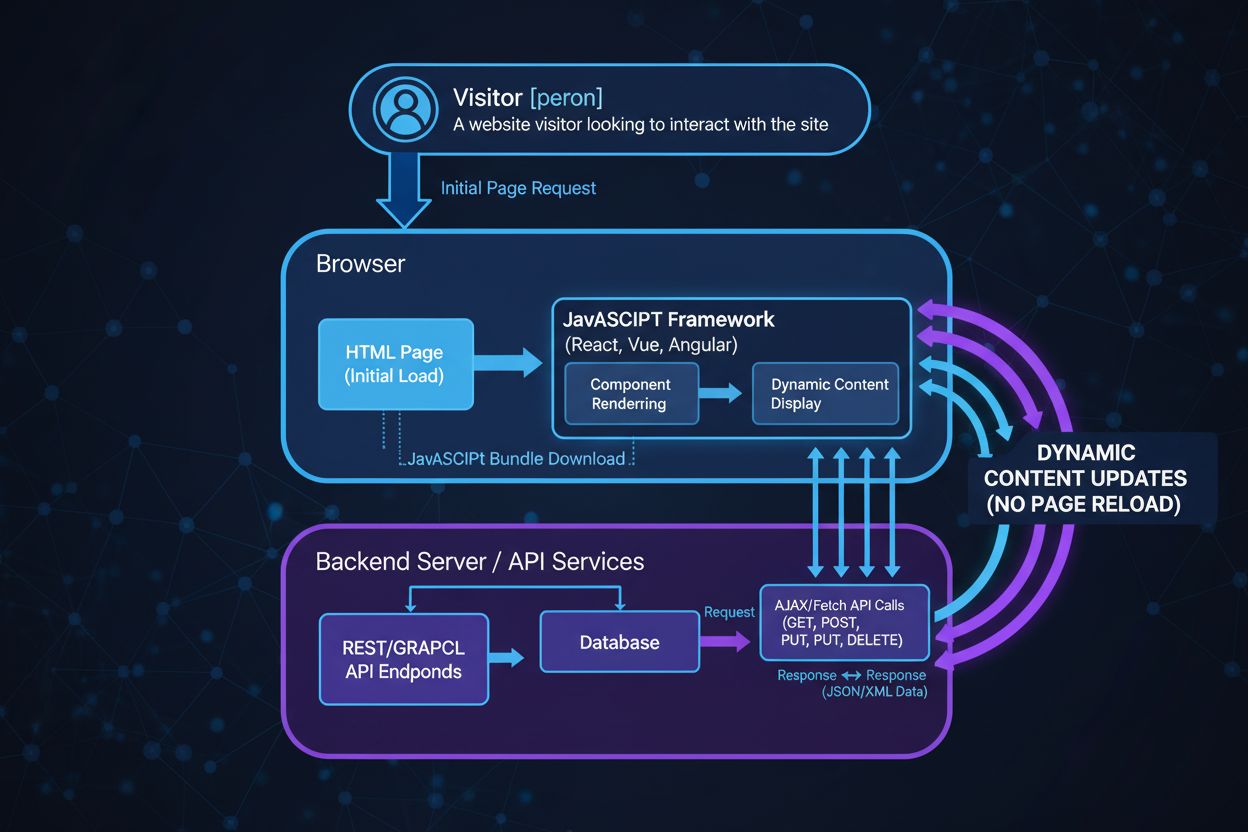
Single Page Application (SPA)
Learn what Single Page Applications (SPAs) are, how they work, their advantages and disadvantages, and how they differ from traditional multi-page applications ...
10 min read
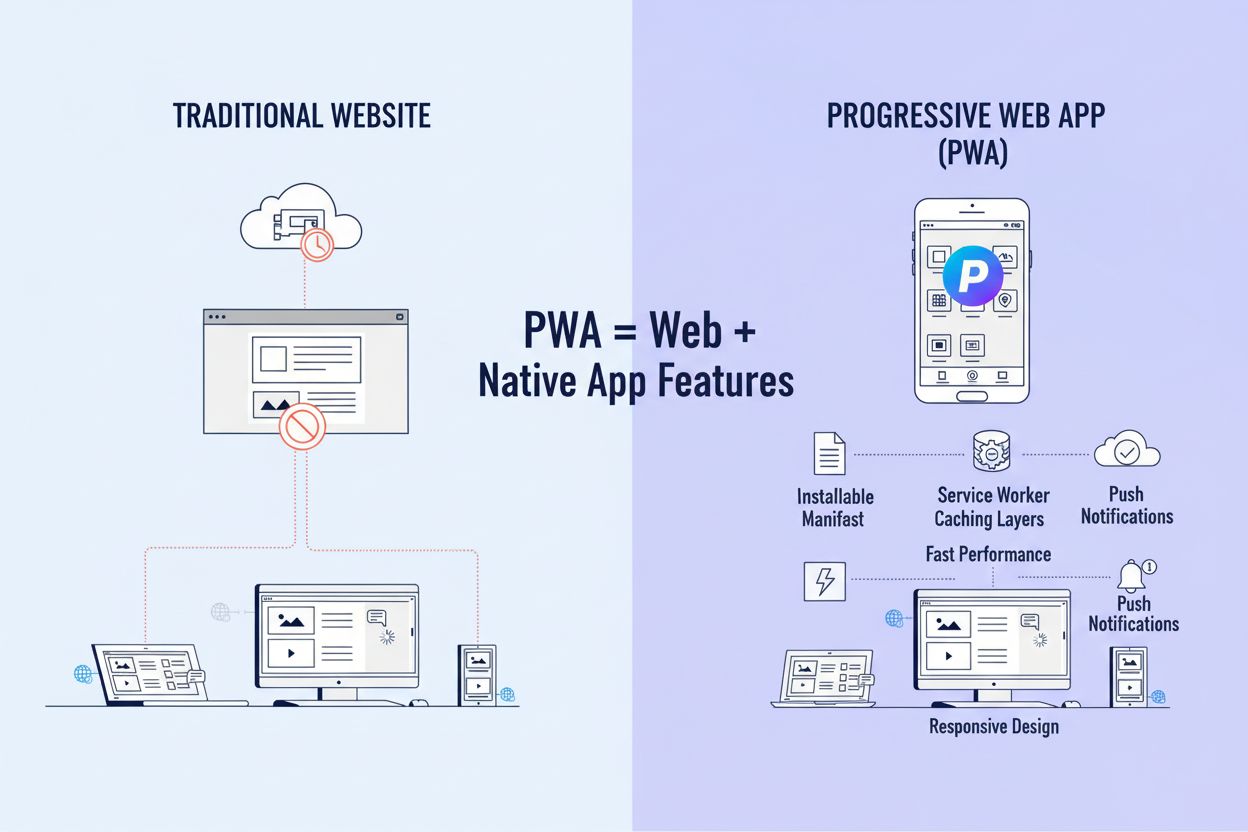
A Progressive Web App (PWA) is a web application built using standard web technologies (HTML, CSS, JavaScript) that provides a user experience similar to native mobile applications, including offline functionality, push notifications, and installability on devices. PWAs combine the best features of websites and native apps, delivering reliable, fast, and engaging experiences across all devices from a single codebase.
A Progressive Web App (PWA) is a web application built using standard web technologies (HTML, CSS, JavaScript) that provides a user experience similar to native mobile applications, including offline functionality, push notifications, and installability on devices. PWAs combine the best features of websites and native apps, delivering reliable, fast, and engaging experiences across all devices from a single codebase.
A Progressive Web App (PWA) is a web application built using standard web technologies—HTML, CSS, and JavaScript—that delivers an experience remarkably similar to native mobile applications while maintaining the accessibility and reach of traditional websites. The term “progressive” reflects the core philosophy: PWAs work for every user, regardless of browser choice or device capability, progressively enhancing with advanced features when supported. PWAs combine the best characteristics of websites and native apps, enabling users to install applications directly from the web, access them offline, receive push notifications, and interact with them through a full-screen, app-like interface. Unlike native applications that require separate development for iOS and Android, PWAs leverage a single codebase to function seamlessly across all platforms, devices, and operating systems. This architectural approach has fundamentally transformed how organizations approach cross-platform application development, with the global PWA market valued at USD 3.53 billion in 2024 and projected to reach USD 21.44 billion by 2033, representing a compound annual growth rate of approximately 28%.
The technical foundation of a PWA rests on three essential pillars: the web app manifest, service workers, and HTTPS security. The web app manifest is a JSON file that provides critical metadata about the application, including the app name, icons, theme colors, display mode, and start URL. This file enables browsers to recognize the PWA as an installable application and display it appropriately on user devices. The service worker is a JavaScript file that runs in the background, separate from the main web page, acting as a proxy between the application and the network. Service workers intercept network requests, manage caching strategies, handle offline scenarios, and enable background synchronization. HTTPS is mandatory for PWAs because service workers require a secure context to function, protecting user data and ensuring the integrity of cached content. Together, these components create a robust architecture that allows PWAs to function reliably across varying network conditions and device capabilities. The implementation of these technologies requires developers to understand progressive enhancement principles, ensuring that applications remain functional even when advanced features are not supported by the user’s browser or device.
| Aspect | Progressive Web App (PWA) | Native App |
|---|---|---|
| Development Cost | 40-60% lower; single codebase for all platforms | Higher; separate development for iOS and Android |
| Development Time | Faster; typically 3-6 months for MVP | Slower; 6-12 months for multi-platform release |
| Platform Coverage | Works on all devices with a web browser | Platform-specific (iOS, Android, Windows, macOS) |
| Installation | Direct from web; no app store required | Downloaded from Apple App Store or Google Play Store |
| Offline Functionality | Supported via service workers and caching | Native support; full offline capability |
| Performance | Good; optimized for web; may lag on complex tasks | Excellent; optimized for specific platform hardware |
| Hardware Access | Limited; via Web APIs (camera, GPS, Bluetooth) | Full access to device features and sensors |
| Push Notifications | Supported; browser-dependent; must be visible | Full support; can be silent or background-triggered |
| SEO and Discoverability | Excellent; indexed by search engines | Poor; not indexed; relies on app store visibility |
| Update Mechanism | Automatic; users always have latest version | Manual; users must download updates from app store |
| Storage Requirements | Minimal; typically 1-5 MB | Larger; typically 50-500 MB depending on app |
| Cross-Platform Compatibility | Native; works on web, mobile, desktop | Requires separate builds for each platform |
| User Acquisition Cost | Lower; organic search and direct links | Higher; app store marketing and paid campaigns |
Service workers are the technological cornerstone that enables PWAs to deliver native-like experiences. These specialized JavaScript workers run in a separate thread from the main application, allowing them to perform background tasks without blocking the user interface or consuming main thread resources. When a PWA is first installed, the service worker is registered and can begin caching application resources—HTML pages, stylesheets, scripts, images, and API responses. The service worker then intercepts all network requests made by the application through the fetch event, allowing developers to implement sophisticated caching strategies. The cache-first strategy prioritizes cached content, checking the cache before attempting network requests, making it ideal for static assets that rarely change. The network-first strategy attempts to fetch fresh content from the network first, falling back to cached content only when offline, suitable for frequently updated data. The stale-while-revalidate strategy serves cached content immediately while simultaneously fetching updated content in the background, providing both speed and freshness. Beyond caching, service workers enable background synchronization, allowing PWAs to queue actions (like sending messages or uploading files) when offline and automatically execute them once connectivity is restored. Research indicates that proper service worker implementation can reduce application load times by up to 70% and improve user retention rates by approximately 40%, making service workers essential for competitive PWA performance.
One of the most transformative features of PWAs is their ability to function reliably when network connectivity is unavailable or intermittent. Offline functionality is achieved through a combination of service workers, caching strategies, and local storage mechanisms that allow applications to serve cached content and maintain functionality without network access. When users first visit a PWA, the service worker caches essential resources needed for core functionality. Subsequently, when users access the application offline, the service worker intercepts requests and serves cached responses, creating a seamless experience. This capability is particularly valuable in regions with unreliable internet infrastructure, where connectivity is intermittent rather than consistently unavailable. Background operations extend this capability further, allowing PWAs to perform tasks even when the application is not actively open. The Background Sync API enables PWAs to queue operations (such as sending emails or uploading data) and execute them automatically when connectivity is restored, without requiring user intervention. The Periodic Background Sync API allows PWAs to refresh content at regular intervals, ensuring that cached data remains relatively fresh even when the application is closed. The Background Fetch API supports long-running downloads that continue even if the user closes the application, with the browser displaying persistent progress notifications. These capabilities transform PWAs from passive web applications into proactive tools that maintain engagement and functionality regardless of network conditions, with studies showing that 82% of users abandon applications that fail to function offline.
PWA installation represents a fundamental shift in how users acquire and interact with applications. Unlike native apps that require downloading from centralized app stores, PWAs can be installed directly from the web through browser prompts or explicit user actions. When a PWA meets specific installability criteria—including a valid web app manifest, service worker, HTTPS connection, and responsive design—browsers display an install prompt, allowing users to add the application to their home screen or app drawer with a single click. This frictionless installation process eliminates the barriers associated with app store discovery, approval processes, and download friction. PWAs are inherently discoverable through search engines, appearing in organic search results and benefiting from SEO optimization, unlike native apps which are invisible to search engines. This search engine visibility provides significant advantages for user acquisition, with PWAs capable of attracting organic traffic through standard web search. Additionally, PWAs can be distributed through multiple channels: directly from websites, through app stores (including Microsoft Store, Google Play, and Apple App Store), through progressive web app directories, and through social sharing. The web app manifest plays a crucial role in discoverability, providing search engines and browsers with metadata that improves indexing and presentation. Companies like Starbucks and Spotify have leveraged PWA discoverability to achieve 150% increases in user engagement and significantly improved conversion rates compared to traditional web experiences.
PWA support varies significantly across browsers and platforms, requiring developers to implement progressive enhancement strategies to ensure functionality across diverse environments. Google Chrome and Chromium-based browsers (Edge, Opera, Brave) provide comprehensive PWA support, including service workers, web app manifest, push notifications, and background sync. Firefox supports most PWA features but with some limitations in background sync and periodic background sync capabilities. Safari on macOS and iOS provides basic PWA support, including installation and offline functionality, but with notable restrictions: Apple’s WebKit engine deletes local storage after seven days of non-use, potentially affecting PWA functionality for infrequently used applications. Mobile browsers on Android generally provide robust PWA support, while iOS PWAs function as web apps rather than true installed applications, lacking some native integration features. Developers must account for these platform differences through feature detection, implementing fallback experiences for browsers that don’t support advanced capabilities. The Permissions API requires explicit user consent for sensitive features like push notifications, camera access, and geolocation, with browsers enforcing strict security policies. Understanding these platform-specific considerations is essential for delivering consistent experiences across the diverse ecosystem of devices and browsers that users employ to access PWAs.
The adoption of PWAs has accelerated dramatically across enterprises, driven by compelling business metrics and cost advantages. Starbucks reported a 150% increase in users who added their PWA to their home screen, with desktop order rates nearly matching mobile rates. Trivago achieved a 97% increase in hotel offer clickouts after implementing a PWA, demonstrating significant conversion improvements. Tinder reduced application load times from 11.91 seconds to 4.68 seconds through PWA optimization, while reducing the application size by 90% compared to their native Android app. Twitter Lite generated a 65% increase in pages accessed per session and a 75% surge in tweets sent, showcasing engagement improvements. These success stories reflect broader market trends: the global PWA market is experiencing explosive growth, with the market size projected to expand from USD 5.23 billion in 2025 to USD 21.44 billion by 2033. This growth is driven by enterprises recognizing that PWAs deliver superior return on investment compared to native app development, with development costs typically 40-60% lower than building separate iOS and Android applications. Organizations are increasingly adopting PWAs for customer-facing applications, internal tools, and hybrid strategies that combine PWAs with native apps for specific use cases requiring deep hardware integration.
The PWA landscape continues evolving rapidly, with emerging technologies and capabilities expanding what’s possible within the web platform. WebAssembly (WASM) enables PWAs to execute near-native performance code, supporting computationally intensive applications like video editing, 3D modeling, and scientific computing. Web Bluetooth API and WebUSB provide direct hardware access, enabling PWAs to interact with peripherals and IoT devices. File System Access API allows PWAs to work with local files, supporting productivity applications and content creation tools. Credential Management API and WebAuthn enable secure authentication mechanisms, supporting enterprise security requirements. The Fenced Frame API and Privacy Sandbox initiatives address privacy concerns while maintaining functionality. As these capabilities mature and browser support expands, the distinction between PWAs and native applications continues narrowing, with PWAs increasingly capable of delivering experiences previously exclusive to native platforms. AI monitoring platforms like AmICited are becoming increasingly important for PWA developers and organizations, as they track how PWAs are mentioned, cited, and discussed across AI-powered search engines and chatbots. Understanding PWA visibility in AI responses helps organizations optimize their documentation, content strategy, and technical implementation to improve discoverability in the AI-driven information landscape. The convergence of PWA capabilities, AI integration, and cross-platform expectations suggests that PWAs will become the default choice for many application categories, with native apps reserved for specialized use cases requiring deep platform integration or extreme performance requirements.
Native apps are built specifically for a single platform (iOS or Android) using platform-specific languages like Swift or Kotlin, requiring separate development and maintenance for each platform. PWAs, conversely, are built using standard web technologies and work across all devices and platforms from a single codebase. While native apps typically offer superior performance and deeper hardware integration, PWAs provide lower development costs, easier maintenance, and better discoverability through search engines. According to industry data, PWAs reduce development costs by up to 60% compared to building separate native applications for multiple platforms.
Service workers are background scripts that run separately from the main web page, allowing PWAs to intercept network requests and serve cached content when the device is offline. When a user first visits a PWA, the service worker caches essential resources like HTML, CSS, JavaScript, and images. Using caching strategies such as 'cache-first' or 'network-first,' service workers determine whether to serve content from the cache or fetch it from the network. This architecture enables PWAs to provide a seamless experience even with intermittent or no internet connectivity, with studies showing that 78% of enterprises now prioritize offline capabilities in their web applications.
A web app manifest is a JSON file that provides metadata about a PWA, including the app name, icons, theme colors, display mode, and start URL. This file is essential because it enables browsers to recognize and install the PWA on a user's device, making it appear and function like a native application. The manifest file must be linked in the HTML head section and must contain specific required fields for the PWA to be installable. Without a properly configured manifest, browsers cannot install the PWA or display it as a standalone application on home screens or app drawers.
Yes, PWAs can send push notifications through the Push API and Notifications API, allowing developers to re-engage users even when the app is not actively open. Push notifications in PWAs require user permission and are delivered through the browser's push service, which communicates with the app server. When a push message is received, the service worker is activated in the background to handle the notification and display it to the user. However, unlike some native apps, PWA push notifications depend on browser support and user browser settings, and all push notifications must be user-visible for privacy reasons.
PWAs offer significant business advantages including reduced development costs (up to 60% lower than native apps), faster time-to-market, and the ability to reach users across all devices from a single codebase. They improve user engagement through offline functionality, push notifications, and app-like experiences, with companies like Starbucks reporting 150% increases in user engagement after implementing PWAs. PWAs are also SEO-friendly, appearing in search results and attracting organic traffic, unlike native apps. Additionally, PWAs eliminate app store approval delays and provide better analytics and control over distribution.
PWAs implement various caching strategies through service workers to balance performance and freshness of content. The 'cache-first' strategy checks the cache before making network requests, ideal for static assets that rarely change. The 'network-first' strategy attempts to fetch from the network first, falling back to cache if offline, suitable for frequently updated content. The 'stale-while-revalidate' strategy serves cached content immediately while updating it in the background. Developers choose strategies based on their content type and update frequency, with research showing that proper caching can reduce load times by up to 70% and improve user retention by 40%.
AI monitoring platforms like AmICited track how PWAs are mentioned and referenced across AI-powered search engines and chatbots such as ChatGPT, Perplexity, Google AI Overviews, and Claude. This monitoring helps PWA developers and companies understand how their applications are being cited and discussed in AI responses, providing insights into brand visibility and authority in the AI-driven search landscape. By tracking these mentions, organizations can optimize their PWA documentation and content strategy to improve their presence in AI-generated responses, which is increasingly important as AI systems become primary information sources for developers and users.
Start tracking how AI chatbots mention your brand across ChatGPT, Perplexity, and other platforms. Get actionable insights to improve your AI presence.
Learn what Single Page Applications (SPAs) are, how they work, their advantages and disadvantages, and how they differ from traditional multi-page applications ...

AMP is an open-source HTML framework for building fast-loading mobile pages. Learn how Accelerated Mobile Pages work, their benefits, limitations, and relevance...
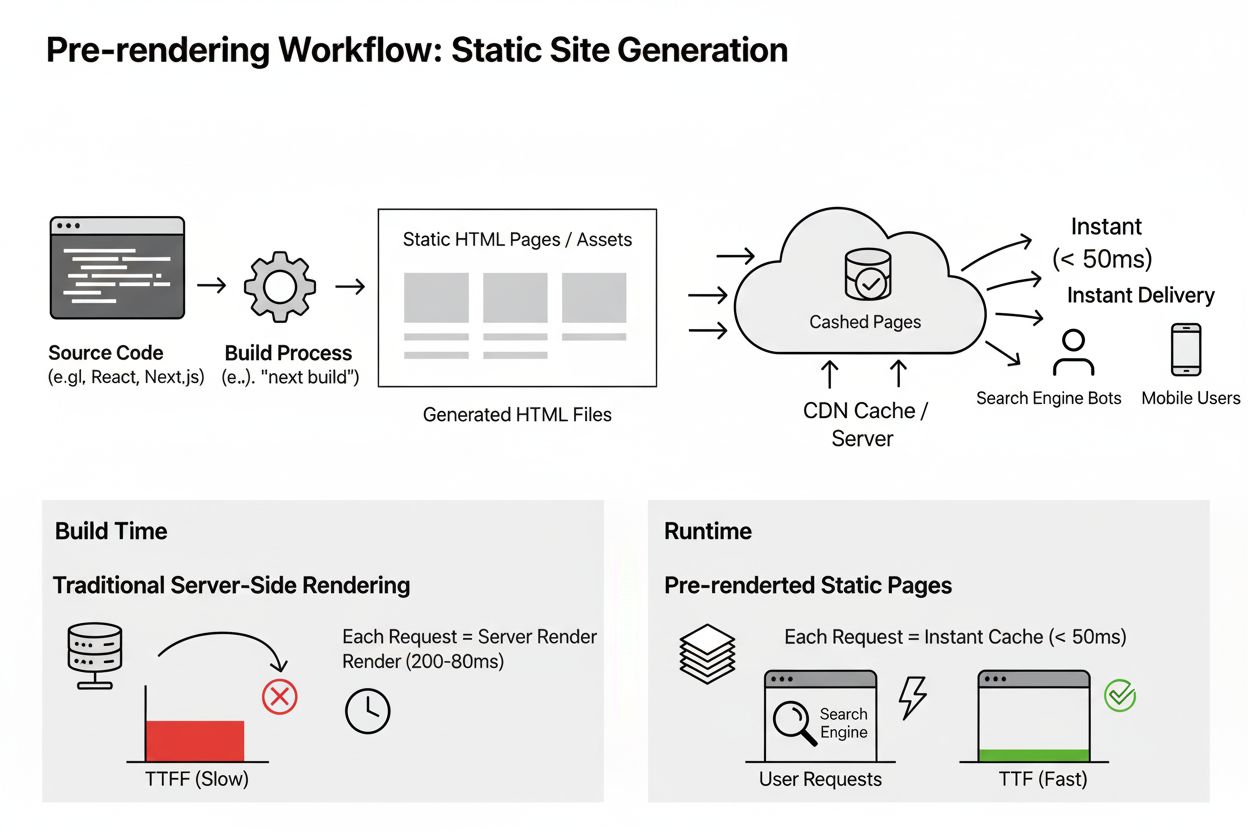
Pre-rendering generates static HTML pages at build time for instant delivery and improved SEO. Learn how this technique benefits AI indexing, performance, and s...