

How HTTPS Affects AI Search Trust: Complete Guide for 2025
Learn how HTTPS impacts AI search trust and visibility. Discover why SSL certificates matter for ChatGPT, Perplexity, and AI answer generators. Essential guide ...
9 min read

Safe Browsing is Google’s security service that identifies and warns users about unsafe websites, phishing pages, and malware-infected downloads in real-time. It protects over five billion devices daily by checking URLs against constantly updated threat lists and uses machine learning to detect previously unknown threats.
Safe Browsing is Google's security service that identifies and warns users about unsafe websites, phishing pages, and malware-infected downloads in real-time. It protects over five billion devices daily by checking URLs against constantly updated threat lists and uses machine learning to detect previously unknown threats.
Safe Browsing is Google’s comprehensive security service designed to identify and warn users about unsafe websites, phishing pages, malware-infected downloads, and other web-based threats in real-time. Launched in 2005 to combat phishing attacks, Safe Browsing has evolved into a sophisticated threat detection system that protects over five billion devices daily across multiple platforms and applications. The service works by checking URLs against constantly updated threat lists, analyzing page behavior for suspicious patterns, and using machine learning algorithms to detect previously unknown threats. Safe Browsing is integrated into Google Chrome, Gmail, Google Search, Android, and numerous third-party browsers and applications, making it one of the most widely deployed security systems globally.
Safe Browsing was initially developed by Google in 2005 specifically to address the growing problem of phishing attacks, which were becoming increasingly sophisticated and difficult for users to identify. Over the past two decades, the service has expanded significantly beyond its original scope to encompass a broader range of web-based threats including malware, unwanted software, social engineering attacks, and abusive content. The evolution of Safe Browsing reflects the changing threat landscape on the internet, where attackers continuously develop new techniques to compromise user devices and steal personal information. According to Google’s transparency reports, the company now identifies approximately 9,500 new malicious sites every single day, demonstrating the scale and velocity of threats that Safe Browsing must address. The service has become increasingly sophisticated through the integration of machine learning, artificial intelligence, and real-time threat intelligence, allowing it to detect threats that traditional signature-based detection methods would miss.
Safe Browsing operates through a multi-layered architecture that combines local threat lists with real-time cloud-based checking to provide comprehensive protection. The system uses URL canonicalization to standardize web addresses before checking them against threat databases, ensuring that variations of malicious URLs are properly identified. When a user attempts to visit a website or download a file, Chrome and other integrated browsers first check if the URL matches entries in a locally stored list of known safe sites. If the URL is not found in the local safe list, the browser sends an obfuscated portion of the URL through a privacy server to Google’s servers, which then checks it against comprehensive threat databases. This approach balances security with privacy by preventing Google from seeing the user’s full URL while still enabling real-time threat detection. The Safe Browsing API offers multiple implementation modes including Real-Time Mode for immediate threat checking, Local List Mode for offline protection using downloaded threat lists, and No-Storage Real-Time Mode for applications that prioritize privacy and cannot store local databases.
Safe Browsing protects users against multiple categories of web-based threats, each with specific detection mechanisms and warning protocols. Malware detection identifies software specifically designed to harm devices or steal user data, with Safe Browsing warning users before they download or execute potentially dangerous files. Phishing protection, which represents the largest threat category with nearly 75 times more phishing sites than malware sites on the internet, uses behavioral analysis and visual feature recognition to identify pages attempting to steal credentials or personal information. Unwanted Software detection, introduced in 2014, identifies programs disguised as helpful downloads that actually make unauthorized changes to browser settings or system configurations. Social Engineering protection warns users about deceptive sites and attacks designed to trick them into performing actions they normally would not, such as revealing passwords or financial information. Additionally, Safe Browsing identifies abusive websites and extensions, malicious and intrusive ads, and deceptive content that violates Google’s policies. The system maintains separate threat lists for each category, allowing for granular protection and enabling users to understand the specific nature of threats they encounter.
| Feature | Standard Protection | Enhanced Protection | No Protection |
|---|---|---|---|
| Local Threat List Checking | Yes | Yes | No |
| Real-Time URL Verification | Limited | Yes | No |
| File Download Scanning | Basic | Deep scanning available | No |
| Unknown Threat Detection | No | Yes | No |
| Data Sent to Google | Minimal | Additional security data | None |
| Protection Against Phishing | Yes | Yes, with real-time checks | No |
| Gmail Integration | Basic | Strengthened | No |
| Performance Impact | Minimal | Minimal | None |
| Recommended For | General users | High-risk users | Not recommended |
Safe Browsing leverages advanced machine learning and artificial intelligence technologies to detect threats that would be impossible to identify through traditional signature-based methods alone. The system analyzes thousands of features from websites including page structure, content patterns, user behavior signals, and historical threat data to identify malicious sites even before they appear on known threat lists. Machine learning models trained on millions of examples of phishing pages, malware distribution sites, and other malicious content can recognize subtle patterns that indicate a site is dangerous, enabling Safe Browsing to provide protection against zero-day threats that have never been seen before. The Enhanced Safe Browsing feature uses more sophisticated machine learning algorithms that analyze visual features of websites, download characteristics, and user interaction patterns to provide real-time protection. Google’s security research teams continuously update these models with new threat data, ensuring that Safe Browsing remains effective against evolving attack techniques. The integration of artificial intelligence also enables Safe Browsing to reduce false positives, ensuring that legitimate websites are not incorrectly flagged as dangerous while maintaining high detection rates for actual threats.
Safe Browsing is deeply integrated into Google’s ecosystem of products and services, providing consistent protection across multiple touchpoints where users might encounter threats. In Google Chrome, Safe Browsing displays warning messages before users visit dangerous sites or download harmful files, with the option to proceed at their own risk. Gmail uses Safe Browsing to identify dangerous links in email messages and warn users before they click on potentially malicious URLs. Google Search displays Safe Browsing warnings in search results when Google has determined that a site might be dangerous, helping users avoid threats before they even click through to a website. Android and Google Play use Safe Browsing infrastructure to scan applications for malware and protect users who install apps from outside official channels through the Verify Apps feature. Beyond Google’s own products, the Safe Browsing API is available for free to developers and organizations, enabling third-party browsers like Firefox, Safari, and Microsoft Edge to integrate Safe Browsing protections into their platforms. This widespread adoption means that Safe Browsing protections reach approximately half of the world’s online population, making it a critical component of global internet security infrastructure.
Safe Browsing implements multiple privacy-preserving mechanisms to protect user data while maintaining effective threat detection capabilities. With Standard Protection, Chrome hides user IP addresses by sending obfuscated portions of URLs through third-party privacy servers before forwarding them to Google, ensuring that neither Google nor the privacy server operator can associate specific URLs with individual users. The system uses hash prefix matching, where only a 4-byte hash prefix of the URL is sent to Google’s servers rather than the full URL, providing an additional layer of privacy protection. For users who require even stronger privacy guarantees, Google offers the Safe Browsing Oblivious HTTP Gateway API, which uses encrypted requests routed through non-colluding third parties to hide user IP addresses from Google entirely. With Enhanced Protection, users share additional security-related information including URLs visited, small samples of page content, download information, and system data, but this information is used only for security purposes and deleted after a short period. Users maintain full control over their protection level and can choose to disable Safe Browsing entirely, though Google strongly recommends maintaining at least standard protection to prevent exposure to malicious content.
Safe Browsing has evolved from a primarily local, list-based detection system to a hybrid architecture that emphasizes real-time cloud-based checking while maintaining offline protection capabilities. The introduction of the Global Cache in Safe Browsing v5 represents a significant architectural shift, allowing clients to download a list of likely-benign sites and perform check-by-default operations instead of the previous allow-by-default protocol. This means that if a URL is not found in the Global Cache of known safe sites, the client automatically performs a real-time check with Google’s servers to determine if the URL represents a threat. This approach dramatically improves protection against new threats, as the system can identify malicious sites within hours or minutes of their creation rather than waiting for them to be added to threat lists. The Real-Time Mode implementation allows applications to check URLs against Google’s threat databases immediately, providing the freshest possible threat intelligence. The Local List Mode enables offline protection by downloading and storing hashed versions of threat lists locally, allowing devices to check URLs even without internet connectivity. This hybrid approach balances the need for real-time protection against emerging threats with the practical requirements of offline functionality and reduced bandwidth consumption.
Safe Browsing has demonstrated exceptional effectiveness in protecting users from web-based threats, with Chrome’s Safe Browsing technology blocking 99.9% of phishing attempts according to independent testing. The scale of Safe Browsing’s impact is staggering, with the system identifying approximately 9,500 new malicious sites every day and protecting over five billion devices from accessing these threats. Research indicates that there are currently nearly 75 times as many phishing sites as malware sites on the internet, highlighting the critical importance of Safe Browsing’s phishing detection capabilities. The service has fundamentally changed the threat landscape by making it significantly more difficult for attackers to successfully compromise users through web-based attacks, as the vast majority of users now have access to Safe Browsing protections through their browsers or devices. The availability of the Safe Browsing API for free to developers and organizations has enabled widespread adoption of threat detection capabilities across the internet, creating a network effect where improved security for one platform benefits the entire ecosystem. However, the effectiveness of Safe Browsing depends on continuous updates and improvements, as attackers constantly develop new techniques to evade detection, requiring Google’s security teams to continuously refine machine learning models and threat detection algorithms.
Developers integrating Safe Browsing into their applications should carefully consider which implementation mode best suits their specific requirements and constraints. The urls.search method provides the simplest implementation approach, allowing developers to send actual URLs to Google’s servers for checking, but this method does not provide URL confidentiality and should only be used when privacy concerns are minimal. The hashes.search method is recommended for applications prioritizing URL confidentiality, as it requires developers to canonicalize URLs, create suffix and prefix expressions, and compute SHA256 hashes before sending requests to Google’s servers. Developers should implement appropriate caching mechanisms to reduce API calls and improve performance, as checking every URL in real-time could create significant latency. The Local List Mode is particularly valuable for applications that need to function offline or reduce dependency on cloud services, as it allows developers to download and maintain local copies of threat lists. Developers must ensure they comply with Safe Browsing’s Terms of Service, which require clear user warnings with specific language and attribution to Google when displaying threat warnings. Additionally, developers should implement appropriate rate limiting and error handling to ensure their applications gracefully handle API failures or rate limit responses from Google’s servers.
Safe Browsing continues to evolve in response to emerging threats and changing user expectations around privacy and security. The shift toward check-by-default protocols in Safe Browsing v5 represents a fundamental architectural change that prioritizes real-time protection over local list maintenance, reflecting the reality that threat velocity has increased to the point where traditional list-based approaches are insufficient. Future developments will likely focus on improving the balance between security and privacy, with technologies like the Oblivious HTTP Gateway potentially becoming standard rather than optional features. The integration of more sophisticated machine learning models trained on larger datasets of threat examples will enable Safe Browsing to detect increasingly subtle indicators of malicious intent, potentially identifying threats before they are widely deployed. As artificial intelligence and machine learning capabilities continue to advance, Safe Browsing will likely incorporate more advanced behavioral analysis and anomaly detection techniques to identify novel attack patterns. The expansion of Safe Browsing protections to emerging platforms and technologies, including progressive web applications, browser extensions, and potentially AI-powered applications, will extend the reach of threat detection beyond traditional web browsing. Additionally, as privacy regulations become more stringent globally, Safe Browsing will need to continue innovating in privacy-preserving threat detection techniques that provide strong security without requiring extensive data collection or user tracking.
Google Safe Browsing uses a combination of machine learning algorithms, real-time scanning, and crowdsourced data to identify threats. The system checks URLs against constantly updated threat lists, analyzes page behavior for suspicious patterns, and uses hash prefix matching to identify malicious content while maintaining user privacy. When Enhanced Safe Browsing is enabled, Google performs deeper scans of downloaded files and analyzes visual features of websites to detect previously unknown threats.
Standard Safe Browsing checks sites against Google's list of known unsafe resources and stores a local copy on your device for offline protection. Enhanced Safe Browsing provides real-time checks, sends additional security data to Google for analysis, performs deeper scans of downloads, and offers protection against previously unknown attacks. Enhanced mode provides stronger protection but shares more data with Google for security purposes.
Google Safe Browsing protects over five billion devices every day across multiple platforms including Chrome, Firefox, Safari, Edge, Gmail, Google Search, Android, and Google Play. This makes it one of the most widely deployed security systems globally, with approximately half of the world's online population benefiting from its protections.
Yes, Google provides the Safe Browsing API for free to developers and organizations who want to protect their users from online threats. The API offers multiple implementation modes including Real-Time Mode for immediate threat checking, Local List Mode for offline protection, and No-Storage Real-Time Mode for privacy-focused applications. Developers can use either the urls.search method for simple URL checks or the hashes.search method for enhanced privacy.
Safe Browsing protects against multiple threat categories including malware, phishing attacks, unwanted software, social engineering, abusive websites and extensions, malicious and intrusive ads, and deceptive sites. The system identifies approximately 9,500 new malicious sites daily and maintains threat lists that are updated in real-time to protect users from emerging threats.
Safe Browsing uses several privacy-preserving techniques including obfuscating URLs before sending them through privacy servers that hide user IP addresses, using hash prefix matching instead of sending full URLs, and employing the Oblivious HTTP Gateway API for additional privacy. Users can choose their protection level, and data is only used for security purposes and deleted after a short period.
Chrome's Safe Browsing technology blocks 99.9% of phishing attempts, making it highly effective at preventing users from accessing malicious content. According to Google's data, there are currently nearly 75 times as many phishing sites as malware sites on the internet, and Safe Browsing successfully identifies and warns users about the vast majority of these threats before they can cause harm.
Start tracking how AI chatbots mention your brand across ChatGPT, Perplexity, and other platforms. Get actionable insights to improve your AI presence.
Learn how HTTPS impacts AI search trust and visibility. Discover why SSL certificates matter for ChatGPT, Perplexity, and AI answer generators. Essential guide ...
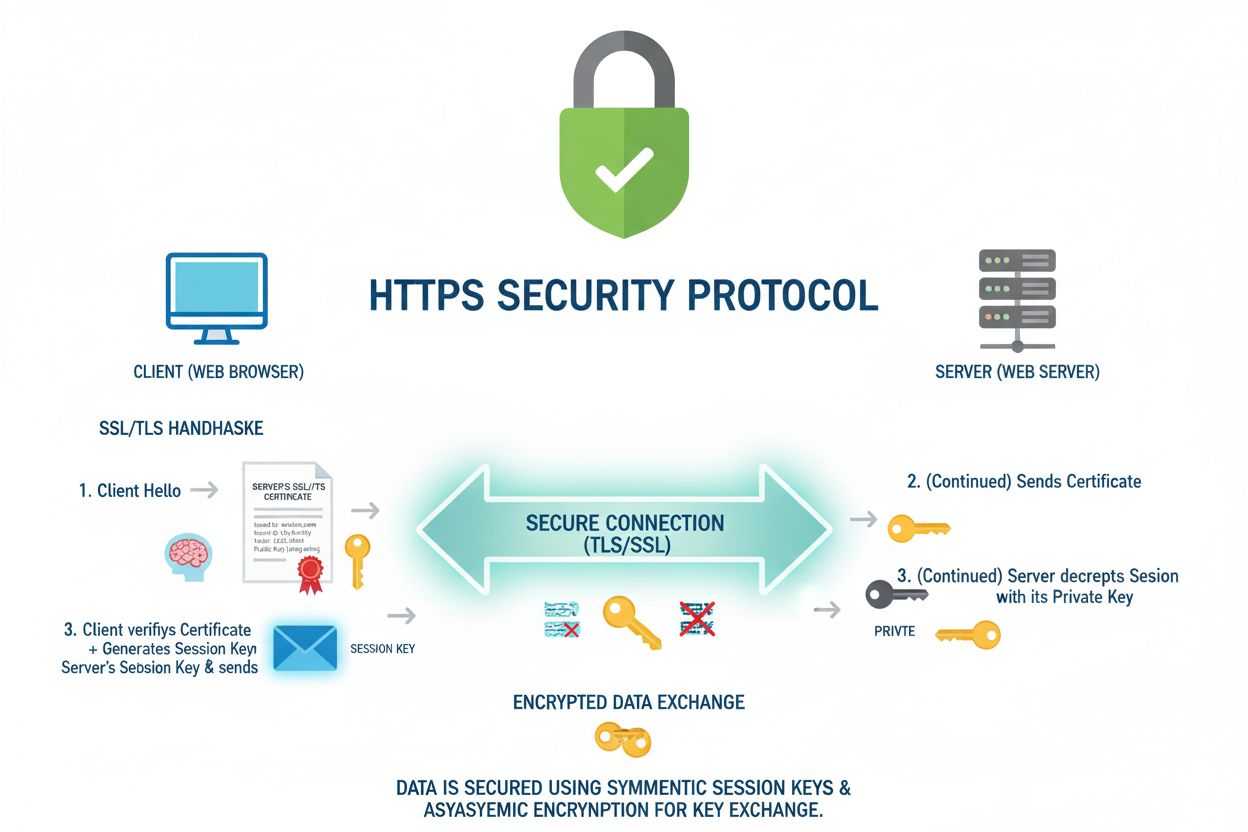
HTTPS is the secure protocol for web communication using SSL/TLS encryption. Learn how it protects data, differs from HTTP, and why it's essential for website s...

Learn how website security vulnerabilities affect SEO rankings. Understand malware, hacking, phishing, and their impact on search visibility, organic traffic, a...
Cookie Consent
We use cookies to enhance your browsing experience and analyze our traffic. See our privacy policy.