



Product Cards: Source-Controlled Commerce Blocks
Build product cards from a trusted SKU source so images, names, prices, availability, and CTAs stay accurate for buyers, search engines, and AI agents.
14 min read

A SKU (Stock Keeping Unit) is a unique alphanumeric code a retailer assigns to a specific product variant to track it through inventory, sales, and fulfillment. Unlike a UPC or barcode, a SKU is internal to the business and can encode attributes like size, color, or warehouse location. Every distinct sellable variation of a product gets its own SKU.
A SKU (Stock Keeping Unit) is a unique alphanumeric code a retailer assigns to a specific product variant to track it through inventory, sales, and fulfillment. Unlike a UPC or barcode, a SKU is internal to the business and can encode attributes like size, color, or warehouse location. Every distinct sellable variation of a product gets its own SKU.
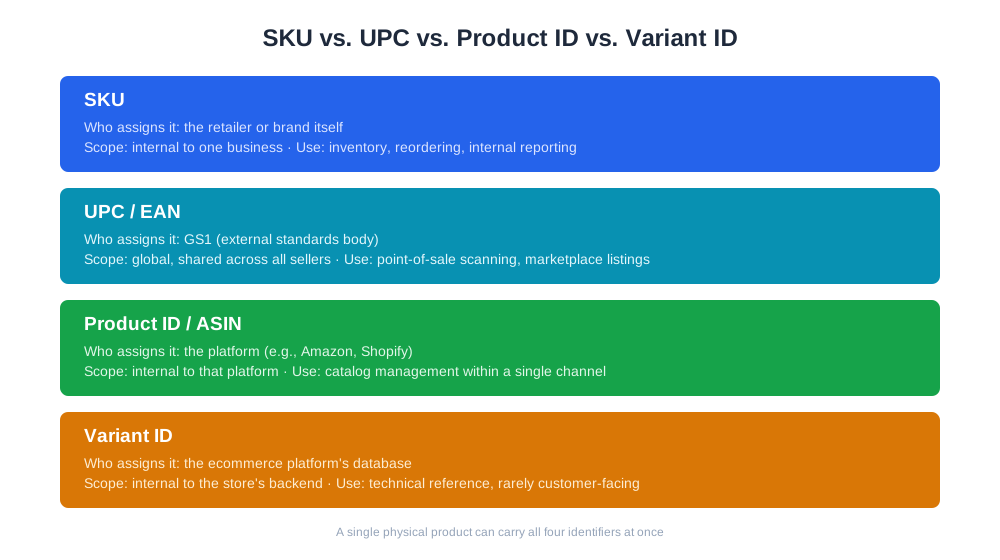
A SKU (Stock Keeping Unit) is a unique identifier a business creates to track a specific, sellable version of a product through inventory, ordering, and sales systems. If a hoodie comes in three colors and four sizes, that is twelve SKUs, because each combination needs to be counted, priced, and reordered independently. A SKU is not the same thing as a product name or a listing — one product can have many SKUs, one for every variant a customer can actually select and buy. SKUs are internal to the business that creates them, which distinguishes them from UPCs and EANs, which are standardized codes assigned by an external body (GS1) and shared across every retailer selling that exact item. A retailer, therefore, might create its own SKU for a product it buys wholesale, layering an internal code on top of the manufacturer’s barcode so its own warehouse and reporting systems can track it consistently.
There’s no universal standard for SKU format, which is both a strength and a common source of chaos. Most merchants build a short alphanumeric string that encodes the attributes that matter for warehouse and reporting purposes: category, product line, color, and size are common building blocks. A typical pattern looks like TSH-CREW-BLK-L for a black, large, crew-neck t-shirt, or MUG-CER-12OZ for a 12-ounce ceramic mug. Good SKU design tends to follow a few rules: keep codes a consistent length so they’re easy to scan visually and sort in a spreadsheet, avoid spaces and special characters that can break CSV imports or URL slugs, and make the code legible enough that a warehouse picker can recognize the product from the code alone, without looking it up. Some businesses instead use sequential numeric SKUs (10001, 10002…) generated automatically by their platform, trading readability for guaranteed uniqueness. Either approach works as long as it’s applied consistently — the failure mode is usually inconsistency: one product line coded by hand, another auto-generated, with no shared logic between them.

Track how AI chatbots mention your brand across ChatGPT, Perplexity, and other platforms.
SKU granularity is what makes inventory management possible at all. Aggregate stock counts at the “product” level hide the fact that one variant is sold out while another is overstocked — a store might show “T-shirt: in stock” while the size that’s actually selling has been backordered for two weeks. SKU-level tracking also underlies reorder point calculations, since a size-medium and a size-XL of the same shirt sell at different rates and need different reorder triggers. Beyond inventory, SKU is the natural join key for margin analysis: once a SKU has a landed cost (unit cost, inbound freight, packaging) attached to it, every order line item can be tied back to a true cost, and revenue and profitability can be reported at the exact same granularity a warehouse uses to manage stock. Without SKU-level cost data, profitability reporting has to fall back to order-level averages, which blur together high-margin and loss-leading products in a way that hides which SKUs are actually worth promoting.
| Identifier | Who assigns it | Scope | Typical use |
|---|---|---|---|
| SKU | The retailer or brand itself | Internal to one business | Inventory, reordering, internal reporting |
| UPC / EAN | GS1 (external standards body) | Global, shared across all sellers | Point-of-sale scanning, marketplace listings |
| Product ID / ASIN | The platform (e.g., Amazon, Shopify) | Internal to that platform | Catalog management within a single channel |
| Variant ID | The ecommerce platform’s database | Internal to the store’s backend | Technical reference, rarely customer-facing |
A single physical product can carry all four simultaneously: a manufacturer-assigned UPC, a retailer-assigned SKU, a marketplace-assigned ASIN, and a platform-assigned variant ID. Multi-channel sellers usually need a mapping table that reconciles these so a sale on Amazon and a sale through a Shopify storefront both roll up to the same underlying SKU for reporting.
Get the latest insights on AI mentions, brand monitoring, and optimization strategies.
As shopping increasingly happens through AI assistants like ChatGPT Shopping, Perplexity Shopping, and Amazon’s Rufus, product data feeds — the structured information that tells these systems what’s in stock, at what price, in what variant — depend on clean SKU-level data underneath. An AI shopping assistant recommending “the medium in blue” needs the underlying feed to resolve that to an actual SKU with real stock and price, not a generic product listing. Messy or duplicated SKUs are a common reason product feeds get rejected or misrepresented across these channels. On the analytics side, tools like AmICited’s eshop_get_products and eshop_list_product_costs reports work at SKU granularity specifically because that’s the level at which profitability questions actually get answered — “which variant of this product should I keep stocking” is a SKU-level question, not a product-name-level one. Reporting revenue and margin by SKU, rather than by product title, is what lets a merchant see that the black medium sells at 40% margin while the neon-green XXL, despite being the “same product,” is barely breaking even.
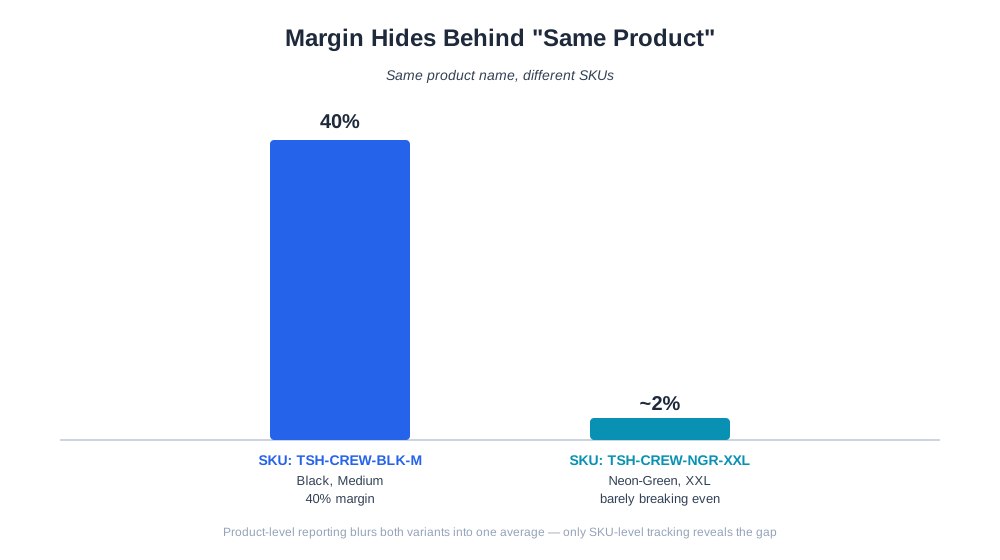
A frequent problem is treating “product” and “SKU” as interchangeable in reporting, which produces inventory counts and margin figures that look fine in aggregate but hide a badly-performing variant underneath a well-performing one. The fix is making sure every report — sales, stock, cost — is generated at SKU level and only rolled up to product level as a display convenience, not as the underlying calculation. Another common issue is SKU drift across sales channels: a merchant creates one SKU scheme in their POS system, a different one gets auto-generated by their ecommerce platform, and a third format shows up on a marketplace listing, leaving no reliable way to reconcile total sales for a given variant without manual matching. The standard fix is a mapping table maintained centrally, ideally inside the platform doing the reporting, rather than recreated ad hoc in a spreadsheet each time. A third mistake is reusing SKUs when a product is discontinued and replaced — a new formulation or redesign given the old SKU muddies historical trend data, making it look like the same product suddenly changed performance rather than showing a clean before/after split. Finally, many smaller merchants skip attaching a real landed cost to each SKU, defaulting instead to a flat estimated margin across the whole catalog; this makes SKU-level profitability reporting technically possible but practically misleading, since it can’t reveal the actual spread between the best and worst performing variants.
Start tracking how AI chatbots mention your brand across ChatGPT, Perplexity, and other platforms. Get actionable insights to improve your AI presence.
Build product cards from a trusted SKU source so images, names, prices, availability, and CTAs stay accurate for buyers, search engines, and AI agents.

Learn what assortment optimization is, how retailers analyze their product mix, and how to build a catalog that maximizes revenue and margin per SKU.
Learn what a stockout is, why it happens, how to measure stockout rate, and practical strategies ecommerce brands use to prevent running out of stock.
Cookie Consent
We use cookies to enhance your browsing experience and analyze our traffic. See our privacy policy.