

Canonical Strategy for AI Search: Optimize Your Content for AI Engines
Learn how canonical tags help your content rank in AI search engines. Discover canonical strategy best practices for ChatGPT, Perplexity, and Google AI Overview...
13 min read

A canonical URL is the preferred version of a webpage that search engines should crawl, index, and rank when multiple URLs contain identical or similar content. It is specified using the rel=“canonical” HTML tag to consolidate ranking signals and prevent duplicate content issues.
A canonical URL is the preferred version of a webpage that search engines should crawl, index, and rank when multiple URLs contain identical or similar content. It is specified using the rel="canonical" HTML tag to consolidate ranking signals and prevent duplicate content issues.
A canonical URL is the primary, preferred, or authoritative version of a webpage that you designate for search engines to crawl, index, and rank when multiple URLs contain identical or substantially similar content. The term “canonical” derives from the concept of establishing a single authoritative source among multiple variations. In the context of search engine optimization and web architecture, a canonical URL serves as the master copy that consolidates ranking signals, link equity, and indexing authority from all duplicate or near-duplicate versions of the same content. This distinction is critical because search engines like Google, Bing, and increasingly AI search systems like ChatGPT, Perplexity, and Claude treat each unique URL as a separate page, even when the content is identical. By explicitly specifying a canonical URL through the rel="canonical" HTML tag or other canonicalization methods, webmasters communicate their preference to search engines, ensuring that the correct version receives indexing priority and ranking benefits.
The concept of canonical URLs emerged as web technologies evolved and websites became increasingly complex. In the early days of the internet, most websites had straightforward URL structures with minimal duplication. However, as content management systems (CMS), e-commerce platforms, and dynamic web applications proliferated, the problem of unintentional duplicate content became widespread. According to research from major SEO platforms, over 30% of websites contain significant duplicate content issues, often without the webmaster’s knowledge. This duplication occurs through various mechanisms: URL parameters used for tracking and filtering, multiple protocol versions (HTTP vs HTTPS), domain variations (www vs non-www), mobile-specific URLs, session IDs, and pagination parameters. Google’s John Mueller has emphasized that canonical tags are essential for communicating site structure to search engines, particularly when websites generate multiple URLs for the same content. The rel="canonical" specification was formally introduced by Google, Yahoo, and Microsoft in 2009 as a standardized method for webmasters to indicate preferred URLs. Since then, canonical URLs have become a fundamental component of technical SEO, with over 78% of enterprise websites implementing canonical tags as part of their SEO strategy. The importance of canonical URLs has only increased with the rise of AI search engines and generative AI systems, which rely on proper canonicalization to attribute content correctly and avoid indexing duplicate versions.
The canonicalization process operates through a systematic workflow that search engines follow when encountering multiple URLs with identical or similar content. When a search engine crawler visits your website, it identifies pages that contain the same or nearly identical content across different URLs. The crawler then looks for canonicalization signals to determine which version should be treated as the primary page. These signals include the rel="canonical" HTML tag placed in the <head> section of the page, HTTP headers containing canonical information, 301 redirects, internal linking patterns, XML sitemap entries, and HTTPS preference signals. The most explicit and powerful signal is the rel="canonical" link element, which appears in the HTML source code as: <link rel="canonical" href="https://www.example.com/preferred-url" />. When search engines encounter this tag, they understand that the URL specified in the href attribute is the canonical version. The crawler then consolidates all ranking signals—including backlinks, internal links, user engagement metrics, and content authority—into the canonical URL. This consolidation process is crucial because it prevents the dilution of ranking power across multiple duplicate URLs. For example, if your product page is accessible through five different URLs due to tracking parameters and domain variations, and each URL receives backlinks independently, those links would normally compete against each other. With proper canonicalization, all link equity flows to the single canonical URL, significantly strengthening its ranking potential. Research indicates that proper canonicalization can improve search visibility by 15-30% for sites with significant duplicate content issues.
| Aspect | Canonical URL (rel=“canonical”) | 301 Redirect | Sitemap Inclusion | Robots.txt Blocking |
|---|---|---|---|---|
| Purpose | Indicates preferred version while keeping duplicates accessible | Permanently moves one URL to another | Suggests canonical URLs to search engines | Prevents crawling of duplicate pages |
| User Experience | Users can access both canonical and duplicate URLs | Users are automatically redirected to new URL | No direct user impact | Users cannot access blocked URLs |
| Search Engine Signal Strength | Strong signal; consolidates ranking power | Strongest signal; complete URL consolidation | Weak signal; requires Google to determine duplicates | Not recommended for canonicalization |
| Implementation Complexity | Moderate; requires HTML modification or CMS settings | Moderate; requires server configuration | Easy; add URLs to sitemap | Easy; add rules to robots.txt |
| Best Use Case | Duplicate content that must remain accessible | Deprecating old URLs or site migrations | Large sites with many canonical URLs | Blocking test/staging environments |
| Link Equity Consolidation | Yes; signals flow to canonical URL | Yes; complete transfer to new URL | Partial; depends on Google’s interpretation | No; blocks crawling entirely |
| Reversibility | Yes; can be changed or removed | Difficult; requires new redirect setup | Yes; can be updated in sitemap | Yes; can be removed from robots.txt |
| Impact on Crawl Budget | Moderate; reduces wasted crawl on duplicates | High; eliminates crawling of old URLs | Low; still crawls all URLs in sitemap | High; prevents crawling of duplicates |
Implementing canonical URLs requires understanding the specific methods available and choosing the approach that best fits your website’s architecture and content management system. The rel="canonical" link element is the most common implementation method, placed directly in the HTML <head> section of duplicate pages. This tag should point to the absolute URL (including the protocol and domain) of the canonical version. For example, on a product page accessible through multiple URLs, you would add: <link rel="canonical" href="https://www.example.com/products/blue-shoes" /> to all duplicate versions. The canonical URL should be a clean, accessible URL without tracking parameters, session IDs, or unnecessary query strings. Self-referential canonical tags—where a page’s canonical tag points to its own URL—are increasingly recommended as a best practice. This approach reinforces to search engines which URL is canonical, even for unique pages, and prevents accidental canonicalization issues. For non-HTML content such as PDFs, Word documents, or other file types, the rel="canonical" HTTP header method is more appropriate. This involves configuring your server to send a Link header in the HTTP response: Link: <https://www.example.com/document.pdf>; rel="canonical". This method is particularly useful for sites that publish content in multiple formats on different URLs. Additionally, 301 redirects serve as a strong canonicalization signal, particularly when you want to completely consolidate URLs and remove the old version from search results. When Page A is redirected with a 301 status code to Page B, search engines understand that Page B is the canonical version and transfer all ranking signals accordingly. XML sitemaps provide a weaker but still valuable canonicalization signal by listing only the canonical URLs you want indexed. Finally, HTTPS preference is an automatic signal where Google prefers HTTPS versions over HTTP equivalents, so ensuring your canonical URLs use HTTPS is important for proper canonicalization.
Duplicate content represents one of the most significant challenges in modern web management, affecting approximately 29% of all indexed web pages according to industry research. Duplicate content arises from numerous sources: e-commerce sites with product filters and sorting options that generate unique URLs for the same product, blogs with tag archives and category pages that display the same articles, content syndication across multiple domains, mobile-specific URLs alongside desktop versions, and accidental duplicates from staging environments or test pages. Without proper canonicalization, search engines must decide which version to index, often making choices that don’t align with your business objectives. This can result in keyword cannibalization, where multiple versions of the same content compete for the same search terms, diluting ranking power and reducing overall visibility. Canonical URLs solve this problem by explicitly communicating your preference to search engines. When you specify a canonical URL, search engines understand that all duplicate versions should be treated as variations of a single piece of content, with ranking signals consolidated into the canonical version. This consolidation is particularly important for link equity distribution. If your website receives backlinks pointing to different URL variations of the same content, those links would normally be counted separately, splitting the ranking power. With canonical tags, all link equity flows to the canonical URL, creating a stronger ranking signal. For example, if your homepage is accessible through https://www.example.com, https://example.com, http://www.example.com, and http://example.com, and each version receives backlinks independently, canonical tags ensure all link authority consolidates into your preferred version. This consolidation can result in 15-30% improvement in search rankings for pages with significant duplicate content issues.
E-commerce websites face particularly complex canonicalization challenges due to the nature of product pages and filtering systems. A single product might be accessible through multiple URLs: the direct product URL, URLs with color or size filters applied, URLs with sorting parameters, URLs with tracking codes for marketing campaigns, and mobile-specific URLs. Without proper canonicalization, search engines might index dozens of variations of the same product page, wasting crawl budget and diluting ranking power. E-commerce sites implementing proper canonicalization report 20-40% improvements in organic traffic by consolidating ranking signals. The canonical URL for a product should typically be the clean product URL without any parameters: https://www.example.com/products/blue-running-shoes. All filtered, sorted, or tracked variations should include a canonical tag pointing to this clean URL. Content management systems like Magento, Shopify, and WooCommerce often provide built-in canonicalization features that automatically generate appropriate canonical tags. However, these systems sometimes require configuration to ensure they’re functioning correctly. For Shopify stores, canonical tags are automatically added to product and collection pages, but custom implementations may require manual configuration. Magento provides settings to enable canonical tags for products and categories, though category canonicalization requires careful consideration to avoid unintended consolidation. WordPress sites using SEO plugins like Yoast SEO or Rank Math can automatically generate canonical tags, with options to customize them on a per-page basis. The key principle for e-commerce canonicalization is ensuring that all product variations—whether created through filters, sorting, or tracking parameters—point to a single canonical product URL, allowing search engines to properly index and rank the product while consolidating all ranking signals.
The emergence of AI search engines and generative AI systems has introduced new dimensions to canonical URL importance. Platforms like ChatGPT, Perplexity, Claude, and Google AI Overviews rely on web crawling and indexing to gather information for generating responses. When these AI systems encounter multiple URLs with identical content, proper canonicalization helps them identify the authoritative source to cite in their responses. Over 60% of enterprises are now concerned about how their content appears in AI-generated responses, making canonical URL management increasingly critical for brand visibility and attribution. When an AI system crawls your website and finds multiple URLs with the same content, it must decide which version to cite as the source. Without canonical tags, the AI system might cite a non-canonical version, potentially directing users to a less optimal page or failing to properly attribute your brand. With proper canonicalization, you ensure that AI systems cite your preferred URL, improving user experience and maintaining consistent brand attribution. This is particularly important for AI citation tracking and monitoring, where platforms like AmICited help organizations track how their content appears in AI-generated responses. By implementing canonical tags correctly, you increase the likelihood that your preferred URL appears in AI citations, improving visibility in the AI-powered search landscape. Additionally, canonical URLs help AI systems understand your site structure and content hierarchy, enabling more accurate and relevant citations. As AI search continues to grow—with Perplexity reporting over 500 million monthly active users and ChatGPT’s search feature expanding—ensuring proper canonicalization becomes essential for maintaining visibility and attribution in AI-generated content.
Implementing canonical URLs effectively requires adherence to established best practices that ensure search engines and AI systems properly recognize and respect your canonicalization signals. Use absolute URLs rather than relative URLs in your canonical tags, always including the full protocol and domain: <link rel="canonical" href="https://www.example.com/page" /> rather than <link rel="canonical" href="/page" />. Relative URLs can cause problems, particularly if your testing environment is accidentally crawled or if URL structures change. Ensure consistency across all canonicalization signals—your canonical tags, internal links, XML sitemap entries, and 301 redirects should all point to the same URL. Conflicting signals confuse search engines and reduce the effectiveness of canonicalization. Avoid canonical tag chains, where Page A points to Page B, and Page B points to Page C. Search engines may not follow these chains correctly, resulting in improper canonicalization. Never point canonical tags to redirected URLs or to pages blocked by robots.txt or marked with noindex. This creates conflicting signals that search engines struggle to interpret. Implement self-referential canonical tags on all pages, including your canonical pages themselves. This reinforces to search engines which URL is canonical and prevents accidental canonicalization issues. Use HTTPS in your canonical URLs if your site supports HTTPS, as search engines prefer HTTPS versions. Maintain consistent URL formatting regarding trailing slashes, www prefixes, and capitalization. For example, decide whether your canonical URLs will include trailing slashes (https://example.com/page/) or not (https://example.com/page), and apply this consistently across your site. Regularly audit your canonical tags using tools like Google Search Console, Moz Pro Site Crawl, or Semrush Site Audit to identify missing, broken, or conflicting canonical tags. Test your implementation using browser developer tools or SEO tools to verify that canonical tags are properly placed in the HTML head section and pointing to the correct URLs.
Despite the importance of canonical URLs, many websites implement them incorrectly, undermining their effectiveness and potentially harming SEO performance. One of the most common mistakes is pointing canonical tags to non-existent or broken URLs. This creates a situation where search engines receive conflicting signals—the canonical tag suggests one URL should be indexed, but that URL returns a 404 error or is blocked from indexing. Always verify that your canonical URLs are accessible, return a 200 status code, and are not blocked by robots.txt or marked with noindex. Another frequent error is using canonical tags for non-duplicate content. Canonical tags should only be used for duplicate or near-identical content. Some SEOs mistakenly attempt to use canonical tags to consolidate ranking power from dissimilar pages, such as directing authority from out-of-stock product pages to category pages. Google explicitly advises against this practice and is likely to ignore such canonical tags. Canonical tag chains represent another significant mistake, where Page A points to Page B, Page B points to Page C, and so forth. Search engines may not follow these chains correctly, resulting in improper canonicalization. Always ensure that canonical tags point directly to the final canonical URL. Conflicting canonicalization signals occur when different canonicalization methods point to different URLs. For example, if your canonical tag points to one URL but your 301 redirect points to another, search engines receive conflicting information and may ignore both signals. Ensure all canonicalization methods—canonical tags, redirects, sitemaps, and internal links—point to the same URL. Placing canonical tags outside the HTML head section prevents search engines from finding them. Canonical tags must be in the <head> section of your HTML. If they’re placed in the body or footer, search engines may not recognize them. Using relative URLs instead of absolute URLs can cause problems, particularly if your site structure changes or if test environments are accidentally crawled. Always use complete URLs including protocol and domain. Forgetting self-referential canonical tags on your canonical pages themselves can lead to accidental canonicalization issues. Each page, including canonical pages, should have a canonical tag pointing to its own URL. Mixing canonical tags with hreflang tags incorrectly on multilingual sites can create confusion. Each language version should have its own canonical tag pointing to itself, with hreflang tags indicating all available language versions.
Crawl budget—the number of pages search engines will crawl on your website within a given timeframe—is a finite resource, particularly for large websites. Websites with significant duplicate content can waste 20-40% of their crawl budget on pages that don’t need to be indexed. Canonical URLs help optimize crawl budget by signaling to search engines which pages are worth crawling and indexing. When you implement canonical tags correctly, search engines understand that duplicate pages don’t need to be crawled as thoroughly, allowing them to allocate more crawl budget to unique, valuable content. This is particularly important for large e-commerce sites with thousands of product variations, news sites with multiple article formats, and content platforms with extensive tag and category archives. By consolidating duplicate URLs through canonicalization, you ensure that search engines spend their crawl budget on pages that matter most to your business. This can result in faster indexing of new content, more frequent crawling of important pages, and improved overall search visibility. Additionally, proper canonicalization reduces the number of URLs that appear in your Google Search Console, making it easier to monitor and manage your site’s search performance. For sites with limited crawl budgets—particularly smaller websites or those in competitive niches—optimizing crawl budget through canonicalization can have a measurable impact on search rankings and visibility.
As the search landscape continues to evolve with the rise of AI-powered search engines and generative AI systems, the role of canonical URLs is becoming increasingly important. The market for AI search is projected to grow from $5.2 billion in 2024 to over $15 billion by 2030, with platforms like Perplexity, ChatGPT, and Claude capturing significant market share. These AI systems rely on web crawling and content indexing similar to traditional search engines, making canonical URLs essential for proper content attribution and visibility. The future of canonical URLs will likely involve greater integration with AI citation tracking and monitoring systems. Platforms like AmICited are pioneering the ability to track how content appears in AI-generated responses, and canonical URLs will play a crucial role in ensuring proper attribution. As AI systems become more sophisticated, they may develop better methods for identifying canonical URLs and consolidating information from multiple sources. Additionally, the emergence of federated search and multi-source AI systems that combine results from multiple search engines and data sources will make canonical URLs even more important for ensuring consistent content representation across platforms. Organizations that implement canonical URLs correctly today will be better positioned to maintain visibility and attribution as AI search continues to evolve. Furthermore, as privacy regulations and content attribution requirements become more stringent, canonical URLs may become a standard requirement for content licensing and syndication agreements. The integration of canonical URLs with structured data markup and semantic web technologies may also enable more sophisticated content consolidation and attribution mechanisms. Ultimately, canonical URLs represent a foundational element of web architecture that will remain relevant and important regardless of how search technology evolves.
+++
A canonical URL uses the rel="canonical" tag to indicate a preferred version while keeping both URLs accessible to users. A 301 redirect permanently moves one URL to another, automatically sending both users and search engines to the new location. Use canonical tags when you need duplicate content to remain accessible, and 301 redirects when you want to completely consolidate URLs and remove the old version from search results.
Yes, cross-domain canonical tags are supported by Google and other search engines. This is useful when you syndicate content across multiple websites or manage related domains. However, use cross-domain canonicals strategically, as they concentrate all ranking power on a single domain, potentially limiting visibility on other properties. Ensure your business strategy aligns with this approach before implementing cross-domain canonicalization.
Without canonical tags, search engines may struggle to identify which version of duplicate content should be indexed and ranked. This can result in split ranking signals across multiple URLs, wasted crawl budget on duplicate pages, and potentially lower search visibility. Google will attempt to determine the canonical version automatically, but it may not choose the URL you prefer, leading to suboptimal SEO performance and inconsistent search results.
While not strictly required, implementing self-referential canonical tags on all pages is considered a best practice. This reinforces to search engines which URL is canonical, even for unique pages. Self-referential canonicals are particularly important for homepages and frequently accessed pages that might be accessed through multiple URL variations (with/without www, trailing slashes, HTTP vs HTTPS).
Canonical URLs help AI search engines understand your preferred content version, similar to traditional search engines. When AI systems crawl and index your content for citation in responses, canonical tags signal which URL should be attributed as the authoritative source. This is increasingly important for AI citation tracking and ensuring your domain receives proper attribution in AI-generated responses across platforms like ChatGPT, Perplexity, Claude, and Google AI Overviews.
Yes, the rel="canonical" HTTP header is supported by search engines for non-HTML content like PDFs and documents. This method is useful when you cannot modify the HTML head section directly. However, HTML canonical tags are generally preferred for web pages as they are more reliable and easier to implement. For non-HTML files, using HTTP headers provides an effective alternative to specify canonical URLs.
A self-referential canonical tag is when a page's canonical tag points to its own URL. For example, a page at https://example.com/blog/article would have a canonical tag pointing to https://example.com/blog/article. This practice reinforces to search engines that the page is its own canonical version and helps prevent accidental canonicalization issues, especially on sites with complex URL structures or dynamic content generation.
You can audit canonical tags using several methods: view the page source code and search for "canonical" in the HTML head section, use SEO tools like Moz Pro Site Crawl or Semrush Site Audit to scan your entire site for canonical issues, check Google Search Console's URL Inspection tool to see which canonical URL Google recognizes, or use browser extensions like MozBar to quickly view canonical information. Regular audits help identify missing, broken, or conflicting canonical tags.
Start tracking how AI chatbots mention your brand across ChatGPT, Perplexity, and other platforms. Get actionable insights to improve your AI presence.
Learn how canonical tags help your content rank in AI search engines. Discover canonical strategy best practices for ChatGPT, Perplexity, and Google AI Overview...
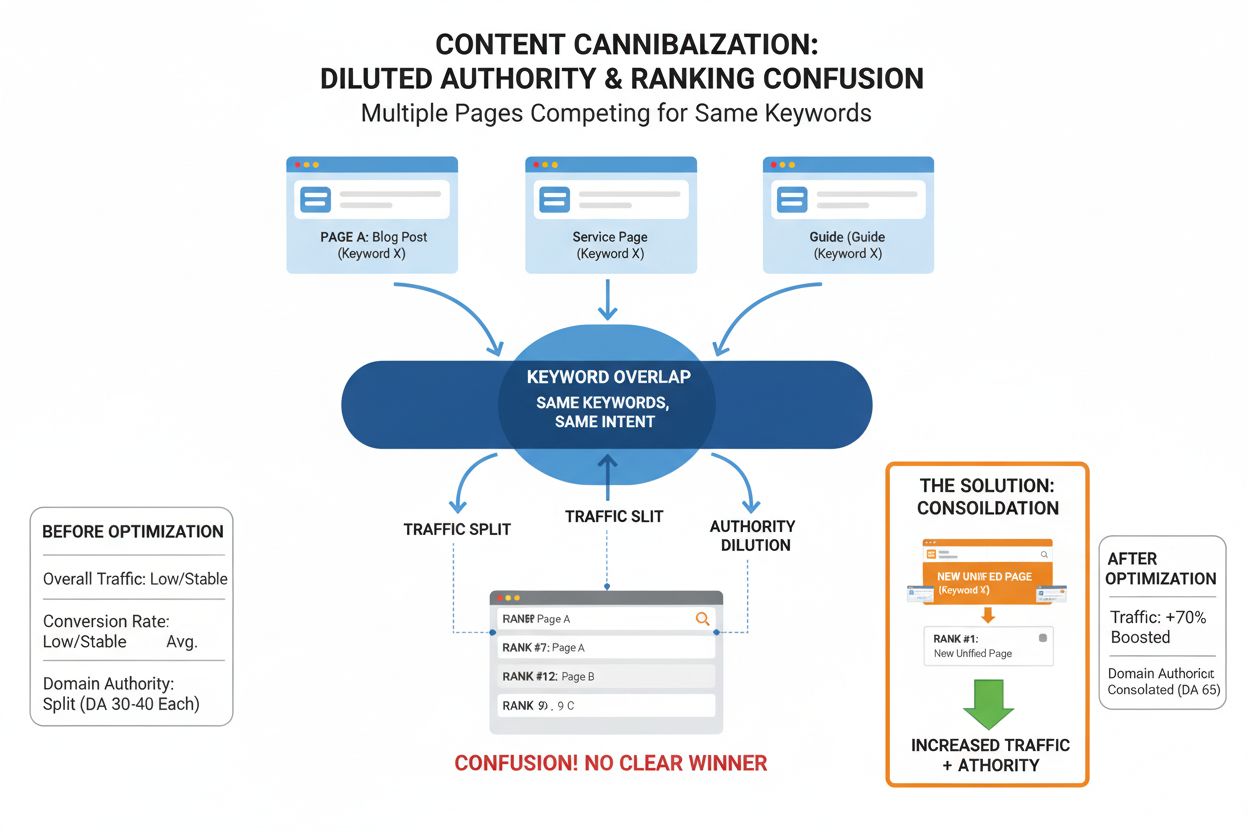
Content cannibalization is when multiple website pages compete for the same keywords, diluting authority and rankings. Learn to identify and fix this critical S...
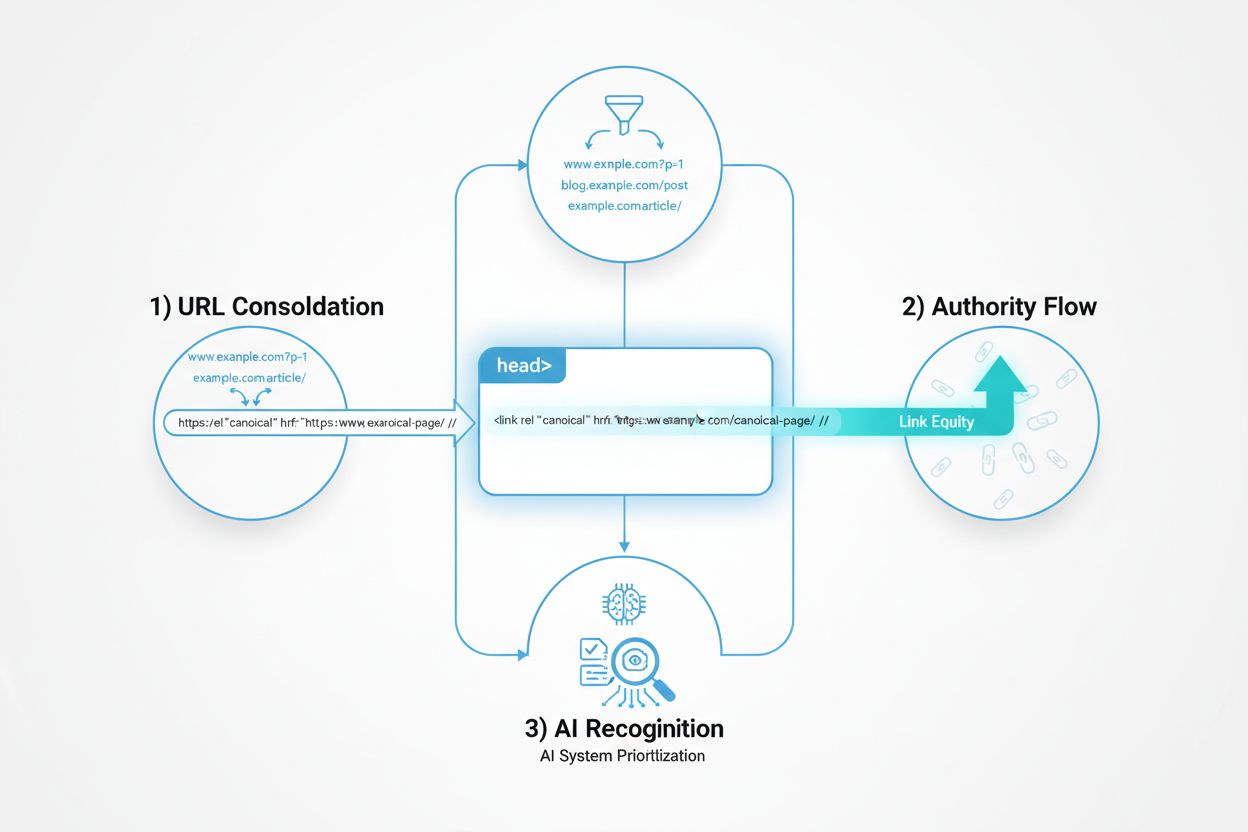
Learn how canonical URLs prevent duplicate content problems in AI search systems. Discover best practices for implementing canonicals to improve AI visibility a...
Cookie Consent
We use cookies to enhance your browsing experience and analyze our traffic. See our privacy policy.