

Google Analytics
Google Analytics is Google's free web analytics platform tracking website traffic, user behavior, and conversions. Learn how it works, key metrics, GA4 features...
12 min read
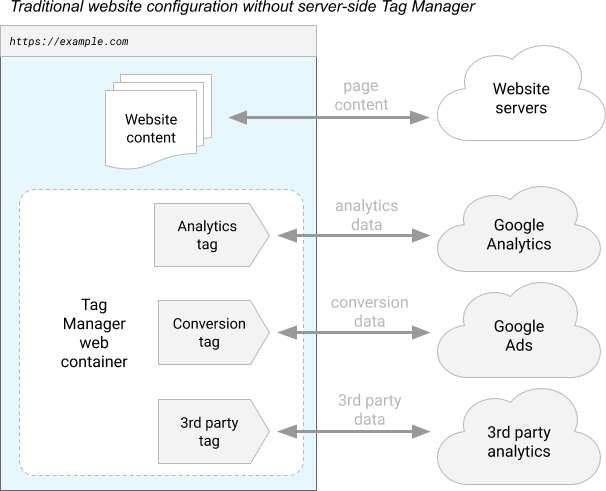
Google Tag Manager (GTM) is a free tag management system that allows users to configure, deploy, and manage marketing and analytics tags on websites and mobile applications without modifying source code. It serves as a centralized platform for controlling how data flows from digital properties to third-party tools and analytics platforms.
Google Tag Manager (GTM) is a free tag management system that allows users to configure, deploy, and manage marketing and analytics tags on websites and mobile applications without modifying source code. It serves as a centralized platform for controlling how data flows from digital properties to third-party tools and analytics platforms.
Google Tag Manager (GTM) is a free, web-based tag management system developed by Google that enables marketers, analysts, and developers to configure, deploy, and manage marketing and analytics tags on websites and mobile applications without requiring direct modifications to source code. Launched in 2012, GTM has become the industry-leading tag management platform, used by approximately 47.1% of all websites globally and accounting for 99.7% of all websites using any tag manager. The platform serves as a centralized hub that simplifies the process of implementing tracking codes, conversion pixels, analytics scripts, and advertising tags across digital properties. By eliminating the need for developers to manually edit website code for each new tag deployment, GTM dramatically reduces implementation time, minimizes errors, and enables rapid iteration on marketing and analytics strategies.
The evolution of tag management systems reflects the growing complexity of modern digital marketing ecosystems. Before GTM’s introduction, organizations had to manually embed tracking code directly into website HTML, a process that required developer involvement for every change and created significant technical debt. This approach was error-prone, time-consuming, and prevented marketing teams from acting independently. Google Tag Manager revolutionized this workflow by introducing a user-friendly interface that abstracts away the technical complexity of tag implementation. The platform’s adoption accelerated dramatically following its launch, with enterprises recognizing the operational efficiency gains and reduced dependency on IT resources. Today, over 78% of enterprises use AI-driven content monitoring tools and tag management systems to track user behavior, measure campaign performance, and ensure data governance compliance. The rise of privacy regulations like GDPR and CCPA further elevated GTM’s importance, as the platform provides built-in consent management features that help organizations maintain compliance while collecting necessary analytics data. GTM’s integration with Google’s broader ecosystem—including Google Analytics 4, Google Ads, and Google Marketing Platform—has solidified its position as the default choice for organizations seeking unified data collection and marketing measurement infrastructure.
Google Tag Manager operates on a container-based architecture that organizes all tracking elements into logical, manageable units. A container is the fundamental organizational structure within GTM, serving as a collection of tags, triggers, variables, and configurations installed on a specific website or mobile application. Each container is assigned a unique container ID (format: GTM-XXXXXX for web containers) that is embedded into the website through a small snippet of code. This snippet, typically placed in the <head> section of HTML pages, establishes communication between the website and GTM’s servers, enabling all subsequent tag management operations without additional code modifications.
The four primary components that comprise a GTM container work in concert to create a flexible, event-driven tracking system. Tags are snippets of JavaScript code or pixels that send data to third-party platforms such as Google Analytics, Google Ads, Facebook Pixel, or custom endpoints. Rather than embedding these tags directly in website code, GTM manages their deployment centrally. Triggers are conditional rules that determine when tags should fire, based on specific user actions or page conditions. For example, a trigger might fire a conversion tag when a user completes a purchase, clicks a specific button, or reaches a particular page. Variables are named containers that store dynamic data values used throughout the container, such as page URLs, user IDs, product names, or custom event parameters. The Data Layer is a JavaScript object that communicates event and user information from the website to GTM, serving as the primary data source for triggers and variables.
This architecture enables marketers to implement complex tracking logic without touching website code. When a user visits a website with GTM installed, the container continuously monitors for events defined by triggers. When a trigger’s conditions are met, the associated tags fire automatically, sending data to their configured destinations. This event-driven model provides unprecedented flexibility, allowing organizations to add, modify, or remove tracking without developer intervention.
| Feature | Google Tag Manager | Adobe Experience Platform Tags | Tealium IQ | Piwik PRO Tag Manager |
|---|---|---|---|---|
| Pricing Model | Free (standard), Enterprise (paid) | Part of Adobe Experience Cloud (paid) | Enterprise (paid) | Freemium and paid plans |
| Ease of Use | User-friendly, intuitive interface | Steeper learning curve, advanced features | Moderate complexity | Balanced approach |
| Primary Ecosystem | Google products (Analytics, Ads) | Adobe Experience Cloud | Vendor-agnostic | Privacy-focused, vendor-agnostic |
| Data Residency Options | Limited (server-side only) | Multiple regions available | Multiple regions available | Cloud, private cloud, on-premises |
| Consent Management | Consent mode feature | Built-in consent management | Built-in consent management | Built-in consent manager |
| Server-Side Tagging | Available (Google Cloud Platform) | Available (Event Forwarding) | Available | Available |
| Mobile App Support | Yes (Android & iOS) | Yes | Yes | Yes |
| Community Support | Extensive | Growing | Strong enterprise support | Growing community |
| Security Features | Tag Blocking, user permissions, ISO 27001 | CSP, SRI, granular access control | Advanced security controls | Privacy-by-design, GDPR-ready |
| Custom Templates | Community Template Gallery | Supported | Supported | Supported |
The operational flow of Google Tag Manager begins with the installation of a container snippet on every page of a website or within a mobile application. This snippet, provided by GTM during container creation, contains two key pieces of code: a synchronous script that initializes GTM as early as possible in the page load sequence, and an asynchronous iframe that loads the actual GTM container without blocking page rendering. This dual-approach ensures that GTM is ready to capture events while minimizing impact on page load performance.
Once installed, GTM establishes a persistent connection to Google’s servers, allowing real-time updates to tag configurations without requiring website redeployment. When users interact with the website—clicking buttons, submitting forms, viewing pages, or triggering custom events—these actions are captured by the Data Layer, a JavaScript object that developers populate with relevant event information. The Data Layer serves as the communication bridge between the website and GTM, containing structured data about user actions, page properties, and business events. GTM continuously evaluates this data against defined triggers, which are conditional statements that specify when tags should execute. When a trigger’s conditions are satisfied, GTM fires the associated tags, which then send data to their configured destinations—whether Google Analytics, advertising platforms, or custom webhooks.
The power of this architecture lies in its separation of concerns. Website developers focus on populating the Data Layer with accurate event information, while marketers use the GTM interface to define how that data should be processed and distributed. This separation enables rapid iteration: marketers can create new tags, modify triggers, or adjust variable mappings without requiring code deployments. Changes are published through GTM’s versioning system, which maintains a complete history of all container configurations and allows rollback to previous versions if issues arise.
Google Tag Manager delivers substantial operational and financial benefits to organizations of all sizes. The most immediate advantage is reduced time-to-market for analytics and marketing initiatives. Without GTM, implementing a new tracking requirement might require weeks of developer time, testing, and deployment cycles. With GTM, the same task can often be completed in hours by marketing team members using the web interface. This acceleration enables organizations to respond quickly to business needs, test new marketing channels, and iterate on measurement strategies without IT bottlenecks.
The second major benefit is cost reduction through decreased developer dependency. By enabling non-technical marketers to manage tags independently, organizations reduce the burden on engineering teams and eliminate the need for specialized contractors. GTM’s free tier makes it accessible to businesses of all sizes, from startups to enterprises, democratizing access to professional-grade tag management. For enterprises, GTM 360 (the paid version) provides additional features like dedicated support, advanced user permissions, and enhanced security controls, justifying the investment through improved governance and compliance capabilities.
Data accuracy and consistency represent another critical benefit. Centralized tag management through GTM ensures that all tracking implementations follow consistent standards and naming conventions. The platform’s built-in debugging tools, preview mode, and tag assistant features help identify and resolve tracking errors before they impact production data. This consistency is particularly important for organizations operating across multiple websites, mobile apps, or international markets, where maintaining uniform measurement standards is essential for reliable reporting and analysis.
Compliance and governance have become increasingly important as privacy regulations proliferate. GTM’s consent mode feature allows organizations to manage tag firing based on user consent preferences, enabling compliance with GDPR, CCPA, and other privacy frameworks. The platform supports granular user permissions, allowing organizations to define who can create, modify, or publish tags, ensuring appropriate oversight and reducing the risk of unauthorized tracking implementations. Audit trails and version history provide transparency into all changes, supporting compliance audits and regulatory investigations.
Google Tag Manager integrates seamlessly with Google’s ecosystem of marketing and analytics products, providing particular advantages for organizations already invested in Google solutions. Google Analytics 4 integration is particularly deep, with GTM providing pre-built GA4 tags and templates that simplify implementation. The platform automatically handles the complex configuration required for GA4 event tracking, allowing users to create GA4 tags through a simple interface without understanding the underlying event schema. This integration has accelerated GA4 adoption, as GTM eliminates much of the technical complexity that previously deterred organizations from upgrading from Universal Analytics.
Google Ads integration enables sophisticated conversion tracking and remarketing implementations. GTM allows marketers to create conversion tags that track purchases, form submissions, or other valuable actions, then automatically send this data to Google Ads for campaign optimization. The platform supports Google Ads’ enhanced conversion feature, which enables first-party data integration for improved attribution and privacy-compliant measurement. Remarketing tag implementation through GTM is similarly streamlined, allowing marketers to create audience segments based on user behavior and automatically deploy remarketing pixels across Google’s display network.
Third-party integrations extend GTM’s utility beyond Google’s ecosystem. The Community Template Gallery provides pre-built tag templates for hundreds of third-party platforms, including Facebook, LinkedIn, Salesforce, Segment, and specialized tools for e-commerce, customer service, and marketing automation. These templates abstract away platform-specific implementation details, allowing users to deploy complex integrations through simple configuration interfaces. For platforms without pre-built templates, GTM’s custom HTML tag feature enables developers to implement any tracking requirement through custom JavaScript code.
Server-side tagging represents a significant evolution in GTM’s capabilities, addressing performance and privacy concerns associated with client-side tag proliferation. By moving tag processing to a server under the organization’s control (typically deployed on Google Cloud Platform), server-side GTM reduces the number of requests made from users’ browsers to third-party servers. This approach improves page load performance, reduces data exposure to third-party vendors, and provides greater control over data transformation and routing. Server-side GTM uses clients (adapters that transform incoming data into events) and tags (which process events and send data to destinations), maintaining the familiar GTM model while operating in a server environment.
Successful Google Tag Manager implementation requires careful planning and adherence to established best practices. The first critical step is Data Layer design, which involves defining the structure and content of the JavaScript object that communicates event information to GTM. A well-designed Data Layer includes consistent naming conventions, clear documentation, and comprehensive event coverage. Organizations should define a standard set of events (page views, clicks, form submissions, purchases) and associated data attributes (user IDs, product information, transaction values) that align with business objectives and analytics requirements.
Naming conventions and governance are essential for maintaining GTM containers as they grow in complexity. Organizations should establish clear naming standards for tags, triggers, and variables, making it easy for team members to understand the purpose and scope of each element. Implementing a tagging governance framework—documented policies and procedures for tag creation, testing, and deployment—prevents duplicate tags, ensures consistency, and reduces errors. Many organizations use spreadsheets or dedicated governance tools to maintain a comprehensive inventory of all tags, their purposes, and their deployment status.
Testing and validation must occur before publishing any changes to production containers. GTM’s preview mode allows users to test tag configurations in a safe environment before publishing, viewing real-time event data and tag firing behavior. The Tag Assistant browser extension provides additional debugging capabilities, displaying which tags are firing on each page and identifying potential issues. Organizations should establish a formal testing process that includes functional testing (verifying tags fire correctly), data validation (confirming data accuracy), and performance testing (ensuring tags don’t negatively impact page load times).
Version control and rollback procedures protect against configuration errors. GTM automatically maintains version history, allowing users to view previous configurations and revert to earlier versions if problems arise. Organizations should establish clear procedures for publishing changes, including approval workflows, change documentation, and rollback plans. For critical implementations, many organizations use staging environments to test changes before deploying to production.
Key implementation best practices include:
While Google Tag Manager provides powerful capabilities, it also introduces security considerations that organizations must carefully manage. The platform’s flexibility—particularly the ability to deploy custom HTML tags—creates potential attack vectors if not properly controlled. Malicious tag injection represents a significant risk, where attackers with GTM access could deploy tags that steal user data, inject malware, or redirect traffic to phishing sites. The most notorious example is Magecart attacks, where attackers compromised GTM containers to inject credit card skimming code that captured payment information from e-commerce websites.
Google provides several security features to mitigate these risks. Tag Blocking allows administrators to define specific tags or tag types that cannot be deployed, preventing unauthorized implementations. User permissions enable granular access control, allowing organizations to restrict who can create, modify, or publish tags. Two-factor authentication adds an additional layer of protection for GTM account access. However, these features are only effective if properly configured and actively managed.
Content Security Policy (CSP) provides an additional layer of protection by restricting which scripts can execute on a website. By implementing a strict CSP that limits script sources to trusted domains, organizations can prevent unauthorized script injection even if GTM is compromised. However, implementing CSP with GTM requires careful configuration, as GTM itself must be whitelisted and custom HTML tags may require special handling.
Server-side tagging addresses many security concerns associated with client-side GTM by moving tag processing to a controlled server environment. This approach reduces the attack surface by limiting the number of third-party connections made from users’ browsers and providing centralized control over data transformation and routing. Organizations concerned about security should strongly consider server-side GTM implementations, particularly for sensitive data or high-value transactions.
Google Tag Manager continues to evolve in response to changing market dynamics, privacy regulations, and technological advances. The platform’s trajectory suggests several important trends. First, server-side tagging adoption will likely accelerate as organizations prioritize performance and privacy. Google’s continued investment in server-side GTM capabilities, including improved client libraries and enhanced debugging tools, indicates this is a strategic priority. Organizations should plan for eventual migration to server-side implementations, particularly those handling sensitive data or operating in privacy-conscious markets.
Second, privacy-first measurement will become increasingly central to GTM’s value proposition. As third-party cookies deprecate and privacy regulations tighten, GTM’s consent management and first-party data capabilities will become more critical. Google’s development of Consent Mode v2 and integration with privacy frameworks demonstrates commitment to helping organizations navigate the privacy landscape. Organizations should expect continued enhancements to consent management features and privacy-compliant measurement capabilities.
Third, AI and machine learning integration will likely enhance GTM’s capabilities. Google is investing heavily in AI-powered analytics and marketing tools, and GTM will likely serve as a key data collection infrastructure for these initiatives. Features like automated anomaly detection, intelligent tag recommendations, and AI-powered data quality monitoring could significantly enhance GTM’s value. Organizations should monitor these developments and consider how AI-powered insights might improve their measurement strategies.
Fourth, cross-platform measurement will continue to be a focus area. As user journeys span websites, mobile apps, offline channels, and emerging platforms, GTM’s ability to provide unified measurement across these touchpoints will become increasingly valuable. Enhanced integration with Google Analytics 4’s cross-domain and cross-device tracking capabilities will enable more sophisticated attribution modeling and customer journey analysis.
Finally, regulatory compliance automation will likely become more sophisticated. As privacy regulations proliferate globally, GTM will likely develop enhanced features for automatically managing compliance across different jurisdictions. This could include automatic consent mode configuration based on user location, automated data retention policies, and enhanced audit capabilities for regulatory investigations.
The strategic importance of Google Tag Manager in the modern digital marketing ecosystem cannot be overstated. As organizations increasingly rely on data-driven decision-making and face mounting pressure to demonstrate marketing ROI while maintaining customer privacy, GTM serves as a critical infrastructure component. Organizations that master GTM implementation and governance will gain significant competitive advantages in data collection accuracy, marketing agility, and regulatory compliance. Those that neglect GTM security and governance risk data breaches, compliance violations, and compromised measurement integrity. The platform’s continued evolution suggests that GTM will remain central to digital marketing infrastructure for years to come, making it essential for marketing and analytics professionals to develop deep expertise in its capabilities and best practices.
Google Tag Manager is a tag management system that provides a user interface for managing multiple tags without code changes, while gtag.js is a JavaScript library that directly sends data to Google Analytics and other platforms. GTM uses gtag.js as one of its underlying technologies but adds a layer of abstraction through containers, triggers, and variables. GTM is better for non-technical users who need to manage many tags, whereas gtag.js is more direct for developers implementing specific tracking.
Google Tag Manager includes consent mode features that allow websites to manage tag firing based on user consent preferences. This enables compliance with GDPR and CCPA by ensuring tags only fire when users have provided appropriate consent. GTM also supports IP anonymization and provides granular controls over which tags can access user data, helping organizations maintain privacy standards while collecting necessary analytics.
A GTM container consists of four main components: Tags (tracking codes sent to third-party platforms), Triggers (conditions that determine when tags fire), Variables (data points used in tags and triggers), and the Data Layer (JavaScript object containing event and user data). These components work together to create a flexible system where marketers can configure complex tracking logic without touching website code.
Yes, Google Tag Manager supports both Android and iOS mobile applications through dedicated SDKs. Mobile GTM containers allow app developers to manage analytics and advertising tags without rebuilding and resubmitting app binaries to app stores. This enables rapid deployment of tracking changes and A/B testing without requiring app updates, similar to web container functionality.
Server-side tagging moves tag processing from the user's browser to a server you control, typically on Google Cloud Platform. This approach improves website performance, enhances data security, and provides better control over data flow to third-party vendors. Server-side GTM uses clients to receive data from various sources, transform it into events, and route it through tags and triggers before sending to destinations.
Google Tag Manager simplifies GA4 implementation by providing pre-built GA4 tags and templates that handle the complex configuration automatically. Users can create GA4 tags within GTM containers and use triggers to fire them based on specific user actions. This integration eliminates the need for manual gtag.js implementation and allows non-technical users to set up comprehensive analytics tracking.
GTM can be exploited if misconfigured, potentially allowing malicious code injection through custom HTML tags or compromised third-party tags. Common risks include credit card skimming attacks and cross-site scripting (XSS) vulnerabilities. Google provides security features like Tag Blocking to prevent unauthorized tags and recommends implementing Content Security Policy (CSP), regular audits, and strict user permission controls to mitigate these risks.
Google Tag Manager allows users to create multiple environments (development, staging, production) within a single container, enabling teams to test tag configurations before publishing to live websites. This feature supports workspaces for concurrent development, version control for tracking changes, and preview modes for debugging. Teams can validate tag behavior across different environments before deploying to production traffic.
Start tracking how AI chatbots mention your brand across ChatGPT, Perplexity, and other platforms. Get actionable insights to improve your AI presence.
Google Analytics is Google's free web analytics platform tracking website traffic, user behavior, and conversions. Learn how it works, key metrics, GA4 features...

Google Trends is a free analytics tool that measures search interest over time and location. Learn how it works, its applications in marketing, SEO, and AI moni...
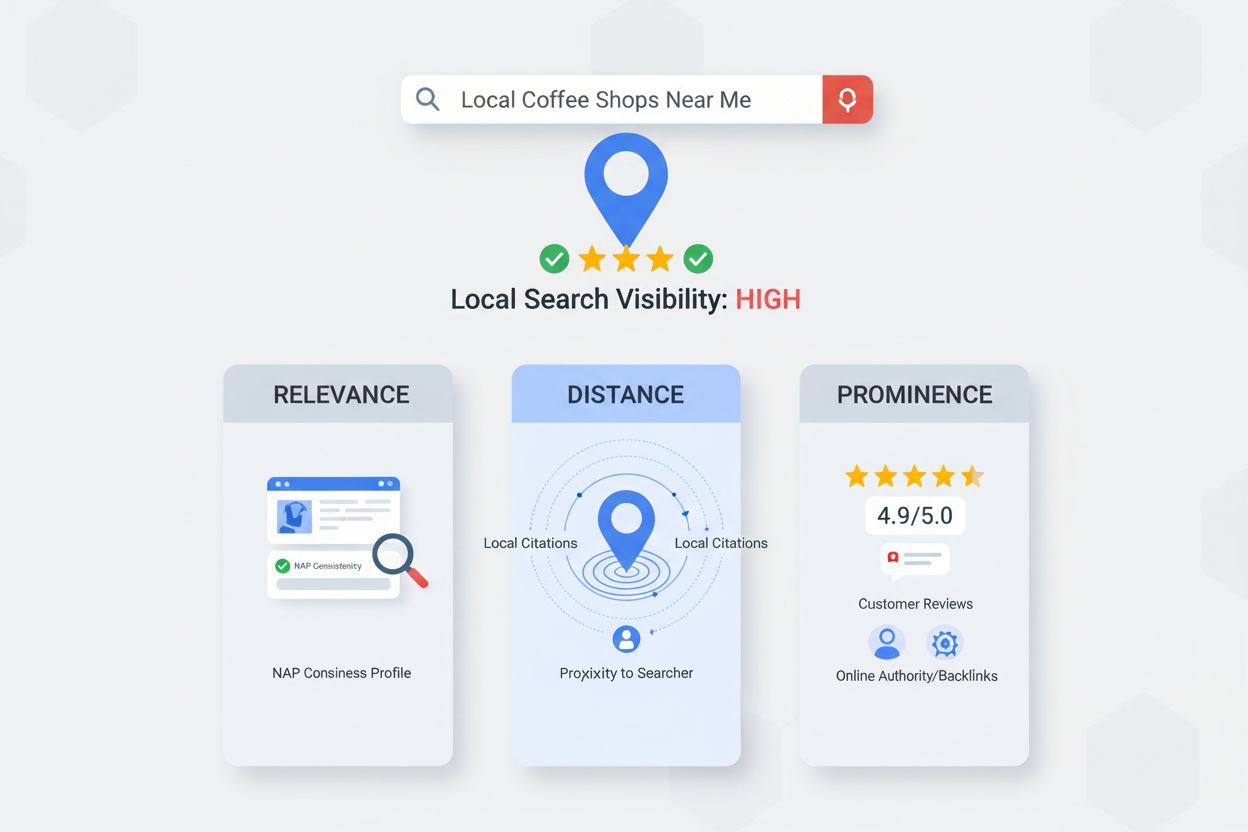
Learn what Google Maps SEO is, how it works, and why it's critical for local business visibility. Discover ranking factors, optimization strategies, and best pr...
Cookie Consent
We use cookies to enhance your browsing experience and analyze our traffic. See our privacy policy.