
Pagination
Pagination divides large content sets into manageable pages for better UX and SEO. Learn how pagination works, its impact on search rankings, and best practices...
9 min read

Infinite scroll is a web design technique where new content loads automatically as a user reaches the bottom of a page, eliminating the need for traditional pagination or ‘Load More’ buttons. This continuous loading mechanism creates a seamless browsing experience commonly used on social media platforms, ecommerce sites, and news feeds.
Infinite scroll is a web design technique where new content loads automatically as a user reaches the bottom of a page, eliminating the need for traditional pagination or 'Load More' buttons. This continuous loading mechanism creates a seamless browsing experience commonly used on social media platforms, ecommerce sites, and news feeds.
Infinite scroll is a web design technique where new content loads automatically and continuously as a user scrolls down a page, eliminating the need for traditional pagination or explicit “Load More” buttons. Also known as endless scrolling or continuous scrolling, this approach was invented in 2006 and has become ubiquitous on modern web platforms. The mechanism works by detecting when a user approaches the bottom of the currently loaded content and automatically fetching and displaying the next batch of items. Infinite scroll creates a seamless, uninterrupted browsing experience that encourages users to explore more content without friction. This design pattern is particularly prevalent on social media platforms like Instagram, TikTok, and Twitter, as well as on news aggregators, ecommerce sites, and content discovery platforms. The primary appeal lies in its ability to minimize user interruptions and maintain engagement by presenting fresh content continuously, making it feel as though the content stream never ends.
Since its introduction in 2006, infinite scroll has experienced exponential growth in adoption, particularly following the rise of mobile devices and touch-based interfaces. The technique gained significant traction as smartphones became the primary browsing device for millions of users, since small mobile viewports naturally encourage scrolling behavior. Nielsen Norman Group research has documented how infinite scroll minimizes interruptions compared to pagination, which requires users to click a “Next” button and wait for a new page to load. This reduction in friction has made infinite scroll the default pattern for social media feeds, where user engagement and time-on-site are critical metrics. However, the technique’s popularity has also revealed significant drawbacks, particularly regarding search engine optimization, accessibility, and user experience for specific use cases. Over 78% of enterprises now use AI-driven content monitoring tools to track their visibility across platforms, making the interaction between infinite scroll and AI crawling increasingly important. The evolution of infinite scroll has led to hybrid approaches, such as combining it with pagination or implementing “Load More” buttons, to balance user experience with technical and accessibility requirements.
Infinite scroll operates through a combination of JavaScript event listeners, API calls, and DOM manipulation. When a user scrolls near the bottom of the page, a JavaScript event listener detects this action and triggers a request to fetch additional content from the server. The fetched content is then dynamically inserted into the DOM (Document Object Model), expanding the page without requiring a full reload. Most implementations use the Intersection Observer API or scroll event listeners to detect when the user is approaching the end of the visible content. Lazy loading techniques are often employed to optimize performance by only rendering items that are currently visible in the viewport, a practice known as virtualization. This prevents the browser from storing thousands of DOM elements in memory, which would cause significant performance degradation. Modern frameworks like React, Vue, and Angular make implementing infinite scroll relatively straightforward through libraries and components. However, the reliance on JavaScript for content loading creates a critical problem: search engine crawlers and AI crawlers often cannot access this dynamically loaded content because they do not execute JavaScript or have very limited JavaScript execution capabilities. This technical limitation has profound implications for SEO and AI search visibility.
| Aspect | Infinite Scroll | Pagination | Load More Button |
|---|---|---|---|
| User Interruptions | Minimal; seamless browsing | High; requires clicks and page loads | Low; optional user control |
| Interaction Cost | Very low; automatic loading | High; explicit navigation required | Medium; one-click per batch |
| Mobile Friendliness | Excellent; natural scrolling | Good; but small tap targets | Good; large touch targets |
| SEO Crawlability | Poor without pagination fallback | Excellent; each page has unique URL | Good; requires URL updates |
| Accessibility | Poor; keyboard and screen reader issues | Good; clear navigation structure | Fair; requires proper ARIA labels |
| Footer Access | Difficult; constant content loading | Easy; footer always accessible | Easy; footer accessible after clicks |
| Refinding Content | Very difficult; no landmarks | Easy; page numbers provide context | Difficult; content blends together |
| Page Load Performance | Can degrade; accumulating DOM | Stable; fixed content per page | Stable; controlled loading |
| Best Use Cases | Social media, entertainment, news feeds | Product catalogs, search results, archives | Ecommerce, content discovery, blogs |
| AI Crawler Compatibility | Very poor; JS-dependent content hidden | Excellent; static URLs and HTML | Good; with proper implementation |
Infinite scroll offers compelling advantages for specific use cases, particularly those focused on content discovery and engagement. The most significant benefit is the reduction of interruptions: research published in the Information Systems Journal found that even brief interruptions—such as clicking a “Next” button—can trigger users on social platforms to abandon their current task. By eliminating these friction points, infinite scroll helps create a seamless experience that encourages users to stay engaged and explore more content. This is especially valuable for social media platforms, entertainment sites, and news aggregators, where the goal is to maximize time spent and content consumption. Infinite scroll also lowers interaction costs by removing the need for users to actively navigate between pages; content simply appears as they scroll. For mobile users, this is particularly advantageous because small viewports already encourage extensive scrolling, and infinite scroll aligns naturally with mobile browsing behavior. Studies consistently show that infinite scroll increases time on site, pages per session, and content discovery compared to pagination. Ecommerce sites using infinite scroll report higher product discovery rates, as users encounter more items without the friction of pagination. Additionally, infinite scroll eliminates the “illusion of completeness” that can occur with pagination, where users might assume they’ve seen all available content when they reach the last page.
Despite its popularity, infinite scroll introduces significant usability challenges that can negatively impact user experience. One of the most critical issues is the difficulty refinding content: without page landmarks or clear navigation structure, users struggle to remember where they saw a specific item and cannot easily return to it. This problem is exacerbated when users click on an item to view details and then use the browser’s back button, only to find themselves at the top of the infinite list, forced to scroll through previously seen content again. Infinite scroll also creates an illusion of completeness, where users may incorrectly assume they’ve reached the end of the content stream when, in fact, more content is loading invisibly below the fold. This confusion is particularly problematic when there is no clear loading indicator. Another major drawback is the inability to access the footer: the constant stream of new content prevents users from reaching important footer information such as contact details, return policies, or links to other site sections. Accessibility problems are severe, particularly for keyboard-only users and screen reader users. Keyboard users must tab through potentially hundreds of items to reach the footer, while screen readers often fail to announce newly loaded content, leaving users unaware that more items are available. Page load performance can also suffer significantly, as the browser accumulates DOM elements with each scroll, consuming increasing amounts of memory and potentially causing the page to become sluggish or unresponsive, especially on mobile devices with limited resources.
Infinite scroll presents substantial challenges for search engine optimization because search engine crawlers cannot reliably access content hidden below the initial page load. Unlike human users who can scroll and trigger content loading, crawlers like Googlebot have limited JavaScript execution capabilities and cannot always emulate the scrolling behavior required to load additional content. This means that content appearing after the initial page load may never be indexed, resulting in poor SEO performance and reduced visibility in search results. Google explicitly recommends that sites using infinite scroll implement a paginated series of component pages with unique URLs to ensure all content is crawlable. Without this fallback, search engines may only index the first batch of content, effectively hiding the majority of your site’s pages from search results. The slow page speed often associated with infinite scroll also negatively impacts SEO, as page speed is a confirmed ranking factor. Additionally, infinite scroll can complicate analytics tracking, as traditional page view metrics become unreliable when content loads dynamically without page reloads. Google Search Console may show indexing issues, and bounce rate metrics become less meaningful. To address these challenges, best practices recommend implementing infinite scroll with pagination, where each scroll position corresponds to a unique URL that can be crawled independently. This hybrid approach maintains the user experience benefits of infinite scroll while ensuring that search engines can access and index all content.
The rise of AI search engines like ChatGPT, Perplexity, and Claude has introduced a new dimension to the infinite scroll problem. Unlike traditional search engine crawlers that can execute JavaScript (albeit with limitations), AI crawlers such as GPTBot and ChatGPT-User do not execute JavaScript at all and only capture raw HTML on the initial page load. This means that content loaded dynamically through infinite scroll is completely invisible to AI systems. Research from Oncrawl confirms that OpenAI’s crawlers do not execute JavaScript despite downloading .js files, making JavaScript-dependent content effectively inaccessible. For ecommerce sites, this creates a critical problem: product details, pricing, availability, and customer reviews—often loaded dynamically—remain hidden from AI crawlers. When users query ChatGPT or Perplexity for product recommendations or information, sites with infinite scroll implementations may not appear in the results because their content is invisible to AI systems. This represents a significant competitive disadvantage, as AI-generated answers are increasingly influencing user behavior and driving traffic. The tight timeouts (1-5 seconds) imposed by AI crawlers further exacerbate the problem, as they may skip pages that load slowly or require JavaScript execution. To ensure visibility in AI search results, sites must implement prerendering or server-side rendering to provide fully rendered HTML that AI crawlers can access immediately without waiting for JavaScript execution.
To maintain the user experience benefits of infinite scroll while ensuring search engine and AI crawler accessibility, several best practices should be followed. First, implement a paginated series of component pages with unique, full URLs (e.g., example.com/category?page=1, example.com/category?page=2) that can be accessed directly without requiring JavaScript. Each component page should contain a reasonable amount of content—typically 10-30 items—to balance user experience with crawlability. Ensure that pagination URLs are descriptive and stable, avoiding relative-time parameters that may change over time. Implement JavaScript’s pushState and replaceState methods to update the browser URL as users scroll, creating a history of pagination states that users can navigate through. This allows search engines to discover and index each pagination state as a separate page. Provide a “View All” fallback page that displays all content in a traditional paginated format, ensuring that crawlers can access everything even if JavaScript fails. Use schema markup and structured data to help search engines understand your content structure. Test that each pagination URL works independently and returns appropriate content without requiring user history or cookies. Verify that out-of-bounds pages (e.g., page=999 when only 10 pages exist) return a 404 status code rather than redirecting or displaying an error page. Finally, ensure that your implementation is accessible by providing keyboard navigation, proper ARIA labels, and screen reader support for dynamically loaded content.
Modern web design increasingly favors hybrid approaches that combine the benefits of infinite scroll with the navigational clarity of pagination. One popular pattern is infinite scroll with integrated pagination, where page indicators appear as users scroll, allowing them to jump between pages while maintaining the seamless scrolling experience. This approach provides landmarks that help users orient themselves and refind content more easily. Another effective hybrid is the “Load More” button, which loads content automatically as users scroll initially but displays a visible button after a certain threshold, giving users control over when additional content loads. This approach reduces bandwidth consumption, improves accessibility, and makes the footer more accessible. Some sites implement infinite scroll with a sticky pagination bar at the bottom of the screen, allowing users to jump to specific pages without scrolling back to the top. Google Shopping and Pepper.pl exemplify this approach, combining automatic content loading with explicit pagination controls. These hybrid approaches address many of the usability and SEO issues associated with pure infinite scroll while maintaining high engagement. The key is to ensure that each pagination state has a unique, crawlable URL and that content is accessible without JavaScript. By combining infinite scroll with pagination, sites can optimize for both user experience and search engine visibility, creating a more robust and inclusive browsing experience.
pushState or replaceState to update browser URLs as users scroll, creating discoverable pagination statesThe definition and implementation of infinite scroll continue to evolve as web technologies advance and user expectations change. Google’s decision to remove infinite scroll from its search results in June 2024 signals a shift in how major platforms view this pattern, suggesting that traditional pagination may regain favor for certain use cases. However, infinite scroll remains dominant on social media and entertainment platforms, where engagement metrics favor continuous content streams. The rise of AI search engines is fundamentally changing how infinite scroll must be implemented, forcing developers to prioritize AI crawlability alongside user experience. Prerendering and server-side rendering are becoming standard practices for sites that want to maintain infinite scroll while ensuring visibility in AI search results. The development of better virtualization techniques and performance optimization methods is making infinite scroll more viable on low-bandwidth connections and mobile devices. Accessibility improvements, including better ARIA support and keyboard navigation, are gradually making infinite scroll more inclusive. The future likely involves more sophisticated hybrid approaches that intelligently combine infinite scroll, pagination, and load more patterns based on content type, user device, and user intent. As AI systems become more prevalent in search and content discovery, the ability to balance user experience with machine readability will become increasingly critical. Sites that successfully implement infinite scroll while maintaining search engine and AI crawler accessibility will have a significant competitive advantage in the evolving digital landscape.
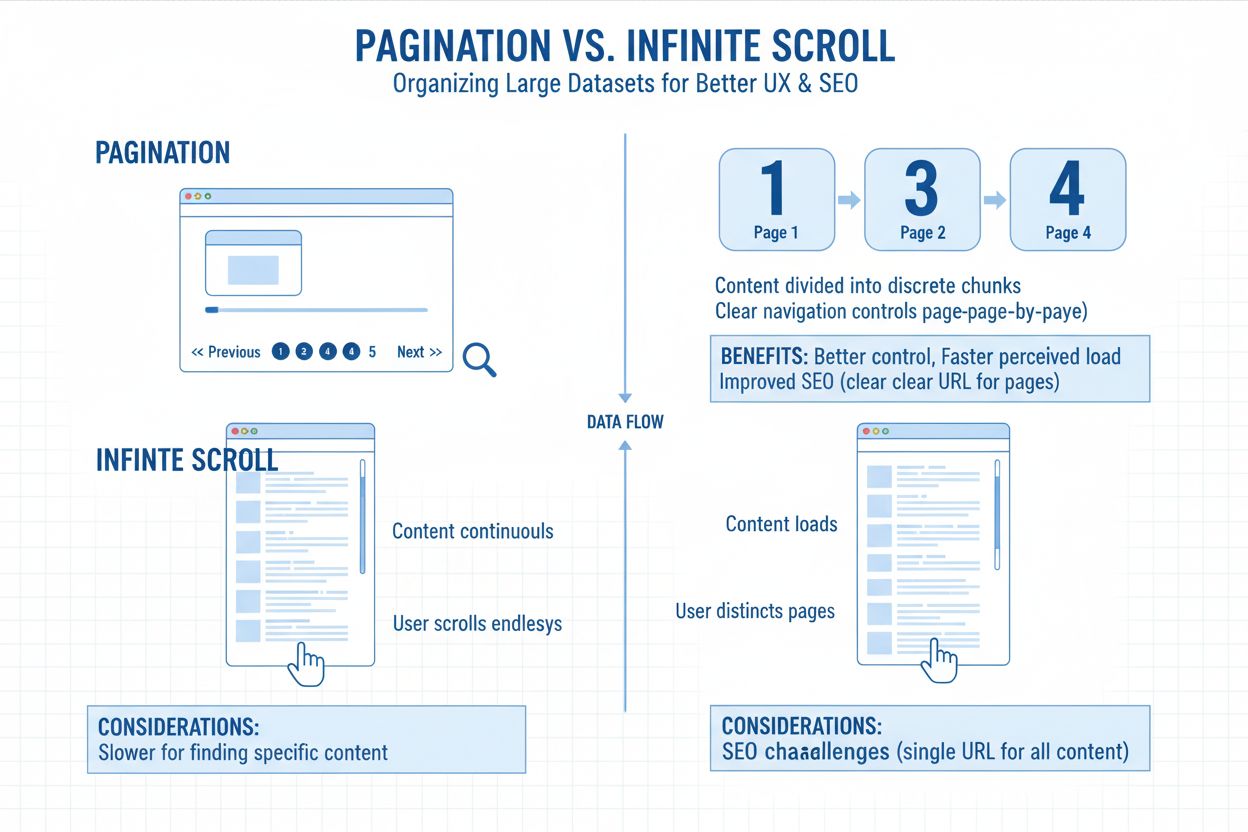
Infinite scroll automatically loads new content as users reach the bottom of a page without requiring clicks, while pagination divides content into discrete pages with numbered links. Pagination provides clear navigation landmarks and easier refinding of content, whereas infinite scroll creates a seamless, uninterrupted browsing experience. Pagination is better for goal-oriented tasks, while infinite scroll excels for exploratory browsing on social media and entertainment sites.
Infinite scroll can negatively impact SEO because search engine crawlers cannot always access content hidden below the initial page load, especially when content loads via JavaScript. Google recommends implementing a paginated series alongside infinite scroll to ensure all content is crawlable. Without proper implementation, search engines may only index the first batch of content, reducing visibility for deep content and potentially harming overall site rankings.
AI crawlers like GPTBot and ChatGPT-User do not execute JavaScript and only capture raw HTML on initial page load. Since infinite scroll typically loads content dynamically through JavaScript, AI crawlers miss this content entirely. This means product details, reviews, and other dynamically loaded information remain invisible to AI systems, reducing visibility in AI-generated answers and responses from platforms like ChatGPT and Perplexity.
Infinite scroll reduces user interruptions by eliminating page clicks, lowers interaction costs, and creates a seamless browsing experience that encourages longer engagement sessions. It is particularly well-suited for mobile devices where small viewports make extensive scrolling natural. Studies show that infinite scroll can increase time spent on site and product discovery compared to traditional pagination, making it ideal for social media, entertainment, and ecommerce platforms.
Infinite scroll creates significant accessibility challenges for keyboard-only users and screen reader users. Keyboard users must tab through potentially hundreds of items to reach the footer or other page elements, while screen readers often only detect the initial content batch without triggering the loading of new items. The ARIA 'feed' role has improved support, but many implementations still lack proper accessibility features, making infinite scroll problematic for users with disabilities.
Implement a hybrid approach by creating a paginated series of component pages with unique, crawlable URLs alongside your infinite scroll interface. Use JavaScript's pushState or replaceState to update URLs as users scroll, ensuring each page state has a distinct URL. Provide a 'View All' fallback page, implement proper schema markup, and ensure content is accessible without JavaScript. This approach balances user experience with search engine crawlability.
The 'Load More' button is a hybrid approach that combines benefits of both infinite scroll and pagination. Content loads automatically as users scroll initially, but after reaching a certain threshold, a visible 'Load More' button appears. This gives users control over content loading, reduces bandwidth consumption, improves accessibility, and makes it easier to reach the footer. It's increasingly popular on mobile sites and Google's search results pages.
Infinite scroll can significantly increase page load times because the browser continuously accumulates DOM elements as new content loads. This can cause performance degradation, especially on mobile devices with limited bandwidth or processing power. Virtualization techniques and lazy loading can mitigate these issues by rendering only visible items. Poor performance is particularly problematic for users on slow connections or limited data plans, potentially causing them to abandon the site.
Start tracking how AI chatbots mention your brand across ChatGPT, Perplexity, and other platforms. Get actionable insights to improve your AI presence.
Pagination divides large content sets into manageable pages for better UX and SEO. Learn how pagination works, its impact on search rankings, and best practices...

Learn how to implement infinite scroll while maintaining crawlability for AI crawlers, ChatGPT, Perplexity, and traditional search engines. Discover pagination ...
Learn how pagination impacts AI visibility. Discover why traditional page division helps AI systems find your content while infinite scroll hides it, and how to...
Cookie Consent
We use cookies to enhance your browsing experience and analyze our traffic. See our privacy policy.