

How Pagination Affects AI Search Engines and Content Discovery
Learn how pagination impacts AI visibility. Discover why traditional page division helps AI systems find your content while infinite scroll hides it, and how to...
11 min read
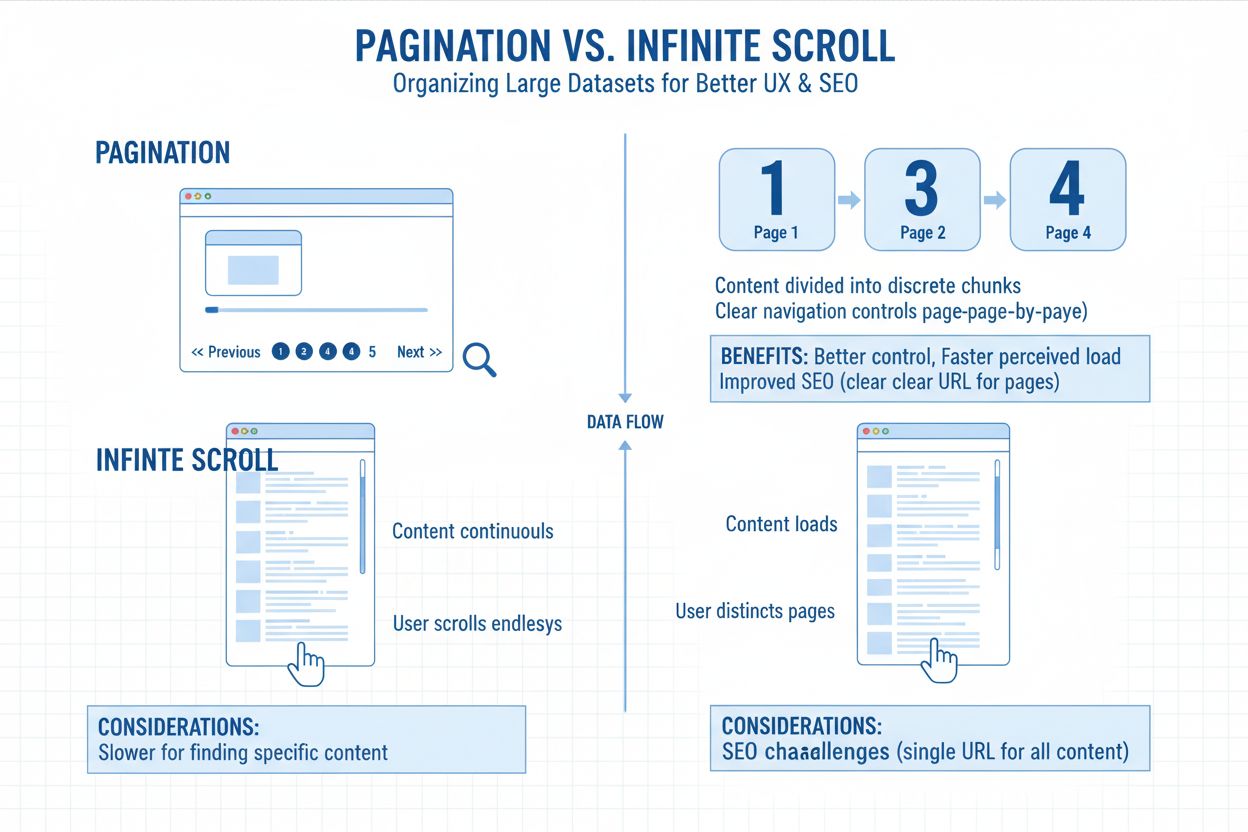
Pagination is the process of dividing content across multiple discrete pages to improve user experience and website performance. Each page displays a limited subset of content, with navigation controls allowing users to move between pages sequentially or jump to specific pages.
Pagination is the process of dividing content across multiple discrete pages to improve user experience and website performance. Each page displays a limited subset of content, with navigation controls allowing users to move between pages sequentially or jump to specific pages.
Pagination is the process of dividing content across multiple discrete pages to improve both user experience and website performance. Rather than displaying all content on a single page, pagination breaks large datasets into manageable chunks, with each page containing a limited number of items. This fundamental web design pattern appears across virtually all major websites—from search engines like Google and Bing to e-commerce platforms like Amazon and eBay, to content sites and forums. The term derives from the traditional concept of dividing printed documents into pages, adapted for digital environments where content volume can be virtually unlimited. Pagination serves as a critical bridge between user needs and technical constraints, enabling websites to present vast amounts of information in an organized, navigable format.
The concept of pagination emerged in the early days of the web when developers recognized that loading thousands of items on a single page created severe performance problems. As the internet evolved and databases grew exponentially, pagination became an essential pattern for managing content discovery. The Interaction Design Foundation notes that pagination is used almost everywhere in different forms, from search results to product listings to blog archives. Over the past two decades, pagination has evolved from simple numbered links to sophisticated systems incorporating filters, sorting options, and dynamic loading. According to research from 2024, approximately 78% of enterprise websites implement some form of pagination or similar content division strategy. The rise of mobile browsing introduced new considerations for pagination design, as touch interfaces and smaller screens required different navigation approaches than desktop environments. Today, pagination remains one of the most widely-used UI patterns, though it competes with alternative approaches like infinite scroll and load more buttons.
Pagination operates by dividing a dataset into fixed-size chunks, with each chunk representing one page. When a user requests a page, the server retrieves only the items for that specific page rather than the entire dataset. This process involves several technical components: the pagination logic that calculates which items belong on each page, the URL structure that identifies which page is being requested (typically through query parameters like ?page=2), and the navigation controls that allow users to move between pages. Search engines crawl paginated content by following links from one page to the next, discovering all pages in a series through sequential linking. The canonical tag plays a crucial role in pagination implementation, with each page containing a self-referencing canonical URL that tells search engines the page is unique and should be indexed independently. Historically, Google recommended using rel="next" and rel="prev" tags to indicate pagination relationships, though Google announced in 2019 that it no longer uses these tags for indexing purposes. However, other search engines like Bing continue to support these tags, and they remain valuable for browser prefetching and user experience optimization.
| Aspect | Pagination | Infinite Scroll | Load More Button |
|---|---|---|---|
| User Control | High - users choose which page to view | Low - content loads automatically | Medium - users trigger loading |
| Page Load Speed | Fast - limited content per page | Slow - accumulates content over time | Fast - initial load, then incremental |
| SEO Friendliness | Excellent - each page has unique URL | Poor - dynamic content, indexing challenges | Good - single page, but content may not index |
| Mobile Experience | Good with responsive design | Excellent - intuitive scrolling | Excellent - minimal interaction needed |
| Crawl Budget Impact | Moderate - multiple pages to crawl | High - search engines may not index all content | Low - primarily single page |
| Best For | Structured data, e-commerce, search results | Social media, news feeds, discovery | Galleries, blog archives, mixed use cases |
| Footer Accessibility | Easy - users can reach footer | Difficult - footer becomes unreachable | Moderate - footer accessible after loading |
| Bounce Rate | Moderate - users may not explore pages | Low - continuous engagement | Low - encourages exploration |
Pagination significantly impacts user experience by reducing cognitive load—the mental effort required to process information. When users see a limited number of items on a page, they can focus more effectively on each item without becoming overwhelmed by choices. Research from the Nielsen Norman Group demonstrates that pagination helps users establish mental landmarks, allowing them to remember “the product I liked was on page three” rather than scrolling through hundreds of items. The pagination controls themselves communicate important information: page numbers indicate the total size of the dataset, the current page highlight shows where users are in the sequence, and navigation arrows provide clear directional cues. However, pagination also introduces friction by requiring users to click to view more content, potentially interrupting their browsing flow. This trade-off between cognitive load reduction and interaction friction makes pagination ideal for goal-oriented tasks (like finding a specific product) but less suitable for exploratory browsing (like social media feeds). Effective pagination design balances these considerations by providing multiple navigation options—numbered pages for jumping to specific sections, previous/next buttons for sequential browsing, and sometimes a “jump to page” input field for large datasets.
Pagination has profound implications for search engine optimization, affecting how search engines crawl, index, and rank paginated content. When implemented correctly, pagination helps search engines understand content relationships and consolidate link equity across a series of pages. Google’s official documentation emphasizes that each page in a pagination sequence should have a unique URL and a self-referencing canonical tag, preventing duplicate content issues that could harm rankings. The pagination structure influences crawl budget allocation—search engines must decide how many resources to spend crawling paginated pages versus other site content. Improper pagination implementation wastes crawl budget by creating duplicate content or confusing search engines about which pages to index. According to Semrush’s research, over 65% of websites implement pagination incorrectly, often by canonicalizing all pages to the first page, which dilutes link equity and prevents inner pages from ranking. Properly implemented pagination can actually improve SEO by reducing page load times (a ranking factor), improving user experience signals, and enabling search engines to index more of your content efficiently. The relationship between pagination and SEO has evolved—while Google no longer uses rel="next" and rel="prev" tags for indexing, these tags remain valuable for other search engines and for indicating content relationships to browsers and other tools.
As AI systems increasingly index and reference web content, pagination implementation affects how AI platforms discover and cite your content. Pagination presents unique challenges for AI crawlers because these systems must understand that paginated pages are part of a series rather than independent content. When AI systems like ChatGPT, Perplexity, Google AI Overviews, and Claude encounter paginated content, they need clear signals about content relationships—proper canonical tags, sequential linking, and consistent URL structures help these systems understand your content architecture. AI platforms may struggle with pagination if pages lack clear navigation or if the content structure is ambiguous. For example, if a paginated series lacks rel="next" and rel="prev" tags and has weak internal linking, AI crawlers might index individual pages as standalone content rather than recognizing them as part of a series. This fragmentation can reduce the likelihood that AI systems cite your content as an authoritative source, since they may not recognize the full context and scope of your content. Conversely, well-implemented pagination with clear navigation and proper markup helps AI systems understand your content’s structure, potentially increasing the likelihood of citation in AI-generated responses. AmICited’s monitoring platform helps track how your paginated content appears across these AI systems, revealing whether your pagination strategy effectively communicates content relationships to AI crawlers.
Implementing pagination effectively requires attention to several technical and design considerations. First, each page in a pagination sequence must have a unique URL—typically using query parameters like ?page=2 or directory structures like /products/page/2/. Second, each page should include a self-referencing canonical tag pointing to itself, not to the first page or any other page in the series. Third, pages should link sequentially to adjacent pages using <a href> tags in the page body, with the first page containing only a rel="next" link, middle pages containing both rel="prev" and rel="next" links, and the last page containing only a rel="prev" link. Fourth, avoid using URL fragments (the # symbol) for pagination, as search engines ignore fragments and may not recognize different pages. Fifth, provide clear visual indicators of the current page and total number of pages, helping users understand their position in the sequence. Sixth, ensure pagination controls are accessible via keyboard navigation and screen readers, with descriptive labels like “Next page” rather than just “Next.” Seventh, consider implementing structured data markup for paginated content to help search engines understand content relationships. Finally, test pagination thoroughly on mobile devices, ensuring controls are touch-friendly and responsive design adapts appropriately to smaller screens.
The future of pagination is evolving as web technologies and user behaviors change. While pagination remains dominant for structured content and e-commerce, hybrid approaches combining pagination with infinite scroll or load more buttons are becoming increasingly common. Progressive web apps and modern JavaScript frameworks enable more sophisticated pagination implementations that load content dynamically without full page refreshes, improving perceived performance. The rise of AI-powered search and content discovery is reshaping how pagination functions—AI systems require clearer signals about content relationships than traditional search engines, potentially driving more explicit pagination markup and structured data implementation. Voice search and conversational AI introduce new considerations for pagination, as users interacting through voice interfaces may need different navigation paradigms than visual pagination controls. Mobile-first indexing and the continued growth of mobile traffic suggest that pagination design will increasingly prioritize touch-friendly interfaces and simplified navigation. The emergence of Core Web Vitals as ranking factors emphasizes the importance of pagination for page performance—websites that implement pagination effectively to reduce page load times gain competitive advantages. Looking forward, pagination will likely remain essential for large-scale content management, but its implementation will become more sophisticated, incorporating AI-friendly markup, accessibility features, and performance optimization. Organizations that understand pagination as both a user experience pattern and an SEO/AI visibility strategy will be better positioned to manage large content catalogs effectively in an increasingly AI-driven search landscape.
Pagination impacts SEO by improving page load times, reducing crawl budget waste, and helping search engines understand content relationships. When implemented correctly with self-referencing canonical tags and sequential linking, pagination consolidates link equity across paginated series while allowing search engines to index individual pages. However, improper pagination—such as canonicalizing all pages to page one—can dilute SEO value and confuse search engines about which page should rank.
Pagination displays numbered page links allowing users to jump to specific pages, infinite scroll automatically loads content as users scroll down, and load more buttons append content to the existing page. Pagination works best for structured content where users have specific goals, infinite scroll suits exploratory browsing on social media, and load more buttons balance both approaches. Each has different SEO implications and user experience outcomes depending on content type and user intent.
While Google announced in 2019 that it no longer uses rel='next' and rel='prev' tags for indexing purposes, these tags remain valuable for other search engines like Bing and for browser prefetching. Google now relies on sequential linking and canonical tags to understand pagination relationships. However, keeping these tags doesn't harm SEO and may benefit users and other search engines, so most SEO professionals recommend maintaining them alongside proper canonical implementation.
E-commerce pagination should include self-referencing canonical tags on each page, unique URLs with consistent query parameters (like ?page=2), sequential linking between pages, and clear navigation controls. Avoid noindexing paginated pages or using the first page as a canonical for all pages. Provide filtering and sorting options to help users narrow results, and consider implementing structured data markup for product information to enhance search visibility and user experience.
Pagination significantly improves page load speed by limiting the amount of content loaded on each page, reducing server processing time and bandwidth consumption. This is especially important for mobile users with limited data plans. Users benefit from faster initial page loads, reduced cognitive load from viewing fewer items at once, and clearer navigation landmarks. Studies show that faster-loading pages reduce bounce rates and improve user engagement, which indirectly benefits SEO performance.
Common pagination mistakes include canonicalizing all paginated pages to the first page instead of using self-referencing canonicals, applying noindex tags to paginated pages, breaking the sequential linking chain, using URL fragments (#) instead of query parameters, and not providing clear navigation controls. These mistakes prevent search engines from properly crawling and indexing paginated content, waste crawl budget, and can result in duplicate content penalties or reduced visibility in search results.
Mobile pagination should prioritize touch-friendly design with larger clickable areas, simplified page number displays showing only current and adjacent pages, and responsive layouts that adapt to smaller screens. Consider using simplified controls like previous/next buttons instead of displaying all page numbers. Ensure pagination controls remain accessible and don't obstruct content, and test thoroughly on various devices to confirm usability. Mobile users often prefer infinite scroll or load more buttons due to touch interaction patterns.
Start tracking how AI chatbots mention your brand across ChatGPT, Perplexity, and other platforms. Get actionable insights to improve your AI presence.
Learn how pagination impacts AI visibility. Discover why traditional page division helps AI systems find your content while infinite scroll hides it, and how to...
Content pruning is the strategic removal or updating of underperforming content to improve SEO, user experience, and search visibility. Learn how to identify an...
Infinite scroll is a web design technique that automatically loads new content as users scroll down. Learn how it works, its benefits, drawbacks, and impact on ...
Cookie Consent
We use cookies to enhance your browsing experience and analyze our traffic. See our privacy policy.