

ChatGPT
ChatGPT is OpenAI's conversational AI assistant powered by GPT models. Learn how it works, its impact on AI monitoring, brand visibility, and why it matters for...
10 min read

User-defined preferences that shape how ChatGPT responds, influencing which brands and content types appear in personalized answers. Custom Instructions allow users to set system-level preferences about their background, role, and desired response format, creating a persistent personalization layer that applies across all conversations.
User-defined preferences that shape how ChatGPT responds, influencing which brands and content types appear in personalized answers. Custom Instructions allow users to set system-level preferences about their background, role, and desired response format, creating a persistent personalization layer that applies across all conversations.
ChatGPT Custom Instructions represent a powerful personalization feature that allows users to establish persistent preferences shaping how the AI assistant responds across all conversations. Unlike traditional prompts that apply only to individual queries, Custom Instructions function as system-level settings that automatically influence ChatGPT’s behavior, tone, and output format every time you interact with the platform. This feature operates through a two-part framework: the first section captures information about you—your role, background, expertise, and professional context—while the second section specifies exactly how you want ChatGPT to format and deliver its responses.
The feature is available across all ChatGPT platforms, including the web interface, iOS app, and Android app, making personalization accessible whether you’re working from a desktop or mobile device. Each section of Custom Instructions accommodates up to 1,500 characters, providing sufficient space for detailed preferences without overwhelming the system. This character limit encourages conciseness while allowing users to communicate nuanced requirements about their needs and preferences.
| Aspect | Custom Instructions | Regular Prompts |
|---|---|---|
| Persistence | Applied to all conversations automatically | Only applies to current conversation |
| Setup | Configured once in settings | Entered with each query |
| Priority | System-level, higher priority | Query-level, lower priority |
| Scope | Affects all future interactions | Affects only current response |
| Flexibility | Consistent across conversations | Can vary per query |
| Character Limit | 1,500 per section | Unlimited |
The distinction between Custom Instructions and regular prompts is fundamental. While a regular prompt might ask ChatGPT to “write in a professional tone,” Custom Instructions embed this preference into your account settings, ensuring every response maintains that tone without repetition. This creates a more efficient workflow, particularly for professionals who use ChatGPT regularly for specific purposes. The system-level priority of Custom Instructions means they carry more weight than individual prompt instructions, making them ideal for establishing baseline preferences that should apply universally.
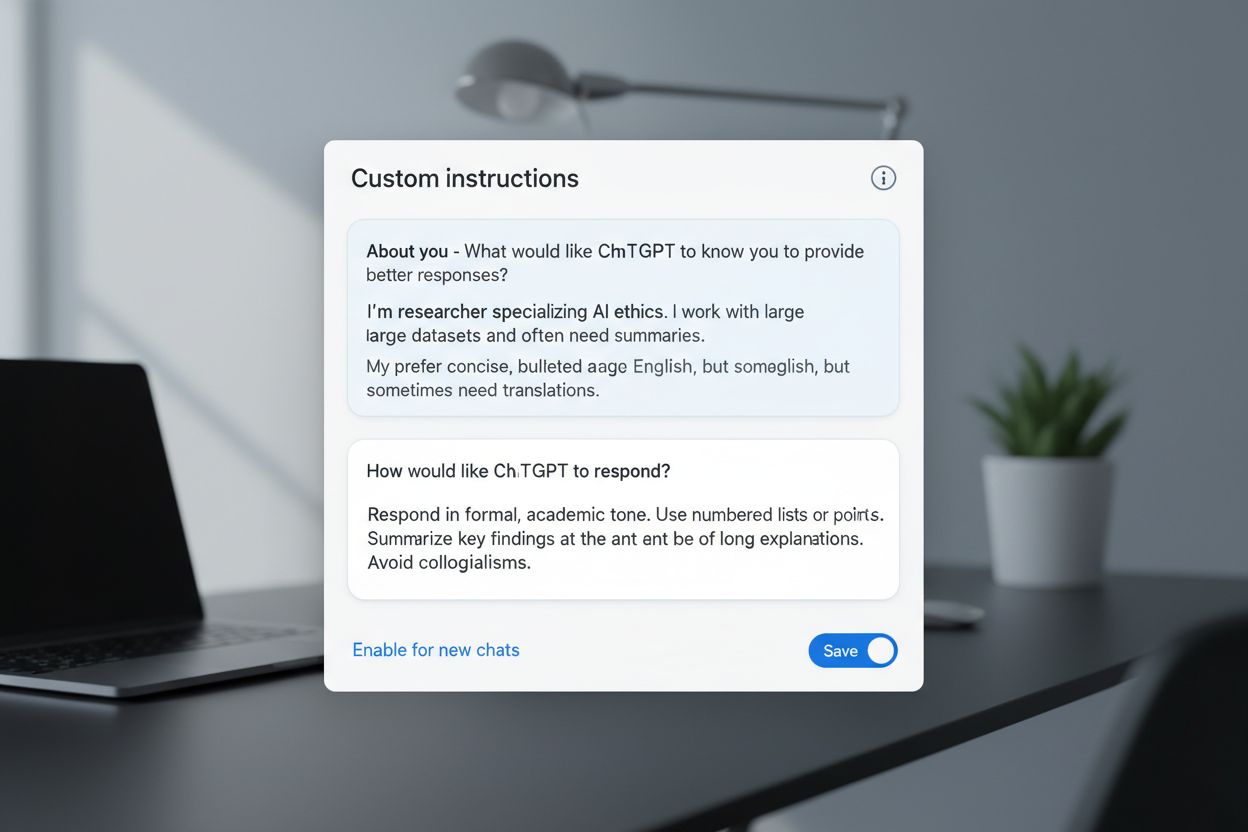
Accessing ChatGPT Custom Instructions is straightforward across all platforms, though the navigation paths differ slightly. For web users, the process begins by clicking your username or profile icon located in the lower-left corner of the ChatGPT interface. From the dropdown menu that appears, select “Settings” and then navigate to “Customize ChatGPT.” This opens the customization panel where you’ll find the toggle switch for “Enable customization” at the top—ensure this is switched ON before proceeding. Below this toggle, you’ll see two text input boxes: the first labeled “About you” and the second labeled “How would you like ChatGPT to respond?”
Mobile users follow a similar but slightly different path. On both iOS and Android devices, open the ChatGPT app and navigate to the Settings menu, typically accessible through a gear icon or menu button. From Settings, select “Account” and look for the “Custom Instructions” option. Toggle this feature ON, and you’ll gain access to the same two text input boxes available on the web platform. The mobile interface is optimized for smaller screens, so you may need to scroll within each text box to see your full instructions.
Step-by-step setup process:
When writing your Custom Instructions, clarity and specificity yield the best results. Rather than vague preferences like “be helpful,” provide concrete details: “I’m a software developer specializing in Python. I prefer concise code examples with explanatory comments. Format responses with code blocks and bullet-point summaries.” This specificity helps ChatGPT understand exactly what you need. Common mistakes include being too verbose (exceeding the 1,500-character limit), using contradictory instructions, or being too vague about preferences. Additionally, avoid including sensitive personal information like passwords, API keys, or confidential business details in your Custom Instructions, as these are stored with your account.
Best practices for effective Custom Instructions include testing your setup with a few queries to ensure the AI responds as expected, then refining based on results. If you find the effect too strong or too weak, adjust the directness of your language. Start with essential preferences and add more detailed instructions only if needed. Remember that Custom Instructions work best when they complement rather than contradict each other—ensure your “About you” section and your “How to respond” section align logically.
ChatGPT Custom Instructions prove invaluable across diverse professional fields, each with unique requirements and preferences. Understanding how different professionals leverage this feature reveals its versatility and practical impact on productivity and output quality.
Software Developers benefit significantly from Custom Instructions tailored to their coding preferences. A developer might specify: “I’m a Python developer who values clean, DRY (Don’t Repeat Yourself) code. Provide efficient solutions with clear comments explaining complex logic. Include error handling and suggest best practices.” This instruction set ensures ChatGPT provides code that aligns with the developer’s standards, reducing the need for manual refactoring and accelerating development cycles.
Content Creators can optimize ChatGPT for SEO-focused content generation by specifying: “I’m a content creator specializing in travel blogs targeting adventure enthusiasts aged 25-45. I need SEO-optimized content with relevant keywords, meta descriptions, and FAQ sections. Include internal linking suggestions and structure content for readability with headers and bullet points.” This approach transforms ChatGPT into a specialized content assistant that understands both the creator’s audience and technical SEO requirements.
Students and Academics can customize their experience for research and writing: “I’m a graduate student in environmental science. I need help with research synthesis, academic writing in formal tone, and proper citation formatting (APA style). Provide sources for factual claims and help me identify gaps in my arguments.” This setup creates an academic research partner that maintains scholarly standards throughout interactions.
Business Analysts and Consultants might use: “I’m a management consultant focused on operational efficiency. I analyze business processes and recommend improvements. Provide data-driven insights, structure responses with executive summaries, and include relevant frameworks like Porter’s Five Forces or SWOT analysis.” This instruction set ensures responses align with consulting methodologies and client expectations.
Data Analysts and Researchers benefit from format-specific instructions: “I’m a data analyst. Format all responses with tables, outlining pros and cons for each option. Use bullet points for key findings and include relevant statistics. Highlight data quality considerations and limitations.” This approach ensures ChatGPT delivers information in the exact format needed for analysis and reporting.
Legal Professionals can specify: “I’m a legal professional specializing in corporate law. Provide insights into legal terminology, case law principles, and regulatory frameworks. Maintain formal legal language and note when information requires verification with current statutes. Highlight jurisdictional considerations.” This customization ensures responses maintain legal accuracy and professional standards.
| Industry | Custom Instruction Example | Expected Benefit |
|---|---|---|
| Software Development | “Python developer, DRY principles, include error handling and best practices” | Faster coding, better code quality, reduced refactoring |
| Content Creation | “Travel blog creator, SEO-optimized, include keywords, meta descriptions, FAQ” | Higher search rankings, better audience engagement, faster content production |
| Academic Research | “Graduate student, formal academic tone, APA citations, identify argument gaps” | Stronger research papers, proper citations, improved critical thinking |
| Business Consulting | “Management consultant, data-driven insights, include frameworks like SWOT” | Client-ready analysis, faster deliverables, strategic recommendations |
| Data Analysis | “Data analyst, format with tables, pros/cons, bullet points, include statistics” | Clearer insights, faster reporting, better decision-making |
| Legal Services | “Corporate lawyer, legal terminology, case law, jurisdictional considerations” | Legally sound advice, proper terminology, regulatory compliance |
The versatility of Custom Instructions extends beyond these examples. Marketing professionals can optimize for campaign development, project managers can tailor responses for stakeholder communication, and entrepreneurs can customize ChatGPT to serve as a business advisor. The key is identifying your specific role, your audience, and the output format that best serves your work.

Beyond basic setup, sophisticated users can leverage advanced techniques to maximize ChatGPT’s effectiveness through Custom Instructions. These techniques involve understanding how to layer multiple preferences, optimize language choices, and work within technical constraints to achieve precise results.
Verbosity levels represent one of the most powerful customization tools. Rather than simply requesting “detailed” or “brief” responses, specify a verbosity scale: “Provide responses at verbosity level 3 out of 5, where 1 is extremely concise (one sentence) and 5 is comprehensive (multiple paragraphs with examples).” This numerical framework gives ChatGPT a clear target for response length. Different tasks benefit from different verbosity levels—quick reference questions might use level 1-2, while complex analysis might require level 4-5.
Role-based instructions allow you to establish multiple personas within a single instruction set. For example: “When I ask programming questions, adopt the role of ‘Code Mentor’ and provide educational explanations. When I ask business questions, adopt the role of ‘Strategy Advisor’ and focus on competitive advantages. When I ask writing questions, adopt the role of ‘Editor’ and focus on clarity and impact.” This approach enables ChatGPT to adjust its expertise and perspective based on query context.
Tone and style specifications should be concrete rather than abstract. Instead of “be friendly,” specify: “Use conversational language with occasional humor, avoid corporate jargon, and explain technical concepts as if speaking to an intelligent non-specialist. Use contractions and active voice.” This level of detail ensures consistent tone across all interactions.
Output format preferences dramatically improve usability. Specify exactly how you want information structured:
Format all responses as follows:
- Start with a one-sentence summary
- Provide 3-5 key points as bullet list
- Include a relevant example or case study
- End with actionable next steps
- Use tables for comparative analysis
- Highlight important terms in bold
This structured approach ensures ChatGPT delivers information in your preferred format without requiring reformatting.
Combining multiple instructions requires careful attention to potential conflicts. Ensure your instructions work together harmoniously. For instance, if you specify “be concise” in one section and “provide comprehensive examples” in another, ChatGPT may struggle to balance these competing demands. Instead, clarify the priority: “Prioritize conciseness, but include brief examples when they significantly enhance understanding.”
Character limit optimization becomes crucial when you have extensive preferences. Prioritize your most important instructions and use abbreviations strategically. Instead of writing “I would really appreciate it if you could provide responses that are professional in tone and use formal language,” compress to “Professional tone, formal language.” This compression allows fitting more preferences within the 1,500-character limit. Use line breaks and formatting to make instructions scannable, and consider using shorthand like “V=3” for verbosity level 3 or “R=Analyst” for role specification.
Advanced users often create instruction templates they can modify for different projects. For example, a consultant might have a base instruction set for general use, then create variations for specific client engagements by modifying the “About you” section while keeping the “How to respond” section consistent. This approach maintains efficiency while allowing project-specific customization.
Custom Instructions fundamentally alter how ChatGPT processes and responds to your queries by establishing system-level context that influences every interaction. Understanding this impact helps users appreciate why Custom Instructions produce noticeably better results than relying solely on individual prompts.
The system-level priority of Custom Instructions means they carry more weight than instructions embedded in regular prompts. When you ask ChatGPT a question, the AI considers both your Custom Instructions and your specific query, with Custom Instructions providing foundational context. This creates a layered approach where your baseline preferences shape the response framework, and your specific query provides the detailed request. For example, if your Custom Instructions specify “I’m a visual learner who prefers diagrams and infographics,” and you ask “Explain photosynthesis,” ChatGPT will naturally incorporate visual descriptions and suggest diagram elements, even though your query didn’t explicitly request them.
Before Custom Instructions: A developer might need to specify coding preferences with every query: “Write this in Python, use DRY principles, include comments, and follow PEP 8 standards.” This repetition wastes time and risks inconsistency if the developer forgets to include these specifications.
After Custom Instructions: The developer specifies these preferences once, and every code response automatically adheres to these standards without repetition. The developer can simply ask “How do I implement a binary search?” and receive a response perfectly aligned with their preferences.
Consistency across conversations represents another significant benefit. Without Custom Instructions, ChatGPT might respond differently to similar questions in different conversations, as it lacks persistent context about your preferences. Custom Instructions ensure that your tone, format, and style preferences remain constant, creating a more cohesive experience across all your interactions. This consistency proves particularly valuable for professionals who use ChatGPT as a regular work tool.
Improved relevance and accuracy stem from ChatGPT understanding your specific context and needs. When you provide background information in Custom Instructions—your role, expertise level, industry, and goals—ChatGPT can tailor responses to your exact situation. A financial analyst asking about investment strategies receives different guidance than a student asking the same question, because Custom Instructions provide the context needed for appropriate responses.
The reduction in repetitive context-setting streamlines workflows significantly. Rather than explaining your background, preferences, and requirements with every query, you establish this context once. This efficiency gain compounds over time, particularly for professionals who interact with ChatGPT daily. A content creator might save 30 seconds per query by not needing to specify SEO requirements, audience demographics, and formatting preferences—savings that accumulate to hours monthly.
However, Custom Instructions have limitations worth acknowledging. They work best for consistent preferences but may not adapt well to highly variable needs. If your requirements change dramatically between projects, you might need to update your Custom Instructions frequently. Additionally, extremely specific instructions might occasionally produce overly rigid responses that don’t adapt to nuanced query variations. The key is finding the balance between specificity and flexibility.
Custom Instructions also influence which brands and content types appear in responses. By specifying your industry, interests, and preferences, you shape the examples and references ChatGPT includes. A marketing professional with Custom Instructions emphasizing digital marketing will receive examples and case studies focused on digital channels, while a traditional marketer’s instructions might yield different examples. This personalization extends to brand mentions—your preferences and context influence which companies and products ChatGPT references as relevant examples.
The relationship between Custom Instructions and brand visibility in AI responses represents a critical consideration for organizations monitoring their presence across AI platforms. As users increasingly customize their ChatGPT experience, understanding how these personalization settings influence brand mentions becomes essential for comprehensive AI answer monitoring.
Custom Instructions directly shape which brands and companies appear in AI-generated responses by establishing user context and preferences. When a user specifies their industry, role, and interests through Custom Instructions, ChatGPT tailors its examples and references accordingly. A user working in e-commerce technology might receive responses featuring Shopify, WooCommerce, and BigCommerce as relevant examples, while a user in traditional retail might see different brand references. This personalization means that brand visibility in AI responses varies significantly based on individual user customization.
This variability creates a complex monitoring landscape where a single query produces different results depending on the responder’s Custom Instructions. A query about “best project management tools” generates different brand mentions for a software developer than for a marketing manager, because their Custom Instructions establish different contexts and priorities. For organizations tracking brand mentions across AI platforms, this personalization layer adds significant complexity to monitoring efforts.
AmICited.com addresses this challenge directly by monitoring how brands appear across different AI platforms and personalization settings. Rather than assuming consistent brand visibility, AmICited tracks brand mentions in both generic and personalized AI responses, providing organizations with comprehensive insights into their AI answer presence. This monitoring capability proves invaluable for understanding how personalization affects brand visibility and ensuring consistent brand representation across different user segments.
The impact on content recommendations extends beyond simple brand mentions. Custom Instructions influence the context, tone, and framing of brand references. A brand mentioned in a response to a user with “focus on sustainability” receives different contextual treatment than the same brand mentioned to a user with “focus on cost efficiency.” AmICited’s monitoring captures these nuances, helping organizations understand not just whether their brand appears, but how it’s positioned and contextualized in personalized AI responses.
Privacy considerations accompany this personalization. Users should understand that Custom Instructions are stored with their account and used to personalize their experience. While OpenAI maintains privacy protections, users should avoid including sensitive information in Custom Instructions. Organizations should also recognize that monitoring personalized AI responses requires respecting user privacy while gathering competitive intelligence about brand visibility.
The strategic implication is clear: as AI personalization becomes more sophisticated, brand monitoring must evolve accordingly. Organizations can no longer assume that a single query produces consistent results across all users. Instead, comprehensive AI answer monitoring requires tracking brand mentions across multiple personalization scenarios, understanding how different user contexts influence brand visibility, and using these insights to optimize brand positioning in AI-driven search and discovery.
While Custom Instructions offer powerful personalization capabilities, users frequently encounter limitations and challenges that require understanding and strategic approaches to overcome. Recognizing these constraints and implementing best practices ensures optimal results.
Character limit constraints represent the most immediate limitation. With only 1,500 characters per section, users must prioritize their most important preferences. This constraint requires ruthless editing and strategic abbreviation. Rather than writing “I would really appreciate it if you could provide responses that are professional in tone and use formal language,” compress to “Professional tone, formal language.” This compression allows fitting more preferences within the limit while maintaining clarity.
Instruction clarity requirements demand precision in language. Vague instructions like “be helpful” or “provide good examples” don’t give ChatGPT sufficient guidance. Instead, specify exactly what you mean: “Provide 2-3 concrete, real-world examples for each concept, preferably from Fortune 500 companies or well-known startups.” This specificity ensures ChatGPT understands your expectations.
Common issues and solutions:
| Problem | Solution |
|---|---|
| Responses too verbose despite “be concise” instruction | Specify verbosity level (e.g., “V=2 out of 5”) instead of vague requests |
| Instructions not being followed | Check character limit isn’t exceeded; simplify and clarify instructions |
| Inconsistent responses | Ensure instructions don’t contradict each other; test with multiple queries |
| Format not matching preferences | Provide explicit format examples in instructions |
| Role confusion | Specify role clearly and use consistent terminology |
When Custom Instructions might not work as expected often relates to instruction conflicts or unrealistic expectations. If you specify “be concise” and “provide comprehensive analysis,” ChatGPT must balance competing demands, potentially satisfying neither fully. Similarly, if you request “write like Shakespeare” and “use modern business terminology,” these conflicting styles create confusion. The solution involves prioritizing preferences and ensuring they work together harmoniously.
Balancing specificity with flexibility requires understanding that overly rigid instructions can produce responses that don’t adapt to query variations. A developer who specifies “always use Python” might receive Python responses to questions better answered in JavaScript. Instead, specify “prefer Python unless another language is clearly more appropriate for the task.” This approach maintains your preference while allowing necessary flexibility.
Testing and iteration approach ensures your Custom Instructions actually produce desired results. After setting up instructions, test them with several representative queries. If results don’t match expectations, refine your instructions based on actual outputs. This iterative process typically requires 2-3 rounds of adjustment before achieving optimal results. Document what works and what doesn’t, building a personal knowledge base of effective instruction patterns.
Best practices checklist:
The landscape of AI personalization continues evolving rapidly, with Custom Instructions representing just the beginning of more sophisticated customization capabilities. Understanding emerging trends and future directions helps users and organizations prepare for the next generation of personalized AI experiences.
The evolution of personalization features is accelerating across AI platforms. OpenAI continues expanding Custom Instructions capabilities, with potential future enhancements including conversation-specific overrides, multi-profile support (allowing different instruction sets for different use cases), and more granular control over response characteristics. Other AI platforms are developing competing personalization features, recognizing that customization significantly enhances user satisfaction and platform stickiness.
Comparison with other AI platforms:
| Platform | Personalization Feature | Capabilities |
|---|---|---|
| ChatGPT | Custom Instructions | System-level preferences, two-part setup, 1,500 char limit |
| Perplexity | Custom Modes | Role-based responses, research-focused customization |
| Google AI Overviews | Search Preferences | Limited personalization through search history |
| Claude (Anthropic) | System Prompts | Similar to Custom Instructions, conversation-level customization |
| Gemini | Personalization Settings | Emerging personalization capabilities |
Emerging customization trends include memory integration, where AI systems remember user preferences and context across sessions without requiring explicit Custom Instructions. Dynamic personalization adapts responses based on real-time context, user behavior patterns, and query characteristics. Multi-modal personalization extends beyond text to include preferences for visual, audio, and interactive response formats.
Privacy considerations become increasingly important as personalization deepens. Users must balance the benefits of customization against data privacy concerns. Future developments will likely include enhanced privacy controls, allowing users to personalize their experience while maintaining strict data protection. Organizations will need to navigate the tension between leveraging personalization for competitive advantage and respecting user privacy.
The role of monitoring tools like AmICited becomes more critical as AI personalization sophistication increases. As different users receive increasingly different responses based on their Custom Instructions and personalization settings, comprehensive brand monitoring requires tracking brand mentions across multiple personalization scenarios. Future monitoring tools will likely incorporate AI personalization analysis as a standard feature, helping organizations understand how their brand appears to different user segments with different customization settings.
What’s next for ChatGPT customization likely includes conversation-level customization, allowing users to override system-level Custom Instructions for specific conversations. Template libraries might emerge, offering pre-built instruction sets for common use cases that users can customize. Collaborative customization could enable teams to share and refine instruction sets together. Advanced analytics might show users how their Custom Instructions affect response quality and suggest optimizations.
The broader implication is that AI personalization will become increasingly sophisticated, nuanced, and essential for effective AI tool usage. Users who master personalization techniques early will gain significant advantages in productivity and output quality. Organizations that understand how personalization influences brand visibility in AI responses will better position themselves for success in an AI-driven information landscape.
Custom Instructions are system-level preferences that persist across all conversations, while regular prompts apply only to individual queries. Custom Instructions have higher priority and automatically influence every response, whereas regular prompts must be entered with each query.
Yes, Custom Instructions are available on all ChatGPT plans, including the free version. The feature is accessible across web, iOS, and Android platforms regardless of your subscription level.
Custom Instructions improve response quality by providing system-level context about your needs, role, and preferences. This allows ChatGPT to deliver more relevant, consistent, and appropriately formatted responses without requiring repetitive context-setting with each query.
Be specific and concise about your role, preferences, and desired output format. Avoid vague requests like 'be helpful' and instead specify concrete details. Stay within the 1,500-character limit by prioritizing your most important preferences and using abbreviations strategically.
Yes, by specifying your industry, interests, and preferences through Custom Instructions, you shape the examples and references ChatGPT includes. Your personalization settings influence which companies and products appear as relevant examples in responses.
Tools like AmICited monitor how brands appear across different AI platforms and personalization settings. Rather than assuming consistent results, they track brand mentions in both generic and personalized responses, providing comprehensive insights into brand visibility across different user segments.
Custom Instructions are stored with your account and used to personalize your experience. While OpenAI maintains privacy protections, you should avoid including sensitive personal information like passwords, API keys, or confidential business details in your instructions.
Currently, you can only have one set of Custom Instructions per account. However, you can modify them as needed for different projects, or create separate accounts if you need completely different instruction sets for different use cases.
Custom Instructions shape how AI responds to users. AmICited tracks your brand mentions across ChatGPT, Perplexity, Google AI Overviews, and more—even with personalized settings.
ChatGPT is OpenAI's conversational AI assistant powered by GPT models. Learn how it works, its impact on AI monitoring, brand visibility, and why it matters for...
Learn how ChatGPT Search retrieves real-time information from the internet using web crawlers, indexing, and partnerships with data providers to deliver accurat...
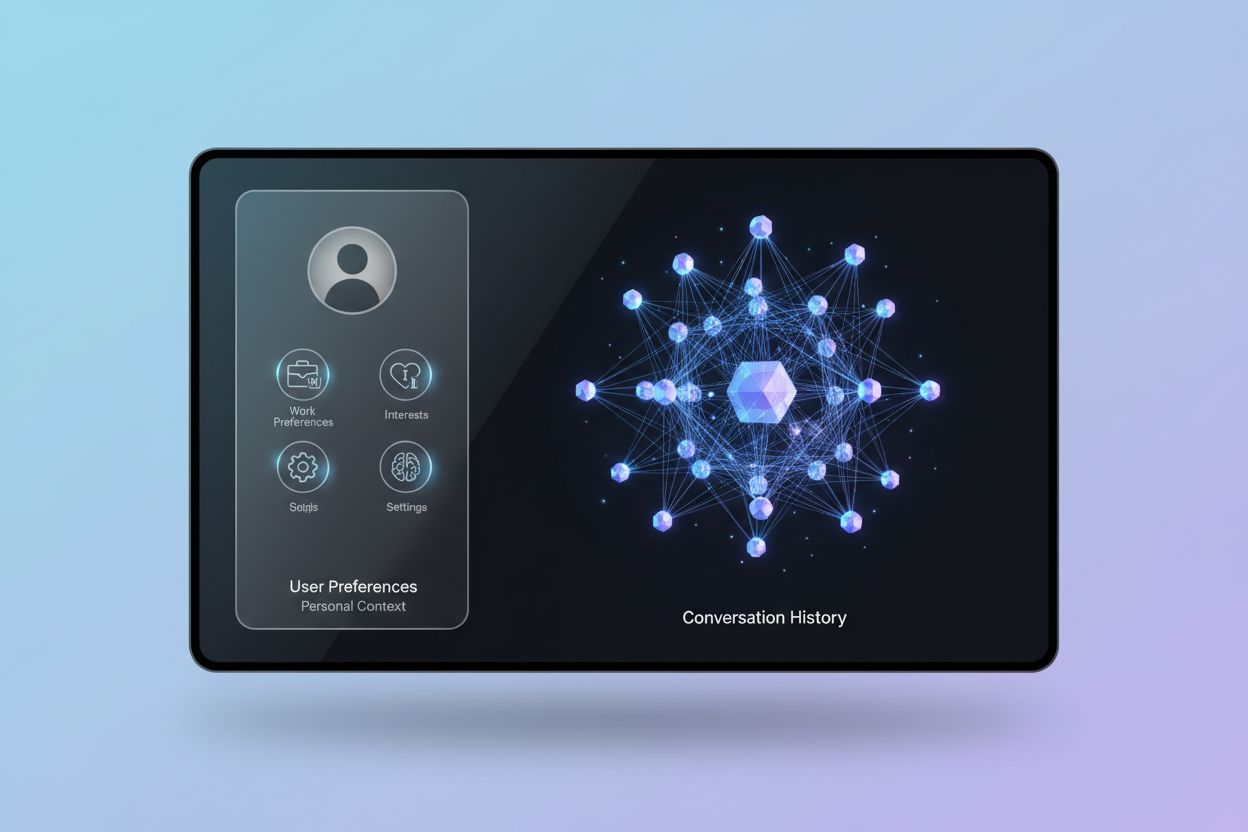
Learn about ChatGPT Memory, OpenAI's feature for retaining user preferences and context across conversations. Understand how it works, its benefits, limitations...
Cookie Consent
We use cookies to enhance your browsing experience and analyze our traffic. See our privacy policy.