Definition of Prompt Tracking
Prompt tracking is the practice of recording the prompts you write, the exact settings you use, the responses you receive, and how satisfied you are with the results. Think of it like a workout log for your AI interactions: you record what you did, what happened, and how to do it better next time. At its core, prompt tracking answers three questions: What did I ask? What did I get? And how can I improve it? The simplest form requires no special software, just a place to write things down, a willingness to test, and patience to see patterns emerge.
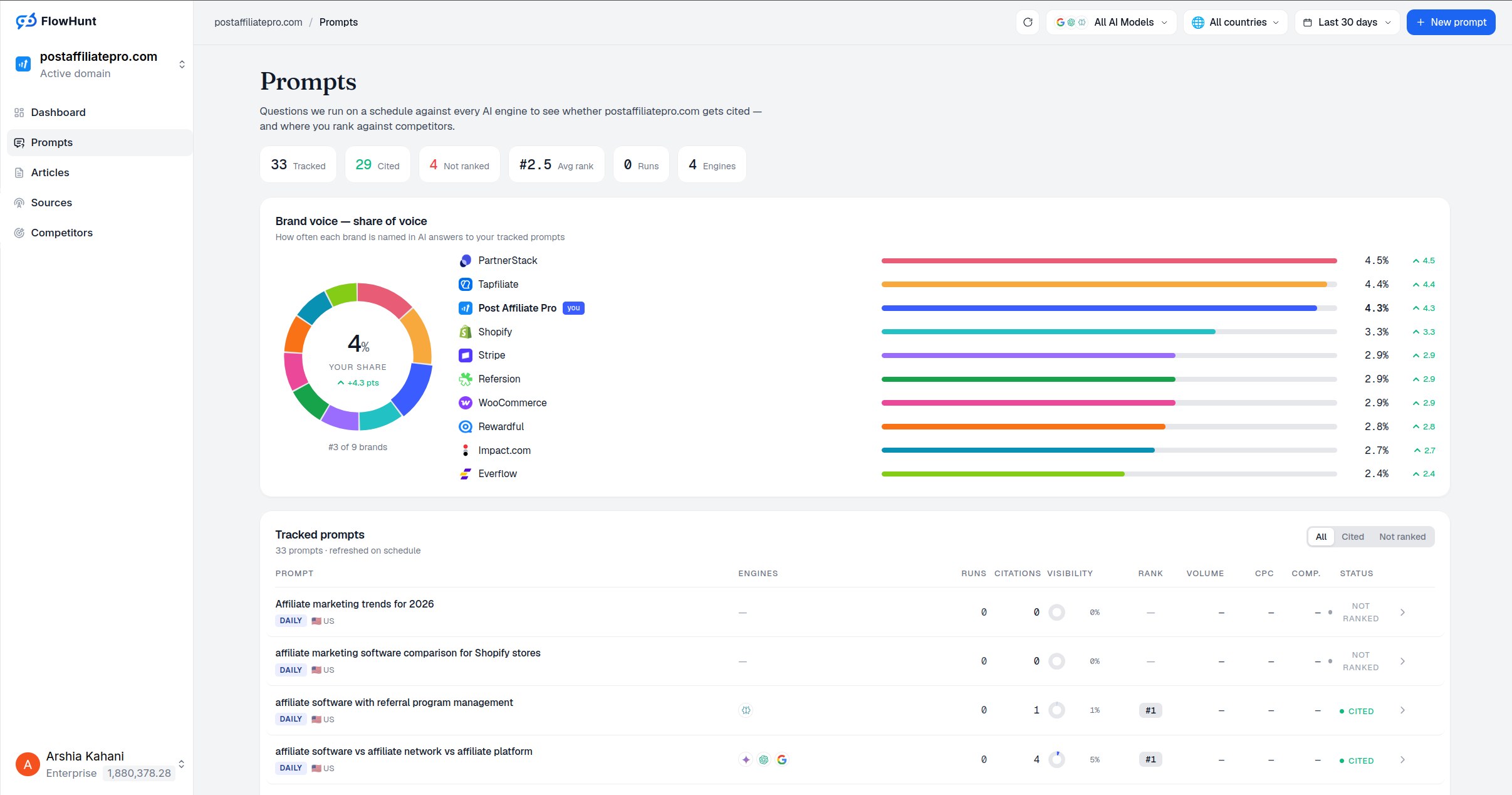
The term also has a second, distinct meaning in a marketing and SEO context: brand-focused prompt tracking, where a business monitors how AI platforms like ChatGPT, Perplexity, and Google AI Overview respond to prompts about that brand and its competitors, to understand and improve AI visibility. Both uses share the same underlying idea, recording a prompt and its result to learn from it, but they serve very different audiences and goals.
Why Prompt Tracking Matters
If you’re new to AI tools, you might think every conversation is a one-off. But small changes in how you phrase a request, what context you provide, or which model settings you use can dramatically change the output. Without tracking, you’re flying blind. With it, you build a personal library of proven prompts that save time and deliver consistent results.
There are three core reasons this matters:
Consistency. When you find a prompt that produces exactly what you need, a well-structured email, a detailed explanation, creative ideas, you want to be able to recreate it. Without tracking, you’ll spend time trying to remember what you asked the first time.
Debugging. If an AI response misses the mark, you need to know what changed. Did you forget to mention the audience? Did you use a different model? Did a setting shift? Tracking helps you identify what went wrong so you can fix it.
Efficiency. Over time, you build a personal library of prompts that work. Instead of starting from scratch every time, you refine and reuse. Consider a content writer who needs to generate blog post outlines: the first time might take 30 minutes of trial and error, but if they’ve tracked what works, the second time takes minutes.
Two Worlds: Brand Visibility vs. Personal Optimization
It’s important to understand that “prompt tracking” means different things in different contexts.
Brand-focused prompt tracking is about monitoring how a company appears in AI-generated answers. If someone asks ChatGPT “What’s the best email marketing tool?” does your software get mentioned? This is the kind of tracking platforms like Am I Cited are built for: it requires specialized tools and focuses on competitive positioning, share of voice, and citation monitoring across AI platforms.
Personal prompt tracking is about optimizing your own AI interactions. It’s about building a system that helps you get better results faster from tools like ChatGPT or Claude. You’re not worried about brand mentions or competitor visibility; you’re worried about how to get better, more consistent outputs from your own prompts.
Both are valuable, and they’re not mutually exclusive: a marketer might track their own content-generation prompts for efficiency while also using a brand-monitoring tool to track how AI platforms describe their company.
| Aspect | Personal Prompt Tracking | Brand Prompt Tracking |
|---|
| What you record | Full conversational prompts, AI responses, settings | Prompts about your brand, competitor mentions, citations |
| Goal | Reproduce good results, improve AI outputs | Monitor AI visibility, benchmark against competitors |
| Data available | Unlimited prompt variations, no volume data | Citation frequency, position, sentiment, source attribution |
| Tools needed | Spreadsheet or notebook, or developer tools like LangSmith | Dedicated AI visibility platforms |
| Frequency | Can test continuously | Typically daily or weekly scheduled checks |
| Audience focus | Personal or team productivity | Marketing, SEO, and brand teams |
Ready to Monitor Your AI Visibility?
Track how AI chatbots mention your brand across ChatGPT, Perplexity, and other platforms.
How Prompt Tracking Works
The Anatomy of a Tracked Prompt
Every tracked prompt consists of the same core elements:
- The prompt text: the exact question or instruction given to the AI, specific enough that you could paste it again and expect similar results.
- Context and variables: the pieces you might change later, such as topic, audience, format, or a specific analogy or constraint.
- Model and settings: which AI model was used (ChatGPT, Claude, Gemini, etc.) and settings like temperature (controls randomness) and max tokens (controls length).
- The output: what the AI produced, and whether it met your needs. You don’t need to save the entire response, just whether it worked and what was missing.
- Your rating: a simple scale (1-5, or “good/needs work”) to identify which prompts are worth refining.
- Notes for next time: what you’d change, such as adjusting the wording or a setting.
What Data to Capture
Tracking too much creates busy work. A minimal, useful set of fields includes the prompt text, a task/category label, the model used, key settings like temperature, an output quality rating, notes on what worked and what to improve, and the date tested. You generally don’t need to save the full AI response unless it’s exceptional.
The Feedback Loop
Effective prompt tracking follows a simple cycle: test the prompt, rate the output, note what worked and what didn’t, tweak the prompt based on those notes, test again, and repeat until you have a prompt you’re satisfied with. That refined version becomes a “master prompt,” worth saving and reusing.
Manual Prompt Tracking Methods
You don’t need special software to start. Manual tracking has real advantages: it builds intuition for what affects output, forces a habit of reflection after each test, avoids tool lock-in, and costs nothing.
The copy-paste method: every time you get a great result, copy the prompt into a document with a one-line note. Fast to start, but hard to search or filter as it grows.
The spreadsheet method: a simple sheet with columns for date, category, prompt text, model, rating, and notes. Structured enough to be useful, simple enough to maintain, and the recommended starting point for most people.
The notebook method: a physical notebook or notes app, organized by category. Flexible and personal, though harder to compare prompts side by side at scale.
Stay Updated on AI Visibility Trends
Get the latest insights on AI mentions, brand monitoring, and optimization strategies.
Common Mistakes to Avoid
Vague prompts that don’t describe real problems. Prompts like “tell me about email marketing” are too generic for the AI to produce something useful. Providing context, who you are, what you’ll do with the output, and what you specifically need, produces far more useful results.
Not recording settings and variables. Temperature, model version, and max tokens all affect output significantly. If you don’t record them, you may get a great result and then struggle to reproduce it.
Tracking every single prompt. Trying to track throwaway, one-off prompts is exhausting and pointless. Track only “master prompts”: ones you’ll reuse, that took effort to refine, and that solved a real problem.
Forgetting to test before you track. Saving a prompt to your system without running it first means you might be tracking a prompt that sounds good in theory but performs poorly in practice. Always test, rate, and refine before saving.
Building a Prompt Tracking System, Step by Step
Step 1: Define your goals. Identify the 1-3 areas where you use AI most (writing, coding, brainstorming, learning, analysis) and start narrow.
Step 2: Choose your storage method. A spreadsheet, notebook, or document all work; a simple spreadsheet is a reasonable default for most people.
Step 3: Create templates. A template is a prompt with blanks you fill in, such as “Write a [LENGTH]-word blog post outline about [TOPIC] for [AUDIENCE],” which saves you from starting from scratch each time.
Step 4: Run your first prompts and log them. Test a handful of prompts, rate each output, and log the results. Aim for learning patterns, not perfection.
Step 5: Review and iterate. After a couple of weeks, review your highest- and lowest-rated prompts to see what they have in common, and refine your system based on what you learn.
After manual tracking for a while, some people move to dedicated tools. LangSmith is aimed at developers and offers a free tier that automatically logs prompts, responses, and performance metrics. Helicone tracks API calls to AI models, logging prompts, responses, costs, and latency, and is more technical but useful if you’re integrating AI into applications. Google Sheets remains a fully viable long-term option for many people: not fancy, but functional, and you can add formulas and charts to track trends over time.
When evaluating a tool, consider ease of use (can you log a prompt in seconds?), cost (is there a usable free tier?), automation (does it auto-log prompts or require manual entry?), reporting (can you see trends over time?), and integration with the AI tools you already use.
You’re generally ready to move from manual to automated tracking once you’re tracking dozens of prompts and it’s getting hard to manage, you want automatic logging, you need historical comparisons, or you’re tracking across multiple AI models and need a unified view.
Prompt Tracking vs. Keyword Tracking
If you work in marketing or SEO, it’s worth understanding how prompt tracking differs from traditional keyword tracking.
| Aspect | Keyword Tracking | Prompt Tracking |
|---|
| What you’re tracking | Short keywords (e.g., “email marketing tool”) | Full conversational prompts (e.g., “an email marketing tool that integrates with Shopify”) |
| Data available | Search volume, ranking position, SERP features | No volume data, no ranking positions, near-infinite variations |
| Goal | Monitor search visibility, track rankings | Reproduce results, optimize outputs, or monitor brand mentions in AI answers |
| Tools | Traditional SEO rank trackers | Spreadsheets, developer tools, or dedicated AI visibility platforms |
| Frequency | Weekly or monthly snapshots | Can test continuously, or scheduled daily/weekly for brand monitoring |
| Variability | Relatively stable (same keyword, same intent) | Highly variable (same intent, many possible phrasings; LLM outputs also vary run to run) |
The core difference: keyword tracking is about how search engines see you. Prompt tracking, in its personal sense, is about how you can use AI more effectively; in its brand sense, it’s about how AI describes you. A content marketer might reasonably use both: keyword tracking to understand what topics an audience searches for, and prompt tracking (in both senses) to optimize their own content-creation prompts and to monitor how their brand appears in AI answers.
The Future of Prompt Tracking
The practices and tools around prompt tracking are still evolving. Emerging trends include AI-powered prompt optimization tools that analyze your results and suggest improvements automatically; version control for prompts, similar to how developers use Git for code, so teams can see how a prompt evolved and revert to earlier versions; collaborative prompt libraries shared across a team rather than kept individually; and more detailed prompt analytics that reveal not just whether a prompt worked, but which specific phrases or settings drove better results.
The fundamentals, however, are likely to remain stable: recording what you ask, testing variations, and learning from the results is the core of prompt tracking regardless of how the tooling around it evolves.
Conclusion
Prompt tracking is simple in concept but powerful in practice. By recording what you ask an AI, what you get back, and what works, you turn AI from a tool you use once into a system you refine and rely on. Start small: pick one use case, create a simple spreadsheet or document, test a handful of prompts, rate them, and note what works. In its brand-visibility sense, the same underlying discipline, tracking prompts and their results over time, is what allows a business to understand and improve how it’s represented across AI search platforms.