


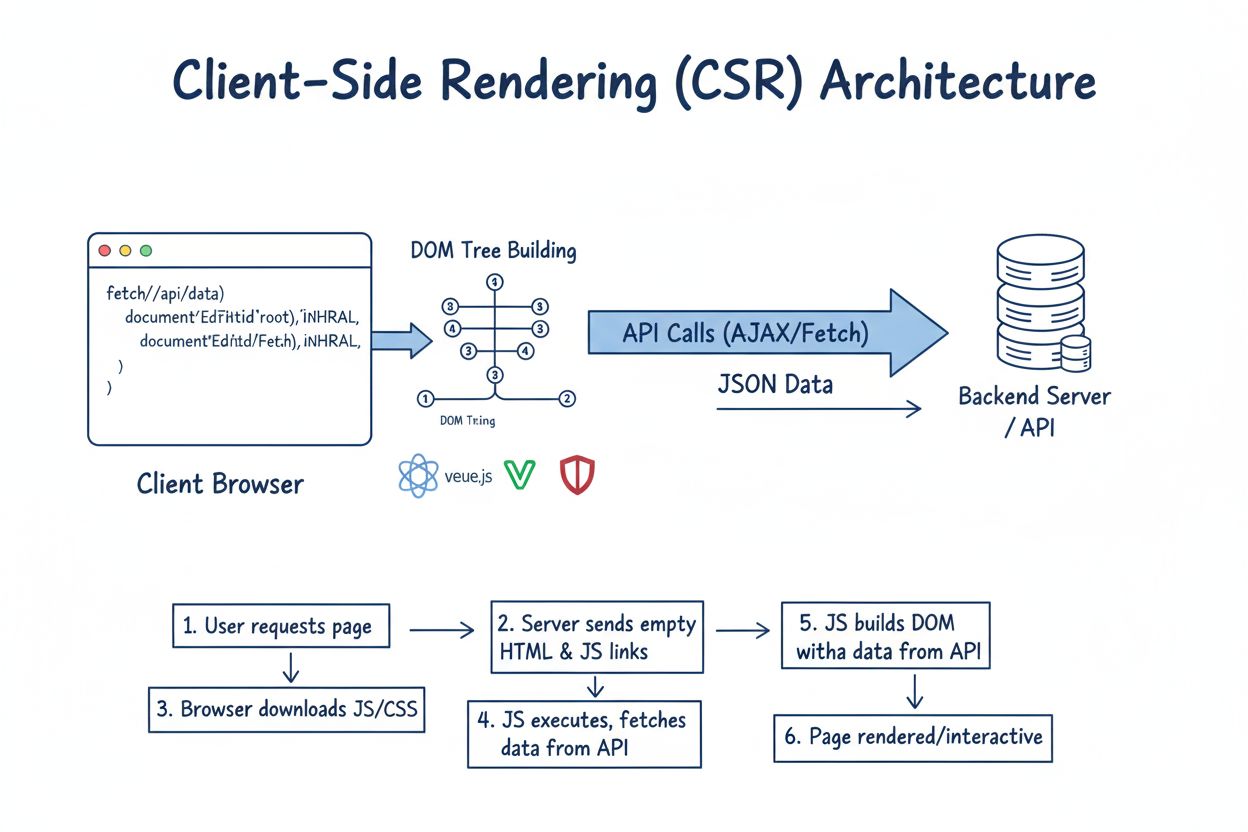
Client-Side Rendering (CSR)
Learn what Client-Side Rendering (CSR) is, how it works, its advantages and disadvantages, and its impact on SEO, AI indexing, and web application performance i...
13 min read
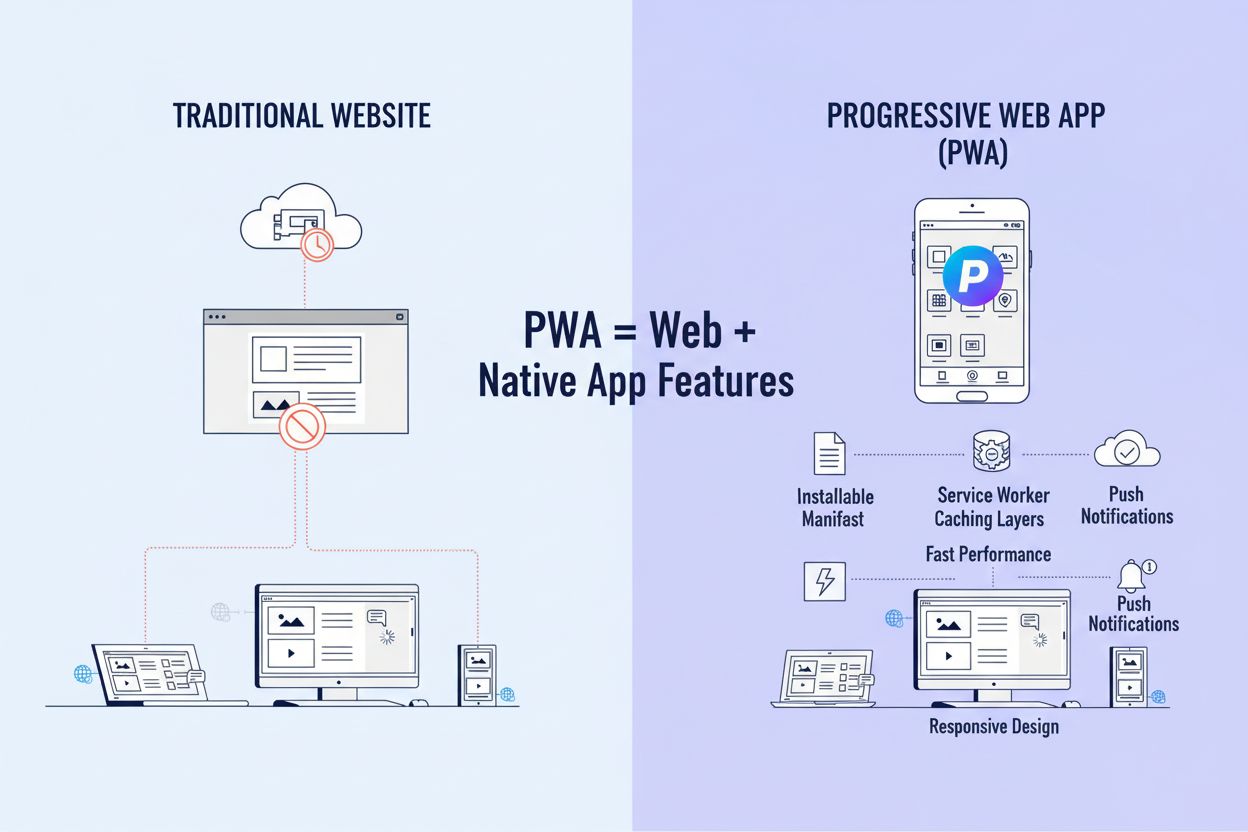
A Progressive Web App (PWA) is a web application built using standard web technologies (HTML, CSS, JavaScript) that provides a user experience similar to native mobile applications, including offline functionality, push notifications, and installability on devices. PWAs combine the best features of websites and native apps, delivering reliable, fast, and engaging experiences across all devices from a single codebase.
A Progressive Web App (PWA) is a web application built using standard web technologies (HTML, CSS, JavaScript) that provides a user experience similar to native mobile applications, including offline functionality, push notifications, and installability on devices. PWAs combine the best features of websites and native apps, delivering reliable, fast, and engaging experiences across all devices from a single codebase.
A Progressive Web App (PWA) is a web application built using standard web technologies—HTML, CSS, and JavaScript—that delivers an experience remarkably similar to native mobile applications while maintaining the accessibility and reach of traditional websites. The term “progressive” reflects the core philosophy: PWAs work for every user, regardless of browser choice or device capability, progressively enhancing with advanced features when supported. PWAs combine the best characteristics of websites and native apps, enabling users to install applications directly from the web, access them offline, receive push notifications, and interact with them through a full-screen, app-like interface. Unlike native applications that require separate development for iOS and Android, PWAs leverage a single codebase to function seamlessly across all platforms, devices, and operating systems. This architectural approach has fundamentally transformed how organizations approach cross-platform application development, with the global PWA market valued at USD 3.53 billion in 2024 and projected to reach USD 21.44 billion by 2033, representing a compound annual growth rate of approximately 28%.
The technical foundation of a PWA rests on three essential pillars: the web app manifest, service workers, and HTTPS security. The web app manifest is a JSON file that provides critical metadata about the application, including the app name, icons, theme colors, display mode, and start URL. This file enables browsers to recognize the PWA as an installable application and display it appropriately on user devices. The service worker is a JavaScript file that runs in the background, separate from the main web page, acting as a proxy between the application and the network. Service workers intercept network requests, manage caching strategies, handle offline scenarios, and enable background synchronization. HTTPS is mandatory for PWAs because service workers require a secure context to function, protecting user data and ensuring the integrity of cached content. Together, these components create a robust architecture that allows PWAs to function reliably across varying network conditions and device capabilities. The implementation of these technologies requires developers to understand progressive enhancement principles, ensuring that applications remain functional even when advanced features are not supported by the user’s browser or device.

Track how AI chatbots mention your brand across ChatGPT, Perplexity, and other platforms.
| Aspect | Progressive Web App (PWA) | Native App |
|---|---|---|
| Development Cost | 40-60% lower; single codebase for all platforms | Higher; separate development for iOS and Android |
| Development Time | Faster; typically 3-6 months for MVP | Slower; 6-12 months for multi-platform release |
| Platform Coverage | Works on all devices with a web browser | Platform-specific (iOS, Android, Windows, macOS) |
| Installation | Direct from web; no app store required | Downloaded from Apple App Store or Google Play Store |
| Offline Functionality | Supported via service workers and caching | Native support; full offline capability |
| Performance | Good; optimized for web; may lag on complex tasks | Excellent; optimized for specific platform hardware |
| Hardware Access | Limited; via Web APIs (camera, GPS, Bluetooth) | Full access to device features and sensors |
| Push Notifications | Supported; browser-dependent; must be visible | Full support; can be silent or background-triggered |
| SEO and Discoverability | Excellent; indexed by search engines | Poor; not indexed; relies on app store visibility |
| Update Mechanism | Automatic; users always have latest version | Manual; users must download updates from app store |
| Storage Requirements | Minimal; typically 1-5 MB | Larger; typically 50-500 MB depending on app |
| Cross-Platform Compatibility | Native; works on web, mobile, desktop | Requires separate builds for each platform |
| User Acquisition Cost | Lower; organic search and direct links | Higher; app store marketing and paid campaigns |
Service workers are the technological cornerstone that enables PWAs to deliver native-like experiences. These specialized JavaScript workers run in a separate thread from the main application, allowing them to perform background tasks without blocking the user interface or consuming main thread resources. When a PWA is first installed, the service worker is registered and can begin caching application resources—HTML pages, stylesheets, scripts, images, and API responses. The service worker then intercepts all network requests made by the application through the fetch event, allowing developers to implement sophisticated caching strategies. The cache-first strategy prioritizes cached content, checking the cache before attempting network requests, making it ideal for static assets that rarely change. The network-first strategy attempts to fetch fresh content from the network first, falling back to cached content only when offline, suitable for frequently updated data. The stale-while-revalidate strategy serves cached content immediately while simultaneously fetching updated content in the background, providing both speed and freshness. Beyond caching, service workers enable background synchronization, allowing PWAs to queue actions (like sending messages or uploading files) when offline and automatically execute them once connectivity is restored. Research indicates that proper service worker implementation can reduce application load times by up to 70% and improve user retention rates by approximately 40%, making service workers essential for competitive PWA performance.
Get the latest insights on AI mentions, brand monitoring, and optimization strategies.
One of the most transformative features of PWAs is their ability to function reliably when network connectivity is unavailable or intermittent. Offline functionality is achieved through a combination of service workers, caching strategies, and local storage mechanisms that allow applications to serve cached content and maintain functionality without network access. When users first visit a PWA, the service worker caches essential resources needed for core functionality. Subsequently, when users access the application offline, the service worker intercepts requests and serves cached responses, creating a seamless experience. This capability is particularly valuable in regions with unreliable internet infrastructure, where connectivity is intermittent rather than consistently unavailable. Background operations extend this capability further, allowing PWAs to perform tasks even when the application is not actively open. The Background Sync API enables PWAs to queue operations (such as sending emails or uploading data) and execute them automatically when connectivity is restored, without requiring user intervention. The Periodic Background Sync API allows PWAs to refresh content at regular intervals, ensuring that cached data remains relatively fresh even when the application is closed. The Background Fetch API supports long-running downloads that continue even if the user closes the application, with the browser displaying persistent progress notifications. These capabilities transform PWAs from passive web applications into proactive tools that maintain engagement and functionality regardless of network conditions, with studies showing that 82% of users abandon applications that fail to function offline.
PWA installation represents a fundamental shift in how users acquire and interact with applications. Unlike native apps that require downloading from centralized app stores, PWAs can be installed directly from the web through browser prompts or explicit user actions. When a PWA meets specific installability criteria—including a valid web app manifest, service worker, HTTPS connection, and responsive design—browsers display an install prompt, allowing users to add the application to their home screen or app drawer with a single click. This frictionless installation process eliminates the barriers associated with app store discovery, approval processes, and download friction. PWAs are inherently discoverable through search engines, appearing in organic search results and benefiting from SEO optimization, unlike native apps which are invisible to search engines. This search engine visibility provides significant advantages for user acquisition, with PWAs capable of attracting organic traffic through standard web search. Additionally, PWAs can be distributed through multiple channels: directly from websites, through app stores (including Microsoft Store, Google Play, and Apple App Store), through progressive web app directories, and through social sharing. The web app manifest plays a crucial role in discoverability, providing search engines and browsers with metadata that improves indexing and presentation. Companies like Starbucks and Spotify have leveraged PWA discoverability to achieve 150% increases in user engagement and significantly improved conversion rates compared to traditional web experiences.
PWA support varies significantly across browsers and platforms, requiring developers to implement progressive enhancement strategies to ensure functionality across diverse environments. Google Chrome and Chromium-based browsers (Edge, Opera, Brave) provide comprehensive PWA support, including service workers, web app manifest, push notifications, and background sync. Firefox supports most PWA features but with some limitations in background sync and periodic background sync capabilities. Safari on macOS and iOS provides basic PWA support, including installation and offline functionality, but with notable restrictions: Apple’s WebKit engine deletes local storage after seven days of non-use, potentially affecting PWA functionality for infrequently used applications. Mobile browsers on Android generally provide robust PWA support, while iOS PWAs function as web apps rather than true installed applications, lacking some native integration features. Developers must account for these platform differences through feature detection, implementing fallback experiences for browsers that don’t support advanced capabilities. The Permissions API requires explicit user consent for sensitive features like push notifications, camera access, and geolocation, with browsers enforcing strict security policies. Understanding these platform-specific considerations is essential for delivering consistent experiences across the diverse ecosystem of devices and browsers that users employ to access PWAs.
The adoption of PWAs has accelerated dramatically across enterprises, driven by compelling business metrics and cost advantages. Starbucks reported a 150% increase in users who added their PWA to their home screen, with desktop order rates nearly matching mobile rates. Trivago achieved a 97% increase in hotel offer clickouts after implementing a PWA, demonstrating significant conversion improvements. Tinder reduced application load times from 11.91 seconds to 4.68 seconds through PWA optimization, while reducing the application size by 90% compared to their native Android app. Twitter Lite generated a 65% increase in pages accessed per session and a 75% surge in tweets sent, showcasing engagement improvements. These success stories reflect broader market trends: the global PWA market is experiencing explosive growth, with the market size projected to expand from USD 5.23 billion in 2025 to USD 21.44 billion by 2033. This growth is driven by enterprises recognizing that PWAs deliver superior return on investment compared to native app development, with development costs typically 40-60% lower than building separate iOS and Android applications. Organizations are increasingly adopting PWAs for customer-facing applications, internal tools, and hybrid strategies that combine PWAs with native apps for specific use cases requiring deep hardware integration.
Choosing a PWA over a native app comes down to matching the trade-offs in the comparison table above to your actual product requirements. Choose a PWA when development budget and time-to-market matter most: PWAs cost 40-60% less to build than separate iOS and Android apps and typically reach MVP in 3-6 months versus 6-12 months for native. Choose a PWA when organic discoverability is part of the growth strategy, since PWAs are indexed by search engines the way native apps are not—an app store listing alone won’t surface your product to someone searching Google. Choose a PWA when your use case is content-, commerce-, or information-centric and doesn’t depend on deep hardware integration; offline functionality via service workers and push notifications cover most engagement needs without native-level access to sensors. Choose native instead when the application requires full, unrestricted access to device hardware—background location tracking, deep Bluetooth peripheral control, or camera processing beyond what Web APIs expose—since PWA hardware access remains limited compared to native SDKs. Choose native instead if your primary user base is on iOS and depends on features that persist reliably over time: Safari’s WebKit engine deletes local storage after seven days of non-use, which can silently break offline data for infrequent users in a way native apps never experience. Consider a hybrid approach when the two audiences diverge: a PWA for the broad, search-driven customer base, paired with a native app for power users who need the deeper platform integration a browser sandbox can’t provide.
Start tracking how AI chatbots mention your brand across ChatGPT, Perplexity, and other platforms. Get actionable insights to improve your AI presence.
Learn what Client-Side Rendering (CSR) is, how it works, its advantages and disadvantages, and its impact on SEO, AI indexing, and web application performance i...
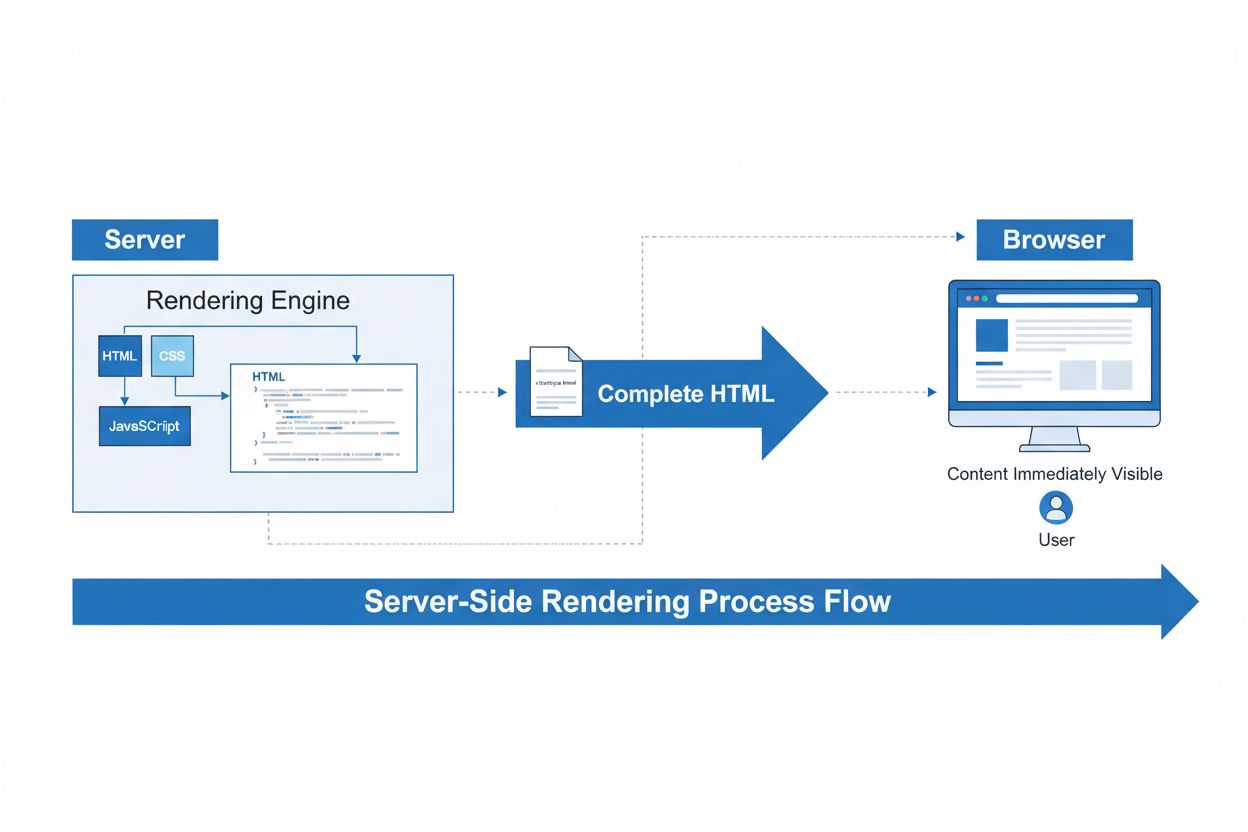
Server-Side Rendering (SSR) is a web technique where servers render complete HTML pages before sending them to browsers. Learn how SSR improves SEO, page speed,...
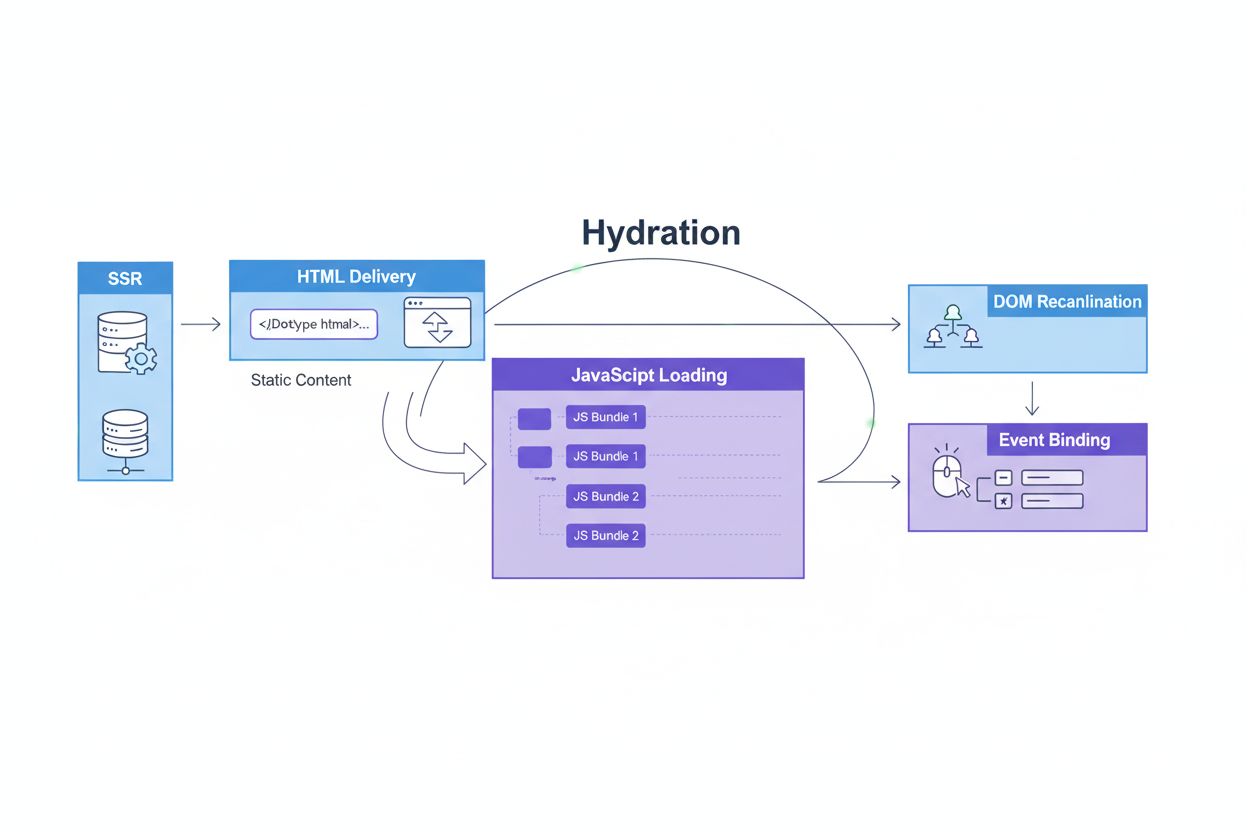
Hydration explained: the web development process of converting static server-rendered HTML into interactive applications. Learn how frameworks like React, Vue, ...
Cookie Consent
We use cookies to enhance your browsing experience and analyze our traffic. See our privacy policy.