


Google Search Sitemaps and Indexing
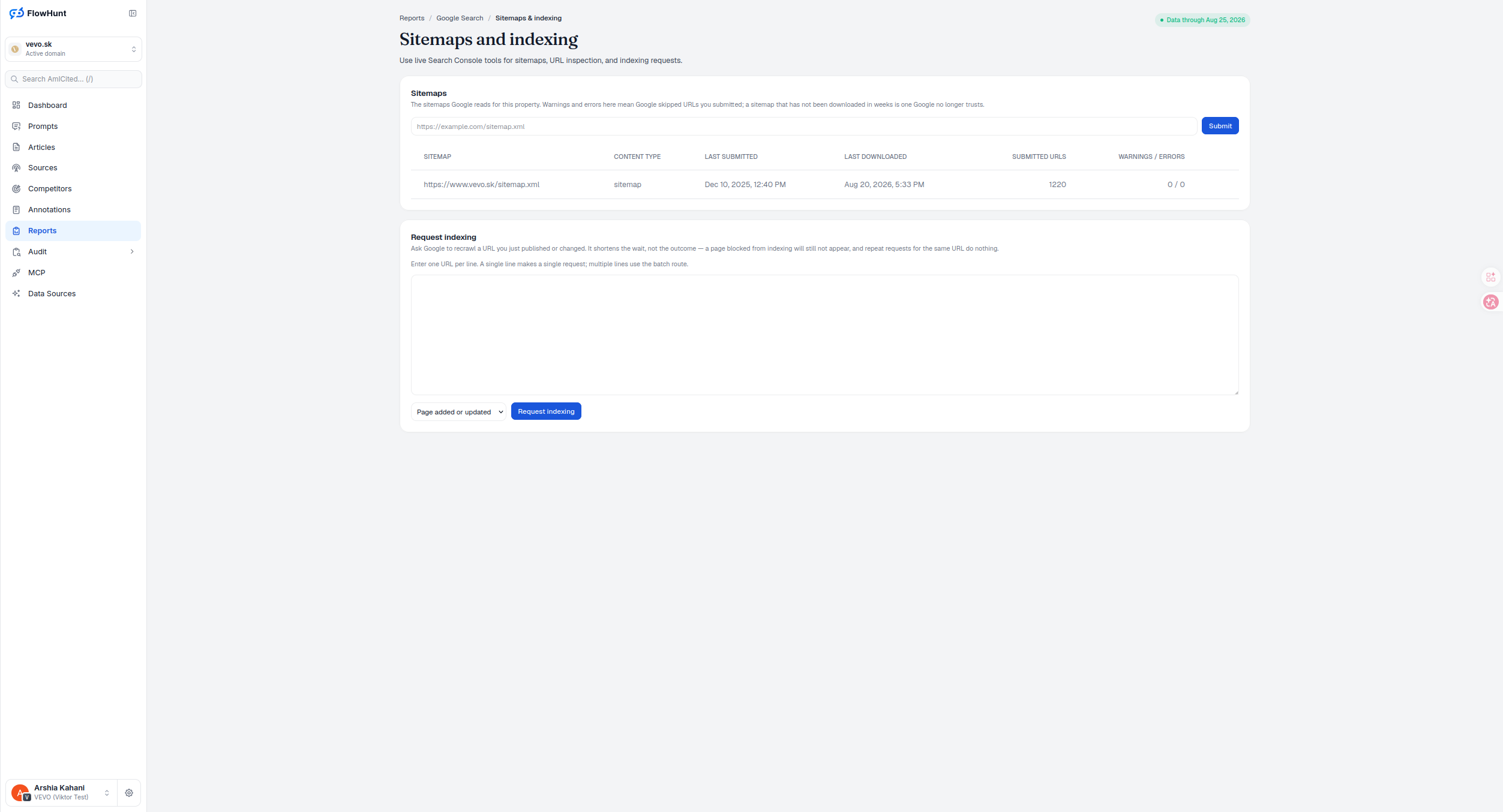
Sitemaps and indexing pairs a google sitemaps report with search console indexing tools that act, not just report: submit a sitemap or request indexing for a URL directly through Search Console’s own API, without leaving AmICited.
Google Recrawl Request Limits
Request indexing asks Google to recrawl a URL you just published or changed. It shortens the wait, not the outcome — a page blocked from indexing will still not appear, and repeat requests for the same URL do nothing further.
- Live write actions, not just reads — submitting a sitemap and requesting indexing both call Search Console’s API directly, the only page in this batch that changes something in Google rather than reporting on it.
- No date range, on purpose — sitemap state and indexing notifications are current property-level facts, not a historical warehouse metric, so there’s nothing here for a date filter to govern.
- Sitemaps table — SITEMAP, CONTENT TYPE, LAST SUBMITTED, LAST DOWNLOADED, SUBMITTED URLS, WARNINGS/ERRORS for every sitemap Google reads for this property, taken straight from Google’s own response — a missing field shows as a dash, missing warnings or errors show as zero.
- Submit or remove a sitemap — a URL input to register one, plus a per-row delete; both ask for browser confirmation first, and the input clears itself after a successful submit.
- Warnings and errors mean skipped URLs — and a sitemap not downloaded in weeks is one Google no longer trusts.
- Request indexing, one or many, added or removed — enter one URL per line; a single line makes a single request, multiple lines use the batch route (capped at 100 URLs), with a reason dropdown for Page added or updated versus Page removed.
- Read and write are separate permissions — every connected user sees the sitemap table; only users with update permission see the submit input, delete buttons and the indexing card at all.
Google Search Sitemaps Report
Warnings and errors here mean Google skipped URLs you submitted; a sitemap that has not been downloaded in weeks is one Google no longer trusts. This property’s sitemap.xml reads clean: submitted Dec 10, 2025, downloaded as recently as Aug 20, 2026, 1,220 submitted URLs, 0 warnings and 0 errors — recent activity and a clean count is what a healthy sitemap looks like here. Submit a new sitemap directly from the same card, no need to leave AmICited to register one with Search Console.
- SITEMAP, CONTENT TYPE — identifies the sitemap and what it declares; index sitemaps and pending sitemaps carry their own tags.
- LAST SUBMITTED, LAST DOWNLOADED — when you registered it and when Google last actually read it; a download that never happened reads Not downloaded yet rather than a blank cell.
- SUBMITTED URLS, WARNINGS/ERRORS — the URL count summed across content types, and Google’s flagged count, colored amber for warnings and the error color for errors, zero for neither.
- Submit-a-sitemap input — register a new sitemap without leaving the page; a browser confirmation gates both submitting and deleting, and the list reloads on success.
- What this table doesn’t show — an indexed-URL total isn’t part of Google’s Sitemaps API response, so it isn’t shown here; confirm any individual URL’s real index status on URL Inspection instead.
Request Google URL Recrawls
Enter one URL per line: a single line makes a single request, multiple lines use the batch route, capped at 100 URLs, with blank lines and stray whitespace stripped automatically. Pick a reason — Page added or updated for new or changed pages, Page removed for anything gone — then Request indexing, which asks for confirmation before it fires. This shortens the wait for a recrawl — it does not change whether Google indexes the page; a page blocked from indexing stays blocked, and requesting the same URL again does nothing more.
- One URL per line — a single line is a single request; two or more route through the batch endpoint automatically, capped at 100 URLs.
- Two reasons — Page added or updated, or Page removed, telling Google which of the two notification types to send.
- No per-item receipts — the batch response isn’t shown row by row and the textarea isn’t cleared after a successful send; a failed request surfaces as a page-level error instead.
- Shortens the wait, not the outcome — a blocked page still will not appear, and repeat requests for the same URL do nothing further.
- Update permission required — this card, like Submit and delete above, is invisible to read-only users.
Automatic URL Indexing Requests
The automatic-indexing toggle controls whether changed URLs on the mapped site are submitted to Search Console. It is a deliberate write setting alongside manual requests, not a ranking switch: crawlability, eligibility and Google’s indexing decision remain outside the toggle.
- Toggle only when the mapping is right — it applies to the connected site, not every URL a workspace can see.
- Use it with the same caution as a manual request — repeated notification does not force indexing.
- Keep authority visible — the setting is an update action, so readers can inspect the report without receiving an external write control.
of these pages that writes to Google, not just reads from it
Sitemap submission and indexing requests both call Search Console’s own API — a real action against Google’s index, not a dashboard view of it.
See URL InspectionManage Google Search Indexing
Submit sitemaps and see their warnings and errors, then request indexing for a URL you just published or changed — one at a time or in a batch.
Ready to get a page recrawled faster?
Free check · 7-day trial · card required