


Stockout
Learn what a stockout is, why it happens, how to measure stockout rate, and practical strategies ecommerce brands use to prevent running out of stock.
5 min read
A backorder is an order for a product that a customer can still place even though the item is temporarily out of stock, with fulfillment promised once new inventory arrives. It differs from a stockout in that the sale is accepted rather than blocked, and from a waitlist in that payment and commitment are typically taken up front. Backorders are a deliberate inventory strategy as much as an inventory problem.
A backorder is an order for a product that a customer can still place even though the item is temporarily out of stock, with fulfillment promised once new inventory arrives. It differs from a stockout in that the sale is accepted rather than blocked, and from a waitlist in that payment and commitment are typically taken up front. Backorders are a deliberate inventory strategy as much as an inventory problem.
A backorder is a customer order accepted for a product that is currently out of stock, with fulfillment deferred until new inventory arrives. Unlike a stockout, which simply blocks a sale, a backorder converts unmet demand into a confirmed but delayed transaction: the customer commits to the purchase, often paying immediately, in exchange for a promised ship date once replenishment stock lands. Backorders appear across nearly every category of e-commerce, from made-to-order furniture and limited production runs to popular items caught in a temporary supply gap. The practice sits at the intersection of inventory management and customer experience: handled well, with realistic timelines and proactive communication, a backorder preserves a sale that would otherwise be lost; handled poorly, it becomes a source of cancellations, refund requests, and damaged trust.
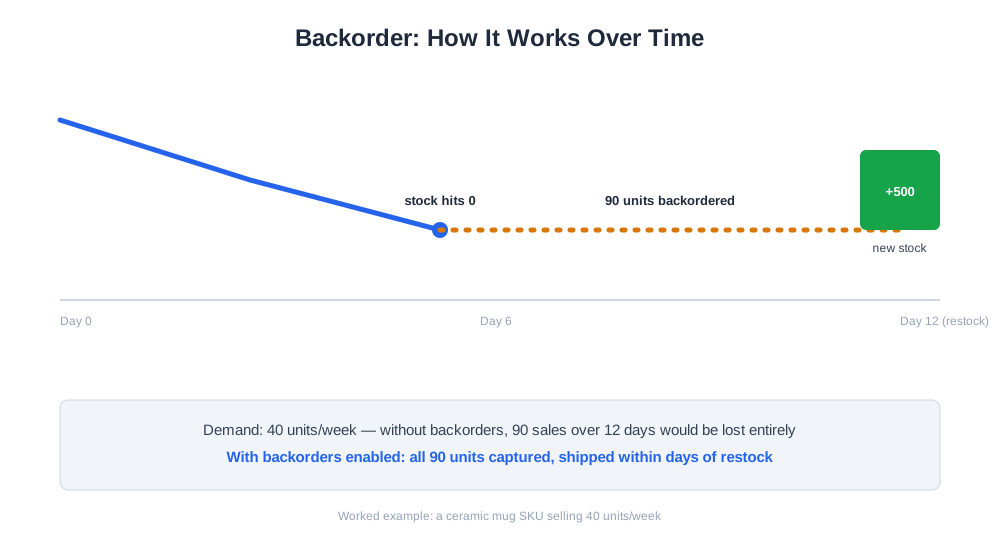
The mechanics of a backorder typically follow a consistent sequence. First, on-hand inventory for a SKU reaches zero while demand continues, usually because a replenishment order is already in transit or scheduled with a supplier. Second, the merchant decides whether to allow continued ordering against that incoming stock rather than hiding the product or marking it fully out of stock. Third, if backorders are enabled, the product page displays an estimated ship date, and the order is flagged internally as backordered rather than ready to fulfill. Fourth, once the replenishment shipment arrives at the warehouse, backordered units are allocated in the order they were placed, and fulfillment proceeds as normal.
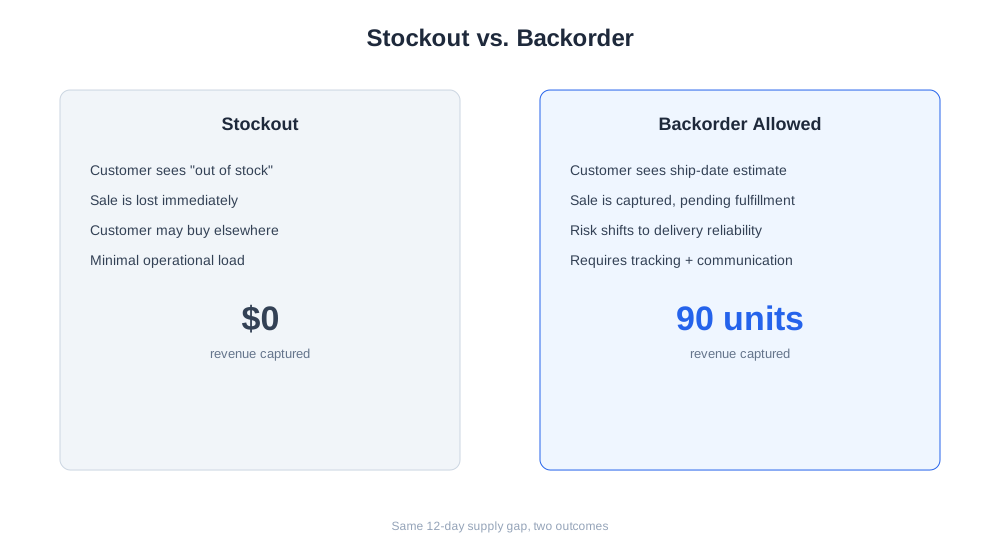
Worked example: a store sells 40 units per week of a popular ceramic mug, and on-hand inventory drops to zero with a new shipment of 500 units confirmed to arrive in 12 days. Rather than blocking sales, the store allows backorders and displays “ships in 2 weeks” on the product page. Over those 12 days, it takes 90 additional backorder units, all of which ship within a day or two of the new stock arriving. Without the backorder option, those 90 sales would likely have been lost entirely or diverted to a competitor.

Track how AI chatbots mention your brand across ChatGPT, Perplexity, and other platforms.
Backorders directly affect revenue capture during any supply gap. A store that disables purchasing the moment stock hits zero forfeits every sale during the replenishment window; a store that allows backorders on the right products recovers much of that demand instead. But the benefit only holds if delivery promises are kept — a backorder that slips well past its estimated date behaves like a broken promise rather than a delayed sale, and tends to generate cancellations, chargebacks, and support tickets that cost more than the lost sale would have. Backorders also carry a working-capital dimension: money collected up front for goods not yet in hand needs to be reflected correctly in revenue recognition and refund liability, since a backorder that is ultimately cancelled needs to be unwound cleanly.
| Scenario | Stockout (no backorder) | Backorder allowed |
|---|---|---|
| Customer experience | Sees “out of stock,” may leave the site | Can still purchase with a ship-date estimate |
| Revenue impact | Sale is lost immediately | Sale is captured, pending fulfillment |
| Risk | Customer may buy from a competitor | Risk shifts to delivery-date reliability |
| Best suited for | Highly impulse-driven, low-loyalty categories | Predictable restock dates, loyal or patient buyers |
| Operational load | Minimal — item simply hidden or disabled | Requires tracking, communication, and allocation on arrival |
AI shopping assistants such as ChatGPT Shopping, Perplexity Shopping, and Amazon Rufus increasingly surface real-time availability when comparing products across retailers, which means a poorly labeled backorder can quietly push a shopper toward a competitor showing the same item as in stock. Accurate, consistently updated backorder status feeding into these channels matters more than ever, since an AI assistant summarizing options has no context for why a “ships in 2 weeks” listing might actually be a better deal than an in-stock alternative at a higher price. AmICited’s eshop_get_replenishment tool helps merchants stay ahead of this by tracking incoming purchase orders, supplier lead times, and current sell-through velocity against live demand, flagging SKUs that are trending toward a stockout or backorder situation before it happens. That advance warning gives a merchant time to either expedite a replenishment order or proactively update product listings and any connected shopping feeds with an accurate, realistic delivery estimate.
Get the latest insights on AI mentions, brand monitoring, and optimization strategies.
Allowing backorders on every product regardless of restock certainty. Backorders work when the replenishment date is genuinely reliable; applying the same policy to a SKU with an uncertain or repeatedly delayed supplier creates a pattern of broken promises that erodes trust faster than simply marking the item out of stock would have. Underestimating shipping timelines to make products look more attractive. Optimistic ship-date estimates generate short-term conversions but produce a wave of cancellations and support tickets once the real timeline becomes clear, which usually costs more in refunds and reputation than the extra sales were worth. Failing to track backordered demand separately in forecasting. If backorder quantities aren’t counted as real demand distinct from fulfilled sales, the next replenishment order is calculated against understated demand, which can trigger a repeat stockout almost immediately after the first one clears. Not communicating proactively when a backorder date slips. Customers tolerate a single, clearly explained delay reasonably well; they tolerate silence or a repeatedly moving delivery date far worse, and this is consistently the top driver of backorder-related cancellations and negative reviews. Allocating new stock on a first-come basis without reconciling cancelled backorders. If a customer cancels a backordered item, that unit needs to be released back into available allocation immediately, or the next customer in line ends up waiting for stock that was actually already available.
Start tracking how AI chatbots mention your brand across ChatGPT, Perplexity, and other platforms. Get actionable insights to improve your AI presence.
Learn what a stockout is, why it happens, how to measure stockout rate, and practical strategies ecommerce brands use to prevent running out of stock.
Learn what order fulfillment is, the step-by-step process, common fulfillment models, and how ecommerce brands optimize fulfillment speed and cost.
Learn what wholesale ecommerce is, how it differs from retail ecommerce, and how brands run bulk B2B sales alongside their direct-to-consumer store.
Cookie Consent
We use cookies to enhance your browsing experience and analyze our traffic. See our privacy policy.