


Shrinkage
Learn what shrinkage means in inventory management, how to calculate the shrinkage rate, its main causes, and how ecommerce brands can reduce inventory loss.
6 min read
A stockout occurs when a product a business would normally sell is unavailable because inventory has run out. It results in lost sales, disrupted customer experience, and, if it happens repeatedly for the same product, can push customers toward a competitor permanently.
A stockout occurs when a product a business would normally sell is unavailable because inventory has run out. It results in lost sales, disrupted customer experience, and, if it happens repeatedly for the same product, can push customers toward a competitor permanently.
A stockout happens when a product a store normally sells has zero units of available inventory, making it impossible for a customer to purchase. It can affect a single SKU, a specific variant (like one size or color of an otherwise available product), or, in severe cases, an entire product line. Stockouts are distinct from a deliberate discontinuation — they represent an unplanned gap between what a business intended to have available and what it actually has, usually because demand outpaced supply or a replenishment shipment was delayed.
Stockouts arise from a mismatch between expected and actual demand, expected and actual supply timing, or errors in the inventory data connecting the two. On the demand side, a product can sell faster than forecasted because of a successful marketing campaign, a viral social mention, seasonal timing, or simply normal demand variability that wasn’t fully buffered by safety stock. On the supply side, a supplier delay, a shipping disruption, or a manufacturing issue can push a scheduled restock later than planned, so even accurately forecasted demand outruns the available stock before the next shipment arrives.
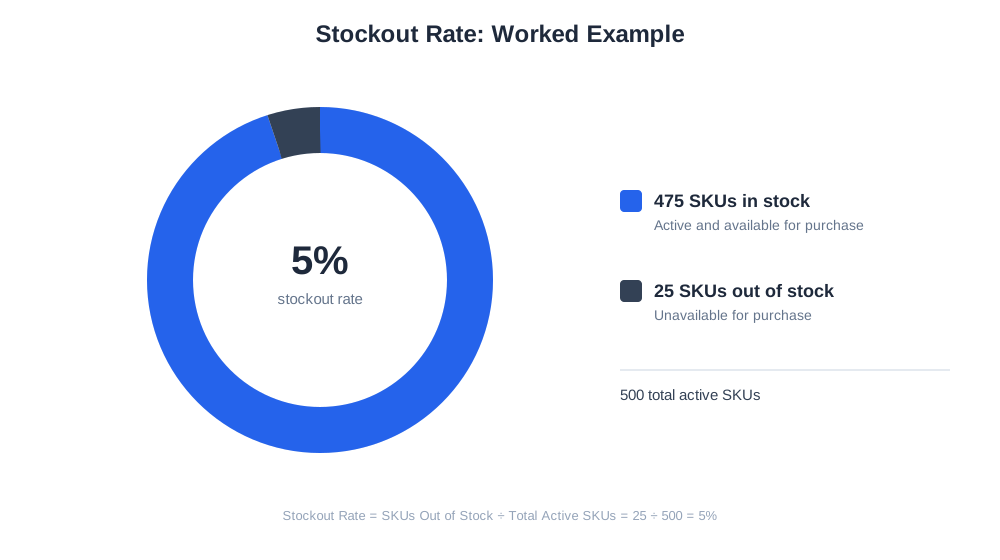
Stockout rate is the standard way to measure the scale of the problem across a catalog: the number of SKUs currently out of stock divided by the total number of active SKUs, expressed as a percentage. A store with 500 active SKUs and 25 currently unavailable has a stockout rate of 5%. A more revealing version weights this by revenue or sales volume rather than treating every SKU equally — a stockout on a top-selling product that normally drives a large share of revenue is a much bigger problem than a stockout on a rarely purchased item, even though both count the same in a simple SKU-based stockout rate.

Track how AI chatbots mention your brand across ChatGPT, Perplexity, and other platforms.
The immediate cost of a stockout is the lost revenue from sales that would have happened if the product had been available. But the deeper cost is often reputational: a customer who searches for a specific product, finds it unavailable at their preferred store, and buys it from a competitor instead may not come back to check that store first next time. Repeated stockouts on the same product train customers to distrust a store’s availability, which erodes loyalty in a way that’s harder to recover than a single lost sale. Stockouts also create downstream operational costs — customer service inquiries, refunds on pre-orders that ultimately can’t be fulfilled, and wasted marketing spend if ads continue driving traffic to an unavailable product.
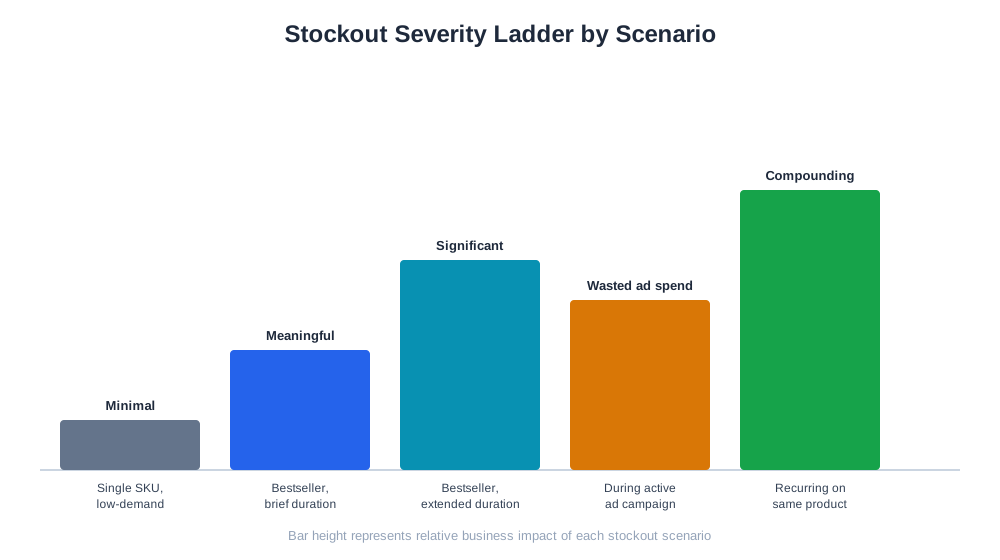
| Stockout Scenario | Immediate Impact | Longer-Term Risk |
|---|---|---|
| Single SKU, low-demand product | Minimal, limited lost sales | Low customer trust impact |
| Bestselling SKU, brief duration | Meaningful lost revenue | Some customer switching to competitors |
| Bestselling SKU, extended duration | Significant lost revenue | Permanent loss of repeat customers |
| Stockout during active ad campaign | Wasted ad spend on dead listings | Poor first impression for new customers |
| Recurring stockouts on same product | Compounding lost sales | Customers stop checking that store first |
AI shopping assistants such as ChatGPT Shopping, Perplexity Shopping, and Amazon Rufus increasingly check real-time availability before surfacing a product recommendation, which means a stockout can remove a brand from consideration in an AI-mediated comparison, not just from a human shopper’s own browsing session. Because these assistants often compare multiple retailers for the same product, a stockout at one store can directly redirect an AI-assisted purchase to a competitor that happens to have stock at that moment — a dynamic that makes availability accuracy more consequential than it was when shoppers primarily browsed one store at a time. AmICited’s eshop_get_replenishment tool helps merchants get ahead of this by flagging products trending toward a stockout based on current sales velocity against available inventory and expected restock timing, giving enough lead time to reorder before a listing actually goes dark.
Get the latest insights on AI mentions, brand monitoring, and optimization strategies.
A frequent mistake is discovering a stockout only after a customer complains or a sales report shows a sudden revenue drop, rather than monitoring sales velocity against inventory proactively — by the time a stockout is noticed this way, the lost sales have already accumulated. Another common issue is continuing to run paid ads or email promotions for a product that’s gone out of stock, which wastes marketing spend driving traffic to a dead listing and creates a poor first impression for new customers. Some businesses also treat every stockout the same, without distinguishing between a low-demand SKU that barely matters and a bestseller whose stockout is actively costing significant revenue — prioritizing replenishment and safety stock investment by actual sales impact fixes this. Inventory sync errors between a store’s front-end listing and its actual warehouse stock are another recurring cause, where a product shows as available when it’s actually sold out, leading to canceled orders and refunds after the fact; regular reconciliation between platform and warehouse data closes this gap. Finally, some merchants react to a painful stockout by over-ordering dramatically for that product afterward, swinging from a stockout risk to an overstock and holding-cost problem instead of recalibrating safety stock to a level proportional to the actual demand variability.
Start tracking how AI chatbots mention your brand across ChatGPT, Perplexity, and other platforms. Get actionable insights to improve your AI presence.
Learn what shrinkage means in inventory management, how to calculate the shrinkage rate, its main causes, and how ecommerce brands can reduce inventory loss.
Learn what a backorder is, how it differs from a stockout, and how ecommerce merchants manage backordered inventory without losing customer trust.
Learn what inventory turnover is, how to calculate the ratio, healthy benchmarks by category, and practical ways e-commerce brands can improve it.
Cookie Consent
We use cookies to enhance your browsing experience and analyze our traffic. See our privacy policy.