


Google Search Directory Performance
Directories is a search console directories report of site section search performance, rolling Search Console data up by section instead of by page or query, with a treemap sized by the metric you pick and a drill-down that goes one level deeper each time you open a tile.
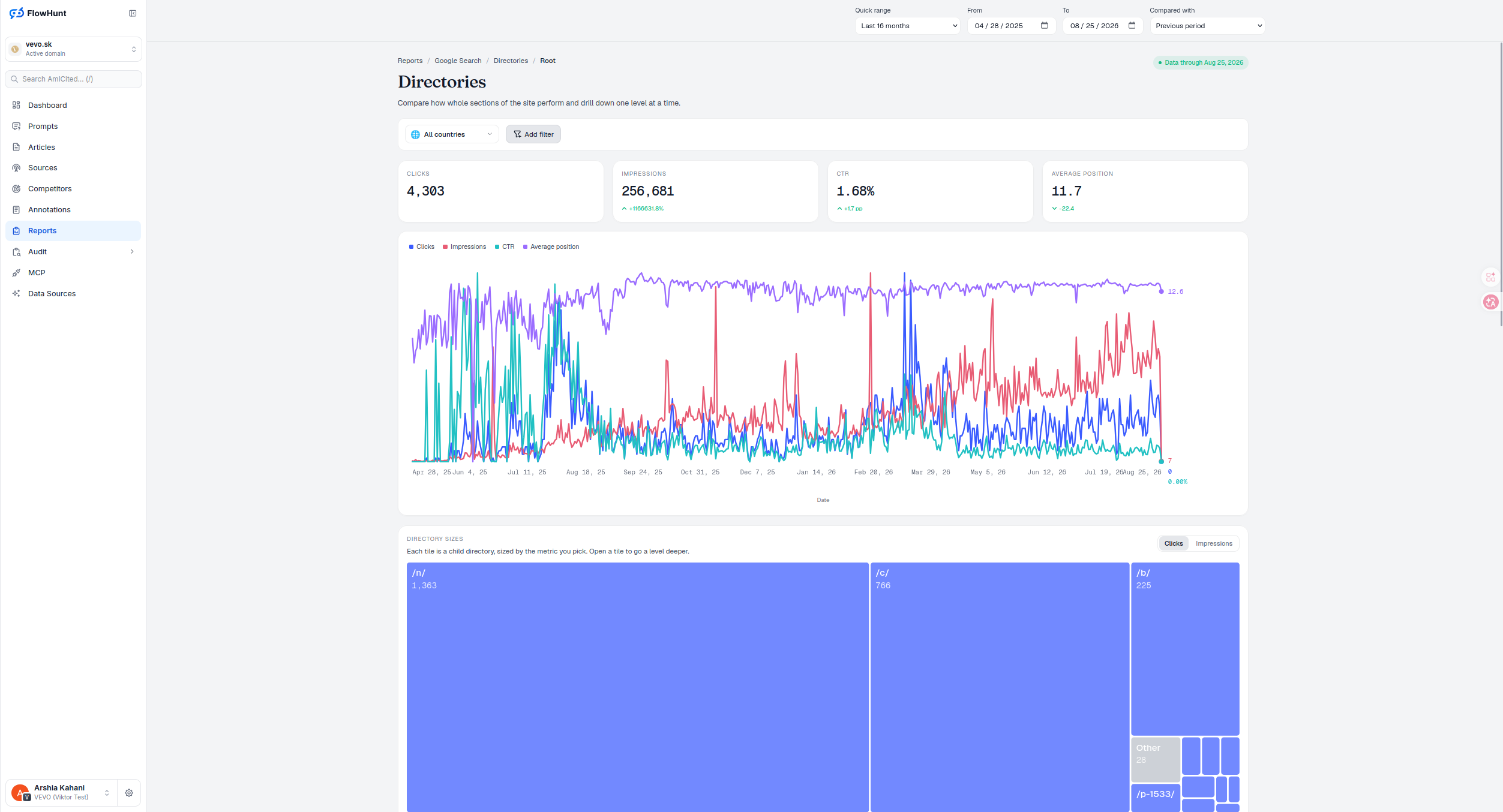
Google Search Directory Tiles
Toggle between Clicks and Impressions and the treemap resizes every tile to match. Open a tile to go a level deeper — the same drill-down mechanic as Directory View, scoped here to Google Search Console data specifically.
- Four stat tiles — Clicks, Impressions, CTR and Average position, each with a period-over-period delta arrow, scoped to the current directory and country but not to stacked table filters.
- Same trend chart as Queries and Pages — Clicks (blue), Impressions (red), CTR (teal) and Average position (purple), over the selected date range, each normalized 0-100 against its own peak since the four share no common unit.
- Filter by country — the All countries dropdown, plus Add filter for query, page, country, device, impressions, clicks or position.
- Directory sizes treemap — each tile is a child directory, sized by Clicks or Impressions, the only two metrics offered because their values can legitimately be summed into a tile’s area.
- Twelve tiles, then Other — the 12 largest children get individual tiles; everything smaller is summed into one grey, unopenable Other tile, and directories with zero for the selected metric draw no area at all.
- Drill down one level at a time — open a tile or table row to descend into that section, starting from Root, with breadcrumbs back up to any ancestor.
- Search Console-scoped — the same drill-down idea as Directory View, but built specifically on Search Console’s own clicks and impressions.
Directory Clicks and Impressions
Each tile is a child directory of the current level, sized by whichever metric is active. At Root here, /n/ leads with 1,363 clicks, /c/ follows at 766, /b/ at 225 — everything smaller is summed into a single grey Other tile at 28, which can’t be opened; it’s an aggregate, not a real directory. Switching from Clicks to Impressions can reorder the tiles entirely — a section with modest clicks but heavy impressions is a candidate for the same title-and-snippet fix that Pages surfaces per URL, just at section scale.
- Clicks / Impressions toggle — Clicks is active by default; switch to size tiles by Impressions instead. Color never encodes value, only the blue-vs-grey distinction between a real directory and the Other aggregate.
- Open a tile or row to descend — the drill-down goes exactly one directory level deeper each time and resets the table to page one.
- Starts at Root — breadcrumbs track the current depth and jump straight back to any ancestor level.
- No subdirectories left? — Show pages switches to the Pages report, scoped to this exact path as a true prefix, not a substring match.
level deeper every time you open a tile
The treemap starts at Root and descends one directory level per click, resizing tiles to whichever metric — Clicks or Impressions — is toggled on.
See Sitemaps and IndexingCompare Google Search Directories
A treemap sized by Clicks or Impressions, drilling down one directory level at a time, built on Google Search Console data.
Ready to see which section of your site Search actually favors?
Free check · 7-day trial · card required