


Google Search Query Performance
Queries pulls the searches that bring visitors to this domain straight from the Google Search Console API — clicks, impressions, CTR and average position, filterable by country, and trended over the range you pick.
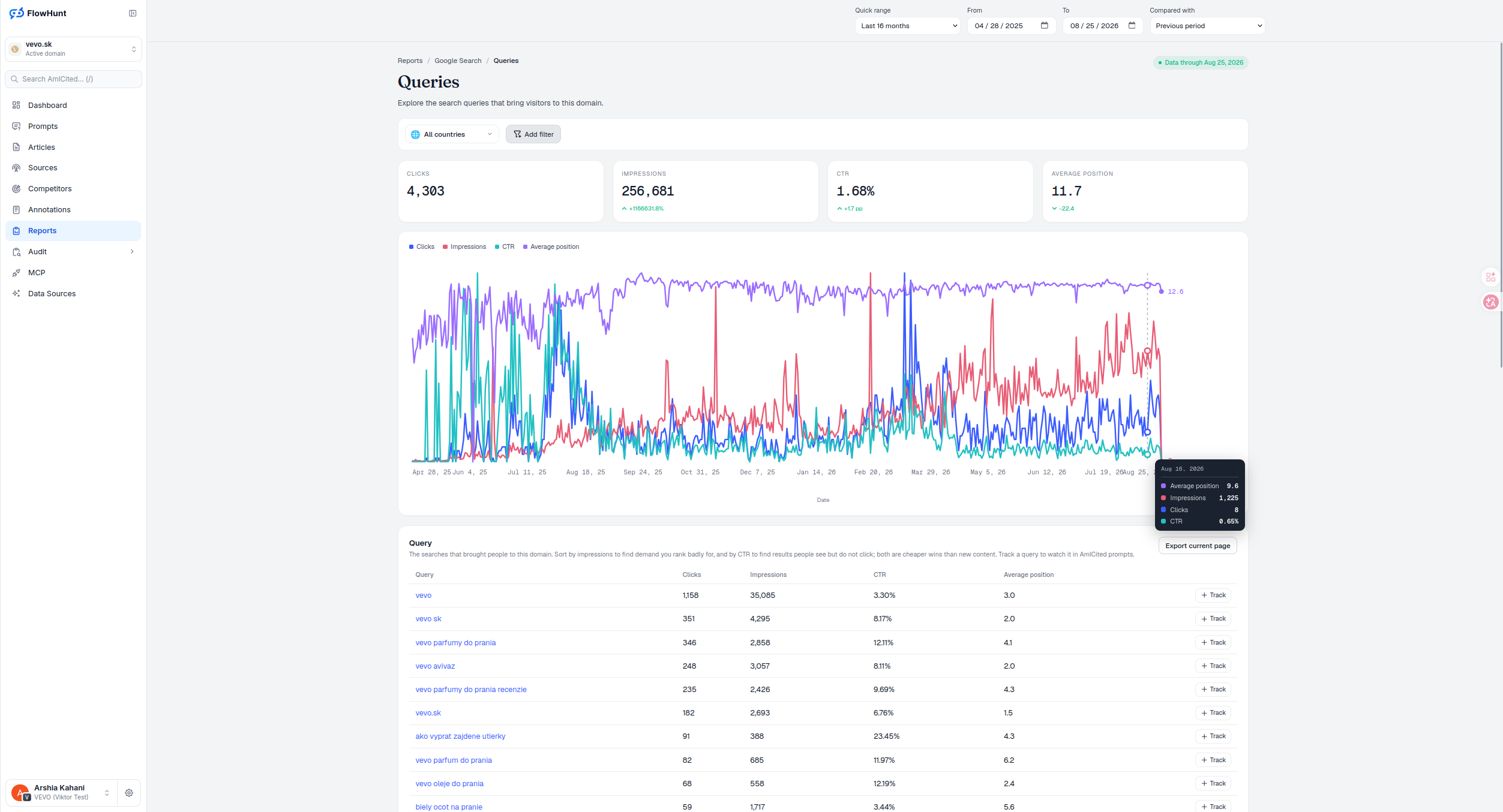
Sort Google Search Queries
Reading search query performance well starts with the sort: by impressions to find demand you rank badly for, and by CTR to find results people see but don’t click — both are cheaper wins than new content. When a query matters enough to watch closely, Track promotes it into AmICited’s own AI-prompt tracking without leaving the table.
- Four stat tiles — Clicks, Impressions, CTR and Average position, each with a period-over-period delta arrow. Scoped to date, country and any page drill-down; the extra stacked filters below don’t narrow these tiles.
- Multi-line trend chart — Clicks (blue), Impressions (red), CTR (teal) and Average position (purple) over the selected date range. There’s no literal vertical axis: each line is normalized 0-100 against its own peak, so compare direction within a color, never height across colors — the tooltip carries the real numbers.
- Filter by country — the All countries dropdown, plus Add filter for query, page, country, device, impressions, clicks or position, with an active page scope showing as a removable chip.
- Sort for the cheap win — high impressions and weak position is untapped demand; decent impressions and low CTR is a title or snippet problem, not a content one. Positions in the 5-15 range are usually the cheapest to move.
- Track a query — a per-row action that promotes a Search Console query straight into AmICited’s own AI-prompt tracking, or opens it if it’s already tracked, bridging what Google sees with what AI answers say.
- Click a query to drill in — opens the Pages report already filtered to the pages ranking for it, so demand and the landing page serving it stay one click apart.
- Export current page — the visible current-period rows and columns only, not the full result set and not comparison values.
Google Search Query Metrics
Every row is a search query with its clicks, impressions, CTR and average position for the selected range and country filter, up to 50 per page. With a comparison window on, each metric also shows its earlier value and a change badge — percent for clicks and impressions, percentage points for CTR, raw places for position, where a lower position number is the improvement. The last column is Track — a per-row button that promotes the query into AmICited’s own prompt-tracking system, or opens it if it’s already tracked, so a query worth watching in Search Console becomes one AmICited also watches inside AI answers.
- Query, Clicks, Impressions, CTR, Average position — the five core columns for every row, sortable by clicking any header; picking a new column resets the page back to one.
- Click the query itself — opens the Pages report already filtered to the pages that rank for it, without re-entering anything.
- Track — promotes the query into AmICited’s own AI-prompt tracking, bridging raw Search Console data into how AI systems answer for it.
- Add filter — narrow by query, page, country, device, impressions, clicks or position, beyond the All countries dropdown.
click to move a query from Search Console into AI-prompt tracking
Track turns a raw Search Console row into a prompt AmICited watches for AI-answer visibility — no re-entry, no separate setup.
See Google Search PagesAnalyze Google Search Queries
Clicks, impressions, CTR and average position for every query bringing traffic to this domain — with a Track action that feeds AmICited’s own AI-prompt tracking.
Ready to see which queries actually drive traffic?
Free check · 7-day trial · card required