


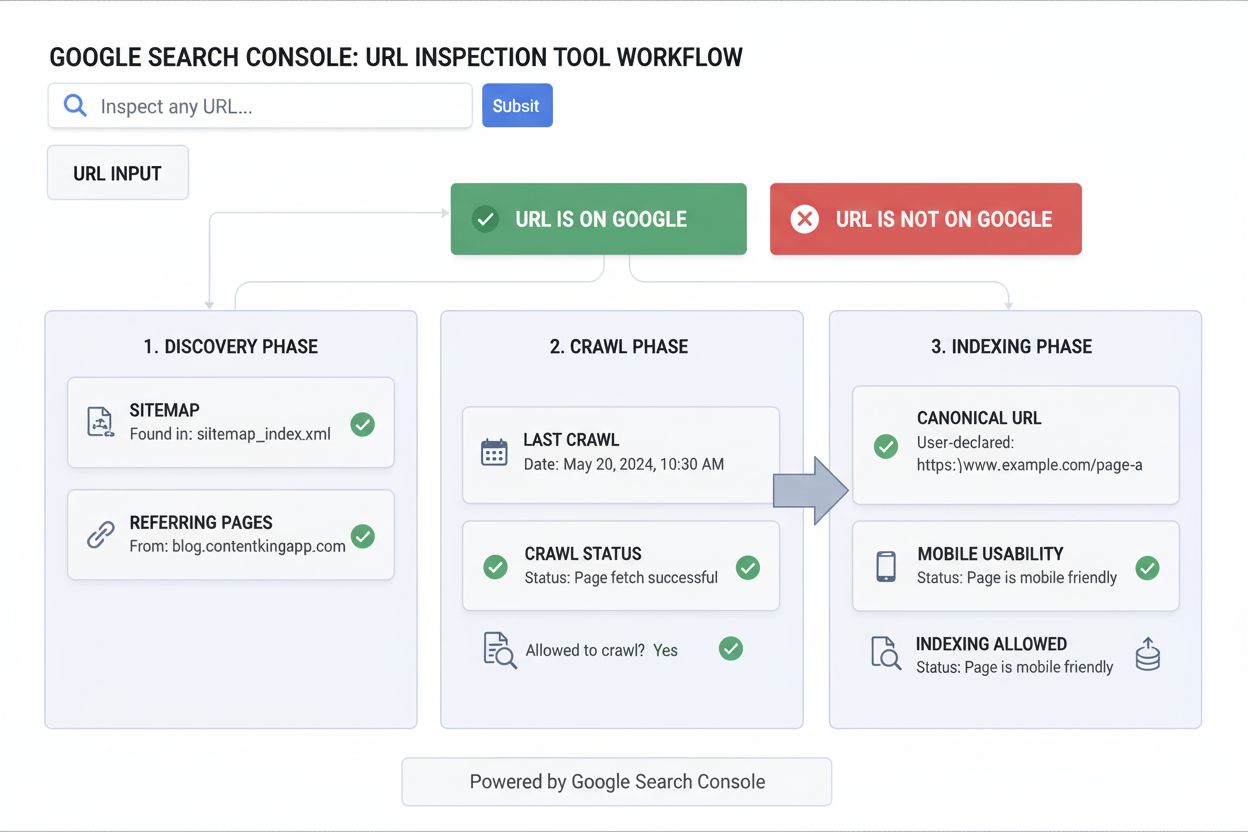
URL Inspection Tool
Learn what the URL Inspection Tool is, how it works, and why it's essential for monitoring page indexing status in Google Search Console. Includes live testing ...
10 min read
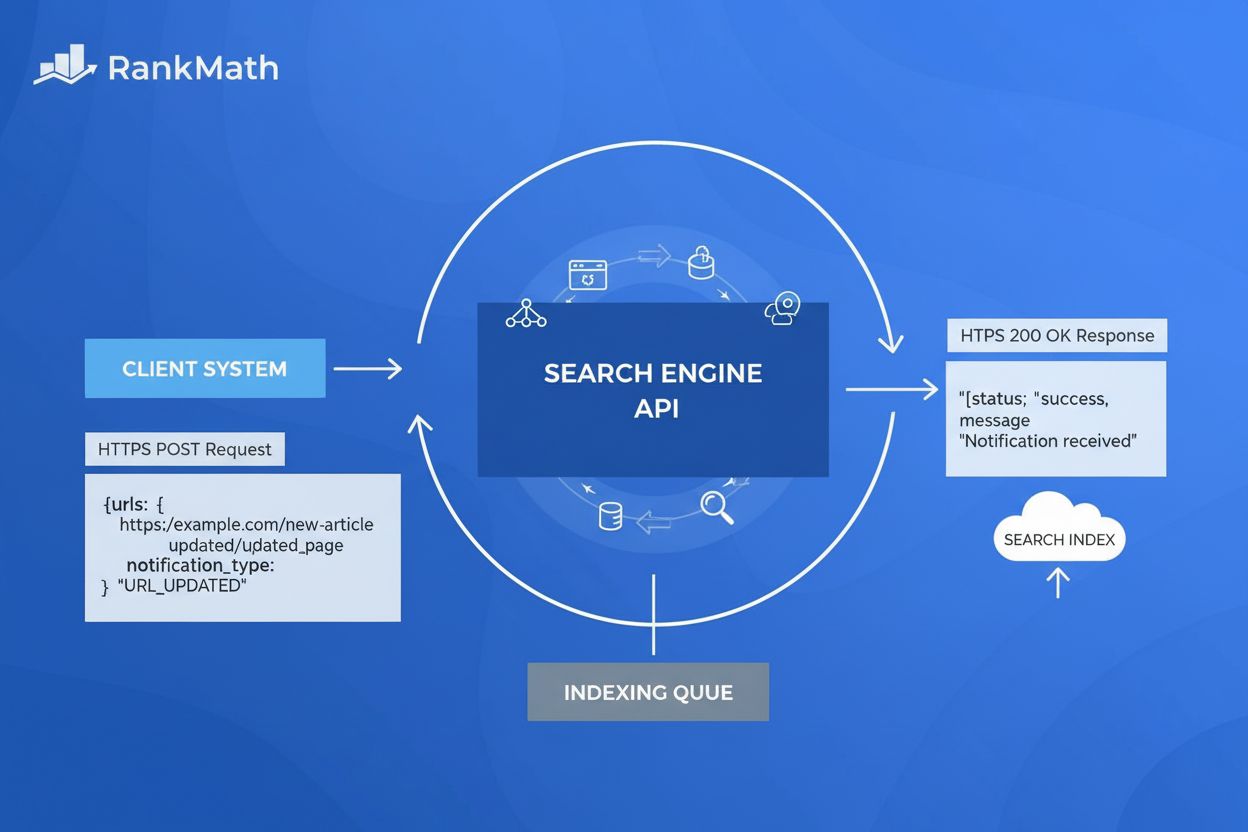
The Indexing API is a Google-provided tool that allows website owners to directly notify Google when URLs are added, updated, or deleted, enabling faster crawling and indexing of web pages. It supports direct submission of URLs for job postings and livestream events, with a default quota of 200 daily requests per project.
The Indexing API is a Google-provided tool that allows website owners to directly notify Google when URLs are added, updated, or deleted, enabling faster crawling and indexing of web pages. It supports direct submission of URLs for job postings and livestream events, with a default quota of 200 daily requests per project.
The Indexing API is a programmatic tool developed by Google that enables website owners to directly notify Google Search when URLs are added, updated, or removed from their websites. Rather than waiting for Google’s crawlers to discover new content through traditional crawling methods, the Indexing API allows you to send real-time notifications to Google’s indexing infrastructure, triggering immediate crawl scheduling for specified URLs. This direct submission mechanism represents a fundamental shift from passive discovery to active communication with search engines, significantly reducing the time between content publication and search engine indexing. The API operates through HTTP POST requests to Google’s endpoint at https://indexing.googleapis.com/v3/urlNotifications:publish, accepting JSON payloads that specify the URL and notification type.
The Indexing API was officially introduced by Google in June 2018, initially designed to address the unique indexing challenges faced by job posting websites and livestream event pages. These content types require frequent updates and time-sensitive indexing to maintain accuracy in search results—a job posting that remains indexed after being filled creates poor user experience, and livestream events need rapid indexing to appear in real-time search results. Before the API’s introduction, website owners relied entirely on XML sitemaps, internal linking structures, and Google’s organic crawl budget to get their content discovered. The API represented Google’s acknowledgment that certain content categories demanded faster, more predictable indexing mechanisms. Over the past six years, adoption has grown significantly, with major content management systems and hosting platforms integrating Indexing API support directly into their platforms. Industry data shows that approximately 80% of enterprises now use some form of API-driven content management, with the Indexing API becoming a standard component of technical SEO strategies for time-sensitive content publishers.

Track how AI chatbots mention your brand across ChatGPT, Perplexity, and other platforms.
The Indexing API operates through a straightforward but powerful mechanism: you send an HTTP POST request containing a JSON payload to Google’s designated endpoint. The JSON body must include two required fields: the fully-qualified URL you want to notify Google about, and the notification type (URL_UPDATED or URL_DELETED). When Google receives your request with an HTTP 200 response code, it means your notification was successfully received and Google will schedule a crawl of that URL. The API supports batch processing, allowing you to combine up to 100 individual URL notifications into a single HTTP request, which reduces overhead and improves efficiency for sites with high-volume updates. Each batch request can contain a mix of update and deletion notifications, making it flexible for complex content management scenarios. The Indexing API also provides a metadata endpoint (/urlNotifications/metadata) that allows you to check the status of previously submitted notifications, showing the timestamp of the last update and deletion notifications Google received for a given URL.
The Indexing API operates under specific quota limitations designed to prevent abuse and ensure fair resource allocation across all users. The default quota provides 200 publish requests per day per project, which encompasses both URL_UPDATED and URL_DELETED notification types combined. This means if you submit 150 update notifications, you have only 50 deletion notifications remaining for that day. Additionally, there’s a 180 read-only requests per minute quota for metadata queries and a 380 requests per minute limit across all endpoints. These quotas reset at midnight Pacific Time, meaning new quota availability can take up to 24 hours to become effective. For websites requiring higher quotas, Google allows you to request approval through a formal application process, with quota increases determined based on document quality, legitimate use cases, and compliance with Google’s spam policies. Importantly, the Indexing API is completely free to use—Google does not charge any fees regardless of quota tier or request volume.
Get the latest insights on AI mentions, brand monitoring, and optimization strategies.
| Aspect | Indexing API | XML Sitemap | IndexNow Protocol |
|---|---|---|---|
| Mechanism | Push-based (active notification) | Pull-based (passive discovery) | Push-based (active notification) |
| Indexing Speed | Minutes to hours | Hours to days | Minutes to hours |
| Search Engine Support | Google only | Google, Bing, Yandex | Bing, Yandex, Naver, Seznam |
| Content Coverage | Specific URLs only | Complete URL inventory | Specific URLs only |
| Setup Complexity | Moderate (requires authentication) | Simple (one-time submission) | Simple (API key generation) |
| Cost | Free | Free | Free |
| Best For | Time-sensitive content, job postings, livestreams | Complete site coverage, SEO foundation | Multi-engine indexing, non-Google traffic |
| Quota Limits | 200 daily requests (default) | No limits | No limits |
| Guaranteed Indexing | No (crawl only) | No (crawl only) | No (crawl only) |
To use the Indexing API, you must establish proper authentication and authorization through Google’s OAuth 2.0 framework. First, you need a Google Cloud Project with the Indexing API enabled through the Google Cloud Console. Next, you must create a Service Account within that project and generate a JSON key file containing authentication credentials. This service account must then be added as an Owner to your website’s property in Google Search Console, establishing the trust relationship between your service account and your domain. The authentication process requires obtaining an OAuth 2.0 access token using your service account credentials, which you then include in the Authorization header of your API requests. All requests must use "application/json" as the Content-Type header. This multi-step authentication process, while more complex than simple API key submission, provides robust security by ensuring only authorized representatives of a domain can submit indexing requests for that domain.
Implementing the Indexing API involves several sequential steps that must be completed in order. First, navigate to the Google Cloud Platform console and create a new project specifically for indexing operations. Second, enable the Indexing API for that project through the API library. Third, create a Service Account and download its JSON credentials file—this file contains your authentication secrets and must be kept secure. Fourth, add the service account email address as an Owner in your website’s Google Search Console property settings. Fifth, configure your website’s backend or use a plugin (like Rank Math’s Instant Indexing) to automatically send notifications whenever content is published, updated, or deleted. Finally, test the integration by submitting a sample URL and verifying that Google responds with an HTTP 200 status code. Once operational, the system can automatically notify Google of content changes without manual intervention, creating a seamless indexing workflow.
The Indexing API officially supports only two content types: JobPosting and BroadcastEvent (embedded within VideoObject). For JobPosting pages, your HTML must include structured data using the JobPosting schema from schema.org, containing essential fields like job title, company name, job location, and employment type. For BroadcastEvent pages, the structured data must be embedded within a VideoObject schema, specifying the broadcast start and end times. Google’s official documentation emphasizes that pages submitted through the API must contain valid, properly formatted structured data for one of these two types. However, industry testing has shown that Google’s crawlers will process URLs submitted through the API regardless of structured data presence, though official compliance requires proper markup. This discrepancy between official requirements and observed behavior has led many SEO professionals to use the API more broadly, though Google recommends strict adherence to the official guidelines to avoid potential access revocation.
The Indexing API dramatically accelerates the time between content publication and search engine visibility. Traditional indexing through crawling and sitemap discovery can take anywhere from hours to weeks, depending on your site’s crawl budget and authority. With the Indexing API, pages are typically crawled within minutes of notification submission. Industry case studies demonstrate that news websites using the Indexing API achieve indexing within 30 minutes to 2 hours, compared to 15-48 hours for sitemap-only approaches. This speed advantage is particularly valuable for time-sensitive content like breaking news, product launches, job postings, and limited-time offers. Faster indexing translates directly to competitive advantage—your content can rank and capture search traffic before competitors’ similar content is even discovered. For e-commerce sites, rapid indexing of new product pages means faster visibility in product search results. For job boards, immediate indexing ensures job listings appear in Google Jobs results while they’re still actively being recruited for.
Most modern content management systems now offer built-in or plugin-based support for the Indexing API. WordPress users can leverage plugins like Rank Math’s Instant Indexing or standalone fast-indexing plugins that automatically submit URLs to the API whenever posts are published or updated. Shopify store owners can use third-party apps or custom scripts to integrate API submissions with product updates. Webflow developers can implement the API through custom code or automation platforms like Zapier. WooCommerce stores can use SEO plugins that support automatic API submissions. For custom-built websites and enterprise platforms, developers can integrate the API directly into the backend publishing workflow, ensuring every content update automatically triggers an indexing notification. This widespread integration means that many website owners benefit from the Indexing API without explicitly configuring it—their platform handles the technical implementation automatically.
Verifying the API is functioning correctly requires checking more than just whether requests return a 200 status. Step 1: Confirm authentication is genuinely valid, not just configured. Check that the service account is listed as an Owner (not just a user) in Google Search Console for the verified property—a service account with insufficient permissions can still authenticate successfully while silently failing to register notifications. Step 2: Check quota consumption against your actual submission volume. Pull usage data from the Google Cloud Console and compare it against how many URLs you believe you’re submitting daily—a mismatch indicates either duplicate submissions or a broken integration that’s failing silently on some pages. Step 3: Query the metadata endpoint for a sample of submitted URLs. The /urlNotifications/metadata endpoint returns the timestamp Google last received a notification for a given URL—if this timestamp doesn’t match your recent submission, the notification isn’t reaching Google despite your system reporting success. Step 4: Verify content type eligibility. Since the API’s official support is limited to JobPosting and BroadcastEvent structured data, confirm the pages you’re submitting actually carry that schema markup correctly—use Google’s Rich Results Test to validate the markup independently of the API submission. Step 5: Compare actual indexing speed before and after implementation. Check crawl dates in Search Console’s URL Inspection Tool for recently submitted pages against a baseline set of pages that weren’t submitted through the API—if there’s no meaningful difference in time-to-crawl, the integration may be misconfigured even though it reports success.
+++
Start tracking how AI chatbots mention your brand across ChatGPT, Perplexity, and other platforms. Get actionable insights to improve your AI presence.
Learn what the URL Inspection Tool is, how it works, and why it's essential for monitoring page indexing status in Google Search Console. Includes live testing ...

Live Search Console API tools, not just reporting: submit sitemaps and see their warnings and errors, and request indexing for a URL you just published or chang...
Submit one or more URLs to Bing for indexing, track daily and monthly quota before you send, and push instant updates to Bing, Yandex and every other IndexNow e...
Cookie Consent
We use cookies to enhance your browsing experience and analyze our traffic. See our privacy policy.