


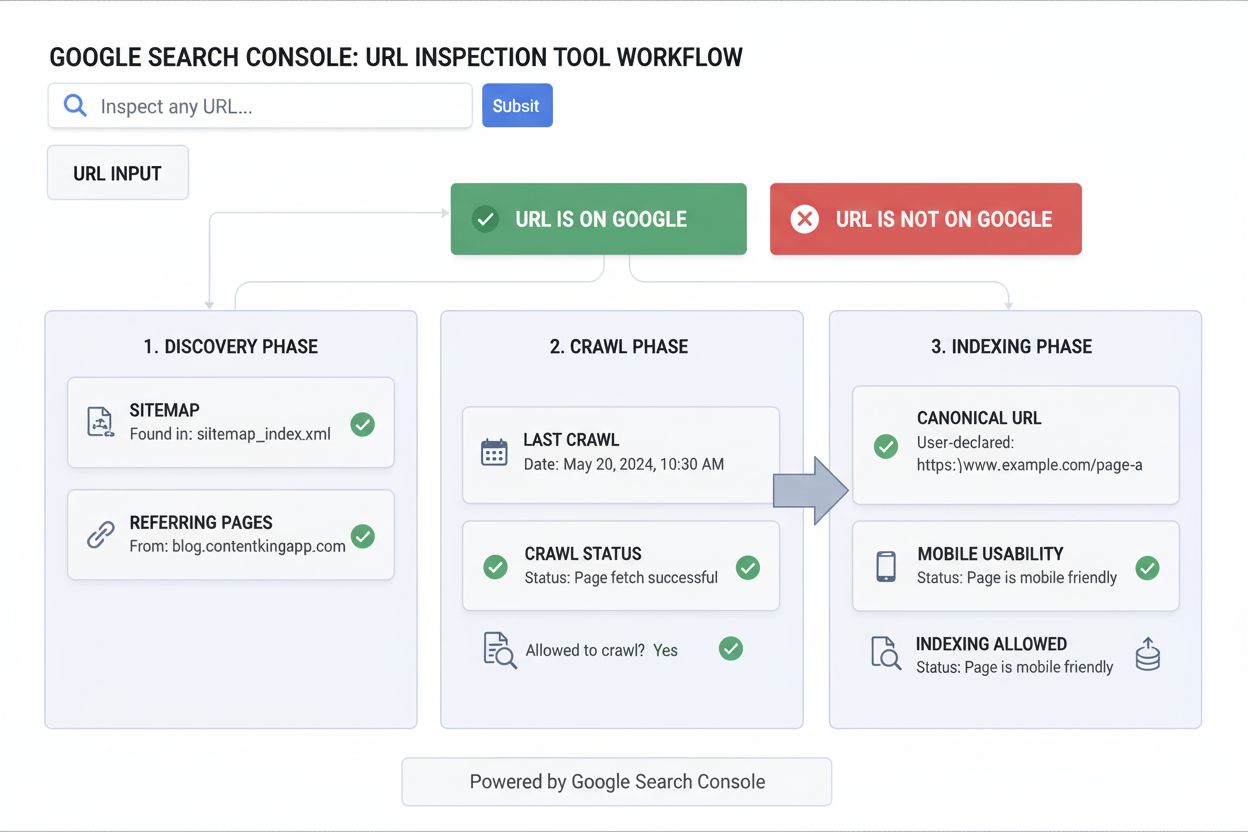
URL Inspection Tool
Learn what the URL Inspection Tool is, how it works, and why it's essential for monitoring page indexing status in Google Search Console. Includes live testing ...
10 min read
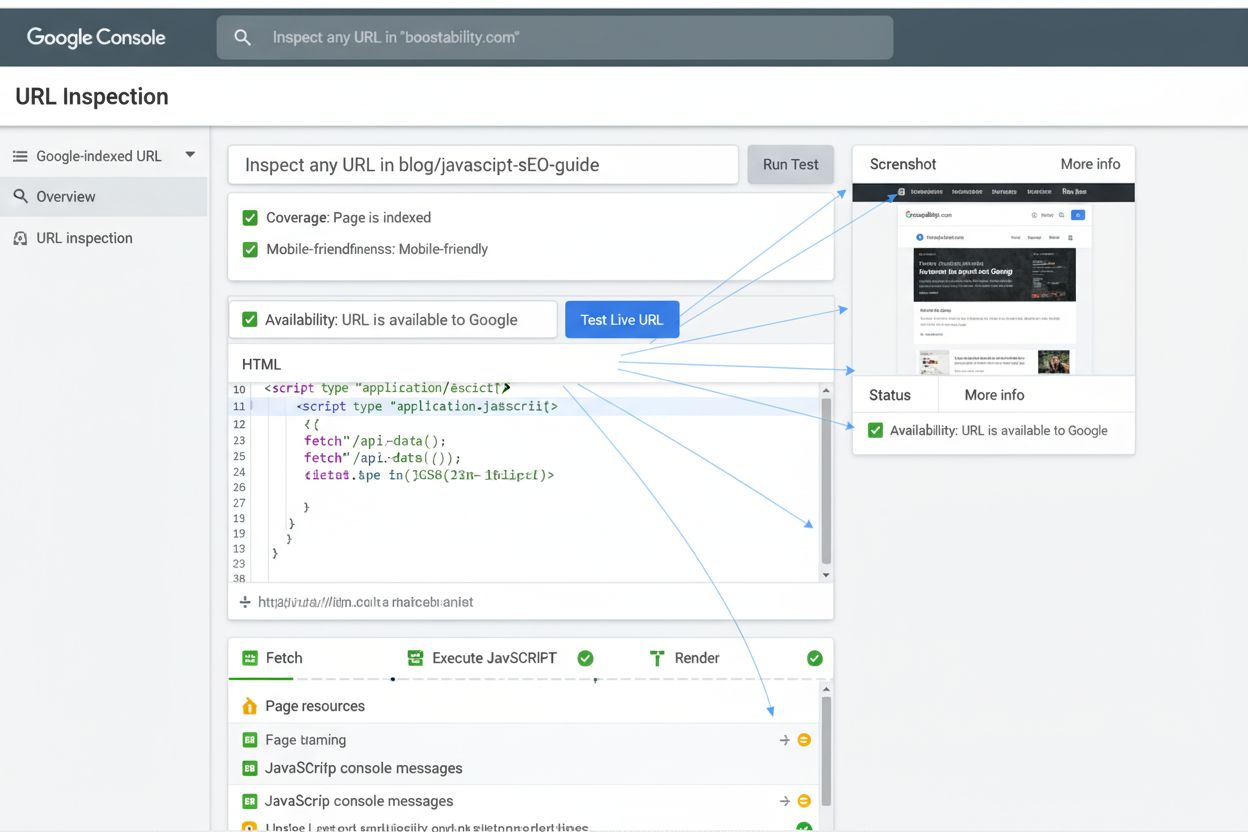
Fetch and Render is a testing feature in Google Search Console that allows webmasters to see how Googlebot crawls and visually renders a webpage, including how JavaScript is executed and resources are loaded. This tool helps diagnose technical SEO issues and ensures search engines can properly access and display page content.
Fetch and Render is a testing feature in Google Search Console that allows webmasters to see how Googlebot crawls and visually renders a webpage, including how JavaScript is executed and resources are loaded. This tool helps diagnose technical SEO issues and ensures search engines can properly access and display page content.
Fetch and Render is a diagnostic testing feature within Google Search Console (formerly known as the URL Inspection Tool) that enables webmasters and SEO professionals to observe exactly how Googlebot crawls, processes, and visually renders a webpage. This tool simulates the complete rendering pipeline that Google’s search engine uses, including fetching external resources like CSS files, JavaScript, and images, then executing the code to produce a final visual representation of how the page appears to search engines. By providing both the raw HTML source code and a rendered screenshot, Fetch and Render bridges the critical gap between how a page displays in a standard web browser and how it appears to search engine crawlers, making it an indispensable tool for diagnosing technical SEO issues and ensuring proper indexability.
The importance of Fetch and Render has grown exponentially as modern websites increasingly rely on client-side rendering and JavaScript frameworks to generate content dynamically. Without this tool, webmasters would have no reliable way to verify whether their content is actually accessible to search engines, potentially leading to indexing failures, reduced visibility in search results, and lost organic traffic. The tool represents Google’s commitment to transparency in how it processes web content, allowing site owners to take proactive measures to optimize their sites for search engine visibility.
The Fetch and Render feature has its roots in Google’s original Webmaster Tools, where it was initially called “Fetch as Googlebot.” This early version provided webmasters with two distinct options: the basic Fetch function, which simply retrieved and displayed the raw HTML response from a server, and the more advanced Fetch and Render option, which went further by executing JavaScript and displaying how the page would appear after full rendering. This dual approach recognized that many websites were beginning to use JavaScript to dynamically generate content, and Google needed to help webmasters understand whether their JavaScript-dependent content was actually being indexed.
When Google launched the redesigned Search Console in 2018, the company consolidated and enhanced these tools into what is now called the URL Inspection Tool. This evolution reflected Google’s recognition that the original Fetch and Render functionality needed to be more integrated with other diagnostic features. The new URL Inspection Tool retained the core rendering capabilities while adding enhanced features such as live testing, mobile-friendliness validation, structured data verification, and AMP error reporting. According to research from Sitebulb, only 10.6% of SEO professionals perfectly understand how Google crawls, renders, and indexes JavaScript, highlighting the continued importance of tools like Fetch and Render in demystifying this complex process.

Track how AI chatbots mention your brand across ChatGPT, Perplexity, and other platforms.
When a webmaster submits a URL to the Fetch and Render tool, Google initiates a multi-stage process that closely mirrors how Googlebot actually processes web pages in production. First, the tool sends a request to the specified URL using the Googlebot user agent, which identifies the request as coming from Google’s crawler rather than a standard browser. The server responds with the initial HTML document, which Fetch and Render displays in its raw form so webmasters can inspect the source code and verify that the server is responding correctly with appropriate HTTP status codes.
Next, the tool enters the rendering phase, where it processes all external resources referenced in the HTML, including stylesheets, JavaScript files, images, fonts, and any other embedded content. This is where Fetch and Render becomes particularly valuable for modern websites. The tool executes all JavaScript code in the page, allowing dynamic content generation to occur just as it would in a user’s browser. This execution environment is crucial because many contemporary websites generate their visible content entirely through JavaScript, meaning that without proper rendering, the content would be invisible to search engines. The tool then captures a screenshot of the fully rendered page, providing a visual representation of what Googlebot actually sees after all processing is complete.
| Feature | Fetch and Render | URL Inspection Tool | Rich Results Test | Mobile-Friendly Test |
|---|---|---|---|---|
| Primary Purpose | View how Googlebot crawls and renders pages | Comprehensive URL indexing diagnostics | Validate structured data markup | Test mobile responsiveness |
| JavaScript Rendering | Yes, full execution | Yes, with live testing | Limited (structured data only) | No |
| Resource Fetching | Yes, all external resources | Yes, with blocking detection | No | No |
| Visual Screenshot | Yes, rendered preview | Yes, with live preview | No | Yes, mobile preview |
| HTML Source Display | Yes, raw code | Yes, crawled version | No | No |
| Mobile Testing | Yes, separate mobile view | Yes, mobile-specific data | No | Yes, dedicated |
| Structured Data Validation | Limited | Yes, comprehensive | Yes, detailed | No |
| AMP Validation | No | Yes, AMP-specific errors | No | No |
| Indexing Status | Indirect indication | Direct status reporting | No | No |
| Best For | Debugging rendering issues | Overall indexing health | Rich snippet optimization | Mobile UX verification |
Get the latest insights on AI mentions, brand monitoring, and optimization strategies.
One of the most critical aspects of Fetch and Render is its handling of blocked resources. When Googlebot attempts to fetch external files needed to render a page, it respects the rules defined in a website’s robots.txt file. If a website has configured robots.txt to disallow crawling of certain resources—such as CSS files, JavaScript libraries, or image directories—Fetch and Render will display these as unavailable in its report. This is a crucial diagnostic feature because many websites inadvertently block resources that are essential for proper rendering, causing Googlebot to see a broken or incomplete version of the page.
Additionally, if a server fails to respond to a resource request or returns an HTTP error code (such as 404 Not Found or 500 Internal Server Error), Fetch and Render will flag these issues. The tool provides detailed information about which resources failed to load and why, enabling webmasters to quickly identify and resolve problems. Google’s official guidance recommends ensuring that Googlebot can access any resources that meaningfully contribute to visible content or page layout, while noting that certain resources—such as analytics scripts, social media buttons, or advertising code—typically don’t need to be crawlable since they don’t affect the core content or layout.
The business implications of Fetch and Render extend far beyond simple technical diagnostics. In an era where JavaScript-heavy websites dominate the landscape—particularly in single-page applications (SPAs), progressive web apps (PWAs), and modern e-commerce platforms—the ability to verify that search engines can properly render your content is directly tied to revenue and visibility. Research indicates that over 78% of enterprises now use some form of AI-driven content monitoring or search engine optimization tools, and Fetch and Render is a foundational component of this toolkit.
When a website’s JavaScript fails to render properly for Googlebot, the consequences can be severe. Pages may not be indexed at all, or they may be indexed with incomplete content, resulting in poor search rankings and significantly reduced organic traffic. For e-commerce sites, this can translate directly to lost sales. For content publishers, it means reduced visibility and lower ad revenue. By using Fetch and Render to proactively identify and fix rendering issues, webmasters can ensure that their content is fully accessible to search engines, maximizing their organic search potential. The tool essentially provides insurance against the common pitfall of building websites that look great to users but are invisible to search engines.
While Fetch and Render is a Google-specific tool, the principles it demonstrates apply across all major search engines. Bing, Baidu, and other search engines also execute JavaScript and render pages, though their rendering engines and capabilities may differ slightly from Google’s. However, Google’s rendering engine is based on Chromium, the same technology that powers Google Chrome, making it one of the most advanced and standards-compliant rendering engines available. This means that if your site renders correctly for Google’s Fetch and Render tool, it will likely render correctly for most other search engines as well.
The rise of AI-powered search platforms like Perplexity, ChatGPT, and Google AI Overviews has added another layer of complexity to search engine optimization. These platforms also need to crawl and understand web content, and they often rely on similar rendering technologies. While these platforms may not use Fetch and Render directly, understanding how your pages render through Google’s tool provides valuable insights into how these AI systems will perceive your content. This is particularly relevant for AmICited users who are tracking their brand’s appearance across multiple AI search platforms—ensuring proper rendering for Google is a prerequisite for visibility across the broader AI search ecosystem.
To maximize the value of Fetch and Render, webmasters should follow a systematic approach to testing and optimization. First, identify critical pages that are essential for your business—typically your homepage, key landing pages, product pages, and high-value content pages. Submit these URLs to Fetch and Render and carefully review both the HTML source code and the rendered screenshot. Compare the rendered version to how the page appears in your browser to identify any discrepancies. If you notice missing content, broken layouts, or non-functional elements in the rendered version, this indicates a rendering issue that needs to be addressed.
Next, examine the resource loading section of the Fetch and Render report. Identify any resources that failed to load or were blocked by robots.txt. For resources that are essential to page functionality or appearance, update your robots.txt file to allow Googlebot to crawl them. Be cautious about allowing crawling of all resources indiscriminately, as this can waste crawl budget on non-essential files. Focus on resources that directly impact content visibility or layout. Additionally, review any HTTP errors reported by the tool and work with your development team to resolve them. Common issues include misconfigured CDN settings, incorrect file paths, or server configuration problems.
When a page’s rendered screenshot doesn’t match what a browser shows, the cause usually falls into one of a few recurring categories. Blank or mostly empty rendered page almost always means critical JavaScript failed to execute—check the resource loading section for JavaScript files marked as blocked or errored, since a single failed script dependency can prevent an entire client-side-rendered page from populating. Content present in the raw HTML but missing from the rendered screenshot points to a JavaScript error occurring mid-execution rather than a resource being blocked outright; this typically requires checking the browser console for errors when loading the same page directly, since Fetch and Render surfaces the outcome but not always the specific JavaScript exception. Resources showing as “blocked” in the report should be checked against robots.txt first—a disallow rule targeting a script or CSS directory is the most common cause, and Google explicitly recommends allowing crawler access to any resource that affects visible content or layout, even if that resource lives in a directory otherwise blocked for other reasons. Mobile rendering differing significantly from desktop rendering usually indicates a responsive design breakpoint issue or a mobile-specific script that isn’t firing correctly—testing both views separately in Fetch and Render isolates which environment is failing. A page rendering correctly but still not getting indexed is not a rendering problem at all; Fetch and Render confirms Googlebot can see the content, but indexing depends on separate factors like noindex directives, duplicate content, or overall site quality, so a clean render result with a missing index status should redirect troubleshooting toward the Index Coverage report rather than back to rendering diagnostics.
Start tracking how AI chatbots mention your brand across ChatGPT, Perplexity, and other platforms. Get actionable insights to improve your AI presence.
Learn what the URL Inspection Tool is, how it works, and why it's essential for monitoring page indexing status in Google Search Console. Includes live testing ...

Learn why AI crawlers like ChatGPT can't see JavaScript-rendered content and how to make your site visible to AI systems. Discover rendering strategies for AI v...
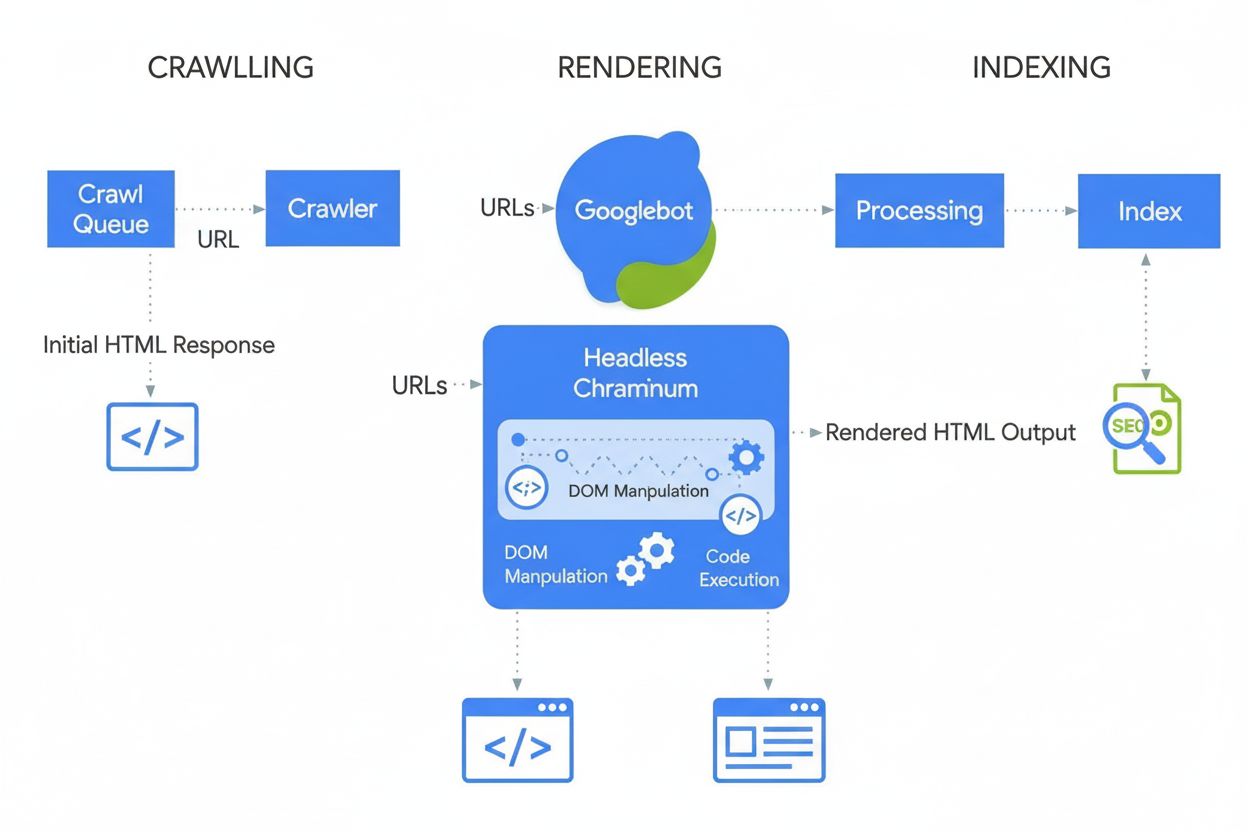
JavaScript SEO optimizes JavaScript-rendered websites for search engine crawling and indexing. Learn best practices, rendering methods, and strategies to improv...
Cookie Consent
We use cookies to enhance your browsing experience and analyze our traffic. See our privacy policy.