


- A product detail page (PDP) covers one product in full: name, images, price, variants, stock, add-to-cart, description, specs, shipping and returns, and reviews.
- Measure it with add-to-cart rate. If few visitors add to cart, the page is the problem. If many add but few buy, look at the cart, shipping costs and checkout.
- Write a unique description, put specs in a text table rather than an image, and keep Product structured data matching the visible price and stock.
- AI engines comparing products pull specs and prices from PDPs. Facts hidden in images, click-to-load tabs or scripts are easier to miss.
Where AmICited fits
AmICited’s Shopping report shows which products and sellers appear on AI product cards for the prompts you track, with how often each appears, its average position, price and rating. Its Sources report lists the URLs AI engines cite, so you can see whether your product pages are among them.
See source citations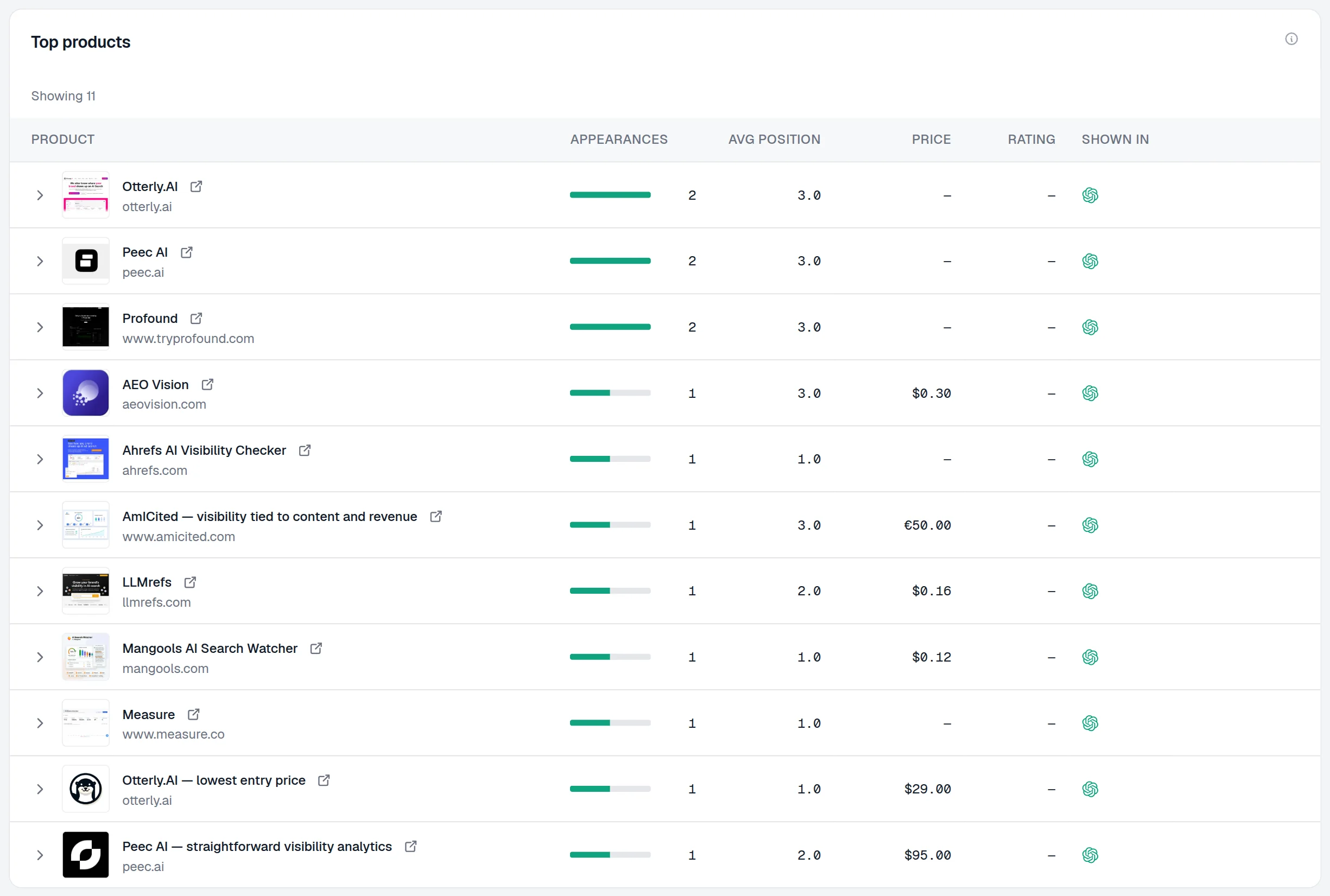
What Is a Product Detail Page?
A product detail page (PDP) is the page that covers one product in full. It carries the product’s name, images, price, variant options (size, color, capacity), stock status, add-to-cart button, description, specifications, shipping and return details, and reviews. In most stores it’s the page with the most influence on whether someone buys.
Every ecommerce platform has a PDP template: Shopify calls it the product template, Amazon calls it the detail page and builds it per ASIN. PDPs also carry most of a store’s product SEO. Their titles, descriptions and product schema feed Google search results, Google Shopping free listings and, more and more, AI answers. Teams working on conversion rate optimization spend much of their time here.
How a Product Detail Page Works
A PDP has one job: answer every question a buyer has, in the order they have it. A typical layout does this in layers:
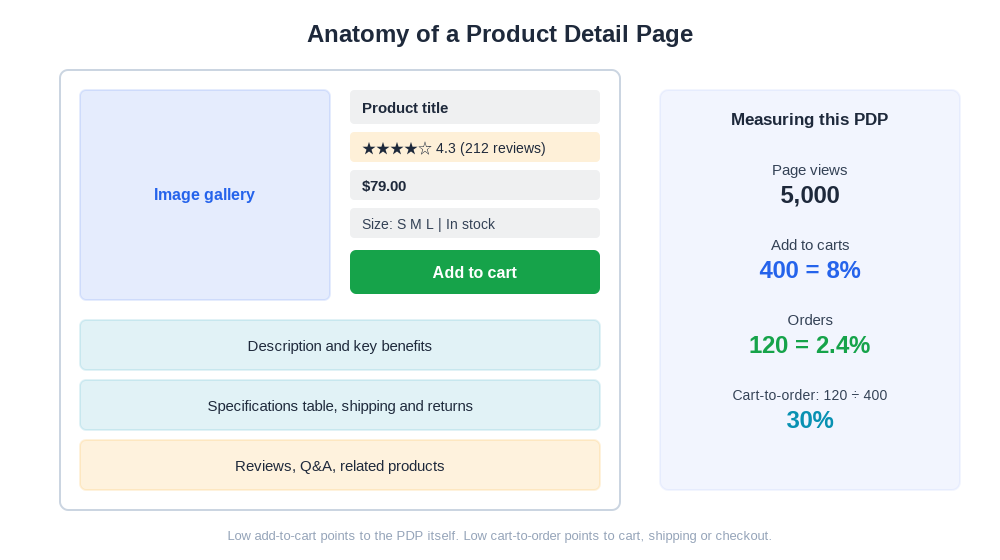
- Above the fold: title, main image gallery, price, rating summary, variant selectors, stock status and add-to-cart.
- Just below: key benefits in short bullets, delivery estimate, returns promise and trust signals.
- Detail section: full description, specifications table, size guide, materials, what’s in the box.
- Social proof: reviews, Q&A, customer photos.
- Cross-sell: related products, “frequently bought together”, recently viewed.
Measure PDPs with two rates. Say a product page gets 5,000 views in a month. 400 visitors add the item to cart, an add-to-cart rate of 8% (400 ÷ 5,000). 120 of those buy, so PDP conversion is 2.4% (120 ÷ 5,000) and cart-to-order is 30% (120 ÷ 400). If add-to-cart is low, the PDP is the problem: price, images, missing info or doubt. If add-to-cart is healthy but orders are low, look at the cart, shipping costs and checkout instead.
Product Detail Page Elements and What They Do
| Element | What it answers | Common gap |
|---|---|---|
| Title | “Is this the thing I’m looking for?” | Missing model, size or key attribute |
| Image gallery | “What does it really look like?” | No scale, no detail shots, no lifestyle context |
| Price and offers | “Is it worth it?” | Hidden shipping costs, unclear discounts |
| Variant selectors | “Does it come in my size or color?” | Out-of-stock variants not marked |
| Stock and delivery estimate | “When will I get it?” | Generic “ships soon” text |
| Description and bullets | “Why this one?” | Manufacturer copy duplicated across many stores |
| Specifications | “Will it fit or work with what I have?” | Specs only in a PDF or image |
| Reviews and Q&A | “Do other buyers trust it?” | No reviews, or reviews hidden below many sections |
| Returns and guarantee | “What if it’s wrong?” | Policy only on a separate page |
PDP vs PLP
A PLP (product listing page) is a category, collection or search results page: many products, filters and sort options. Its job is to help shoppers narrow down. The PDP’s job is to close. That changes what each page needs. PLPs need good filters, accurate thumbnails and fast loading. PDPs need depth: every fact and reassurance a buyer could want. In SEO, PLPs usually target broad category keywords (“men’s trail running shoes”), while PDPs target specific product and model queries.
If one PDP covers several variants, decide how URLs work. Some stores use one URL per product with a variant selector, others give each variant its own URL. Either can work for SEO, as long as canonical tags point to the right version and the selected variant’s price and stock appear in both the page and the structured data.

Stay Updated on AI Visibility Trends
Get the latest insights on AI mentions, brand monitoring, and optimization strategies.
Product Detail Pages and AI Search
When someone asks ChatGPT, Perplexity or Google’s AI Mode to compare two products, the engine often pulls specs and prices from product pages, alongside reviews and comparison articles. PDPs that state facts in plain text (dimensions, materials, compatibility, who it’s for) give engines clean material to quote. Facts locked inside images, tabs that only load on click, or client-side scripts are easier to miss. Google’s product structured data documentation explains which properties it reads.
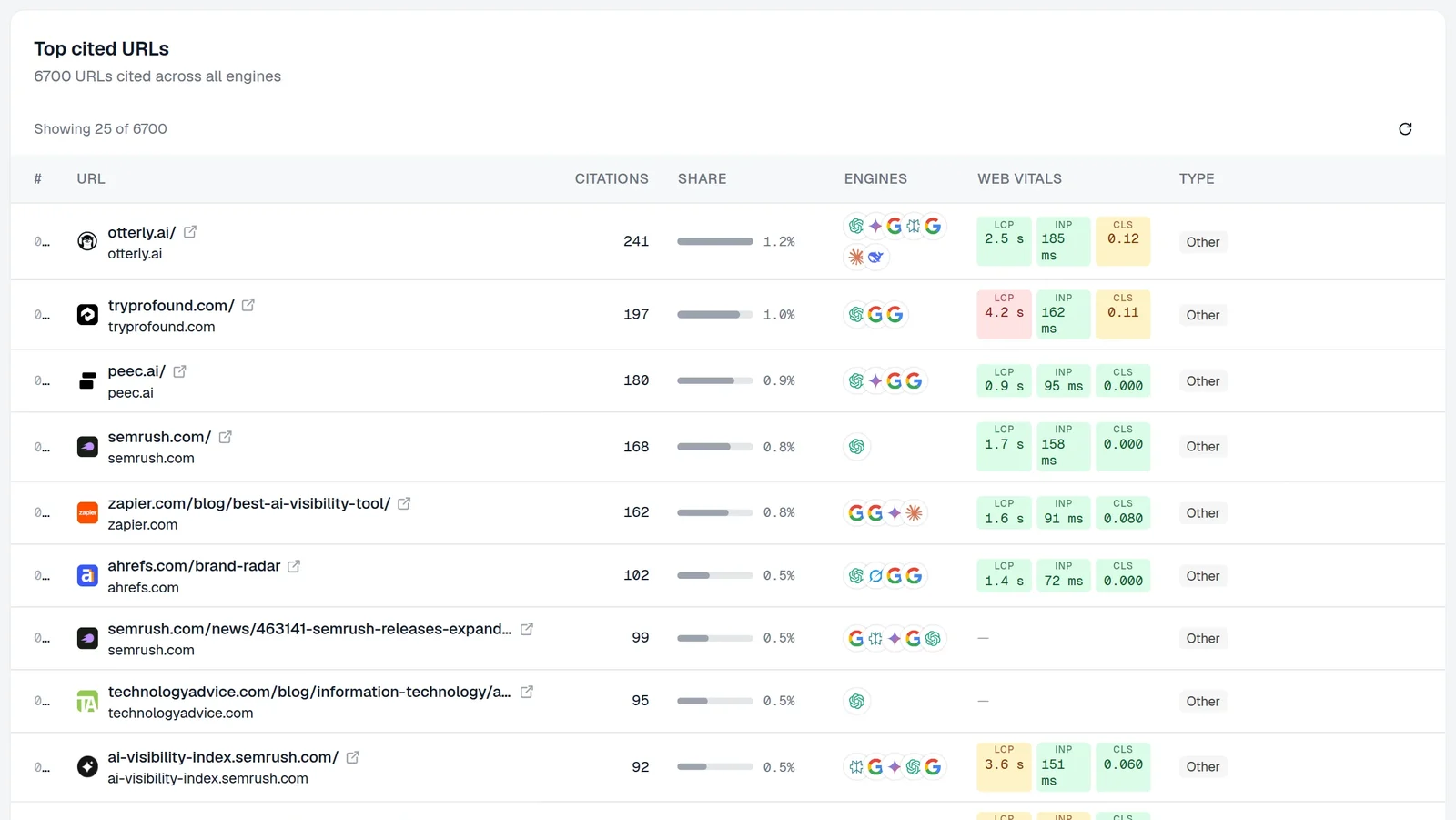
To see whether your PDPs are actually used, AmICited’s Source and Citation Intelligence shows which pages AI engines cite, down to the URL. Pair it with AI product cards to understand how products are displayed inside AI answers.
Best Practices for Product Detail Pages
- Write a unique description for each product. Lead with who it’s for and the main benefit, then the specs.
- Show 5 or more images, including scale, detail and in-use shots, plus video where it helps.
- Put price, delivery estimate, stock status and returns promise near the add-to-cart button.
- Present specifications as a text table, not an image.
- Show reviews and their count high on the page, and answer common questions in a Q&A block.
- Add Product structured data with price, availability, GTIN, brand and review data that match the visible page.
- Test changes one at a time and measure add-to-cart rate, not just orders.
Common Product Detail Page Mistakes
The most common PDP mistake is copying the manufacturer’s description word for word. Dozens of other stores use the same text, so the page has nothing unique for search engines or shoppers. Close behind are thin pages with one image and no specs, which push buyers to look elsewhere for answers.
Other frequent problems: surprise shipping costs that only appear at checkout, out-of-stock variants that can still be selected, slow image galleries that hurt mobile load times, and schema markup that shows a different price or stock status than the page. Each one either costs the sale or sends wrong facts to search engines and AI answers.