


Keyword Position Movers by Device
The seo keyword rank tracker twin of URL Position Movers: every tracked query’s impression-weighted average position, previous period against current, with the same scatter, segment breakdown and click-impact chart — except the segment here is device, not section.
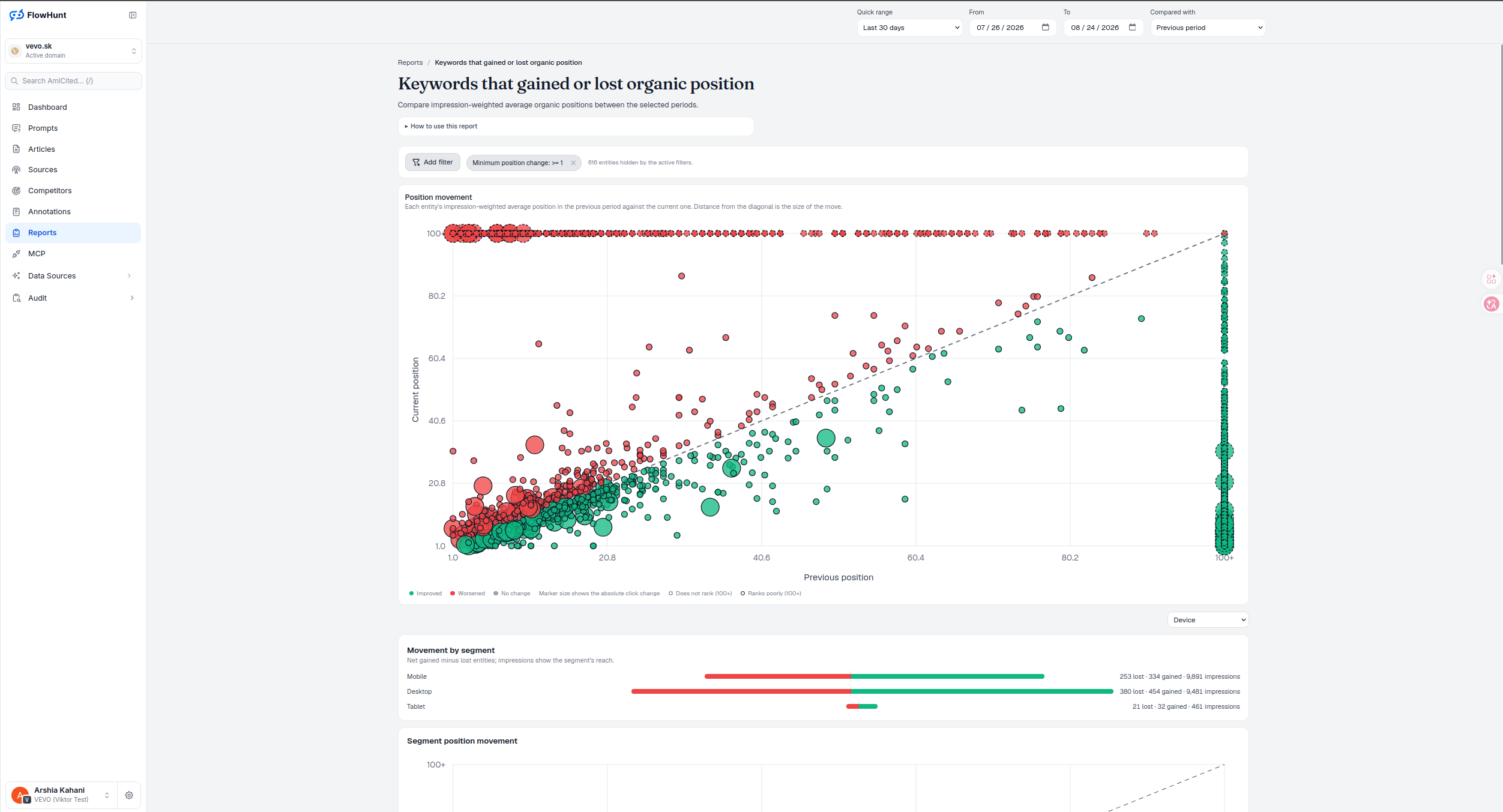
Keyword Movement by Device
Google ranks the same query differently by device more often than most reports admit. Keyword Position Movers breaks Movement by segment and Segment crossing down by Desktop, Mobile and Tablet, so a keyword’s net position change never hides two opposite stories underneath it. Country, impression-volume band and position band are available too — URL section and URL depth aren’t, since a keyword row carries no page structure to group by.
- Position movement scatter — previous position against current position for every tracked query, bubble size is the click change.
- Filter by outcome, position or click threshold — Improved/Lost, a minimum absolute position movement (default 1, to suppress decimal-level averaging noise), and a minimum absolute click movement.
- Movement by segment: device — net gained minus lost keywords for Desktop, Mobile and Tablet, each with its own impression reach shown.
- Segment position movement — the previous-vs-current scatter rolled up per device, so you see the shape of a platform-wide shift at a glance.
- Segment crossing table — device against position band (1–10, 11–20, 21–50, 51+, Entered), net gained minus lost, symmetric around zero.
- Position impact chart — position improvement against click change for every keyword ranked in both periods, quadrant-read for whether the move actually paid off.
- Full data table, exportable — keyword, group, previous/current/change for position, clicks and impressions, downloadable as CSV.
- Track, not a page explorer — a keyword row has no page to drill into, so its action is the shared Track button, adding the term to prompt tracking instead.
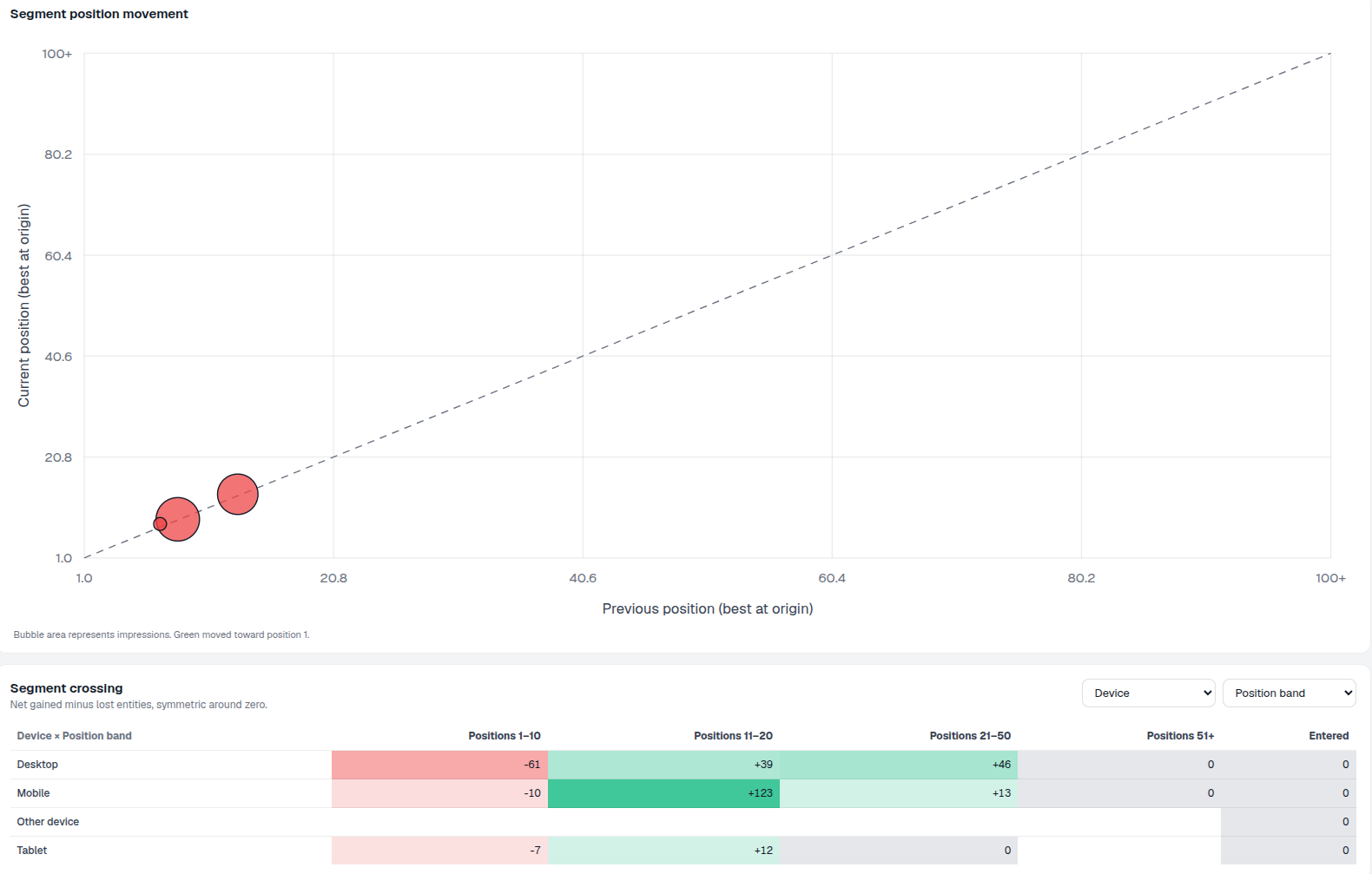
Keyword Position Movement States
Improved, Worsened, No change, Does not rank (100+) and Ranks poorly (100+) — the same reading rules as URL Position Movers apply here, because the underlying mechanic is identical: an impression-weighted average position compared across two periods, green below the no-change diagonal for improved, red above it for worsened. What changes is the entity: a search query instead of a landing page, and Device replaces Section as the default way to segment it.
- Improved / Worsened / No change — colored consistently with every other position-movement chart in AmICited.
- 100+ edge markers — a keyword absent from one period plots at the edge as entered or left, not silently dropped.
- Bubble size = click change — the size answers whether a rank move actually moved traffic, capped at the 95th-percentile magnitude so one viral query doesn’t shrink every other bubble to a dot.
- Break down by Device — the one dimension unique to the keyword view, since a page has one URL but a query has multiple device audiences.
- Readiness before results — a running import, a pending mart rebuild, a credit pause and an import error each surface their own notice, distinct from a genuinely empty comparison.
Keyword Position Impact
The same four-quadrant read as the URL view — position improvement (previous minus current) against click change (current minus previous), both zero-centered — gained position and gained clicks, lost both, or the two mismatched quadrants where rank and clicks moved in opposite directions, often the fingerprint of an AI Overview or a SERP feature absorbing clicks a plain ranking move should have earned. Bubble size is the larger of the two periods’ impression counts, so a keyword’s full search demand sets the size, not just what it’s pulling now.
- Four quadrants, four verdicts — read position change against click change at a glance, per keyword.
- Entered means no prior impressions, Left means none now — the missing-side clicks and impressions for those keywords are true zero, not unknown.
- Full table underneath — Keyword, Group, and Previous/Current/Change for Position, Clicks and Impressions, sortable on every column.
- Export CSV — the filtered, sorted table, ready for a spreadsheet or a content brief.
- Entered and Left counted, not hidden — new and disappeared keywords are surfaced as their own number, never folded silently into Moved.
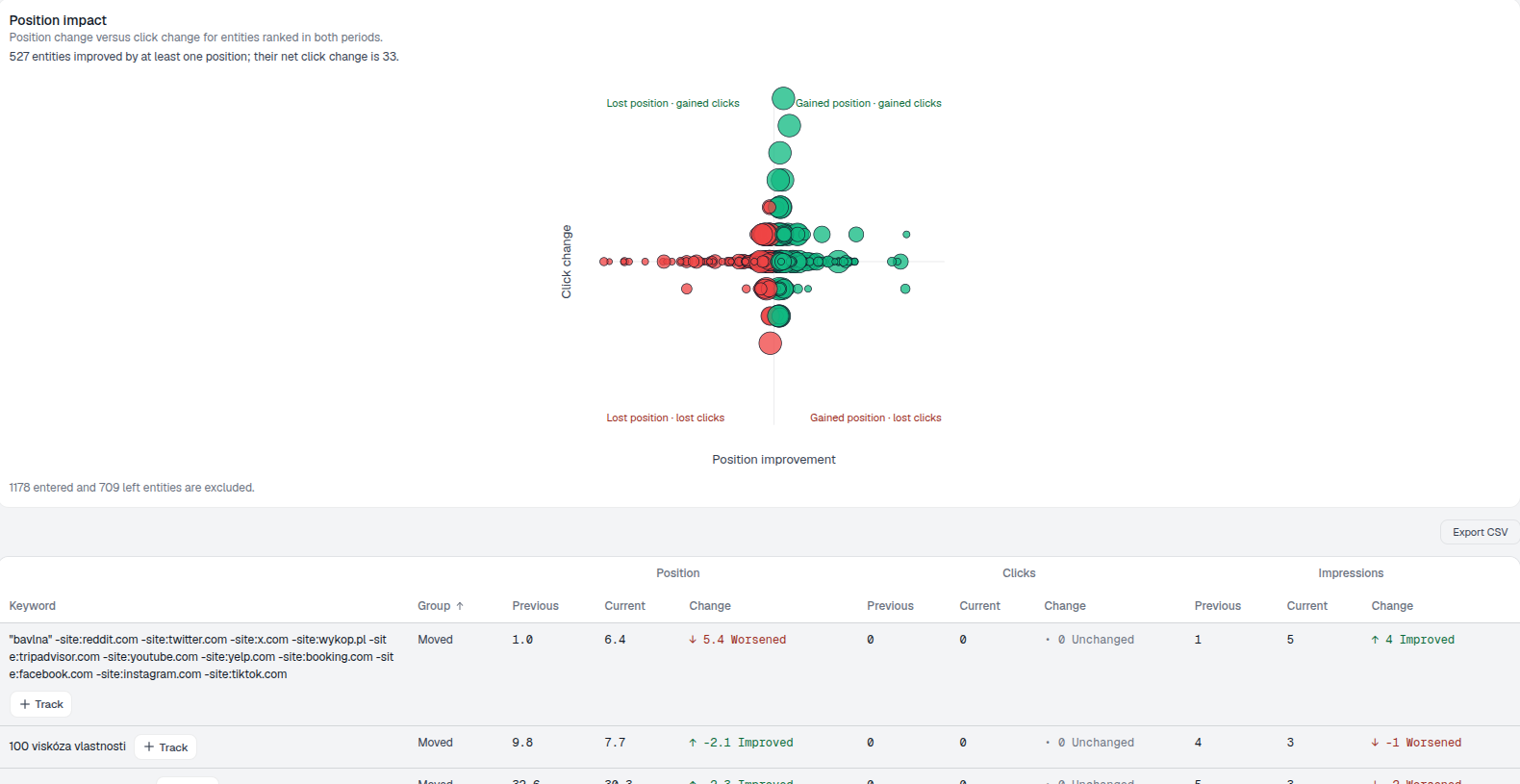
Desktop and Mobile Gains
Mobile and Desktop each carry thousands of impressions and both closed this window net positive, but Mobile’s net gain of 81 keywords outpaces Desktop’s 74 even though Desktop has more raw impressions behind it. Tablet, with a fraction of the reach, moved by only 11 net. None of the three is negative this window — worth knowing before assuming a device-wide problem, since a real regression would show up here as a segment with more lost than gained.
- Net gained minus lost, not raw counts — a device can have both winners and losers; the bar shows what’s left over.
- Sorted strongest net move first — Mobile leads even though Desktop has slightly more impressions behind it.
- Impressions shown alongside — reach for scale, since a net move on a low-impression device matters less than the same number on a high-impression one.
- Device-wide loss would show up here first — a segment with more lost than gained is the signal to check a device-specific template, page-speed or indexing issue before anything else.
device segments, read independently
Desktop, Mobile and Tablet each get their own gained/lost counts and their own segment scatter — a query moving in opposite directions across devices is visible instead of averaged away.
See URL Position MoversTrack Keyword Position Changes
Previous position against current position, split by Desktop, Mobile and Tablet — so a keyword winning on one device and losing on another is never averaged into a false non-move.
Ready to see which keywords actually moved?
Free check · 7-day trial · card required