


- Interstitial ads are full-screen ads shown at a natural break, such as between game levels or after a task, that the user closes or taps through.
- They earn a much higher eCPM than banners but interrupt the user, so too many of them can cost more in lost retention than they bring in.
- On the mobile web, Google may rank pages lower when a pop-up or interstitial blocks the content right after a visitor arrives from search.
Where AmICited fits
A full-screen overlay can also stop an AI agent that browses your page like a person. AmICited’s AI Accessibility audit checks whether agents can read and use your pages, including an accessibility-tree check with pass or fail per item.
See the AI Accessibility audit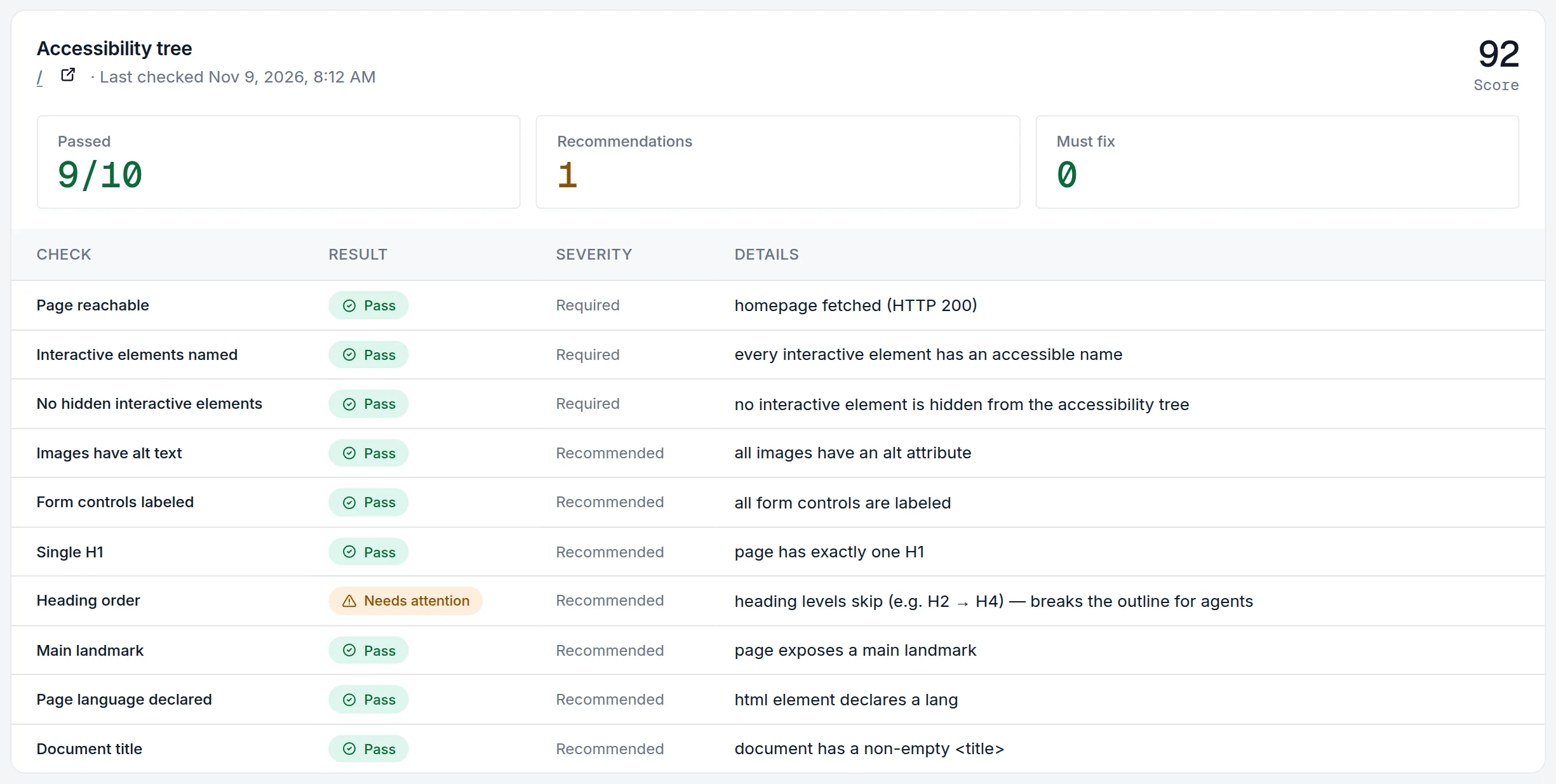
What Are Interstitial Ads?
Interstitial ads are full-screen ads that cover the interface of an app or website at a transition point, such as between levels of a game, between articles, or after a task is completed. The user sees the ad, then closes it (often after a short countdown) or taps through to the advertiser. The word “interstitial” means “in between”, which is the idea: the ad fills a natural gap rather than sitting in a corner of the screen.
Interstitials are most common in mobile apps. Ad networks such as Google AdMob, AppLovin, Unity Ads and Meta Audience Network offer them as a standard format, as image, video or playable ads. On the mobile web they are more controversial: Google treats intrusive pop-ups that block content as a poor experience, and the Coalition for Better Ads lists several full-screen formats among the ad experiences people find most annoying.
How Interstitial Ads Work
In an app, the developer loads an interstitial in advance through the ad network’s SDK, then shows it at a chosen moment, such as when a level ends. The ad network runs an auction (often through mediation across several networks) to pick the ad, and the app earns revenue per impression.
Publishers judge formats by eCPM, effective revenue per thousand impressions:
Revenue = Impressions ÷ 1,000 × eCPM
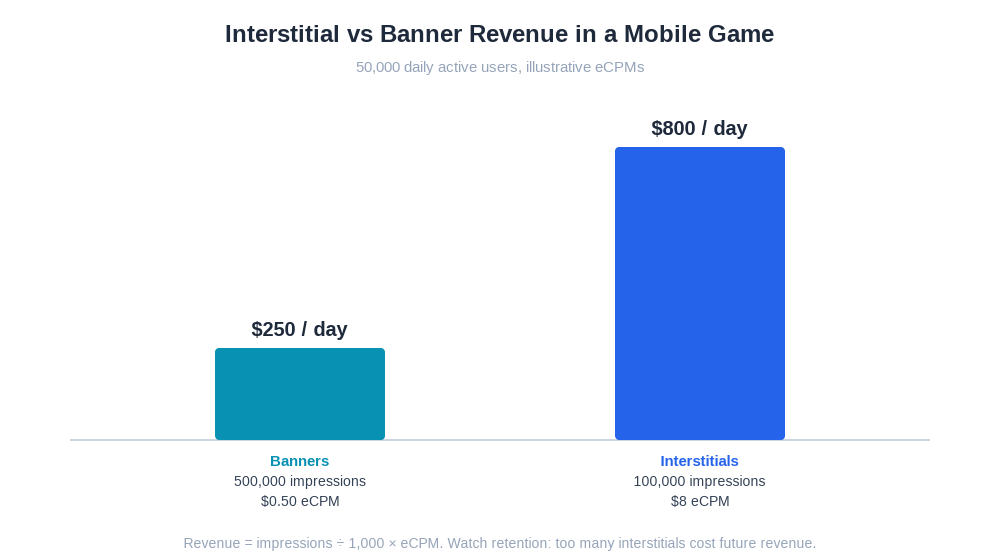
Worked example for a mobile game with 50,000 daily active users:
- Banners: 50,000 users × 10 banner impressions each = 500,000 impressions at a $0.50 eCPM = $250 per day.
- Interstitials: 50,000 users × 2 interstitials each = 100,000 impressions at an $8 eCPM = $800 per day.
Interstitials earn far more here, despite five times fewer impressions. The catch is retention. If adding a third interstitial per session makes 10% of players quit, the extra impressions can cost more in lost future revenue than they bring in. The eCPMs above are illustrative. Real values vary widely by country, platform and app category.
Types of Interstitial Ads
| Type | What the user sees | Opt-in? | Best moment to show |
|---|---|---|---|
| Static interstitial | Full-screen image with close button | No | Between levels or screens |
| Video interstitial | Full-screen video, skippable after a few seconds | No | Natural pauses in longer sessions |
| Playable ad | Short interactive demo of another app | No | Games, between rounds |
| Rewarded ad | Video the user chooses to watch for a reward | Yes | When the user wants a bonus |
| Rewarded interstitial | Appears at a transition, gives a reward | No, but skippable | Level completion |
| Web interstitial | Full-page ad between page views | No | Rarely, and not on arrival from search |
Interstitial Ads vs Banner Ads
Banner ads sit in a fixed slot, usually at the top or bottom of the screen, and stay there while the user does something else. They earn little per impression but generate many impressions and do not interrupt. Interstitials take over the screen. They earn much more per impression, get full attention and produce more clicks, including accidental ones. Many apps use both: a banner on menu screens and an interstitial at the end of a level. For a broader view of the format family, see display advertising.

Stay Updated on AI Visibility Trends
Get the latest insights on AI mentions, brand monitoring, and optimization strategies.
Interstitial Ads, SEO and AI Search
On the web, interstitials affect search visibility. Google’s guidance on intrusive interstitials says pages where content is not easily accessible to a user on the transition from search results may rank lower. That covers pop-ups that cover the main content right after arrival and standalone interstitials the user must dismiss before reading.
AI crawlers and agents are affected in a different way. A full-screen overlay rendered by JavaScript may not stop a crawler that reads HTML, but it can block an AI agent that browses the page like a person and needs to click through. AmICited’s AI Accessibility audit checks whether AI agents can read and use your site.
Best Practices for Interstitial Ads
- Show interstitials only at natural breaks: level completion, end of an article, after a task.
- Never show one on app launch, on exit, or right after a user arrives from search on mobile web.
- Cap frequency per session and per hour.
- Make the close button easy to see and tap.
- Preload the ad so it appears instantly instead of after a lag.
- Track retention and session length by ad frequency, not only ad revenue.
- Offer rewarded ads as an alternative where users get something in return.
Common Interstitial Ads Mistakes
The most damaging mistake is placing interstitials where users do not expect them, such as the moment the app opens or while a user is tapping, which causes accidental clicks. Ad networks treat that as a policy violation, and advertisers stop paying for it. Another is showing too many: frequent full-screen ads are a common complaint in app reviews and a major cause of uninstalls.
On websites, the common mistake is a full-page pop-up that appears as soon as a mobile visitor lands from Google. Even when it is a newsletter sign-up rather than an ad, it can count as an intrusive interstitial. Hidden or tiny close buttons are also common, and they frustrate users more than the ad itself.