


- Banner ads are image or HTML5 ads in fixed, standard-size slots on websites and apps that link to the advertiser’s site when clicked.
- They are mostly bought per thousand impressions (CPM). At a $2 CPM and a 0.1% click-through rate, 200,000 impressions cost $400 and bring about 200 clicks.
- If you only make three sizes, make 300×250, 728×90 and 320×50. Responsive display ads cover the rest but give less design control.
- Judge banners on reach and remarketing, not clicks alone, and check the placement report for accidental taps in mobile apps.
Where AmICited fits
AmICited’s cross-source report puts Google Ads, Meta Ads, Bing Ads and ChatGPT Ads next to organic search, with spend, clicks, impressions and CTR for each channel, so display spend can be read against the rest of your traffic.
See cross-source attribution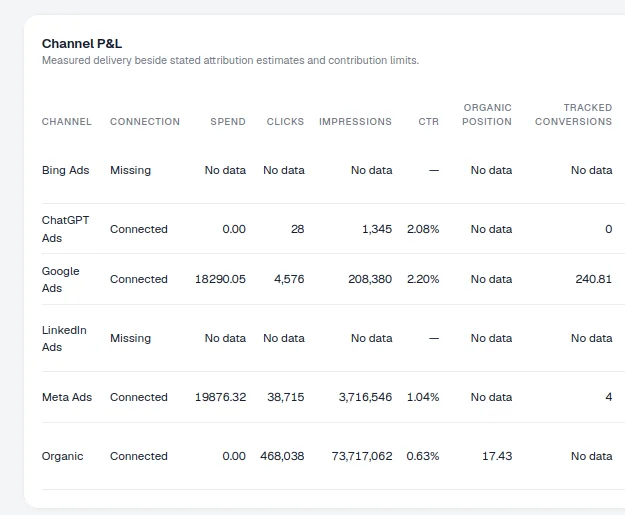
What Are Banner Ads?
Banner ads are rectangular ads in fixed spaces on websites and apps. They are built as images (JPG, PNG, GIF) or HTML5 animations, come in standard sizes, and link to the advertiser’s site when clicked. The first web banner ran in 1994, and banners are still the backbone of display advertising.
Advertisers buy banner placements through the Google Display Network, Microsoft Advertising, programmatic advertising platforms, or directly from publishers. App developers show mobile banners through ad networks like Google AdMob. Banners are used for brand awareness, product launches and, most effectively, remarketing to people who already visited a site.
How Banner Ads Work
A banner campaign follows the same steps as any display campaign:
- Choose sizes. Publishers have slots in standard sizes, so your banner must match the slot. More sizes mean more places your ad can appear.
- Design the creative. A logo, one short message, an image and a clear call to action button.
- Set targeting. Contextual (pages about a topic), audience (interests, demographics), remarketing (past visitors) or specific placements.
- Bid and buy. Most banners are bought per thousand impressions (CPM) in an auction, or per click.
- Measure. Impressions, viewability, clicks, conversions and view-through conversions.
The math:
Cost = Impressions ÷ 1,000 × CPM and CTR = Clicks ÷ Impressions
Suppose you buy 200,000 impressions at a $2 CPM. Cost is 200 × $2 = $400. With a 0.1% click-through rate, you get 200 clicks, an effective cost per click of $2.00. A remarketing banner shown to past visitors might reach a CTR several times higher at a similar CPM, which cuts cost per click proportionally.
Standard Banner Ad Sizes
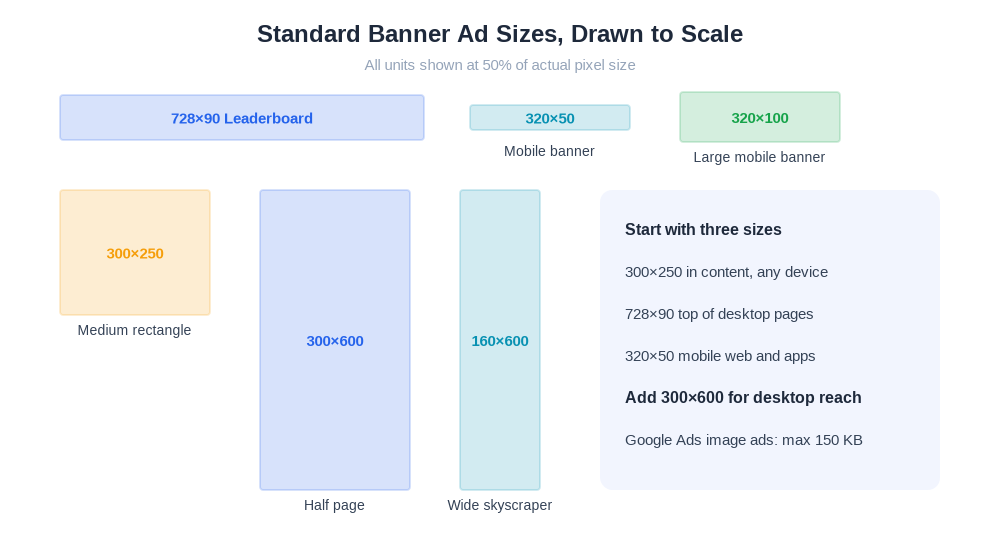
The IAB’s ad unit guidelines defined the sizes most publishers use. These are the ones that matter in practice:
| Name | Size (pixels) | Where it appears | Notes |
|---|---|---|---|
| Medium rectangle | 300×250 | In content, sidebars, apps | Most widely available size |
| Leaderboard | 728×90 | Top of desktop pages | Common header placement |
| Mobile banner | 320×50 | Top or bottom of mobile screens | Standard in mobile apps |
| Half page | 300×600 | Desktop sidebars | Large, high-visibility |
| Wide skyscraper | 160×600 | Desktop sidebars | Older but still common |
| Billboard | 970×250 | Top of desktop pages | Premium, high impact |
| Large mobile banner | 320×100 | Mobile web and apps | More space than 320×50 |
If you only make three sizes, make 300×250, 728×90 and 320×50. Responsive display ads, where you upload images and text and the platform builds the banner, cover all sizes automatically but give you less design control.
Banner Ads vs Native Ads
Banners look like ads and sit in ad slots. Native ads take the form of the content around them, such as a sponsored post in a feed or a recommended article card. Native ads usually get more attention and higher click-through rates because they avoid banner blindness. Banners are cheaper per impression, easier to produce once and run on a much wider range of sites. Many campaigns use banners for reach and remarketing, and native for content promotion. Full-screen formats are covered under interstitial ads.
Static and animated banners also differ in practice. A static image is quick to produce and loads fast. An HTML5 banner can show several products or messages in sequence, but it is heavier and needs more testing across sizes. For most campaigns, static banners in the core sizes plus a responsive display ad cover the ground well.

Stay Updated on AI Visibility Trends
Get the latest insights on AI mentions, brand monitoring, and optimization strategies.
Banner Ads and AI Search
Banner ads do not influence what AI engines say about your brand. AI answers are built from the content AI engines read and cite, not from ad placements. The indirect effect runs the other way: as people get more answers inside ChatGPT, Perplexity and Google AI Overviews, some publishers see fewer page views, which means fewer banner impressions available on those sites.
Best Practices for Banner Ads
- Keep one message per banner: brand, benefit, call to action.
- Make the logo and call to action visible in the first frame of an animated banner.
- Produce the core sizes (300×250, 728×90, 320×50) at minimum, plus 300×600 for desktop reach.
- Keep files light. Google Ads caps uploaded image ads at 150 KB, and heavy banners slow pages.
- Refresh creative every few weeks for audiences that see you often.
- Use frequency caps and exclude placements that drive accidental clicks.
- Point each banner to a landing page that matches its message, not the homepage.
Common Banner Ads Mistakes
The most common mistake is cramming too much into a small space: several offers, long text and a tiny logo. At 320×50, there is room for about five words and a button. Another is judging banners on clicks alone and turning them off, when their value is reach and support for other channels.
Advertisers also skip the placement report and let budget flow to mobile apps where users tap banners by accident. Others run one size, which limits where the ad can show, or run the same banner for months until the audience no longer notices it. Finally, animated banners that loop forever or flash quickly irritate readers and may break publisher or platform policies.