


Abandoned Cart Recovery
Learn what abandoned cart recovery is, which tactics actually recover lost sales, and how to measure and improve your recovery rate.
6 min read
A shopping cart is the software component of an online store that lets a customer collect products they intend to buy before completing checkout. It holds item selections, quantities, and pricing in a temporary session or persistent record until the customer pays, abandons the session, or the cart expires.
A shopping cart is the software component of an online store that lets a customer collect products they intend to buy before completing checkout. It holds item selections, quantities, and pricing in a temporary session or persistent record until the customer pays, abandons the session, or the cart expires.
A shopping cart is the part of an online store where a customer temporarily collects the products they intend to buy. Functionally, it is a data structure — a list of product IDs, variants, quantities, and prices — tied to a session, a cookie, or a logged-in customer account. The cart sits between product discovery and checkout: a shopper browses, taps “add to cart,” and the cart holds that selection until they either proceed to pay or leave without buying. Every major ecommerce platform, from Shopify and WooCommerce to custom-built storefronts, implements some version of this pattern, though the underlying mechanics — how long a cart persists, whether it survives a closed browser tab, whether stock is reserved while items sit in the cart — vary considerably between platforms.
Technically, a shopping cart can be implemented in a few ways. A session-based cart lives only in the browser or a temporary server session and disappears when the session ends, which is common for anonymous visitors. A persistent cart is tied to a customer account or a long-lived cookie so the contents survive across devices and days — useful for shoppers who browse on mobile and buy on desktop later. Some platforms also implement stock-reserved carts, where adding an item temporarily holds inventory for a short window (common for limited-stock drops), while others leave inventory unreserved until payment clears, which can cause a shopper to reach checkout only to find an item sold out.
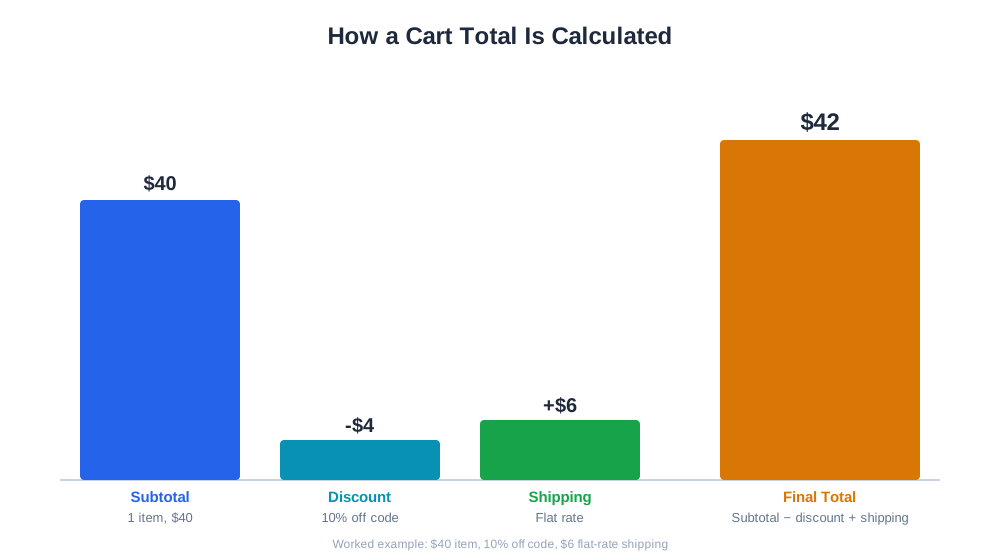
A typical cart record stores, per line item: product and variant identifiers, quantity, unit price at time of add, and any applied discount. At checkout, the cart’s contents get combined with shipping address, tax rules, and payment details to calculate the final order total. A store selling a $40 item with a 10% off code and $6 flat-rate shipping would show a cart subtotal of $40, a discount line of -$4, shipping of $6, and a final total of $42 — the arithmetic is simple, but surfacing it clearly, early, and without surprises is where most carts succeed or fail.

Track how AI chatbots mention your brand across ChatGPT, Perplexity, and other platforms.
The cart is the highest-leverage screen in the entire buying journey because it sits directly before the money changes hands. A store can win every earlier stage — get found in search, get clicked, get the product page read — and still lose the sale if the cart introduces friction. Unexpected shipping costs, forced account creation, a confusing quantity selector, or a cart that silently drops an item when a shopper hits “back” are all common causes of lost revenue that have nothing to do with product or price. Because the cart is also where average order value gets shaped — through bundle offers, free-shipping thresholds, and cross-sell prompts — it functions as a merchandising surface, not just a technical checkpoint.
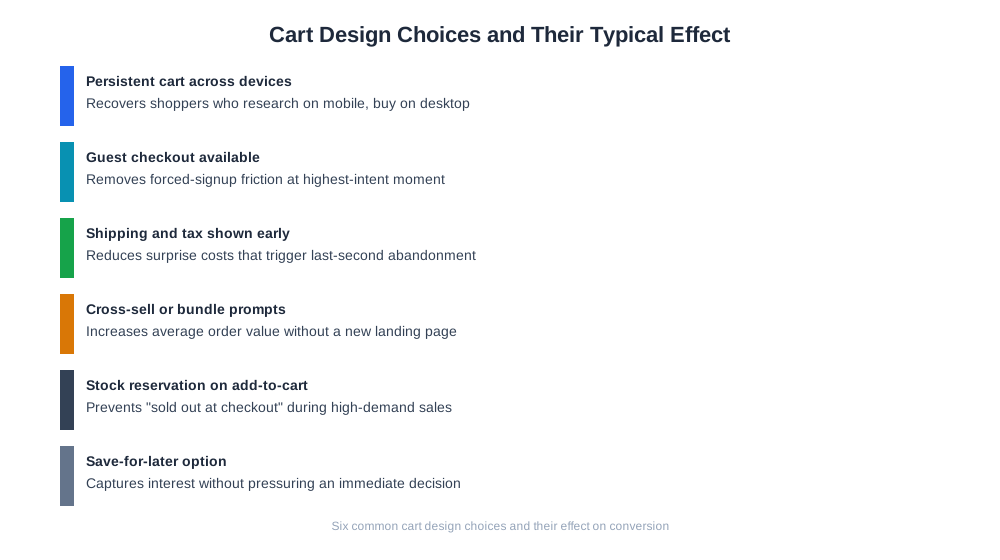
| Cart Design Choice | Typical Effect |
|---|---|
| Persistent cart across devices | Recovers shoppers who research on mobile, buy on desktop |
| Guest checkout available | Removes forced-signup friction at the highest-intent moment |
| Shipping and tax shown early | Reduces surprise costs that trigger last-second abandonment |
| Cross-sell or bundle prompts in cart | Increases average order value without a separate landing page |
| Stock reservation on add-to-cart | Prevents “sold out at checkout” frustration during high-demand sales |
| Save-for-later option | Captures interest without pressuring an immediate decision |
As AI shopping assistants like ChatGPT Shopping, Perplexity Shopping, and Amazon Rufus increasingly handle product discovery and comparison for shoppers, the traditional cart is being partially abstracted away — an AI agent may compare products, check price and availability, and even initiate a purchase, with the store’s cart and checkout logic still running underneath as the transactional backbone. This makes it more important than ever that a store’s cart and checkout can be completed cleanly and quickly, since an AI-mediated shopper has less patience for friction than a browsing human does and may simply route the purchase to a competitor with a smoother flow. On the analytics side, AmICited’s ecommerce reporting sits downstream of the cart: tools like eshop_get_order_mix break down completed orders by new versus returning customers and payment method, giving merchants visibility into how cart and checkout design choices actually affect who finishes a purchase, not just who starts one.
Get the latest insights on AI mentions, brand monitoring, and optimization strategies.
A frequent mistake is hiding shipping costs until the final checkout page, which causes shoppers who were otherwise ready to buy to abandon once the true total is revealed — surfacing an estimated shipping cost directly on the cart page, even a range, fixes most of this. Another common issue is a cart that silently empties or partially empties after a session timeout, browser crash, or app update; auditing session length and persistence settings against actual customer browsing patterns (many shoppers take hours or days between adding an item and paying) usually reveals the cart is expiring too aggressively. Some stores over-complicate the cart page with too many upsell modules, discount code fields, and shipping calculators competing for attention, which can overwhelm a shopper who just wants to pay — a cluttered cart page should be trimmed back to the essentials plus one merchandising element. Mismatched pricing between the product page and the cart, often caused by currency or tax-timing bugs, erodes trust immediately and should be treated as a priority fix whenever reported. Finally, forcing account creation before checkout remains one of the most well-documented sources of abandonment; enabling guest checkout with an optional post-purchase account prompt resolves this without losing the ability to build a customer record.
Start tracking how AI chatbots mention your brand across ChatGPT, Perplexity, and other platforms. Get actionable insights to improve your AI presence.
Learn what abandoned cart recovery is, which tactics actually recover lost sales, and how to measure and improve your recovery rate.
Learn what a cart recovery email is, how the timing and sequence work, and what makes an abandoned cart email actually bring shoppers back to buy.
Learn what a wishlist is in e-commerce, how it works, why it boosts conversion and retention, and how merchants use wishlist data to drive repeat purchases.
Cookie Consent
We use cookies to enhance your browsing experience and analyze our traffic. See our privacy policy.