



To track Google AI Overviews, use two sources. Search Console tells you how often your pages appeared in Google’s AI features. A tracker that runs your own prompts tells you whether you were cited, who was cited instead, and how that changes over time. Neither one is enough on its own.
There’s a second catch: AI Overviews and AI Mode are different surfaces that cite different sources. If you track “Google AI” as one number, you won’t see when one of them cites you and the other doesn’t.
This guide covers what to measure, what Search Console does and doesn’t show, and how to set up tracking for both surfaces.
Key Takeaways
- Search Console’s generative AI report shows impressions only, with no clicks, queries or competitors. It reached all sites on August 31, 2026.
- AI Overviews had over 2 billion monthly users by July 2025, according to Google.
- AI Overviews and AI Mode share only 12 of their top 20 cited domains, a 43% overlap, in AmICited’s data.
- In our own tracking, only 4 of the 10 amicited.com prompts that earned a Google AI citation got one from both surfaces.
- A useful tracker records 5 things per prompt: whether an AI answer appeared, mentions, citations, competitors and history.
What AI Overviews tracking measures
AI Overviews tracking is the practice of running the questions your buyers ask through Google’s AI Overviews on a schedule, and recording what the answer says and which pages it cites. Unlike rank tracking, it doesn’t measure a position on a results page. It measures whether you’re part of the answer.
A tracker should record five things for each prompt:
| What to record | Why it matters |
|---|---|
| AI answer present | Not every query triggers an AI Overview. If none appears, there’s nothing to win. |
| Brand mention | Whether the answer names your brand in its text. |
| Citation | Whether the answer links to one of your pages as a source, and at what position. |
| Competitors | Which brands and domains are named or cited when you aren’t. |
| History | How each of the above changes from run to run, with dates. |
Mentions and citations are separate signals. An AI Overview can recommend your product without linking to you, or link to your guide without naming your brand. Record both. Our explainer on position vs citation goes deeper on these metrics.

Ready to Monitor Your AI Visibility?
Track how AI chatbots mention your brand across ChatGPT, Perplexity, and other platforms.
What Search Console shows
Search Console’s generative AI performance report shows how often URLs from your site appeared in Google’s AI features in Search and Discover. Google announced it on June 3, 2026 and made it available to all sites on August 31, 2026. It shows impressions, nothing else, so it can’t show whether a page was cited, who beat you, or whether anyone clicked.
| Search Console AI report | Prompt tracker | |
|---|---|---|
| Impressions of your pages in AI features | Yes | No |
| Clicks from AI answers | No | No |
| The query or prompt behind the answer | No | Yes, you choose the prompts |
| Whether your brand is named | No | Yes |
| Which competitors are cited | No | Yes |
| The full answer text | No | Yes |
| AI Overviews and AI Mode separately | Not stated by Google | Yes, if the tool runs both |
| Cost | Free | Paid, in most cases |
Google lists the report’s dimensions as pages, countries, devices and dates, and notes that the same data is also included in the overall performance report, per its announcement. Search Engine Journal adds that sites with too few AI impressions may not see the report at all.
Use Search Console as your free baseline. It’s first-party data, and it covers every query, not just the ones you chose. For a closer look at the report, see our guide to Search Console’s AI Overview report.
Why track AI Mode separately
AI Overviews and AI Mode are both Google products, but they don’t cite the same pages. AI Overviews sits on top of a normal results page; AI Mode is a separate conversational search. In AmICited’s analysis of their most-cited domains, only 12 of the top 20 domains were shared, a 43% overlap.
Our own tracking shows the same split at the prompt level. Here’s one prompt, “ai search tracker”, from the same day:
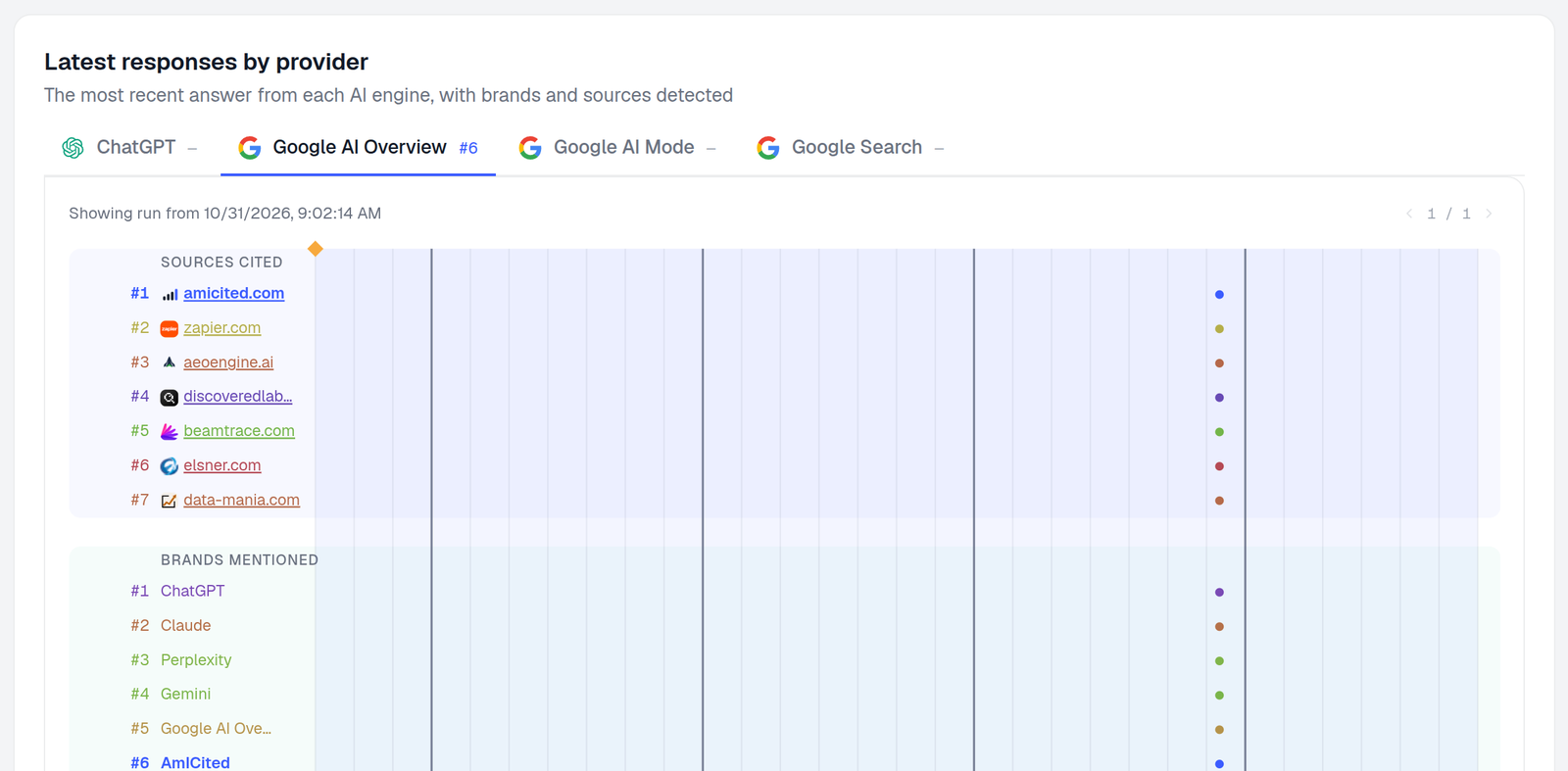
On October 31, 2026, Google AI Overviews cited amicited.com as its first source and named AmICited as the sixth brand. AI Mode answered the same prompt with three sources: zapier.com, youtube.com and botric.ai. It cited no AmICited page.
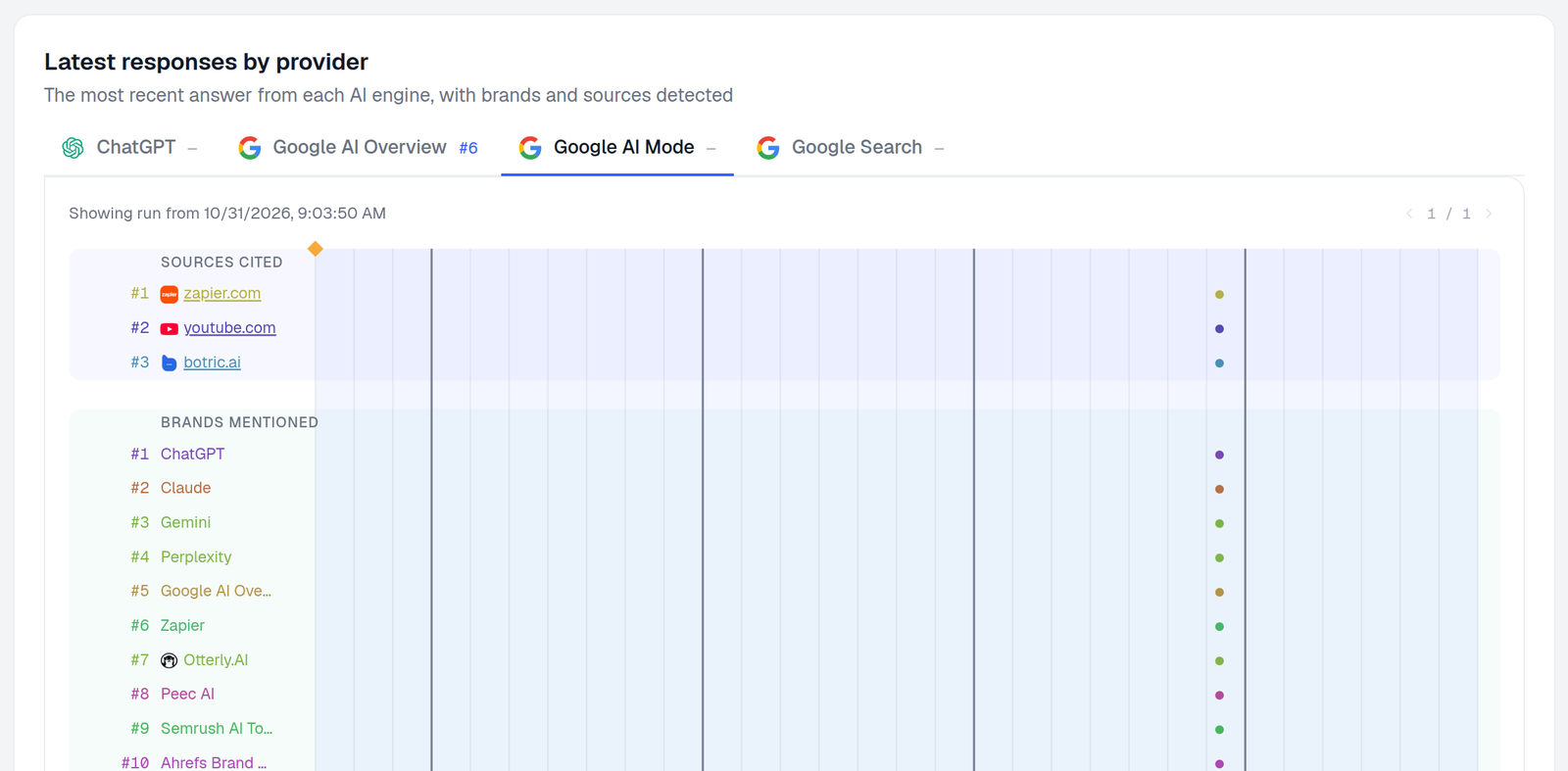
Across all our tracked prompts, the two surfaces disagreed more often than they agreed:
10 tracked prompts in which AI Overviews or AI Mode cited amicited.com, out of 241 tracked prompts. One brand's data; not a market estimate.
Source: AmICited tracking of amicited.com, October 8 – November 6, 2026
The sources differ in kind, too. In the same 30 days, user-generated content such as Reddit threads and YouTube videos made up 25% of the citations AI Overviews gave in our workspace, and 32% of AI Mode’s.
The practical rule: report AI Overviews and AI Mode as two lines, not one. Our post on how Google AI Overviews decide which brands to mention covers what each surface tends to reward.
Stay Updated on AI Visibility Trends
Get the latest insights on AI mentions, brand monitoring, and optimization strategies.
How to track AI Overviews
Setting up AI Overviews tracking is mostly a matter of knowing the questions your buyers ask. You need a list of 20–50 prompts, a short list of competitors and a tracker that runs Google AI Overviews and AI Mode as separate engines. The steps below use AmICited, but they apply to any tracker.
1. Choose your prompts
Write the questions a buyer would ask, not just keywords. Mix intents: “best X for Y”, “how to do X”, “X vs Y” and “what is X”. Start from your Search Console queries that show AI impressions, plus the questions your sales team hears.
Result: 20–50 prompts grouped by topic or product line.
2. Pick the engines and country
Add the prompts and choose Google AI Overview and Google AI Mode as separate engines. Pick the country your customers search from, because answers change by market.
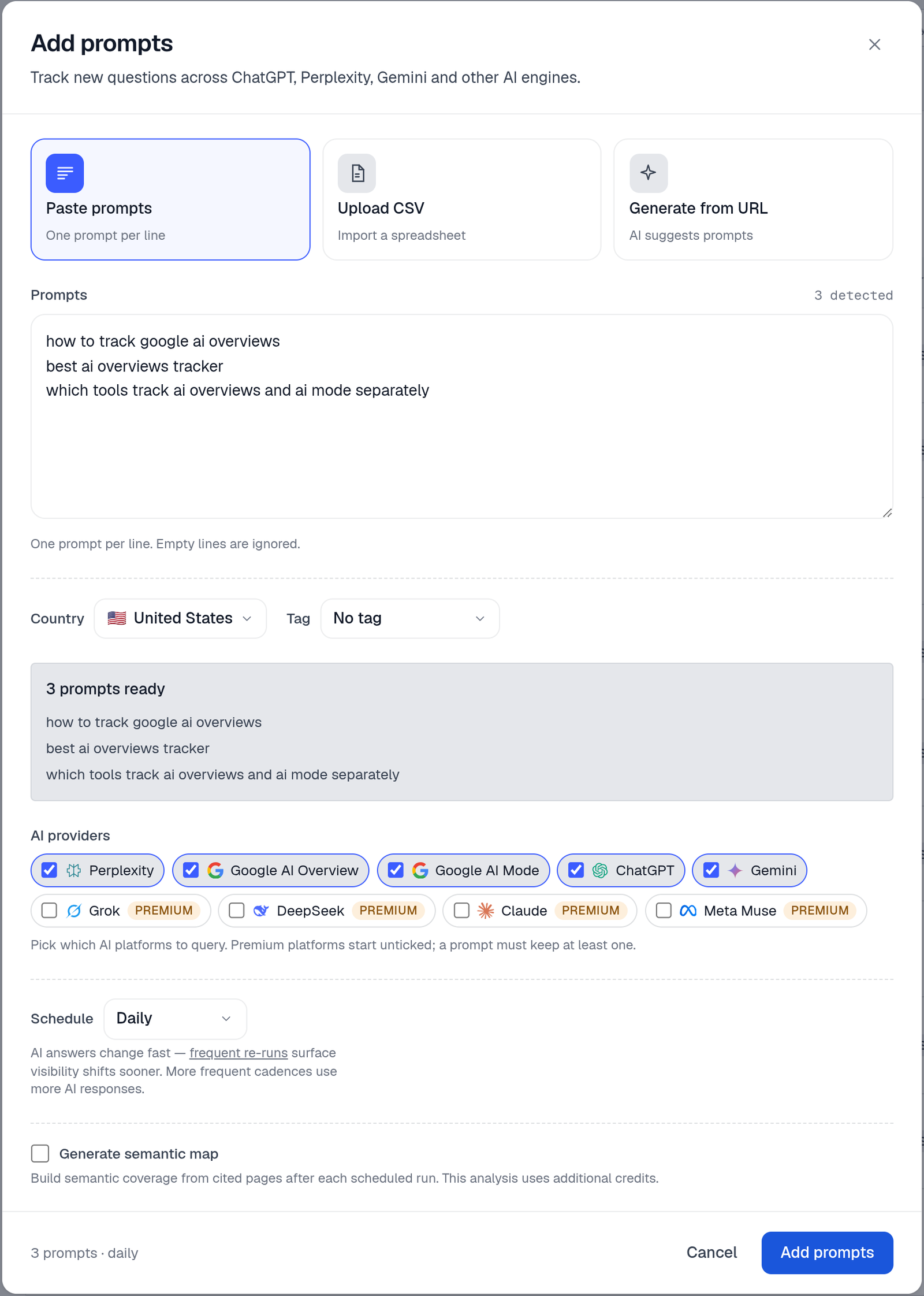
Result: each prompt is set to run on both Google surfaces from one fixed location.
3. Run a baseline
Let the prompts run for one to two weeks before you change anything. A single run is a snapshot, and AI answers change from run to run. A baseline shows what’s stable and what isn’t.
Result: for each prompt and engine, you know whether an AI answer appears, whether you’re named and whether you’re cited.
4. Add competitors and read the sources
Add the competitors you lose deals to. Then filter the sources view to one engine to see which pages AI Overviews actually cites for your prompts.
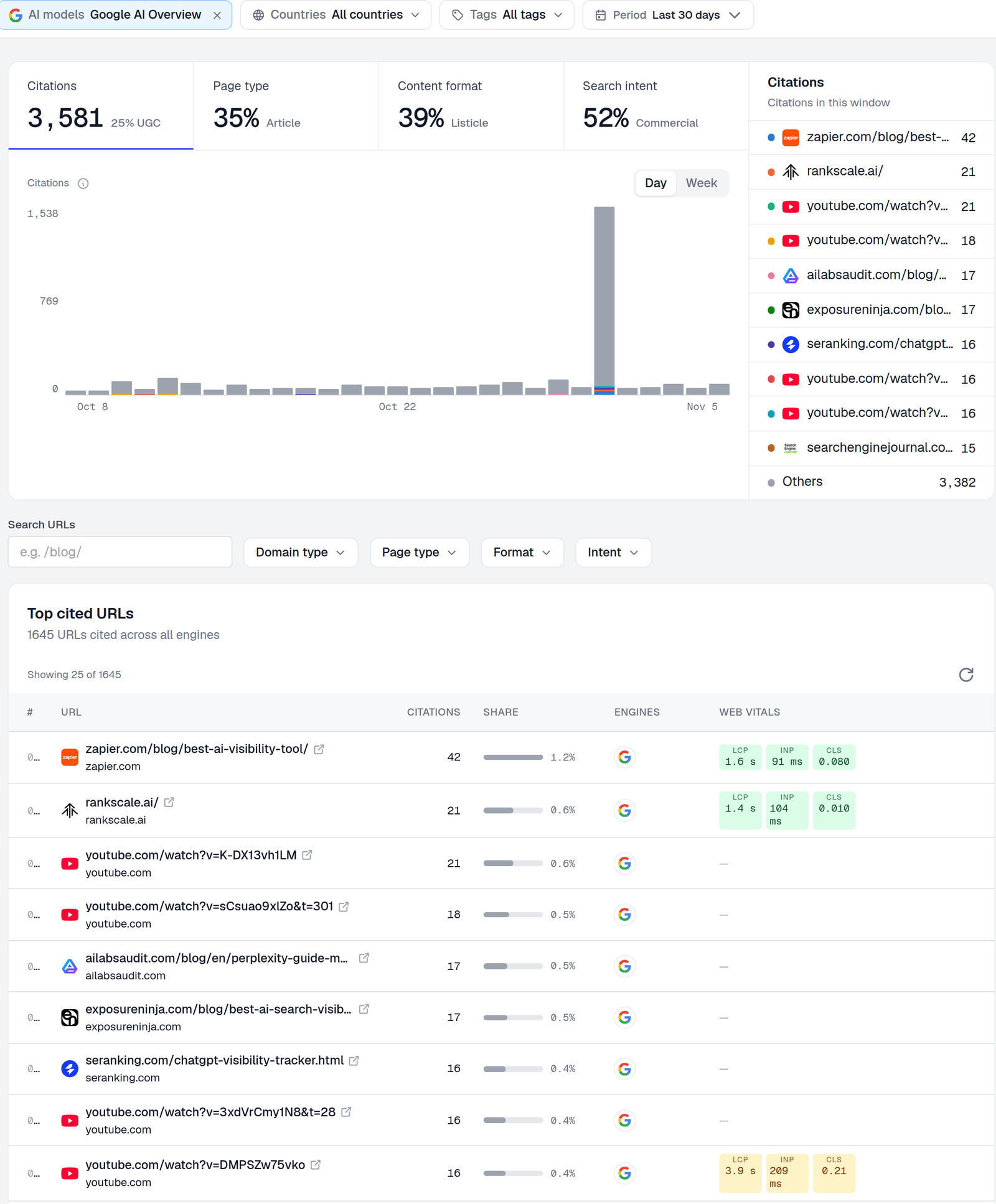
In our workspace, the most-cited page in AI Overviews over the last 30 days was a listicle on zapier.com. Listicles made up 39% of the citations. That tells you which formats and which third-party pages are worth targeting. The Source & Citation Intelligence view lists these per engine, and competitor analysis shows each brand’s share of voice:
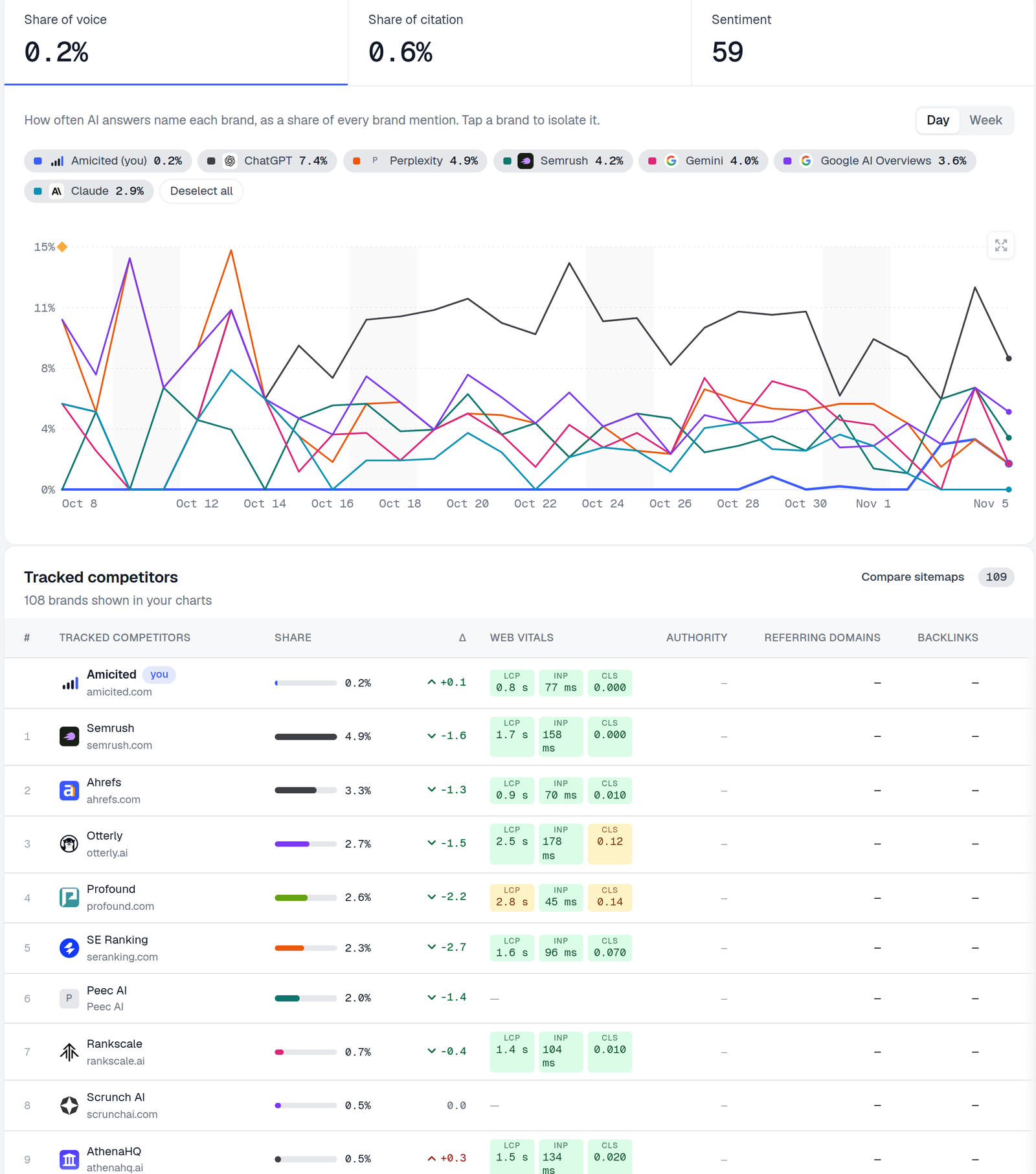
Yes, that’s our own share of voice at 0.2% in AI Overviews. We’re showing it because it’s the real number, and because it’s exactly the kind of gap tracking is for.
Result: a list of the pages and brands AI Overviews prefers for your topic.
5. Set a cadence and act on the gaps
Run revenue-critical prompts daily and the rest weekly. Review per engine, not in aggregate. When a page ranks well on Google but AI Overviews doesn’t cite it, the citation vs ranking gap report flags it.
Result: a weekly view of where you’re cited, where you aren’t, and which pages to fix first.
Final check: you can answer three questions for any priority prompt. Does AI Overviews cite you? Does AI Mode? If not, who do they cite instead?
Why manual checks break
Searching your prompts by hand is a fine first look, but it doesn’t hold up as tracking. AI Overviews change with location, language, device, signed-in account and time of day, so your browser shows one version of an answer that other people may never see. And you can’t compare runs you didn’t record.
If you check by hand anyway:
- use a private window, signed out
- note the country and date of every check
- save a screenshot of the answer and its sources
- check the same prompts in AI Mode separately
That’s enough to spot a big gap, but it won’t show trends.
AI Overviews tracking tools compared
Most SEO suites now track AI Overviews in some form. They differ in whether they track keywords or prompts, whether AI Mode is reported on its own, and whether they record citations as well as mentions. The table below lists what each vendor documents publicly. A blank doesn’t mean a feature is missing, only that we couldn’t confirm it.
| Tool | AI Overviews | AI Mode | Tracks | Notes |
|---|---|---|---|---|
| Google Search Console | Impressions | Impressions | Your pages only | Free; no clicks, queries or competitors |
| SE Ranking | Yes | Separate AI Mode Tracker | Citations, mentions, competitors | Cached copies of results; all countries where AI Overviews run |
| Semrush | Flags keywords that trigger AI Overviews | Yes, in Prompt Tracking | Keyword rankings, AI search positions | AI search tracking is desktop-only, per Semrush’s docs |
| Ahrefs Brand Radar | Yes | Yes | Mentions, citations | Index plus custom prompts; also ChatGPT, Perplexity, Gemini, Copilot |
| Otterly.AI | Yes | Yes | Mentions, citations | Also ChatGPT, Perplexity, Gemini, Copilot |
| Peec AI | Yes | Yes | Brand visibility per prompt | AI Overviews and AI Mode on every listed plan |
| AmICited | Yes | Yes, as a separate engine | Mentions, citations, sources, competitors | Also ChatGPT, Perplexity, Gemini and more; AI Rank Tracker |
Which should you choose?
- You already pay for Semrush or SE Ranking and track keywords: start with their AI Overviews features, and add a prompt tracker if you need citations per question.
- You want to know which pages AI answers cite for buyer questions: use a prompt-based tracker that reports each Google surface separately.
- You’re on a zero budget: Search Console plus a weekly manual check of your top 10 prompts.
For a broader comparison across ChatGPT, Perplexity and other engines, see our AI citation tracking tools guide.
What to do now
- Open Search Console’s AI report. Note which pages appear and in which countries. That’s your free baseline.
- Write 20–50 buyer prompts and track them in AI Overviews and AI Mode separately.
- Read the cited sources, not just your own score. They show which formats and third-party pages Google’s AI trusts for your topic. Our list of the domains AI Overviews cite most is a starting point.
- Fix pages that rank but aren’t cited. Most AI Overviews citations come from pages already in the top 10, so start with pages close to that line.
- Benchmark competitors per surface. Our guide to analyzing competitor AI visibility shows how.
- Review weekly. Look for trends across runs, not single results.
The takeaway
Search Console tells you that Google’s AI showed your pages. A prompt tracker tells you whether it cited you, who it cited instead, and whether AI Overviews and AI Mode agree. On our own data, they often don’t. Track both surfaces separately, start with the questions your buyers ask, and act on the gaps each one shows.
 LinkedIn