



Keyword cannibalization is when two or more of your own pages rank for the same search. Most of what cannibalization reports flag isn’t a problem worth fixing. In the four weeks to November 7, 2026, 6,959 queries on amicited.com had two or more of our URLs ranking in Google. Only 42 of them had 100+ impressions, a change of leading URL and at least one click.
This guide shows how to find keyword cannibalization in Search Console, how to tell a real split from report noise, and which fix fits which cause. It uses our own Search Console data and the Cannibalization Detection report, with two real examples from our site.
Google doesn’t penalize it. John Mueller said in September 2025 that “pages aren’t duplicates just because they happen to appear in the same search results page.” The work is deciding which overlaps cost you clicks.
Key Takeaways
- Keyword cannibalization means two or more of your URLs rank for the same query. Google doesn’t treat it as a penalty, per John Mueller.
- On amicited.com, 6,959 queries had 2+ competing URLs between October 12 and November 7, 2026. Only 42 had 100+ impressions, a leader change and a click.
- 51% of the flagged queries (3,525) were 8 words or longer, mostly prompt-shaped searches, not keywords a team would target.
- On any given day, 7.2–9.9% of the queries we ranked for had two or more of our URLs, per the Cannibalization Detection report.
- A report can flag a query when one URL holds 99.9% of its impressions. Check impression share before changing anything.
- Pick the fix by cause: merge and 301, differentiate intent, canonical, hreflang or redirect repair, or leave it.
What keyword cannibalization is
Keyword cannibalization happens when several pages on one domain rank for the same query, so Google has to choose between them. When it keeps switching, no single page collects the clicks, links and engagement for that search. The glossary entry on content cannibalization covers the broader idea.
Three facts from Google frame the problem:
- It isn’t a penalty. Mueller’s answer was that “Search Console shows data for when pages were actually shown, it’s not a theoretical measurement,” and that “if you have 3 different pages appearing in the same search result, that doesn’t seem problematic to me.” He still advised: “Reduce unnecessary duplication and spend your energy on a fantastic page.”
- Google limits repeats. Since a June 2019 change, Google usually shows no more than two results from the same site in the top results for most queries. Brand queries are an exception.
- Signals have an order. Google’s documentation lists redirects and rel=“canonical” as strong signals for which URL should be canonical, and sitemap inclusion as a weak one.
So the question isn’t “do I have cannibalization?” Every site with more than a few pages does. The question is which overlaps cost you visibility.

Ready to Monitor Your AI Visibility?
Track how AI chatbots mention your brand across ChatGPT, Perplexity, and other platforms.
How to find it in Search Console
Search Console is the free place to start, because it shows what Google actually displayed.
- Open the Performance report. Go to Performance, then Search results, and set the date range to at least 28 days. One day is too noisy.
- Filter to one query. Add a Query filter with “Exact query” for the search you care about.
- Open the Pages tab. Every URL listed had impressions for that query. Two or more URLs with real impressions is a split.
- Compare the URLs. Look at impressions, clicks and average position per page. A page with 95%+ of impressions is a clear winner; the others are just passing visibility.
- Check over time. Switch the chart to daily and compare the pages’ trends. A leader that changes every few days is the signal worth acting on.
Result: a short list of queries where two pages genuinely share impressions.
Search Console’s limit is scale: it checks one query at a time. For a whole site you need a report that groups every query with 2+ URLs, like Semrush, Ahrefs or AmICited (compared below). Here is the AmICited report for our own site over the same window:
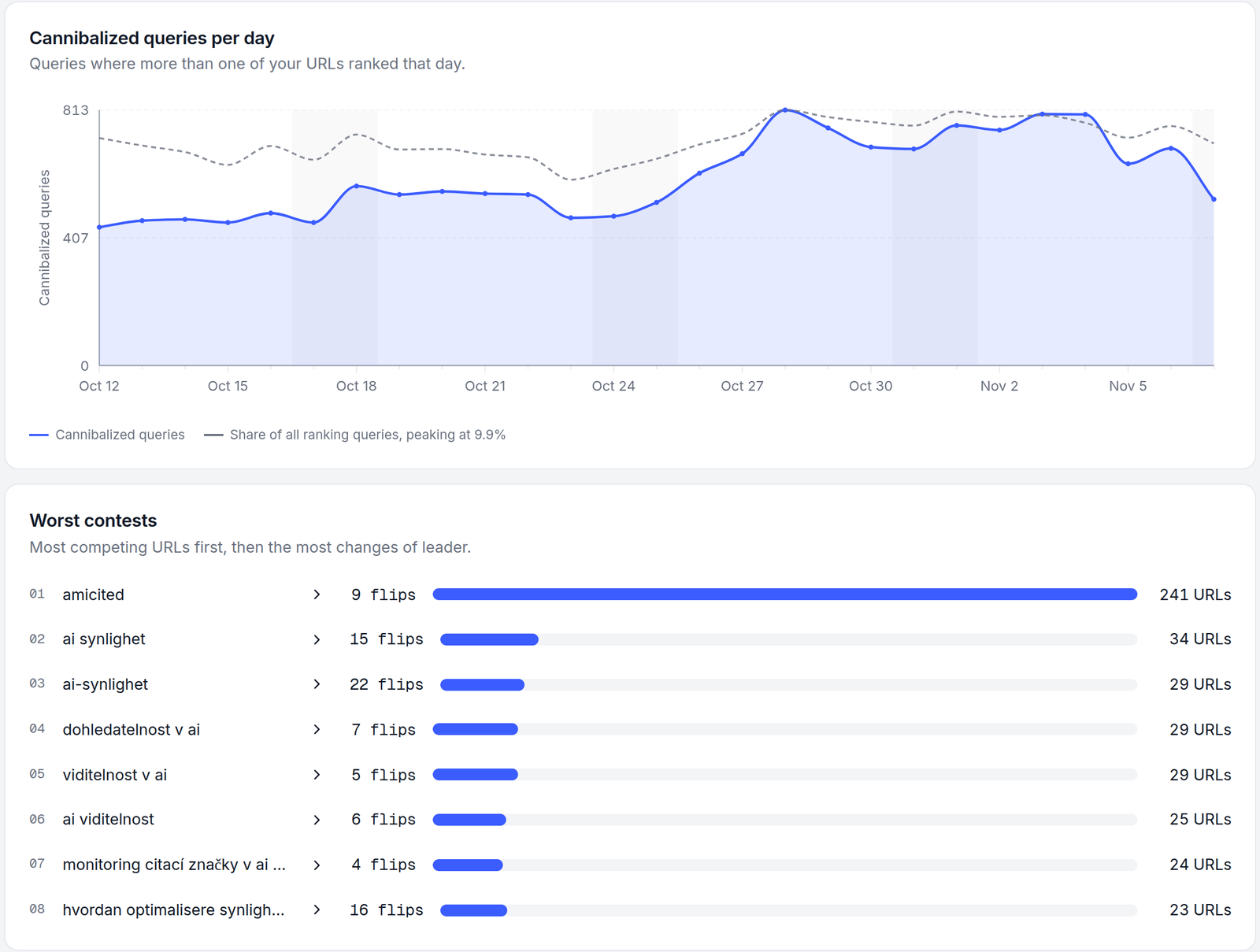
The daily count roughly tracks how many queries the site ranks for at all. On October 12, 440 of 4,980 ranking queries had 2+ URLs (8.8%); on October 28, 813 of 8,193 (9.9%). A rising count with a flat share means more visibility overall, not more cannibalization.
Why most flagged queries are noise
The “Worst contests” list above is a good example of noise. Its top eight queries are our brand name, with 241 competing URLs, and versions of “AI visibility” in Swedish, Slovak, Czech and Norwegian. None of these are pages fighting each other. They’re translations of the same page, and branded searches where Google shows many of a site’s pages by design.
We filtered the full list step by step to see how much was left:
Each bar is a separate filter on the same 6,959 queries; the last bar applies all three conditions together. One site's data, all 15 language versions included.
Source: AmICited Cannibalization Detection, Google Search Console data for amicited.com, October 12 – November 7, 2026
The noise falls into four groups:
- Brand and navigational queries. Google shows several pages of a site for its own name. “amicited” had 241 of our URLs and 65 clicks. That’s working as intended.
- Prompt-shaped queries. 3,525 flagged queries were 8+ words long, such as “what are the best practices for optimizing authorship and credentials to improve ai visibility and citation worthiness?” These look like AI agents and AI-assisted searches, often with zero clicks. Our post on longer Google queries covers that shift.
- Language versions. On a multilingual site, translations can appear for the same query. Google treats localized pages as duplicates only if the main content is untranslated, and hreflang tells it which version to show.
- One clear winner. A query can count as “flipped” when a second URL got a single impression on one day.
The last group is the easiest to miss. Here’s a query the report ranks second by changes of leader:
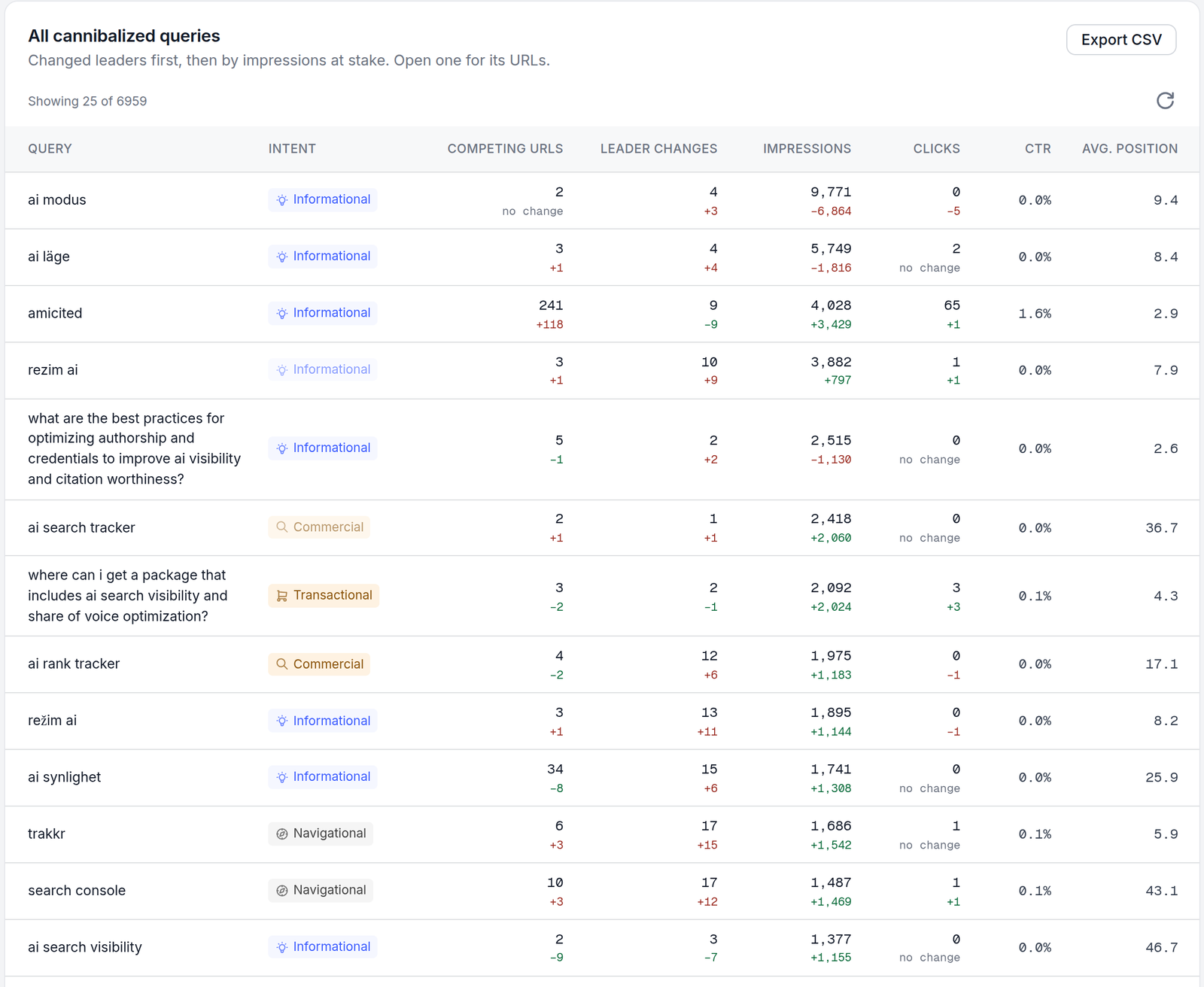
“ai läge” (Swedish for AI Mode) shows 3 competing URLs and 4 leader changes. Open it, and our Swedish Google AI Mode glossary page has 5,741 of 5,749 impressions, 99.9%. The other two URLs had 1 and 7 impressions. The four “leader changes” were four days when one of them, shown once or twice, ranked above the glossary page. There’s nothing to fix.
Stay Updated on AI Visibility Trends
Get the latest insights on AI mentions, brand monitoring, and optimization strategies.
How to diagnose a real case
After the noise filters, 42 queries were left. We sorted them by hand:
| Group | Queries | Example | Likely verdict |
|---|---|---|---|
| AI crawler names | 10 | “oai-searchbot”, “claudebot”, “google-extended” | Differentiate: glossary, review and blog pages serve different intents |
| Non-English queries | 9 | “ai läge”, “rezim ai”, “ai-modus” | Check hreflang; most have one clear winner |
| Brand and product names | 6 | “amicited”, “trakkr”, “profound ai” | Leave: navigational, several results expected |
| English topic queries | 17 | “bluf”, “hub and spoke”, “visibility score” | Review each one |
For each remaining query, answer four questions:
- Do the pages serve the same intent? A definition and a comparison can both deserve to rank. Two guides answering the same question can’t.
- How is the impression share split? 95/5 is a winner and a passer-by. 60/40 is a real split.
- Does the leader keep changing? Regular flips between strong pages mean Google can’t decide.
- Is the cause technical? Look for a missing redirect, a wrong canonical, or a translated page showing for the wrong language.
Here’s a real split from our site. For “oai-searchbot”, four of our URLs had 1,233 impressions between them; a French page had just 2, and three shared the rest:
| URL | Impression share | Avg. position | Clicks |
|---|---|---|---|
| /reviews/gptbot-vs-oai-searchbot/ | 57% | 2.5 | 4 |
| /glossary/oai-searchbot/ | 31% | 9.2 | 3 |
| /ja/reviews/gptbot-vs-oai-searchbot/ | 12% | 5.4 | 3 |
The review compares two OpenAI crawlers; the glossary defines one. Different intents, so the verdict is differentiate, not merge. Make the glossary the plain definition and link it to the comparison. The Japanese version holding 12% of the query is a technical check: confirm the hreflang tags, so English searchers get the English page and Japanese searchers the Japanese one.
How to fix keyword cannibalization
Match the fix to the diagnosis, from the strongest change to the lightest:
| Fix | When to use it | What it tells Google |
|---|---|---|
| Merge and 301-redirect | Two pages answer the same question for the same reader | A 301 redirect is a strong canonical signal; the old URL’s signals move to the new one |
| Differentiate the intent | Both pages are useful but overlap in title, H1 and focus | Rewrite the weaker page around a distinct question and adjust its title, headings and anchor text |
| Canonical tag | A near-duplicate has to stay live (filters, print versions, variants) | rel=“canonical” is a strong signal, but Google can still choose another URL |
| Internal links | One page should clearly be the main one | Point links on the topic to that page, with descriptive anchor text |
| Fix hreflang or redirects | Translations or old URLs keep showing up | Repairs the cause instead of the symptom |
| Leave it | One URL has 95%+ of impressions, or the query is your brand | Nothing; changing a winning page can cost you its position |
Two warnings. First, merging is the one fix you can’t easily undo, so do it only when the intents are truly the same. Second, after any change, give Google a few weeks and compare the same query’s impressions, clicks and leader changes for the same window length. Our case study on fixing cannibalization with Claude Code walks through one site-wide run, including a redirect file that had been silently deleted. For canonical details, see our guide to canonical URLs.
Does cannibalization affect AI Overviews?
No public study has measured whether keyword cannibalization lowers your chance of being cited in AI Overviews, AI Mode or ChatGPT. What we can show is which pages AI engines picked for cannibalization questions.
AmICited tracked five cannibalization prompts in October 2026, including “how to fix keyword cannibalization” and “keyword cannibalization tool”. Google AI Overviews, AI Mode and ChatGPT gave much the same advice: consolidate, 301, canonical, de-optimize, internal links. None of them cited amicited.com. The pages they did cite were single, focused guides, such as Ahrefs’ glossary entry, Semrush’s guide, Yoast’s article and Search Engine Land’s guide, plus Reddit threads and YouTube videos.
This doesn’t prove that one page per topic gets cited more. It does mean you control which page you’d like engines to cite. If three of your pages answer the same question, you can’t predict which one an engine will pick, or whether it’ll pick yours at all. To see which of your pages AI answers actually cite, compare them with your rankings in the citation vs ranking gap view.
Keyword cannibalization tools compared
Every tool below finds queries with more than one of your URLs. They differ in where the data comes from and how much of the site they cover.
| Tool | Data source | Coverage | Shows leader changes over time | Price |
|---|---|---|---|---|
| Google Search Console | Google’s own impressions | One query at a time, by hand | Only by comparing pages manually | Free |
| Semrush Cannibalization report | Semrush’s rank tracking, top 100 | Keywords in your Position Tracking campaign | Yes, by time period | Guru and Business tiers |
| Ahrefs Organic keywords, “Multiple URLs only” | Ahrefs’ keyword database | Keywords Ahrefs tracks for your site | Via position history | See vendor pricing |
| SE Ranking | SE Ranking’s rank tracking | Top 30 high-volume keywords in Insights, more in Rank Tracker | Not confirmed from its docs | See vendor pricing |
| AmICited Cannibalization Detection | Your Search Console or Bing Webmaster Tools data | Every query with impressions in the window | Yes, daily, per URL | See pricing |
Method: checked against each vendor’s own help or blog pages on November 9, 2026. “Not confirmed” means we couldn’t verify it from the vendor’s documentation; it doesn’t mean the feature is missing.
AmICited is our product. Its report counts only queries where Google or Bing actually showed two of your URLs, not ranks from a third-party crawl. It shows each URL’s impression share, daily position and changes of leader, and compares against a previous period. The same data is available to AI agents through the AmICited SEO MCP server. Its limits: it needs a connected Search Console or Bing property, reads one engine at a time, and only sees queries with impressions, so it can’t warn about overlaps on pages that don’t rank yet.
What brands should do now
- Pull the full list. Use Search Console for a few key queries, or a report like Cannibalization Detection for every query, over at least 28 days.
- Remove the noise first. Set aside brand queries, prompt-shaped queries, translations and anything where one URL holds 95%+ of impressions.
- Keep queries that matter. Focus on the ones with meaningful impressions, clicks and repeated leader changes.
- Diagnose before fixing. Decide same intent or different intent, and check redirects, canonicals and hreflang.
- Apply the lightest fix that works. Differentiate before you merge; merge only when the intent is the same.
- Measure the same window again. Compare impressions, clicks and leader changes a few weeks after the change, and track whether AI answers cite the page you chose with AI visibility tracking.
The takeaway
Keyword cannibalization reports are long because they count every overlap, including your brand, translations and one-impression blips. On our own site, 6,959 flagged queries came down to 42 worth a look, and most of those needed clearer intent, not a merge. Find the real splits, fix their cause, and leave winning pages alone.
 LinkedIn