


- A warehouse management system (WMS) runs the physical work in a warehouse: receiving, put-away, storage, picking, packing and shipping, each step confirmed with a scan.
- Inventory accuracy (bins where system and count match, divided by bins counted) and order picking accuracy show whether a WMS is doing its job.
- The OMS decides which location ships an order, the WMS gets it picked, packed and out the door, and the ERP keeps the financial view of stock.
- Batch or cluster picking often suits small multi-item ecommerce orders better than picking one order at a time.
Where AmICited fits
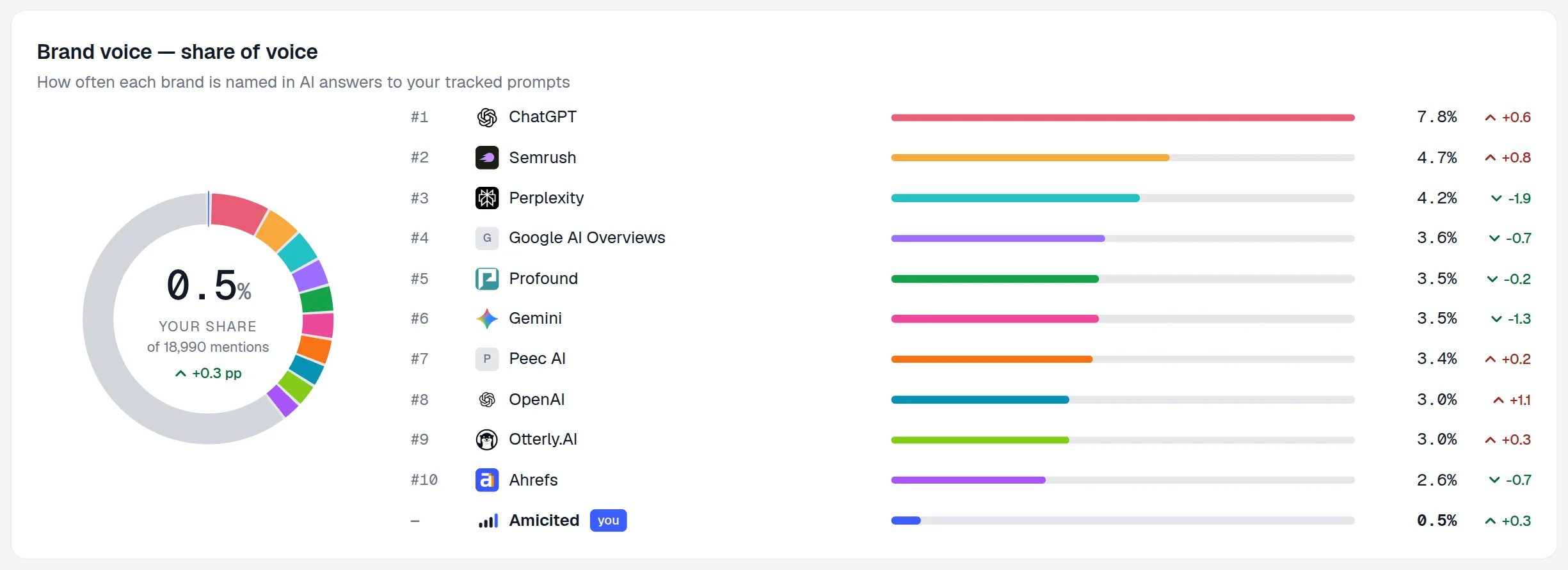
For WMS vendors, AmICited tracks buyer prompts such as “best WMS for a growing Shopify brand” and shows which vendors the AI answers name, at what rank, and how many citations each prompt earned.
See AI visibility tracking
What Is a Warehouse Management System?
A warehouse management system (WMS) is software that runs the physical work of a warehouse. It knows where every item is stored, down to the bin, and it tells staff what to do: where to put incoming goods, what to pick next, which box to use, which label to print. Every step is confirmed with a scan, so stock levels stay accurate as goods move.
WMS software is used by retailers and brands with their own warehouses, by third-party logistics providers, and by distributors and manufacturers. It may be a standalone product (Manhattan, Blue Yonder, Körber and many cloud WMS options for ecommerce), a module inside an ERP, or the system your 3PL runs on your behalf. In any fulfillment center, the WMS is what turns an order into a packed box.
How a Warehouse Management System Works
A WMS directs six core steps:
- Receive. Staff scan inbound goods against the purchase order or advance shipping notice. Shortages and damage are recorded on arrival.
- Put away. The WMS chooses a storage location based on rules such as product size, velocity and available space, and staff scan the item into that bin.
- Store. Inventory is tracked by location in real time. Replenishment tasks move stock from reserve storage to pick faces before they run empty.
- Pick. When an order management system sends orders, the WMS groups them into pick lists and plans efficient routes.
- Pack. Packers scan items to verify the order, the system suggests a carton size, and weights are captured.
- Ship. The WMS generates shipping labels and documents, confirms carrier handover, and updates order status.
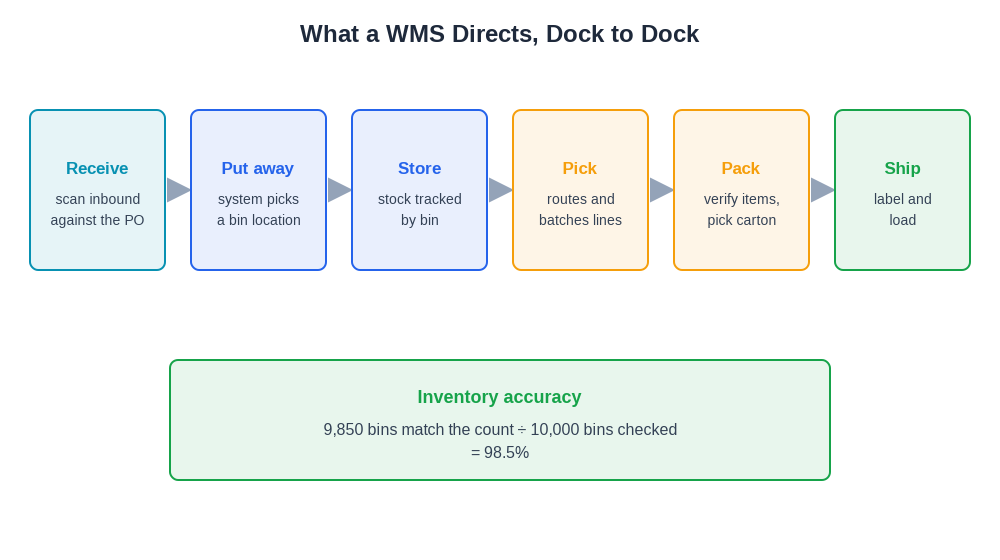
Two metrics tell you whether a WMS is doing its job:
Inventory accuracy = Locations where system and physical count match ÷ Locations counted × 100
If cycle counts check 10,000 bin locations over a quarter and 9,850 match the system, inventory accuracy is 9,850 ÷ 10,000 = 98.5%. The remaining 150 mismatches point to process problems, such as items put away without a scan or picks taken from the wrong bin.
Order picking accuracy = Orders picked without errors ÷ Total orders picked × 100
Picking errors are expensive because each one usually means a return, a reshipment and an unhappy customer.
Types of Warehouse Management Systems
WMS options fall into four groups. Standalone WMS products are built for warehouse operations and offer the deepest features, from slotting to labor management. ERP warehouse modules come inside suites like SAP, Oracle or Microsoft Dynamics and keep everything in one system, often with fewer floor-level features. Cloud WMS for ecommerce is quicker to set up, connects directly to platforms like Shopify and marketplaces, and suits growing brands. Finally, 3PL-provided WMS: if you outsource fulfillment, your 3PL runs its own system and gives you a portal and integrations rather than a WMS of your own.
Warehouse Picking Methods
The way a WMS organizes picking has a big effect on labor costs. Most systems support several methods:
| Picking method | How it works | Best for |
|---|---|---|
| Discrete (single-order) picking | One picker picks one order at a time | Low volume, large or complex orders |
| Batch picking | One picker collects items for several orders in one trip, then sorts | Many small orders with overlapping items |
| Zone picking | Each picker covers one zone; orders pass between zones | Large warehouses, many SKUs |
| Wave picking | Orders are released in timed waves, often by carrier cut-off | High volume with fixed shipping schedules |
| Cluster picking | Picker fills several order totes at once on one cart | Ecommerce with small, multi-item orders |

Stay Updated on AI Visibility Trends
Get the latest insights on AI mentions, brand monitoring, and optimization strategies.
WMS vs OMS vs ERP
A WMS is often confused with the systems it connects to. The OMS decides which location ships an order; the WMS gets that order picked, packed and out of the door. The ERP holds the financial view of inventory, purchasing and accounting, and receives updates from the WMS through ERP integration. Inventory management planning decides how much stock to buy; the WMS tracks exactly where that stock sits once it arrives.
Warehouse Management System and AI Search
For merchants, a WMS affects AI search only indirectly. Accurate stock and reliable delivery mean the availability and shipping promises on your product pages are true, and those pages are part of what AI shopping tools read.
For WMS vendors, the link is direct: buyers now ask AI assistants for “best WMS for a growing ecommerce brand” or “WMS that integrates with Shopify”. Which vendors those answers name, and which review sites they cite, shapes shortlists. Tracking AI visibility for those prompts shows whether your product is on them.
Best Practices for Warehouse Management Systems
- Clean up item and location data before go-live. Wrong dimensions or duplicate SKUs break put-away and carton logic.
- Scan every movement. Any step without a scan is where accuracy problems start.
- Use cycle counts. Count high-value and fast-moving locations more often than slow ones.
- Slot by velocity. Keep fast movers near packing stations and at waist height; review slotting quarterly.
- Match picking method to order profile. Small multi-item ecommerce orders often suit batch or cluster picking better than discrete picking.
- Train for exceptions. Short picks, damaged goods and mislabeled stock need clear procedures, or staff will work around the system.
Common Warehouse Management System Mistakes
The most common mistake is going live with poor master data, then blaming the WMS when it sends pickers to the wrong places. Another is allowing workarounds: staff moving stock without scanning “just this once” during peak, which quietly destroys inventory accuracy. Businesses also customize a WMS heavily to copy old paper processes, which makes upgrades costly and keeps the inefficiencies the system was meant to remove.
Finally, many teams underestimate integration. A WMS that syncs with the ecommerce platform or OMS only every few hours can’t support accurate stock on the website, same-day shipping cut-offs or store pickup.