


- An order management system (OMS) tracks every order from checkout to delivery and through returns, across all the channels a business sells on.
- Its core jobs are order capture, stock visibility, routing each order to a fulfillment location, status tracking, and returns.
- Good routing rules put complete orders and delivery promises ahead of the nearest location, which avoids costly split shipments.
- Most OMS platforms show available-to-promise stock: on hand, minus stock allocated to open orders and a safety buffer, plus confirmed incoming stock.
Where AmICited fits
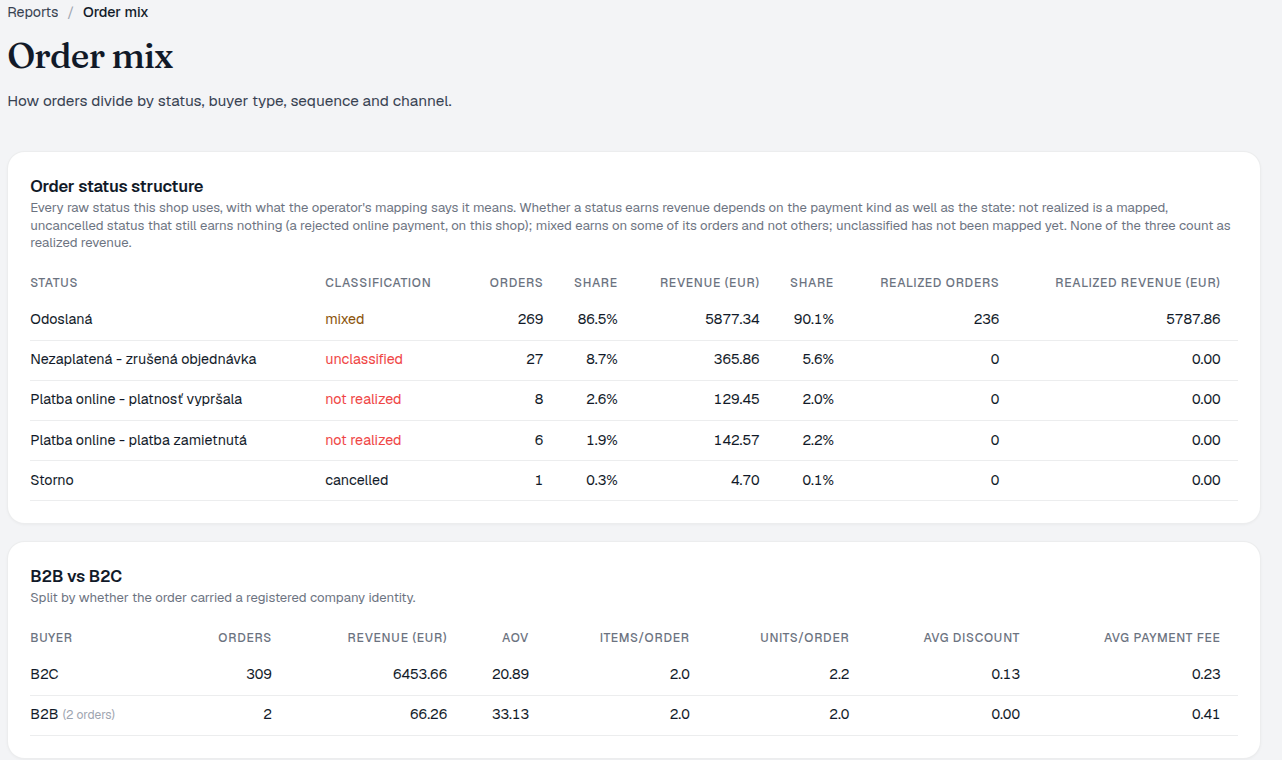
With a connected shop, AmICited maps each of your shop’s own order status names to what it means for the reports, so cancelled, unpaid or rejected orders stop counting as revenue.
See order status mapping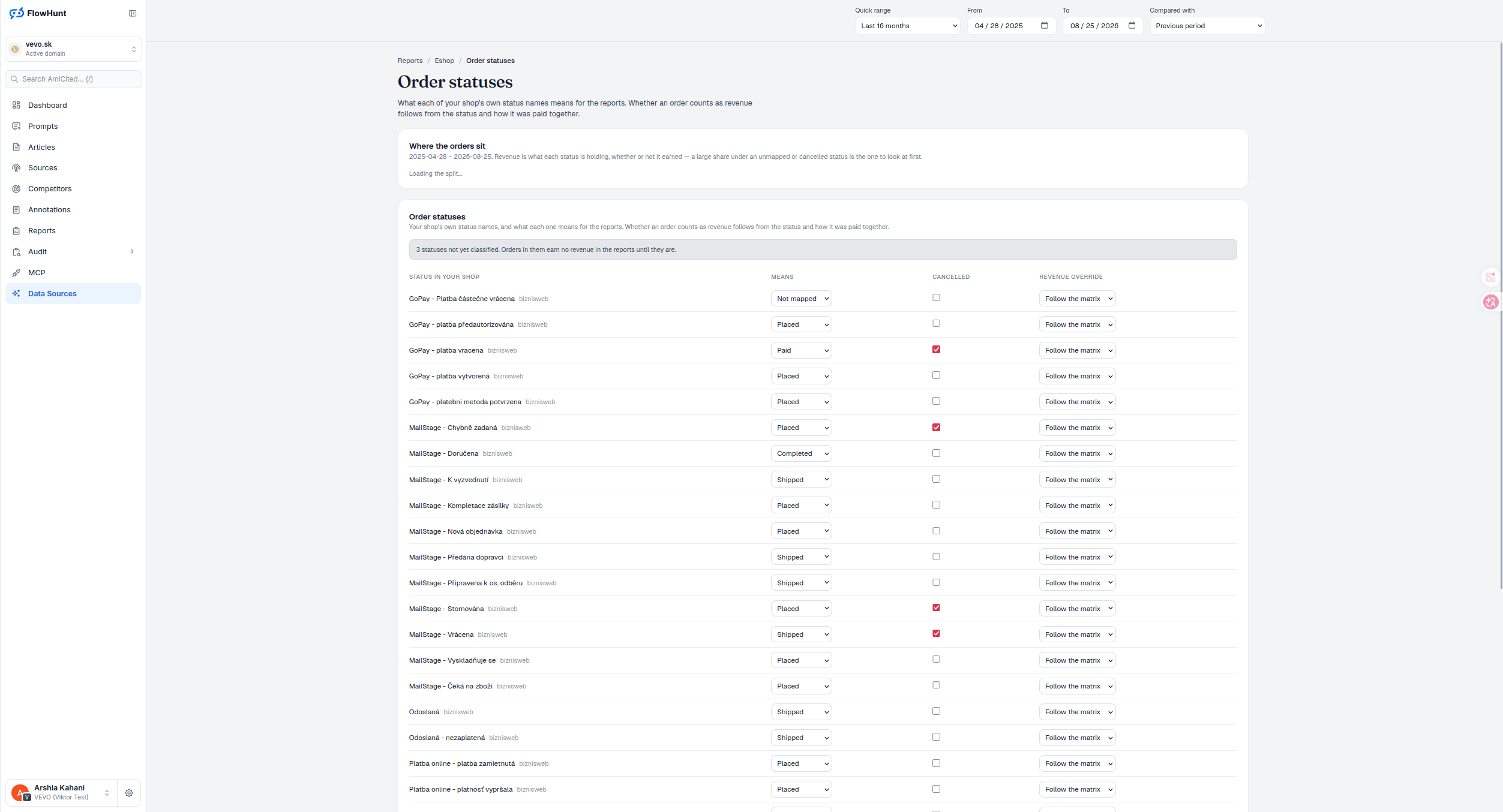
What Is an Order Management System?
An order management system (OMS) is software that manages the life of every order, from the moment a customer clicks “buy” until the package is delivered, and through any return or exchange. It pulls orders in from every channel, checks inventory, decides where each order should ship from, and keeps everyone updated on its status.
Retailers, brands and wholesalers selling across several channels use an OMS: a website, marketplaces like Amazon, physical stores, B2B portals and apps. Single-channel stores get by with the order tools built into Shopify, BigCommerce or WooCommerce. Once you add channels and fulfillment locations, a dedicated OMS (or an OMS module inside an ERP) becomes the system that holds the business together, and the core of any omnichannel setup.
How an Order Management System Works
An OMS handles five main jobs:
- Order capture. Orders from the website, marketplaces, store POS and apps land in one place with a consistent format.
- Inventory visibility. The OMS keeps a view of available stock across warehouses, stores and sometimes suppliers, net of stock already promised to other orders.
- Order routing. Rules decide which location fulfills each order. This is often called distributed order management.
- Fulfillment and status. The order goes to the chosen location (a warehouse running a warehouse management system, a store, a 3PL or a dropship supplier), and the OMS tracks it through picking, shipping and delivery.
- Returns and service. Returns, exchanges, cancellations and refunds run through the OMS, often with a return merchandise authorization step.
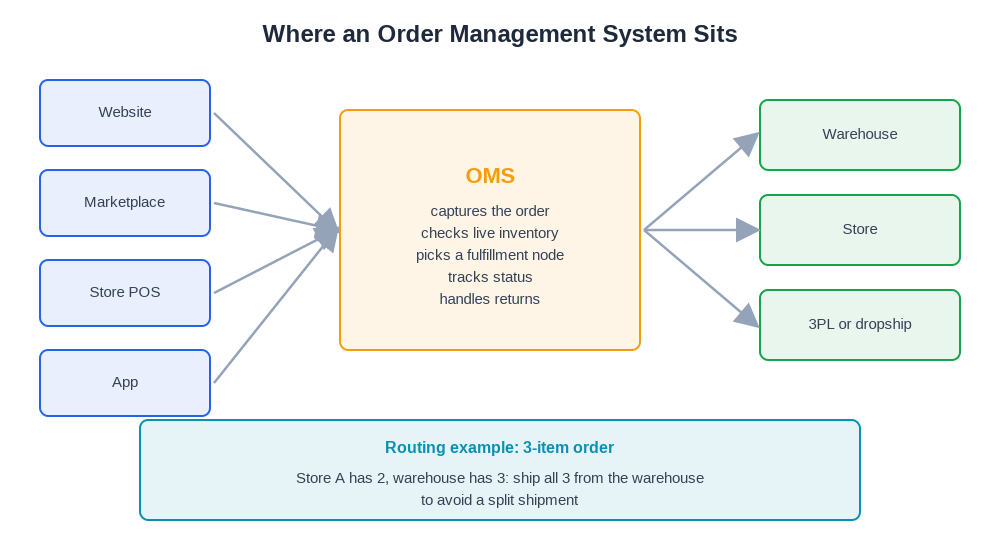
Routing is where an OMS earns its keep. Take a customer who orders three items. Store A, close to the customer, has two of them. The warehouse has all three. A simple “nearest location” rule would split the order: two items from Store A and one from the warehouse, which means two shipments and two shipping costs. A rule that prefers complete orders ships all three from the warehouse in one box. Typical routing rules weigh:
- whether a location can fill the whole order
- distance to the customer and promised delivery date
- shipping cost per location
- location capacity and cut-off times
- protecting store stock for walk-in shoppers
A useful health metric is your perfect order rate:
Perfect order rate = Orders delivered complete, on time, undamaged and with correct paperwork ÷ Total orders × 100
If 4,700 of 5,000 orders in a month meet all four conditions, the perfect order rate is 94%.
Behind the stock numbers on your website, most OMS platforms calculate available-to-promise (ATP) inventory rather than showing raw stock on hand:
Available to promise = On hand − Allocated to open orders − Safety buffer + Confirmed incoming
With 120 units on hand, 30 allocated to orders not yet shipped, a buffer of 10 and 50 arriving tomorrow, ATP is 130 for orders that can wait a day and 80 for orders that need to ship today.
OMS vs WMS vs ERP vs Inventory Management System
| System | Main question it answers | Scope | Typical users |
|---|---|---|---|
| Order management system (OMS) | Which orders do we have, where do they ship from, what’s their status? | All channels and locations | Ecommerce, customer service, operations |
| Warehouse management system (WMS) | Where is each item in this warehouse, and how do we pick, pack and ship it? | One or more warehouses | Warehouse teams |
| ERP | What are our finances, purchasing, inventory value and production? | Whole company | Finance, purchasing, management |
| Inventory management system | How much stock do we have, and when should we reorder? | Stock levels across locations | Buyers, planners |
The lines blur because vendors bundle features. Many ERPs include order and inventory modules, and some ecommerce platforms include basic OMS features. What matters is that one system is clearly the source of truth for each job, connected through ERP integration and APIs rather than manual exports.
Order Management System and AI Search
AI shopping assistants and agents increasingly answer questions about delivery times, store pickup and return policies, and some can start a purchase. The answers they give are only as good as the information they can find on your site and in your product data, and that information comes from your OMS: real availability, real delivery promises, real pickup options.
An OMS doesn’t make AI answers mention your brand. It does make sure that when they do, the promises they repeat are ones you can keep.

Stay Updated on AI Visibility Trends
Get the latest insights on AI mentions, brand monitoring, and optimization strategies.
Best Practices for Order Management Systems
- Pick one source of truth for available stock and sync it to every channel quickly, ideally in near real time.
- Write routing rules around customer promises first, then cost. A cheap route that misses the delivery date costs more in the end.
- Use clear order statuses. Map each status in your OMS to what the customer sees and to how finance treats the order, as with AmICited’s order status mapping.
- Automate exceptions. Flag orders stuck in a status for too long instead of finding them when the customer calls.
- Include returns in the design. Decide where returned items go and how fast they become sellable again.
- Test peak volumes. Make sure routing and integrations hold up during sales events, not just on normal days.
Common Order Management System Mistakes
The most common mistake is showing customers inventory that the OMS hasn’t netted against open orders, which leads to overselling and cancellations. Another is routing purely by distance and creating many split shipments, which raises shipping costs and annoys customers who get three boxes for one order.
Businesses also implement an OMS without cleaning up product and location data first, then blame the system for bad routing decisions. And many forget store staff: ship-from-store and BOPIS only work when stores have the time, space and training to pick online orders.