- BOPIS (buy online, pick up in store) lets a customer order and usually pay online, then collect the order at a store once the retailer marks it ready.
- It fails at two points: stock shown online that is not actually on the shelf, and more orders than staff can pick. Both are operations problems, not website problems.
- Track pickup-ready time and cancellation rate. 10 cancelled out of 200 BOPIS orders in a week is a 5% cancellation rate.
- It saves last-mile shipping but adds store labor: 10 minutes per order at $18 an hour is about $3, against perhaps $8 to ship the parcel.
Where AmICited fits
AmICited’s Order mix report splits a connected shop’s orders by status, buyer type, first or repeat order, payment method and carrier, with a monthly count of cancelled orders, so you can see how orders split across carriers and how many get cancelled.
See the order mix report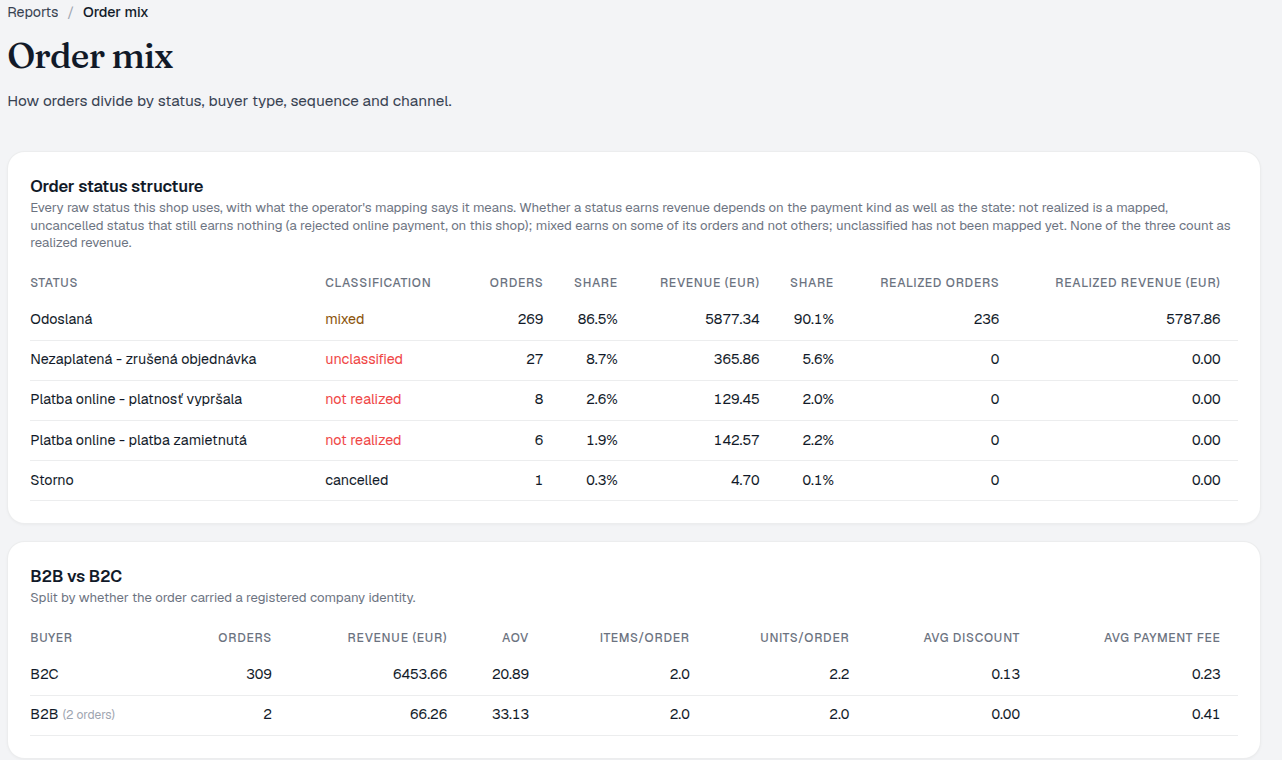
What Is BOPIS?
BOPIS, short for buy online, pick up in store, is a fulfillment option where a customer orders online and collects the order at a physical store. The customer usually pays at checkout, picks a store, gets a “ready for pickup” message, and collects the items at a counter, a locker or the customer service desk.
It’s one of the core services in omnichannel retail. Big-box chains, grocers, department stores, electronics and home improvement retailers in the U.S. all offer it, and platforms such as Shopify support local pickup out of the box for smaller merchants. In Europe the same idea usually goes by click and collect.
How BOPIS Works
A typical BOPIS order goes through five steps:
- Order online. The shopper chooses “pick up in store” at checkout and selects a location that shows the item as available.
- Stock check. The system confirms the store has the items and reserves them, either immediately or when staff accept the order.
- Pick and stage. Store staff pull the items from the shelves or back room and hold them at a pickup area.
- Ready alert. The customer gets an email, SMS or app notification with pickup instructions and an order code.
- Pickup. The customer shows ID or the order code, and staff hand over the order. Unpicked orders are usually cancelled and refunded after a set number of days.
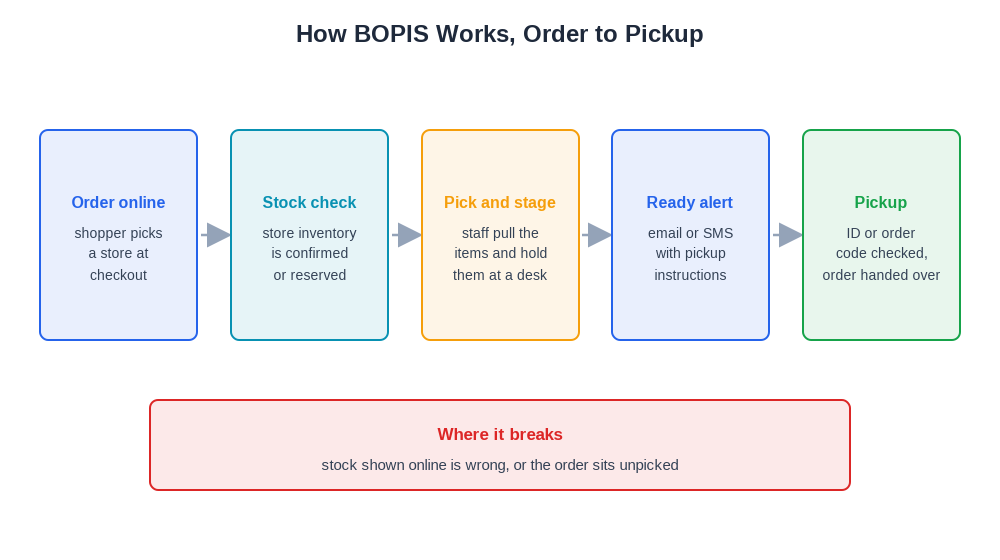
The process breaks at two points: when the stock shown online isn’t actually on the shelf, and when orders arrive faster than staff can pick them. Both are operations problems, not website problems. They depend on accurate inventory management and on an order management system that knows what each store can really fulfill.
Two numbers are worth tracking for any BOPIS program:
Pickup-ready time = Time order marked ready − Time order placed
Order cancellation rate = BOPIS orders cancelled ÷ BOPIS orders placed × 100
If a store gets 200 BOPIS orders in a week and 10 are cancelled because items couldn’t be found, the cancellation rate is 10 ÷ 200 = 5%. Each of those is a customer who expected the item to be there.
BOPIS also has its own cost math. It removes the last-mile shipping cost, but it adds store labor for picking, staging and handing over orders. A rough per-order comparison:
BOPIS cost per order = Picking and handover minutes ÷ 60 × Hourly labor cost
If staff spend 10 minutes per order at an $18 hourly cost, that’s $3 per order, against perhaps $8 to ship the same parcel to the customer’s home. The savings shrink when orders are large or hard to find in the store, and they disappear when pickers have to search the stockroom for items the system said were on the shelf.
BOPIS vs Curbside Pickup vs Ship-to-Store vs Lockers
| Option | Where stock comes from | Where the customer collects | Typical speed | Best for |
|---|---|---|---|---|
| BOPIS | Store’s own stock | Inside the store | Same day | Items the store already carries |
| Curbside pickup | Store’s own stock | Car, at the curb | Same day | Groceries, bulky items, convenience |
| Ship-to-store | Warehouse, shipped to store | Inside the store | Several days | Items not stocked locally, free shipping |
| Pickup lockers | Store or warehouse | Self-service locker | Same day to several days | After-hours pickup, low staff time |
BOPIS and curbside use the same back-end process; the difference is the last few meters. Ship-to-store is a different model, because the item is moving from a warehouse and the store is only the delivery point.
BOPIS and AI Search
When people ask an AI assistant “where can I buy this today near me”, the answer depends on information the assistant can find: retailer pages, local listings and product data. For Google specifically, local inventory feeds in Merchant Center and an accurate Google Business Profile are how stores tell Google which products are in stock and that pickup is available.
AI assistants don’t have a reliable live view of every store’s shelves, so they often fall back on general statements. Clear pickup information on product pages and consistent store details across the web give them better material to work with, and good local SEO remains the foundation. To see what AI answers actually say about your brand for these prompts, you need to check them directly, for example with AI visibility tracking.

Stay Updated on AI Visibility Trends
Get the latest insights on AI mentions, brand monitoring, and optimization strategies.
Best Practices for BOPIS
- Show only stock you can promise. Hold back a safety buffer of store stock so online orders don’t collide with walk-in shoppers.
- Set a realistic ready time. “Ready in 2 hours” that’s always met beats “ready in 30 minutes” that often isn’t.
- Make pickup easy to find. Clear signage, a dedicated counter or lockers near the entrance, and short instructions in the ready message.
- Staff for peaks. Lunchtime and after-work pickups bunch up; schedule pickers accordingly.
- Send reminders. A reminder before the hold period ends reduces uncollected orders.
- Track cancellations by reason. “Item not found” points to inventory accuracy, “customer didn’t collect” points to communication.
Common BOPIS Mistakes
The biggest mistake is offering BOPIS on inventory data that’s hours or days out of date. Shoppers who arrive to find their order cancelled, or who get a “we couldn’t find your item” message after paying, are less likely to try again. Another is treating BOPIS as a website feature and forgetting the store labor it requires, so orders sit in a queue behind in-store tasks.
Retailers also bury the pickup area at the back of the store, or make customers queue at the regular checkout, which removes the time saving that made BOPIS attractive. And many never measure BOPIS separately, so they can’t see that some stores consistently miss ready times or have high cancellation rates.